Guía del comprador de pantallas industriales para equipos OEM

Introducción Las interfaces hombre-máquina (IHM) son actualmente componentes estándar de los equipos industriales modernos. Las pantallas permiten a los operarios ...
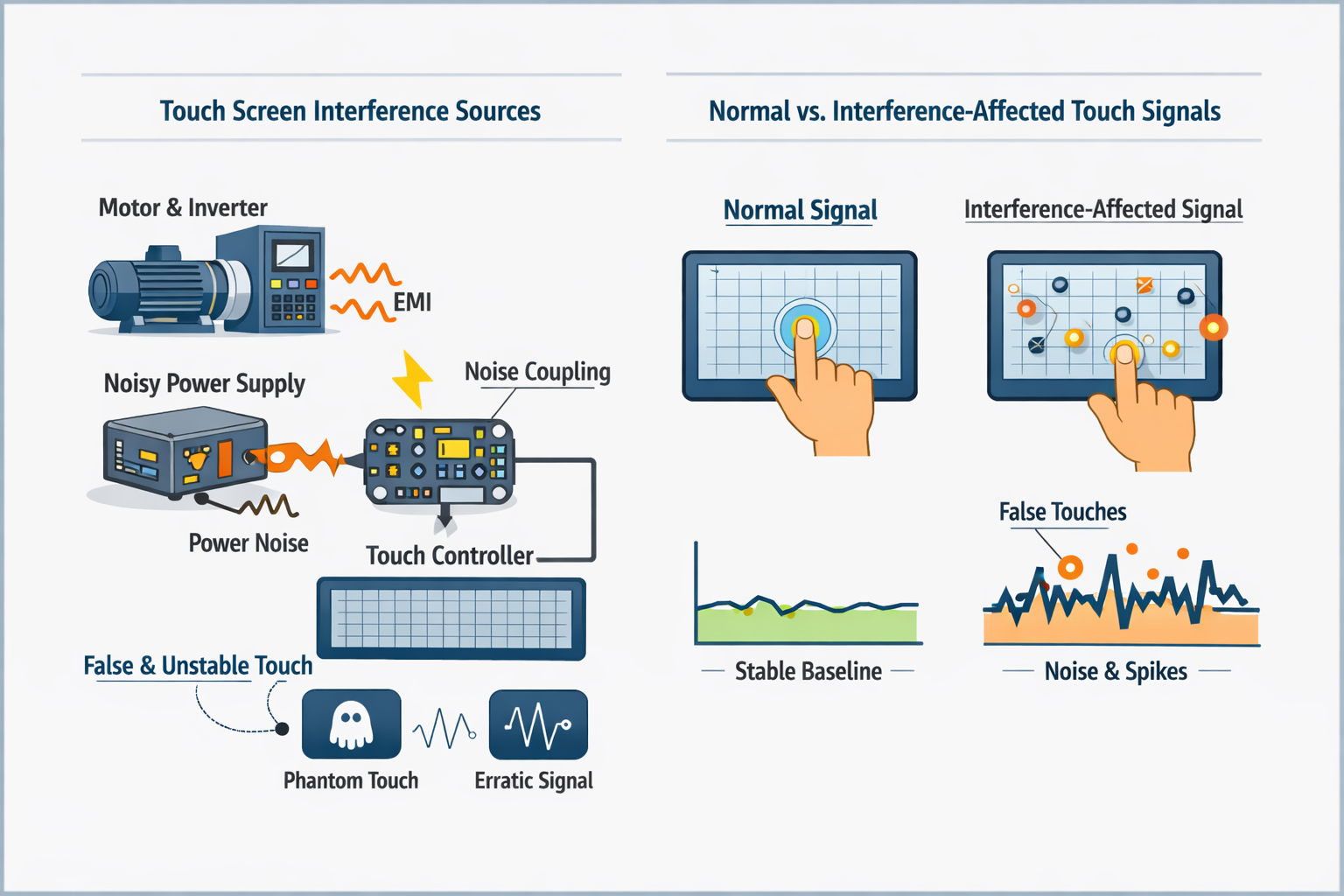
Interferencias en la pantalla táctil se refiere al ruido eléctrico no deseado que interrumpe la detección normal de la señal táctil, provocando un comportamiento táctil inestable o incorrecto.
En los sistemas táctiles capacitivos industriales, las interferencias son no es un error de software, sino un fenómeno sistémico relacionado con ruido eléctrico, conexión a tierra, calidad de la energía e integración mecánica.
Entre las manifestaciones más comunes se incluyen el toque falso, los puntos de toque a la deriva, las coordenadas inestables o la pérdida intermitente de la precisión del toque.
Los problemas relacionados con las interferencias suelen aparecer como:
Estos síntomas suelen en función del entorno o de la integración, no defectos sólo del panel.
Desde el punto de vista de la ingeniería, las interferencias táctiles suelen tener su origen en una o varias de las siguientes fuentes:
Las interferencias táctiles rara vez están causadas por un único factor; suelen ser el efecto combinado de múltiples condiciones marginales.
Se recomienda una evaluación de interferencias cuando:
La evaluación temprana ayuda a distinguir ruido relacionado con la integración por limitaciones del controlador o del sensor.
La interferencia táctil se evalúa observando estabilidad de la señal y comportamiento frente al ruido en lugar de basarse únicamente en las coordenadas táctiles.
Entre los métodos típicos de evaluación se incluyen:
Los ingenieros suelen utilizar diagnósticos basados en herramientas (por ejemplo, ajuste de controladores o visualización de datos sin procesar), pero la interpretación de los resultados depende de la aplicación y no deben basarse únicamente en umbrales numéricos fijos.
La mitigación de interferencias debe abordarse en el fase de diseño del sistema, no como una solución posterior a la implantación.
Las consideraciones clave incluyen:
Ninguna medida por sí sola garantiza la inmunidad; el control eficaz procede de diseño eléctrico y mecánico coordinado.
En los proyectos industriales, los problemas de interferencias táctiles suelen deberse a decisiones de integración del sistema, en lugar de sólo el sensor táctil.
Las implantaciones satisfactorias suelen evaluar el rendimiento táctil junto con el comportamiento de la pantalla, el diseño de la alimentación, la conexión a tierra de la caja y la exposición EMI ambiental, especialmente para HMI, quioscos y sistemas desatendidos.
Se recomienda una revisión técnica si su proyecto implica:
¿Experimenta un comportamiento inestable o de toque falso en su sistema?
Comparta el entorno de su aplicación, la arquitectura del sistema y los síntomas observados con nuestro equipo de ingeniería para una revisión de viabilidad y riesgo de interferencias.
Esta página pretende ser una referencia técnica para comprender y evaluar las interferencias de las pantallas táctiles en aplicaciones industriales. Los procedimientos de diagnóstico específicos de la herramienta pueden variar según la plataforma del controlador y el proyecto.
Introducción Las interfaces hombre-máquina (IHM) son actualmente componentes estándar de los equipos industriales modernos. Las pantallas permiten a los operarios ...

Introducción Las pantallas industriales se instalan con frecuencia en entornos en los que las condiciones de iluminación son difíciles de controlar. Equipos ...

Introducción Las pantallas son un componente de interfaz crítico en muchos tipos de equipos industriales. Proporcionan al sistema ...

Introducción La visibilidad de las pantallas es un parámetro de diseño fundamental en los equipos industriales. Los operarios confían en las interfaces gráficas ...
Envíe los detalles de su solicitud. Le responderemos con la dirección de configuración y los siguientes pasos.