In industrial system design, selecting the appropriate computing architecture directly affects system reliability, integration complexity, and lifecycle maintenance.
A common engineering decision is evaluating panel PC vs industrial computer architectures. While both provide embedded processing capability, they represent fundamentally different approaches to system integration.
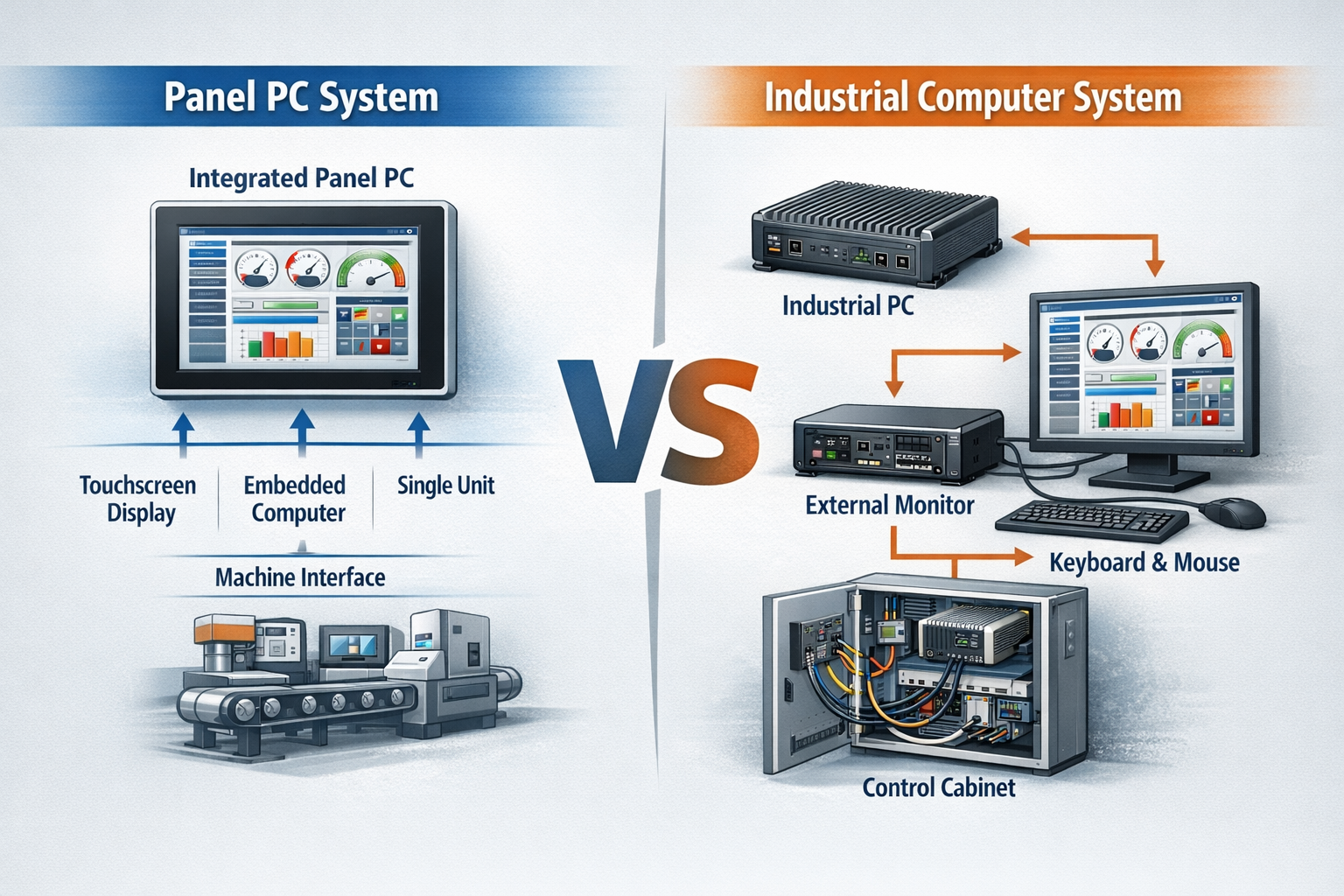
A paneel-PC is an integrated industrial computing device that combines display, touch interface, and embedded processing into a single unit, while an industrial computer is a modular system that requires external display and input components.
This distinction is especially relevant in industrial HMI deployments, where computing, display, and input subsystems must operate reliably under environmental and operational constraints. Panel PCs are typically implemented as distributed operator interface nodes within equipment-level control systems.
For a broader system-level understanding of how panel PCs are deployed within industrial environments, refer to the industrial HMI system architecture guide, which provides a foundational overview of panel PC integration in OEM systems.
Understanding these differences helps engineers align hardware selection with overall system architecture rather than treating computing hardware as an isolated component.
Panel PC vs Industrial Computer Architecture
When comparing panel PC vs industrial computer, the primary difference lies in system integration level.
Panel PC Architecture
A panel PC integrates the following into a single enclosure:
These systems are mounted directly onto equipment panels and function as complete HMI nodes.
System characteristic: → Integrated, machine-level interface device
Industrial Computer Architecture
An industrial computer is a standalone computing platform that requires:
External display (e.g., industrial monitors)
Separate input devices
Independent mounting and power systems
System characteristic: → Modular computing platform
Architecture Summary
From a system design perspective:
Panel PC → tightly integrated HMI node
Industrial computer → flexible, modular control unit
This architectural distinction directly impacts system deployment strategy, integration complexity, and long-term scalability.
Core Technologies and Integration Differences
Both panel PCs and industrial computers use similar embedded computing platforms, including:
x86 or ARM processors
Industrial-grade SSD or eMMC storage
Extended temperature components
Fanless or managed cooling systems
The key difference is not the computing core, but how display, touch, and enclosure are integrated into the system.
Display System Integration
Panel PCs integrate industrial display modules designed for:
Wide viewing angles
High brightness output
Long backlight lifetime
For outdoor or high ambient light environments, sunlight-readable configurations are required. These typically include optical bonding to:
Reduce internal reflection
Improve contrast
Increase mechanical robustness
Touch Interface Technology
Most panel PCs implement projected capacitive (PCAP) touch due to:
No mechanical wear layers
Multi-touch mogelijkheid
Compatibility with sealed front surfaces
This is particularly relevant in environments involving:
Water or oil exposure
Gloved operation
Frequent cleaning
Industrial computers rely on external displays for touch functionality, making performance dependent on the selected monitor.
System Integration Approach
Panel PCs:
Integrated I/O interfaces
Unified power input
Front-side IP-rated sealing
Pre-validated system design
Industrial computers:
PCIe expansion capability
Custom I/O configurations
Multi-display support
Flexible hardware configuration
Engineering Considerations for System Design
From an engineering perspective, the choice between panel PC and industrial computer is driven by environmental conditions, thermal constraints, maintenance strategy, and system complexity.
Bescherming van het milieu
Panel PCs are designed for exposed deployment:
IP65 or higher front protection
Resistance to dust and moisture
Sealed surfaces suitable for washdown
Industrial computers are typically installed inside enclosures, where protection depends on cabinet design.
Thermal Design and Performance
Panel PCs typically use passive cooling:
Aluminum housings for heat dissipation
Fanless operation
Stable thermal behavior
This improves reliability but limits processing performance.
Industrial computers support:
Active cooling systems
Higher TDP processors
GPU acceleration
These are better suited for compute-intensive applications.
EMC, Vibration, and Mechanical Stress
Industrial environments introduce:
Elektromagnetische interferentie (EMI)
Continuous vibration
Mechanical shock
Panel PCs are validated as complete units, simplifying compliance.
Industrial computers require system-level validation when combined with external displays, cabling, and power systems.
Maintenance and Lifecycle Strategy
Panel PCs simplify installation but introduce component coupling:
Display and computing hardware are integrated
Failure may require full unit replacement
Industrial computers support modular maintenance:
Independent replacement of computing unit and display
Easier upgrades in long lifecycle deployments (7–10 years)
Integration Complexity
Panel PCs reduce:
Kabelgeleiding
Power distribution complexity
Installation time
Industrial computers require:
Video signal routing
Additional power design
External display integration
This increases engineering effort but allows greater flexibility.
Relationship to Industrial HMI System Design
The comparison between panel PC and industrial computer is closely related to overall industrial HMI architecture design.
Panel PCs are typically deployed as distributed interface nodes at the machine level, while industrial computers are used for centralized control, data processing, or gateway functions.
Understanding this relationship helps engineers design systems that balance:
Local operator interaction
Centralized processing
System scalability
Application Scenarios
Industriële automatiseringsapparatuur
Panel PCs are widely used as machine-level HMIs:
Production lines
CNC systems
Process control interfaces
Industrial computers are used for centralized control and data processing.
EV-oplaadsystemen
Panel PCs provide user interface and display
Industrial computers handle backend control and communication
Outdoor deployment requires attention to display visibility and environmental sealing.
Kiosks and Public Terminals
Panel PCs are commonly selected due to:
Compact integrated structure
Sealed front design
Reduced system complexity
Slimme infrastructuursystemen
Applications such as ticketing and access control use:
Panel PCs as distributed interface nodes
Industrial computers for centralized monitoring
Selection Guidelines
When Panel PCs Are Suitable
Limited installation space
Integrated HMI requirement
Direct environmental exposure
Need for simplified deployment
When Industrial Computers Are Suitable
High computing performance required
Modular architecture needed
Future upgrades expected
Multiple peripherals required
Limitations and Trade-offs
Panel PC Constraints
Limited expansion capability
Restricted upgrade paths
Coupled maintenance
Industrial Computer Constraints
Higher integration complexity
Larger system footprint
Requires enclosure protection
Engineering Comparison Summary
Aspect
Paneel PC
Industrial Computer
Integratie
High (all-in-one)
Modular
Installatie
Simple
More complex
Onderhoud
Coupled components
Independent components
Performance
Matig
Hoog
Environmental Use
Direct exposure capable
Requires enclosure
Upgrade flexibiliteit
Beperkt
Hoog
Quick Summary
Panel PC → integrated, low complexity, environment-ready
Bij het evalueren van panel PC vs industrial computer, the decision should be based on overall system architecture rather than individual component specifications.
Panel PCs reduce integration effort and support deployment in exposed environments, making them suitable for distributed HMI systems. Industrial computers provide higher flexibility, scalability, and processing capability, which are required in centralized or compute-intensive applications.
In many industrial systems, both architectures are used together—panel PCs for operator interaction and industrial computers for backend processing.
For system-level design considerations, panel PC selection should be evaluated within the broader context of industrial HMI architecture.
FAQ
1. What is the main difference between a panel PC and an industrial computer? A panel PC integrates display, touch, and computing into one unit, while an industrial computer is a modular system requiring external components.
2. Which is more suitable for harsh environments? Panel PCs are generally more suitable due to sealed front panels and integrated construction.
3. Can industrial computers be used for HMI applications? Yes, but they require external displays and touch interfaces.
4. Are panel PCs upgradeable? Upgrade flexibility is limited compared to modular industrial computers.
5. How should engineers choose between them? Selection should be based on system architecture, environmental conditions, performance requirements, and lifecycle planning.
Inleiding Bij het ontwerpen van industriële systemen heeft het kiezen van de juiste computerarchitectuur een directe invloed op de betrouwbaarheid van het systeem en de complexiteit van de integratie, ...
Inleiding Bij het ontwerpen van industriële apparatuur heeft de mens-machine-interface (MMI) een directe invloed op de bruikbaarheid, betrouwbaarheid en het onderhoud van het systeem. ...