What Is an Industrial Panel PC? Components, Types and Applications

An industrial panel PC is a computer with a built-in display, usually a touchscreen, designed for …
Eagle Touch Engineering Team
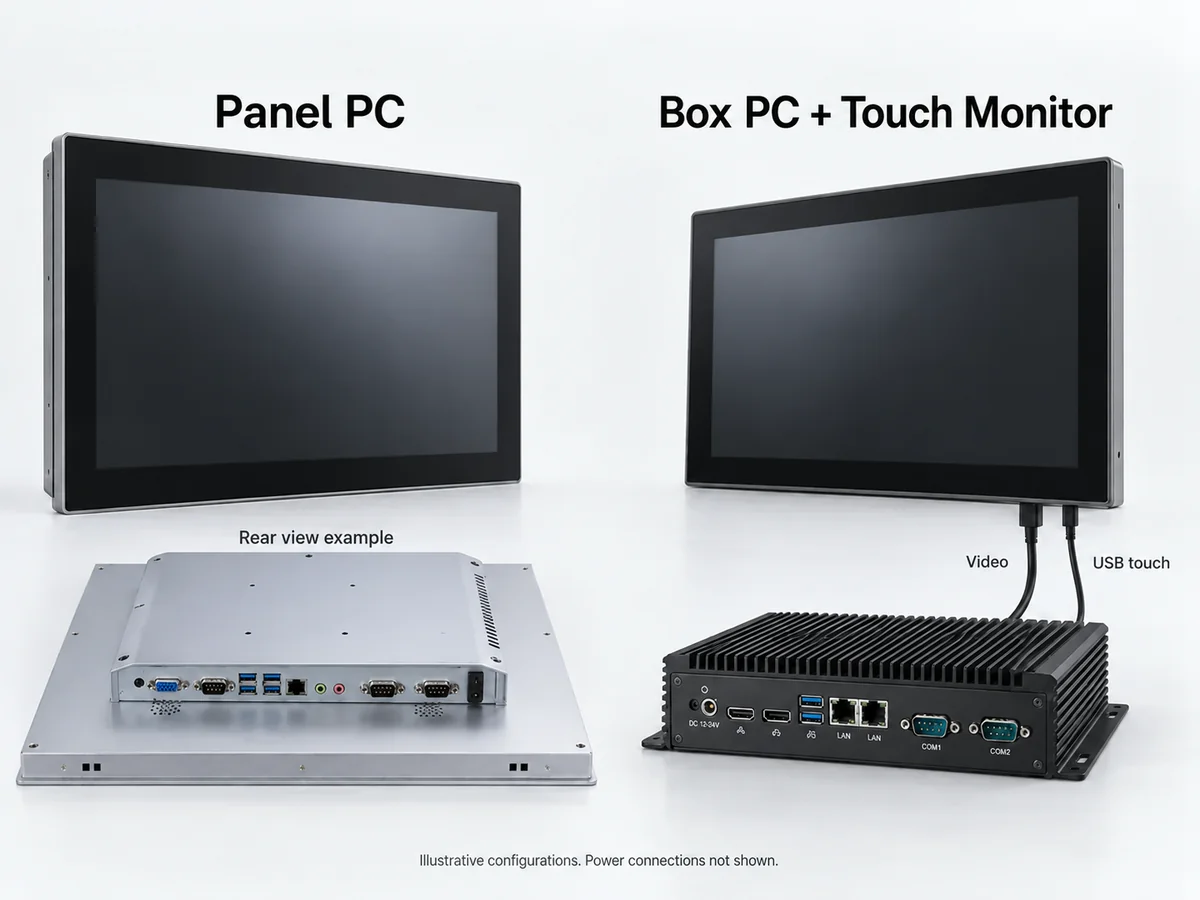
A panel PC puts the computer and touch display in one enclosure, reducing separate mounting and display cabling. A box PC with a separate touch monitor lets you place, upgrade and replace the two independently. The better fit depends on the machine layout and how you plan to service it.
This comparison uses “embedded PC” to mean a box PC without a built-in display; panel PCs can also be embedded computers. If the equipment needs no local screen, consider a box PC operating without a monitor.
| Factor | Panel PC | Box PC + touch monitor |
|---|---|---|
| Equipment layout | Computing and display share one enclosure | Computer and monitor occupy separate locations |
| Mounting space | Must accommodate the rear computer housing | Requires space for the host and a cable route |
| Display connections | Video and touch connections are usually internal | External video and touch connections must be validated |
| Expansion | Depends on the board, enclosure and available interfaces | Host can be selected independently; expansion remains model-dependent |
| Replacement | Serviceable parts and replacement scope vary by design | Monitor and host can usually be replaced separately |
Neither format alone determines processing speed, brightness or environmental protection. Compare models that meet the same application requirements.
Already have a computer running the interface software? Our panel PC vs touch monitor guide covers that starting point.
Start with the equipment drawing. A screen that fits the front opening may still leave too little space for the housing, plugs and cable bends behind it.
For a panel PC, allow room for the rear housing, mounting clamps and access to serviceable parts. On a hinged door, account for the assembly weight and clearance as the door opens.
A separate monitor can help when the operator panel is shallow but another part of the cabinet has room for a computer. The box PC still needs a suitable mounting surface, cooling clearance and accessible connectors. Moving it elsewhere only helps if the cable route is practical.
A compact standalone terminal, by contrast, may be easier to assemble around one panel PC if there is enough depth behind the screen.
Longer cable runs introduce their own checks: validate video quality, touch response, cable retention and any extension hardware in the intended installation.
Include heat in the layout review. A panel PC places the processor and display heat sources in one unit. A box PC lets you position the computer elsewhere, but does not remove its heat from a shared cabinet. Neither arrangement is automatically cooler. Verify operation inside the finished enclosure at the expected workload, brightness and ambient temperature.
Consider what is likely to change after the first production batch.
An equipment range might use the same application and I/O arrangement with several screen sizes. A separate box PC can provide a common computing platform across those variants, while each machine receives the appropriate monitor. Validate resolution, interface compatibility and touch behaviour for each combination.
The reverse also happens: the display remains suitable, but a new software release needs more memory or a faster processor. Separating the host allows you to evaluate a replacement computer without automatically changing the screen or its panel cutout.
That flexibility is useful only if the selected host supports the upgrade. Some compact box PCs have fixed memory and little expansion space. If the project may need an acquisition card, extra network ports or a GPU, check the actual slots, electrical interfaces, power budget, cooling and driver support.
Panel PCs can also offer accessible RAM, storage or replaceable computing modules. Ask what is serviceable on the proposed model before treating integration as a fixed limitation.
For a machine with a stable workload and one approved screen configuration, independent upgrades may offer little benefit. Confirmed component availability, revision control and a tested replacement configuration may matter more.
Walk through a service visit before choosing the hardware.
If the display fails in a separate arrangement, the technician can usually replace the monitor while retaining the computer and its software. The replacement still needs compatible connections, resolution and touch support. It must also fit the mounting opening.
With a panel PC, the response depends on its construction and the agreed repair procedure. Some faults can be handled by replacing an accessible component; others require exchanging the complete terminal. A failed screen does not necessarily mean the computer must be discarded.
For either format, a prepared spare computer or terminal can shorten the service visit. Test the recovery of the operating system, drivers, application settings, licences and machine-specific data before deployment. A stored system image alone does not establish that the replacement is ready to use.
Before approving the sample, record:
Compare costs against this procedure. Include hardware, power supplies, cables, mounting parts, assembly, software setup and spares. A lower purchase price may lose its advantage if replacement requires a longer site visit or additional configuration work.
| Project condition | Start by evaluating | Confirm before selection |
|---|---|---|
| A standalone terminal with fixed computing and display requirements | Panel PC | Rear clearance, workload and replacement procedure |
| A shallow operator panel with space elsewhere for the host | Box PC + touch monitor | Host location, cooling and cable route |
| Several machine variants sharing one computing platform | Box PC + different monitors | Compatibility and configuration control across variants |
| Expected expansion beyond the current I/O or processing capability | A host with the required expansion capacity | Actual slots, power, cooling and software support |
| Field service based on exchanging a prepared complete terminal | Panel PC | Spare configuration, licences and machine-data recovery |
Use the preferred arrangement to shortlist hardware, then test a sample in the machine. Confirm mechanical fit, operation under load and the replacement procedure before releasing the configuration for repeat production.
How much depth is available behind the screen? Where could a separate computer be mounted? Would your service team replace individual assemblies or exchange a complete terminal?
Send Eagle Touch an installation drawing with these details, along with your screen size, software and I/O requirements, operating environment and expected quantity. We can review suitable industrial panel PC configurations and discuss the display arrangement for your equipment.
An industrial panel PC is a computer with a built-in display, usually a touchscreen, designed for …

An embedded PC is a computer configured to work as part of a machine or larger …

Start with the software the panel PC must run and the conditions it must fit. Then …

Choosing an industrial panel PC IP rating starts with two questions: what dust and water exposure …
Share your application, requirements, or current challenge. Our team will review the details and recommend a practical way forward.