Android Panel PC - вариант платформы панельного ПК для управляемых промышленных HMI-развертываний
Часть нашего Промышленный панельный ПК семья. Выбран, когда вам нужно заблокированные изображения системы, определенный ввод/вывод, пользовательские рабочие процессы пользовательского интерфейса, и долгосрочная стабильность поставок для проектов OEM и системной интеграции.
Что это такое (и что это не так)
An Промышленный панельный ПК на базе Android это управляемый вариант платформы Panel PC для HMI и специализированных терминалов. Его выбирают, когда область применения системы четко определена и долгосрочная стабильность зависит от управление изображением, Согласованность ввода/вывода, и управление жизненным циклом.
- Лучше всего подходит: Терминалы, ориентированные на выполнение задач, рабочие процессы с пользовательским интерфейсом, контролируемое развертывание, длительный срок службы.
- Не подходит: многопрограммные нагрузки на ПК, тяжелые вычисления, частые изменения объема работ без контроля изменений.
Android Panel PC: выделенная функция + блокировка версий + управление пользовательским интерфейсом/рабочим процессом
Панельный компьютер с Windows: Экосистема программного обеспечения ПК + совместимость с устаревшим ПО + многоприкладные рабочие нагрузки
Назад к обзору панельного ПК →
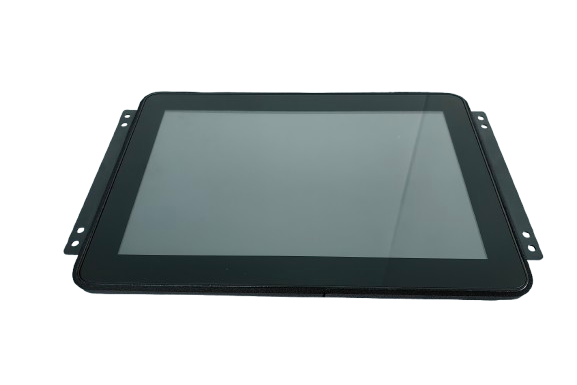
Специально разработано для интеграции управляемых HMI: заблокированный образ ОС + стабильное отображение входов/выходов + планирование сервисной замены.
Кто выбирает ПК с панелями Android
Необходима стабильная терминальная платформа с определенными схемами ввода-вывода для развертывания в полевых условиях, обслуживания и планирования замены.
Необходима механическая согласованность и контролируемая базовая линия программного обеспечения в партиях, выпускаемых в течение нескольких лет.
Развертывание, при котором терминалы выбираются как часть управляемой системы, а не как взаимозаменяемые потребительские устройства.
Варианты платформ (типовые)
Окончательная конфигурация определяется после инженерного анализа границ вашего приложения, списка входов/выходов, окружающей среды и ожиданий жизненного цикла.
Определено проектом: Герметичность, яркость, укладка стекла
- Размеры: 7" / 10,1" / 12,1" / 15,6" / 21,5" (обычно)
- Прикосновение: PCAP (перчатка/мокрый тюнинг по выбору)
- Крепление: крепление на панель / VESA / специальные кронштейны
- Переднее уплотнение: Варианты исполнения передней панели со степенью защиты IP (определяется проектом)
- Оптика: AG/AR/AF, варианты облигаций (определяются проектом)
Определено проектом: Область применения BSP/драйвера, модель управления OTA
- Базовый уровень Android: выбор и блокировка версий (определяется проектом)
- BSP / драйверы: определяется списком входов/выходов и периферийных устройств
- Киоск/замок: Ограниченные возможности, контролируемый поток пользовательского интерфейса
- Поведение при загрузке: Цели быстрой загрузки (определяются проектом)
- Обновление модели: Стратегия ОТА определяется в зависимости от модели владения
Определено проектом: wide-temp, основные элементы EMC, возможности восстановления
- Подход к проектированию в режиме 24/7 (тепловая стратегия)
- Широкополосные опции (определяются проектом)
- Соображения, связанные с ЭМС/ESD (с учетом интеграции)
- Сторожевой таймер / опции автоматического восстановления (определяется проектом)
- Управление жизненным циклом: Стабильность BOM + уведомления PCN
У вас есть чертежи, размеры вырезов и полный список входов/выходов? Мы можем подтвердить осуществимость и риски интеграции на ранней стадии.
Матрица входов/выходов и интерфейсов (типовая)
Точное количество портов и их расположение зависит от условий применения и ограничений корпуса.
- Сетевое взаимодействие: LAN (1/2), Wi-Fi/BT (опционально)
- USB: Порты USB (определяются проектом)
- Сериал: RS232 / RS485 (определяется проектом)
- Полевая шина: CAN (определяется проектом)
- Цифровые входы/выходы: GPIO (определяется проектом)
- Аудио / Камера: определяется проектом (если требуется)
Для планирования драйверов и интеграции, пожалуйста, отправьте свой список периферийных устройств (сканер, принтер, камера, датчики) и модели, если таковые имеются.
Стабильное отображение входов/выходов является частью контролируемого развертывания.
Мы подтверждаем размещение разъемов, ограничения жгутов и доступ к сервисам во время начала проекта, чтобы избежать переделок.
Панельный ПК на базе Android против панельного ПК на базе x86 (Windows / Linux)
В промышленных проектах реальное решение принимается не между операционными системами, а между архитектура платформы и ответственность за систему.
- Специализированные или ориентированные на конкретные задачи промышленные терминалы
- Ориентированные на пользовательский интерфейс рабочие процессы с контролируемым взаимодействием с пользователем
- Блокировка образа системы как основное требование к развертыванию
- Снижение сложности системы при фиксированной области применения
- Четкое разделение собственности на оборудование/систему и приложения
Обычно выбирается, когда долгосрочная стабильность, контролируемые обновления, и упрощенное поведение в полевых условиях более важны, чем гибкость ПК.
- Одна и та же аппаратная платформа, поддерживающая ОС Windows или Linux
- Лучше всего подходит для программного обеспечения для ПК, промежуточного ПО или пользовательских стеков Linux.
- Повышенная гибкость для сред с несколькими приложениями
- Большая ответственность за ОС, драйверы и долгосрочное обслуживание
- Подходит для проектов, требующих совместимости с устаревшим программным обеспечением
Обычно выбирается, когда требуется сложность приложения, повторное использование программного обеспечения, или требуется контроль ОС на инженерном уровне.
Инженерная записка: Панельные ПК на базе Android и x86 не являются взаимозаменяемыми решениями. Правильный выбор зависит от сферы применения, ожиданий жизненного цикла, а также от того, насколько ответственной будет ваша команда на уровне системы.
Управление жизненным циклом: Блокировка версий и контроль изменений
Долгосрочная стабильность достигается за счет контролируемых исходных данных, а не за счет неконтролируемых обновлений.
- Определение базового уровня: Версия Android + ядро/BSP + набор драйверов + отображение ввода/вывода
- Блокировка версии: Контроль заводских изображений в соответствии с рабочим процессом валидации
- Стратегия обновления: Модель OTA, определяемая владением + воротами проверки (определяется проектом)
- Контроль изменений: Процесс ECO для инженерных изменений; уведомления PCN, когда это применимо
- Планирование замены: стабильное механическое соответствие и работоспособность в производственных партиях
Типичный горизонт планирования: проекты, превышающие 3-5 лет требуют явных предположений о жизненном цикле.
- Сводка изображений/базовых данных (идентификаторы версий)
- Контрольный перечень и сводка испытаний (как определено)
- Отслеживание спецификаций и ревизий
- Записи о проверках (IQC / IPQC / OQC) по мере необходимости
- Документы о соответствии или резюме отчетов (при необходимости NDA)
Доступность зависит от модели/конфигурации и квалификации проекта.
Разработка аппаратного обеспечения промышленного класса
Разработан для непрерывной работы и контролируемого развертывания - там, где стабильность работы в полевых условиях имеет большее значение, чем только лабораторные характеристики.
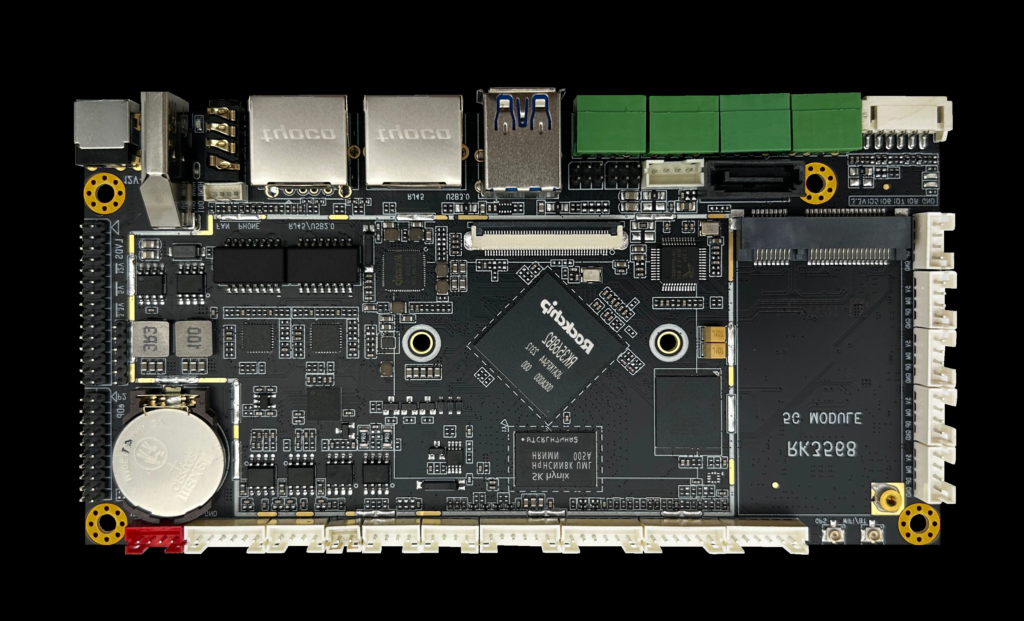
Промышленная архитектура, рассчитанная на длительную эксплуатацию и стабильную интеграцию.
- Тепловая стратегия, согласованная с круглосуточной работой
- Выбор компонентов для обеспечения стабильного срока службы
- Соображения, связанные с ЭМС/ESD (зависит от развертывания)
- Механическая конструкция для обеспечения надежности монтажа
- Долгосрочное планирование доступности (на основе проекта)
Эта платформа предназначена для многолетнего промышленного развертывания, а не для краткосрочного использования потребителями.
Возможности настройки (ориентированные на проект)
Для обеспечения долгосрочной стабильности настройка осуществляется с помощью инженерного анализа и контроля изменений.
- Размер / яркость / сенсорная настройка
- Варианты защитных стекол (AG/AR/AF по желанию)
- Уплотнение / фронтальный IP-подход (определяется проектом)
- Монтаж и адаптация кронштейнов
- Расширение ввода/вывода по областям применения
- Выбор и блокировка версии Android
- BSP и область применения драйверов (согласно списку периферийных устройств)
- Настройка киоска/блокировки и загрузки
- Настройка производительности (определяется проектом)
- Определение стратегии OTA (владение + подтверждение)
- Инженерное сопровождение и технико-экономический анализ
- Планирование проб и валидации
- Пилотный проект → масштабирование массового производства
- Стабилизация и контроль изменений спецификаций
- Планирование поставок с учетом срока службы
Граница ответственности (производитель против владельца приложения)
Четкие границы снижают риск интеграции и обеспечивают долгосрочную стабильность развертывания.
- Мы осуществляем доставку: промышленное оборудование + поддержка на уровне системы (базовый образ, драйверы в соответствии с областью применения, замечания по интеграции)
- Вы доставляете: владение прикладным программным обеспечением и бизнес-логикой
- Мы согласовываем: архитектурные предположения, отображение входов/выходов, обязанности по обновлению, ворота проверки
Это подразделение обеспечивает стабильность поставок на всех этапах: прототип → опытная партия → серийное производство.
Хорошая посадка: Определенные функции + контролируемые изображения + общий план проверки.
Плохая посадка: смещение масштабов + неконтролируемое обновление + неясная принадлежность.
Контрольный список для оценки проекта (отправьте его для быстрого инженерного анализа)
Четкие исходные данные сокращают количество итераций и предотвращают риски интеграции, которых можно избежать.
- Тип приложения + отрасль (чем занимается терминал)
- Условия эксплуатации (температура / ЭМС / рабочий цикл)
- Ожидаемый жизненный цикл (годы) + ожидания замены
- Требования к дисплею/сенсорному покрытию (размер, яркость, влажность в перчатках)
- Список интерфейсов и входов/выходов (RS232/485/CAN/USB/LAN/GPIO)
- Список периферийных устройств (сканер/принтер/камера/сенсоры) + модели, если имеются
- Монтажные ограничения + чертежи / размеры вырезов
- Обновление предпочтений стратегии (владение, ворота проверки)
- Целевой объем (пилотный проект + годовая оценка) + график
Инженерная оценка должна проводиться до принятия решения о закупке.
Быстрая оценка = меньшее количество итераций
Отправьте чертежи + список входов/выходов + замечания по окружающей среде, чтобы получить направление конфигурации и список элементов риска.
Часто задаваемые вопросы (FAQ)
Инженерный обзор
Отправьте информацию о вашем приложении. В ответ мы сообщим направление конфигурации и дальнейшие шаги.