Android-Panel-PC - Eine Panel-PC-Plattform-Variante für kontrollierte industrielle HMI-Einsätze
Teil unseres Industrie-Panel-PC Familie. Ausgewählt, wenn Sie brauchen gesperrte Systembilder, definierte E/A, benutzerdefinierte UI-Workflows, und langfristige Versorgungssicherheit für OEM- und Systemintegrationsprojekte.
Was es ist (und was es nicht ist)
Eine Industrieller Android-Panel-PC ist eine gesteuerte Panel-PC-Plattform-Variante für HMI und dedizierte Terminals. Er wird gewählt, wenn der Systemumfang genau definiert ist und die langfristige Stabilität von folgenden Faktoren abhängt Bildkontrolle, E/A-Konsistenz, und Lebenszyklus-Governance.
- Passt am besten: aufgabenorientierte Terminals, UI-gesteuerte Arbeitsabläufe, kontrollierte Einsätze, lange Nutzungsdauer.
- Passt nicht: PC-Arbeitslasten mit mehreren Programmen, umfangreiche Berechnungen, häufige Umfangsänderungen ohne Änderungskontrolle.
Android-Panel-PC: spezielle Funktion + Versionssperre + UI/Workflow-Kontrolle
Windows-Panel-PC: PC-Software-Ökosystem + Altlastenkompatibilität + Multi-Applikations-Workloads
Zurück zu Panel PC Übersicht →
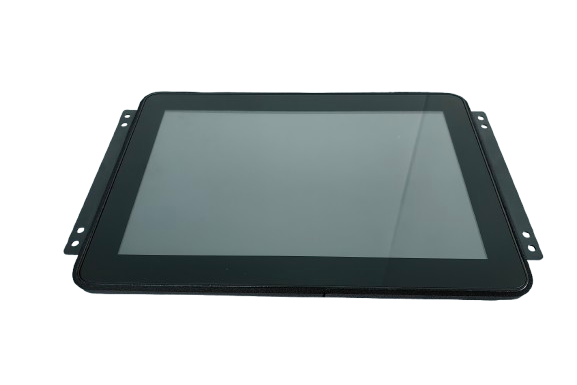
Speziell für die kontrollierte HMI-Integration entwickelt: verriegeltes Betriebssystem-Image + stabile E/A-Zuordnung + Planung von Service-Ersatz.
Wer wählt Android-Panel-PCs
Sie benötigen eine stabile Terminalplattform mit definierter E/A-Zuordnung für den Einsatz vor Ort, die Wartung und die Planung von Ersatzgeräten.
Sie benötigen mechanische Konsistenz und eine kontrollierte Software-Basislinie über mehrere Jahre hinweg.
Einsätze, bei denen die Endgeräte als Teil eines kontrollierten Systems ausgewählt werden - nicht als austauschbare Verbrauchergeräte.
Plattform-Optionen (typisch)
Die endgültige Konfiguration wird nach einer technischen Prüfung der Anwendungsgrenzen, der E/A-Liste, der Umgebung und der Erwartungen an den Lebenszyklus festgelegt.
Projektdefiniert: Versiegelung, Helligkeit, Glasstapelung
- Größen: 7" / 10,1" / 12,1" / 15,6" / 21,5" (typisch)
- Berühren: PCAP (Handschuh-/Nassabstimmung optional)
- Montage: Plattenmontage / VESA / kundenspezifische Halterungen
- Vordere Abdichtung: IP-geschützte Frontoptionen (projektspezifisch)
- Die Optik: AG/AR/AF, Bonding-Optionen (projektspezifisch)
Projektdefiniert: Anwendungsbereich von BSP/Treibern, OTA-Governance-Modell
- Android-Basisversion: Versionsauswahl & Sperren (projektbezogen)
- BSP / Treiber: definiert durch E/A- und Peripherieliste
- Kiosk/Absperrung: eingeschränkte Funktionen, kontrollierter UI-Fluss
- Bootverhalten: Schnellstart-Ziele (projektspezifisch)
- Modell aktualisieren: OTA-Strategie nach Eigentumsmodell definiert
Projektdefiniert: Wide-Temp, EMC-Schwerpunktelemente, Wiederherstellungsoptionen
- Auslegungskonzept für den 24/7-Betrieb (thermische Strategie)
- Wide-Temp-Optionen (projektspezifisch)
- EMC/ESD-Überlegungen (integrationsorientiert)
- Watchdog-/Autorecovery-Optionen (projektspezifisch)
- Lebenszyklus-Governance: Stücklistenstabilität + PCN-Benachrichtigungen
Haben Sie Zeichnungen, Ausschnittmaße und eine vollständige E/A-Liste? Wir können Machbarkeit und Integrationsrisiken frühzeitig bestätigen.
E/A- und Schnittstellenmatrix (typisch)
Die genaue Anzahl der Anschlüsse und die Zuordnung hängen von Ihrer Anwendung und den Gehäuseeinschränkungen ab.
- Vernetzung: LAN (1/2), Wi-Fi/BT (optional)
- USB: USB-Host-Anschlüsse (projektspezifisch)
- Serienmäßig: RS232 / RS485 (projektspezifisch)
- Feldbus: CAN (projektspezifisch)
- Digitale E/A: GPIO (projektspezifisch)
- Audio/Kamera: projektspezifisch (falls erforderlich)
Für die Treiber- und Integrationsplanung senden Sie bitte Ihre Peripherieliste (Scanner, Drucker, Kamera, Sensoren) und Modelle, falls vorhanden.
Stabile E/A-Zuordnung ist Teil der kontrollierten Einsätze.
Wir bestätigen die Platzierung von Steckern, Kabelbaumbeschränkungen und den Zugang zu Serviceleistungen während des Projektstarts, um Nacharbeit zu vermeiden.
Android-Panel-PC vs. x86-Panel-PC (Windows/Linux)
Bei Industrieprojekten ist die eigentliche Entscheidung nicht die zwischen verschiedenen Betriebssystemen, sondern zwischen Plattformarchitektur und Systemverantwortung.
- Dedizierte oder aufgabenbezogene Industrieterminals
- UI-zentrierte Arbeitsabläufe mit kontrollierter Benutzerinteraktion
- Sperrung von Systemabbildern als zentrale Voraussetzung für die Bereitstellung
- Geringere Systemkomplexität, wenn der Anwendungsbereich festgelegt ist
- Klare Trennung zwischen Hardware/System- und Anwendungseigentum
Wird in der Regel gewählt, wenn Langzeitstabilität, kontrollierte Updates, und vereinfachtes Feldverhalten wichtiger sind als PC-Flexibilität.
- Dieselbe Hardware-Plattform, die Windows- oder Linux-Betriebssysteme unterstützt
- Am besten geeignet für PC-Software, Middleware oder benutzerdefinierte Linux-Stacks
- Höhere Flexibilität für Multi-Applikations-Umgebungen
- Größere Verantwortung für Betriebssystem, Treiber und langfristige Wartung
- Geeignet für Projekte, die Kompatibilität mit älterer Software erfordern
Wird in der Regel gewählt, wenn die Komplexität der Anwendung, die Wiederverwendung von Software oder eine Kontrolle des Betriebssystems auf technischer Ebene erforderlich ist.
Technische Anmerkung: Android und x86-Panel-PCs sind keine austauschbaren Lösungen. Die richtige Wahl hängt vom Umfang der Anwendung und den Erwartungen an den Lebenszyklus ab, und davon, wie viel Verantwortung auf Systemebene Ihr Team übernehmen möchte.
Lebenszyklus-Governance: Versionssperre und Änderungskontrolle
Langfristige Stabilität wird durch kontrollierte Basislinien erreicht - nicht durch unkontrollierte Aktualisierungen.
- Definition der Ausgangssituation: Android-Version + Kernel/BSP + Treibersatz + E/A-Zuordnung
- Version gesperrt: Werksbildkontrolle, abgestimmt auf Ihren Validierungsworkflow
- Aktualisierungsstrategie: OTA-Modell, definiert durch Eigentumsverhältnisse + Validierungsgates (projektdefiniert)
- Kontrolle ändern: ECO-Prozess für technische Änderungen; PCN-Benachrichtigungen, falls zutreffend
- Planung der Ersetzung: stabile mechanische Passform und Gebrauchstauglichkeit über Produktionslose hinweg
Typischer Planungshorizont: Projekte mit mehr als 3-5 Jahre erfordern explizite Annahmen zum Lebenszyklus.
- Bild-/Basislinienzusammenfassung (Versionsbezeichner)
- Validierungscheckliste und Testzusammenfassung (wie definiert)
- Rückverfolgbare BOM & Revisionsverfolgung
- Inspektionsaufzeichnungen (IQC / IPQC / OQC) nach Bedarf
- Compliance-Dokumente oder Berichtszusammenfassungen (NDA, falls erforderlich)
Die Verfügbarkeit hängt von Modell/Konfiguration und Projektqualifikation ab.
Industrietaugliches Hardware-Design
Entwickelt für den Dauerbetrieb und kontrollierte Einsätze, bei denen die Stabilität in der Praxis wichtiger ist als die Spezifikationen im Labor.
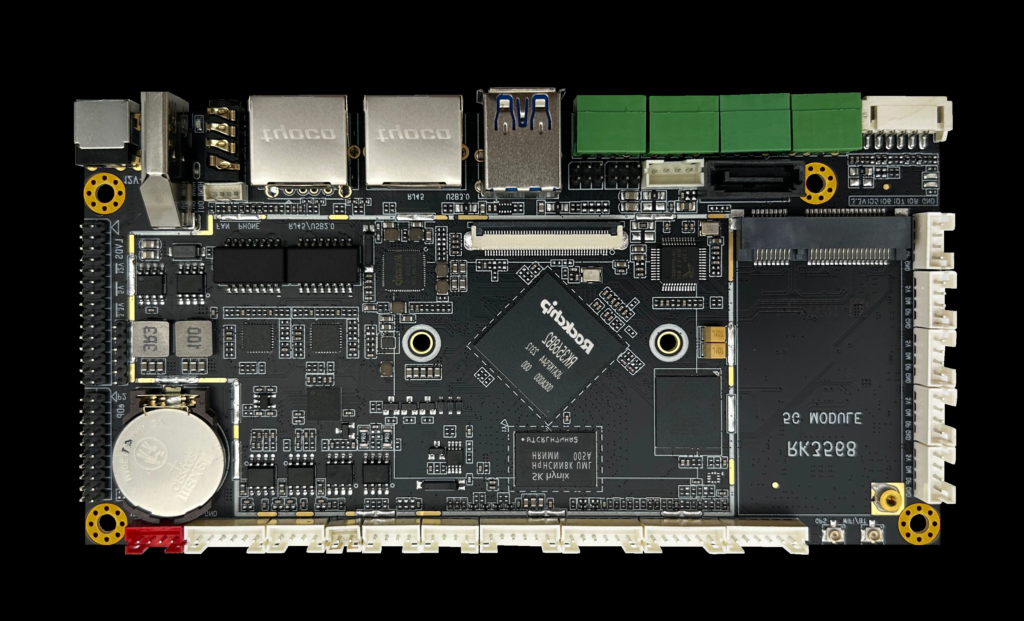
Industrielle Architektur für den Dauerbetrieb und stabile Integration.
- Thermische Strategie auf 24/7-Betrieb ausgerichtet
- Auswahl der Komponenten für eine stabile Nutzungsdauer
- EMC/ESD-Überlegungen (einsatzorientiert)
- Mechanische Konstruktion für konsistente Montage
- Langfristige Verfügbarkeitsplanung (projektbezogen)
Diese Plattform ist für den mehrjährigen industriellen Einsatz und nicht für die kurzfristige Nutzung durch den Verbraucher gedacht.
Anpassungsfähigkeiten (projektorientiert)
Anpassungen werden durch technische Überprüfung und Änderungskontrolle verwaltet, um die langfristige Stabilität zu gewährleisten.
- Größe / Helligkeit / Touch-Tuning
- Deckglasoptionen (AG/AR/AF nach Bedarf)
- Versiegelung / Front-IP-Ansatz (projektspezifisch)
- Montage & Halterungsanpassungen
- E/A-Erweiterung nach Anwendung
- Android-Version auswählen & sperren
- BSP & Treiberumfang (gemäß Peripherieliste)
- Kiosk/Lockdown & Boot-Anpassung
- Leistungsoptimierung (projektspezifisch)
- Definition der OTA-Strategie (Eigentum + Validierung)
- Technische Aufnahme und Machbarkeitsprüfung
- Planung von Probenahme und Validierung
- Pilotprojekt → Skalierung der Massenproduktion
- Stabilisierung der Stückliste und Änderungskontrolle
- Versorgungsplanung für die Nutzungsdauer
Zuständigkeitsabgrenzung (Hersteller vs. Anwendungseigner)
Klare Grenzen verringern das Integrationsrisiko und schützen die langfristige Stabilität des Einsatzes.
- Wir liefern: Industrielle Hardware + Unterstützung auf Systemebene (Baseline-Image, Treiber je nach Umfang, Integrationshinweise)
- Sie liefern: Eigentum an Anwendungssoftware und Geschäftslogik
- Wir passen uns an: Architekturannahmen, E/A-Zuordnung, Aktualisierungszuständigkeiten, Validierungsgates
Diese Abteilung unterstützt die stabile Lieferung von Prototypen, Pilotprodukten und Serienprodukten.
Passt gut: definierte Funktionen + kontrollierte Bilder + gemeinsamer Validierungsplan.
Passt nicht: Verlagerung des Geltungsbereichs + unkontrollierte Aktualisierungen + unklare Eigentumsverhältnisse.
Checkliste für die Projektbewertung (zur schnellen technischen Überprüfung senden)
Klare Eingaben reduzieren Iterationen und verhindern vermeidbare Integrationsrisiken.
- Anwendungsart + Branche (was das Terminal macht)
- Betriebsumgebung (Temperatur / EMV / Einschaltdauer)
- Erwartete Lebensdauer (Jahre) + Erwartungen an den Ersatz
- Anforderungen an Display/Touch (Größe/Helligkeit/Handschuh-Nässe)
- Schnittstellen & E/A-Liste (RS232/485/CAN/USB/LAN/GPIO)
- Liste der Peripheriegeräte (Scanner/Drucker/Kamera/Sensoren) + Modelle, falls vorhanden
- Montagezwänge + Zeichnungen / Ausschnittmaße
- Update-Strategie-Präferenz (Eigentum, Validation Gates)
- Zielvolumen (Pilotprojekt + jährliche Schätzung) + Zeitplan
Die technische Bewertung sollte vor den Beschaffungsentscheidungen erfolgen.
Schnelle Auswertung = weniger Iterationen
Senden Sie Zeichnungen + E/A-Liste + Umgebungshinweise, um eine Konfigurationsanleitung und eine Liste mit Risikopunkten zu erhalten.
Häufig gestellte Fragen (FAQ)
Technische Überprüfung
Senden Sie uns Ihre Anwendungsdetails. Wir antworten mit einer Konfigurationsanweisung und den nächsten Schritten.