Guía del comprador de pantallas industriales para equipos OEM

Introducción Las interfaces hombre-máquina (IHM) son actualmente componentes estándar de los equipos industriales modernos. Las pantallas permiten a los operarios ...
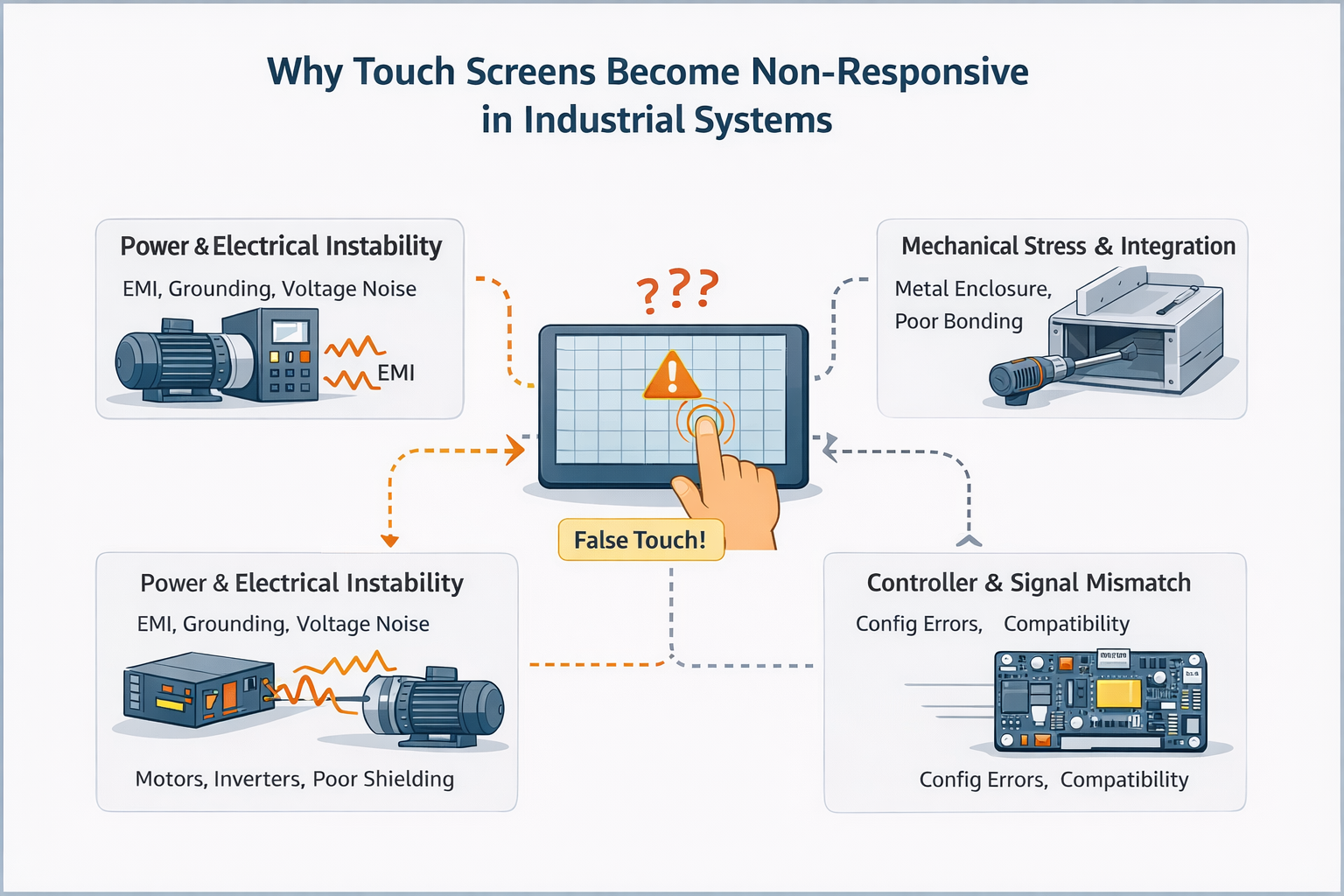
Una pantalla táctil que no responde se refiere a una condición en la que la entrada táctil no se detecta correctamente, de forma inconsistente, o no se detecta en absoluto.
En las aplicaciones industriales, este comportamiento es rara vez se debe a un único componente defectuoso.
A diferencia de los dispositivos de consumo, las pantallas táctiles industriales funcionan como parte de un mayor sistema eléctrico y mecánico, donde la calidad de la energía, la conexión a tierra, la configuración de los controladores y el ruido ambiental desempeñan un papel fundamental.
Como resultado, lo que parece ser una pantalla táctil “muerta” o “fallida” es a menudo una problema a nivel de sistema y no un panel defectuoso.
El comportamiento no receptivo puede presentarse de varias formas:
Estos síntomas suelen indicar integración o factores ambientales, no un fallo inmediato del hardware.
Desde el punto de vista de la ingeniería, las pantallas táctiles que no funcionan suelen pertenecer a una o varias de las siguientes categorías.
Los problemas relacionados con la alimentación suelen manifestarse como comportamiento táctil intermitente o incoherente, en lugar de un fracaso total.
En estos casos, la sustitución del panel táctil por sí sola rara vez resuelve el problema.
Las interferencias electromagnéticas son una de las causas más comúnmente subestimadas de comportamiento táctil no sensible o inestable en sistemas industriales.
Los problemas mecánicos suelen producir falta de respuesta localizada en lugar de un fracaso total.
Un error frecuente durante la resolución de problemas es suponer:
“Si la pantalla táctil no responde, el panel debe estar defectuoso”.”
Esta suposición conduce a menudo a:
En muchos casos, la inspección básica del hardware por sí sola no puede revelar integridad de la alimentación, acoplamiento EMI o problemas a nivel de controlador.
Antes de concluir que una pantalla táctil ha fallado, una evaluación a nivel de ingeniería suele tener en cuenta:
El objetivo no es “encontrar una pieza rota”, sino determinar si el sistema táctil es adecuado para el entorno de aplicación.
Una inspección visual básica y el restablecimiento de los conectores pueden ayudar a identificar daños físicos evidentes.
Sin embargo, si una pantalla táctil:
entonces es poco probable que el problema se resuelva únicamente mediante la sustitución del hardware.
En esta fase, la solución de problemas por ensayo y error suele retrasar la resolución en lugar de acelerarla.
En las implantaciones industriales, los problemas de falta de respuesta táctil suelen estar relacionados con decisiones de integración del sistema, no defectos aislados de los componentes.
Los proyectos que logran un funcionamiento estable a largo plazo suelen evaluar el rendimiento táctil junto con:
Este enfoque a nivel de sistema reduce significativamente los problemas sobre el terreno y los ciclos repetidos de solución de problemas.
Se recomienda una revisión de ingeniería cuando su solicitud implique:
La evaluación temprana ayuda a distinguir riesgo de aplicación de fallo del componente, ahorrando tiempo y dinero.
¿Experimenta un comportamiento táctil inestable o que no responde en su sistema?
Comparta su entorno de aplicación, arquitectura energética y condiciones de integración con nuestro equipo de ingeniería para una evaluación de viabilidad y riesgos.
Este artículo pretende ser una referencia técnica para comprender el comportamiento táctil sin respuesta en los sistemas industriales.
Se centra en la evaluación técnica más que en los procedimientos de reparación paso a paso.
Introducción Las interfaces hombre-máquina (IHM) son actualmente componentes estándar de los equipos industriales modernos. Las pantallas permiten a los operarios ...

Introducción Las pantallas industriales se instalan con frecuencia en entornos en los que las condiciones de iluminación son difíciles de controlar. Equipos ...

Introducción Las pantallas son un componente de interfaz crítico en muchos tipos de equipos industriales. Proporcionan al sistema ...

Introducción La visibilidad de las pantallas es un parámetro de diseño fundamental en los equipos industriales. Los operarios confían en las interfaces gráficas ...
Envíe los detalles de su solicitud. Le responderemos con la dirección de configuración y los siguientes pasos.