Панельный ПК против промышленного компьютера: Различия в архитектуре и интеграции
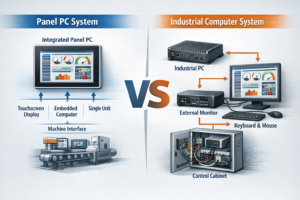
Введение При проектировании промышленных систем выбор подходящей вычислительной архитектуры напрямую влияет на надежность системы, сложность интеграции, ...
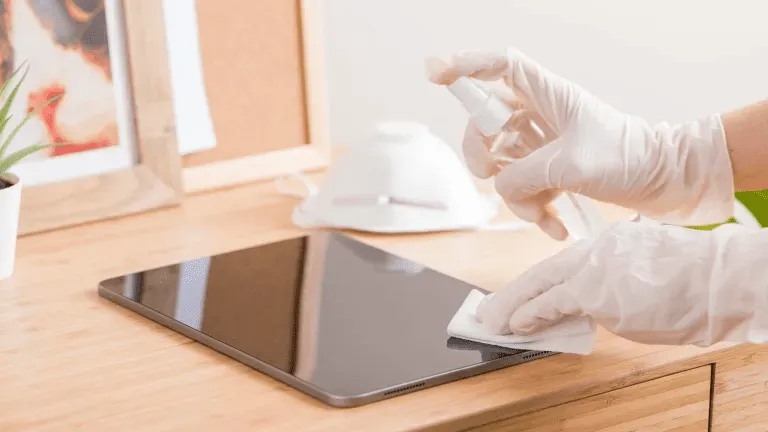
Сенсорные экраны стали неотъемлемой частью промышленных, коммерческих и общественных помещений.
Используется ли в заводские ЧМИ, наружные киоски, торговые терминалы или медицинские системы, Регулярная чистка очень важна для удобство чтения, гигиеничность, долговечность и точность.
Это руководство объясняет, как правильно чистить сенсорный экран, Какие инструменты и принадлежности использовать и как часто проводить уборку в зависимости от сценария использования.
Промышленные и коммерческие сенсорные экраны подвержены:
Неправильная очистка может стать причиной:
Именно поэтому процесс очистки, разработанный специально для промышленных дисплеев Это очень важно как для операторов, так и для команд технического обслуживания.
Прежде чем приступить к работе, соберитесь:
✔ Салфетка из микрофибры (без ворса)
✔ Безопасный для экрана чистящий раствор (без спирта и аммиака)
✔ Дистиллированная вода (необязательно)
✔ Бутылка с распылителем - никогда не распыляйте спрей прямо на экран
⚠ Делайте НЕ используйте бумажные полотенца, абразивные салфетки, средства для мытья окон или бытовые дезинфицирующие средства, содержащие отбеливатель или крепкий спирт.
Они могут повредить покрытие экрана.
Перед чисткой всегда выключайте сенсорный экран или отключайте питание.
Это позволяет избежать статические помехи и обеспечивает четкую видимость всех меток.
Сухой салфеткой из микрофибры аккуратно удалите пыль и частицы.
Предварительное удаление пыли предотвращает появление царапин при нанесении жидкостей.
Не распыляйте чистящее средство непосредственно на экран.
Вместо этого:
Это позволяет сохранить целостность сенсорных датчиков и стеклянных покрытий.
После очистки:
Для систем с высокой степенью контакта, таких как общественные киоски и терминалы самообслуживания, повторяйте чистку ежедневно или несколько раз в смену.
❌ Чистящие средства на основе аммиака
❌ Стеклоочистители с высоким содержанием спирта
❌ Абразивные чистящие средства
❌ Бумажные полотенца или салфетки
Использование правильной химии для очистки обеспечивает долгосрочную работу и сохранение защитных покрытий, таких как Обработка стекла AG, AF и AR.
| Окружающая среда | Рекомендуемая частота очистки |
|---|---|
| Сенсорные дисплеи (киоски, кассовые аппараты) | Ежедневно |
| Медицинские или лабораторные сенсорные панели | После каждого использования / смены |
| Заводские или цеховые программируемые терминалы | Еженедельник |
| Наружные прочные дисплеи | Два раза в неделю или по мере необходимости |
| Внутренние терминалы, не требующие особых усилий | Ежемесячно |
Оптимизация графиков уборки улучшает Время работы, гигиена и удовлетворенность оператора.
❌ Распыление жидкости непосредственно на экран
➡ Вместо этого используйте запотевшую ткань.
❌ Используйте грубую ткань или бумажное полотенце
➡ Перейдите на микрофибру.
❌ Использование сильных дезинфицирующих средств без разбора
➡ Используйте только разрешенные растворы.
❌ Игнорирование краев и зон уплотнения
➡ Не допускайте попадания жидкости в швы.
Многие промышленные экраны включают в себя такие виды обработки поверхности, как:
Чтобы сохранить эти покрытия:
✔ Использование бесспиртовые чистящие средства
✔ Избегайте абразивных материалов
✔ Чистите аккуратно и регулярно
✔ Следуйте рекомендациям производителя
Правильный уход продлевает срок службы защитных стекол и позволяет дисплеям выглядеть как новые.
Правильная очистка сенсорного экрана не только улучшает его внешний вид, но и повышает качество работы:
Используя безопасные чистящие средства и соблюдение последовательного процесса очистки, Промышленные дисплеи дольше сохраняют работоспособность и требуют меньше обслуживания.
Введение При проектировании промышленных систем выбор подходящей вычислительной архитектуры напрямую влияет на надежность системы, сложность интеграции, ...
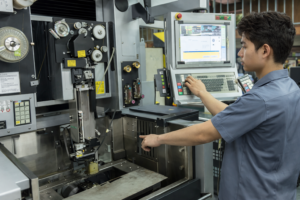
Введение В промышленном оборудовании подсистема дисплея является частью более широкого человеко-машинного интерфейса (ЧМИ) и ...

Введение При проектировании промышленного оборудования человеко-машинный интерфейс (ЧМИ) напрямую влияет на удобство использования, надежность и техническое обслуживание системы. ...

Введение Человеко-машинные интерфейсы (ЧМИ) сегодня являются стандартными компонентами современного промышленного оборудования. Дисплеи позволяют операторам ...
Отправьте информацию о вашем приложении. В ответ мы сообщим направление конфигурации и дальнейшие шаги.