Wat is een industriële panel-pc? Onderdelen, soorten en toepassingen

Een industriële panel-pc is een computer met een ingebouwd scherm, meestal een touchscreen, die is ontworpen voor ...
Het Eagle Touch-technische team
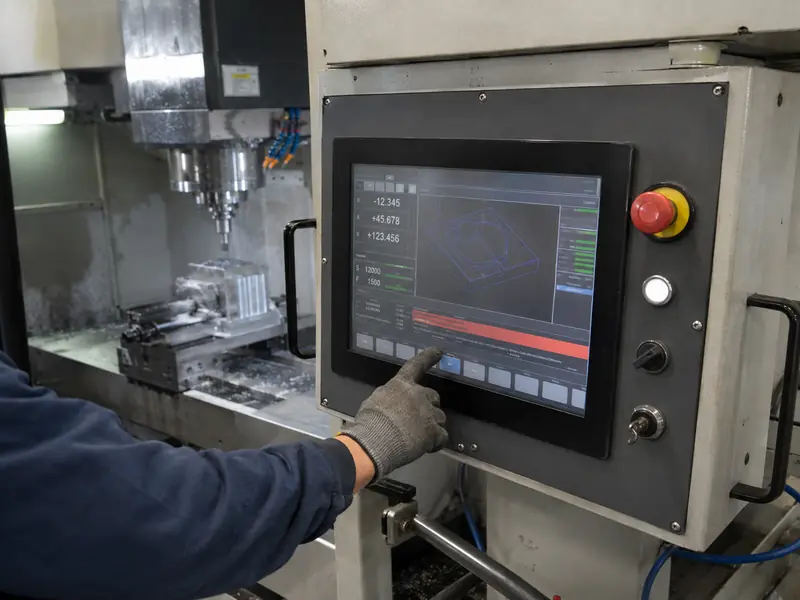
Het display van een CNC-machine vormt de werkinterface tussen de operator en het besturingssysteem. Het geeft coördinaten, programma’s, gereedschapsgegevens, informatie over de spil en de voedingssnelheid, alarmen en onderhoudsschermen weer en ontvangt tegelijkertijd invoer van de operator.
Het moet goed afleesbaar en responsief blijven in omgevingen met koelvloeistof, olienevel, deeltjes, handschoenen, trillingen, elektrische ruis en hitte. Het moet aansluiten bij de besturingseenheid, de mechanische opening, de software-resolutie en de levensduur.
Een moderne CNC-interface moet meer informatie weergeven dan afzonderlijke knoppen op een overzichtelijke manier kunnen weergeven. Tijdens het instellen kan een operator een programma laden, werkstukoffsets invoeren, gereedschapsgegevens controleren en waarden voor de spil of de voeding instellen. Tijdens de productie toont de interface de voortgang van de cyclus, de aspositie, waarschuwingen en diagnostische gegevens.
Via een touchscreen worden deze functies in één HMI samengebracht. Dit vereenvoudigt de invoer van parameters en helpt operators bij het identificeren van alarmen zonder dat daarvoor een aparte serviceterminal nodig is.
Het display is niet bepalend voor de bewerkingsnauwkeurigheid. Die hangt af van de machine, de besturing, het gereedschap, de kalibratie en het proces. Het display ondersteunt de operator door de juiste informatie weer te geven en gecontroleerde toegang tot het systeem te bieden.
De CNC-besturing ontvangt gegevens van aandrijvingen, sensoren en veiligheidscircuits en regelt vervolgens de machinefuncties. HMI-software zet deze gegevens om in coördinaten, statusindicatoren, gereedschapsinformatie, alarmen en bedieningsschermen. Het display toont de interface, terwijl de aanraakbesturing de invoer naar de host stuurt.
De hardware kan bestaan uit een LCD- en touchscreenmodule die is aangesloten op een ingebouwde controller, een industriële aanraakmonitor aangesloten op een externe IPC of CNC-besturing, of een paneel-PC de HMI-software lokaal uitvoeren.
Aanraakbediening mag niet automatisch alle fysieke bedieningselementen vervangen. Noodstops en andere veiligheidsgerelateerde functies vereisen geschikte, onafhankelijke hardware en veiligheidscircuits. Ook vaak gebruikte bedieningselementen kunnen fysiek blijven wanneer onmiddellijke tactiele feedback belangrijk is.
Koelvloeistof, olienevel en deeltjes: Tijdens het bewerken of reinigen kunnen verontreinigingen het bedieningspaneel bereiken. De voorste constructie, de afdichting, de glasrand en de openingen moeten voldoen aan de beschermingseisen. Een aanraakscherm alleen is niet voldoende om de complete machine IP65-gecertificeerd te maken; de afdichting hangt af van de geïnstalleerde monitor en de behuizing.
Bediening met handschoenen aan: Handschoenen van nitril, snijbestendig materiaal, leer en met olie geïmpregneerd materiaal gedragen zich verschillend. De handschoen zelf, het glas, de controller en de firmware moeten samen worden getest.
Trilling: Een display dat op het machineframe of aan een beweegbare bedieningsarm is bevestigd, wordt blootgesteld aan herhaalde trillingen. Beugels, bevestigingsmiddelen, verbindingsstukken en kabelbevestigingen moeten voorkomen dat het beeld of de aanraakverbinding met tussenpozen wegvalt.
Elektrische ruis: Motoren, servoaandrijvingen, schakelaars en frequentieregelaars kunnen het beeld, de USB-touchfunctionaliteit of de PCAP-sensoren verstoren. Aarding, afscherming, gefilterde stroomvoorziening, kabelgeleiding en afstemming moeten worden gecontroleerd terwijl de machine in bedrijf is.
Warmte en levensduur: Een afgesloten behuizing kan veel warmer zijn dan de werkplaats. Het vermogen van de achtergrondverlichting, de luchtstroom en de warmteoverdracht via de behuizing zijn van invloed op de bedrijfstemperatuur. Voor CNC-apparatuur met een lange levensduur zijn bovendien de beschikbaarheid van LCD-schermen, revisiebeheer en vervangingsplanning van belang.
| CNC-toestand | Praktisch uitgangspunt | Wat moet worden gecontroleerd |
|---|---|---|
| Koelvloeistof of olie in de buurt van het paneel | Afgedichte voorkant en bijpassende pakking | Voltooide installatie, randen, openingen en reinigingsmethode |
| Dikke of niet-geleidende handschoenen | Vijfdraads resistief, of afgestemd PCAP wanneer een glazen frontpaneel vereist is | Daadwerkelijke handschoen- en bedieningsgebaren |
| PCAP in de buurt van servoaandrijvingen of frequentieregelaars | Aarding, afscherming, gecontroleerde kabeltrajecten en juiste afstemming | Aanraakstabiliteit bij draaiende motoren en aandrijvingen |
| Bestaande HMI met een beeldverhouding van 4:3 of 5:4 | Pas de oorspronkelijke resolutie, beeldverhouding en het actieve gebied aan | Schaalverdeling, beeldgeometrie en aanraaktoewijzing |
| Tentoonstellen in een afgesloten vitrine | Industrieel LCD-scherm met een passend thermisch ontwerp | Maximale interne temperatuur bij continu gebruik |
| Lange productielevensduur of lange levensduur in de praktijk | Gecontroleerde componenten en gedocumenteerde herzieningen | Compatibiliteit bij vervanging en kennisgeving van wijzigingen |
De configuratie moet worden afgestemd op de geïnstalleerde omgeving. Een hoge helderheid, dik glas of optische verlijming kunnen de warmteontwikkeling, de kosten of de moeilijkheidsgraad van de integratie verhogen wanneer daar geen duidelijke noodzaak voor is.
Geprojecteerde capacitieve touch is geschikt voor een vlakke glazen voorkant, heldere optiek, intensief gebruik en moderne grafische interfaces. Industriële PCAP-technologie ondersteunt het gebruik met handschoenen en is waterafstotend, maar de prestaties zijn afhankelijk van de volledige opbouw en de elektrische omgeving. Dik glas, slechte aarding, elektrische ruis of ongeschikte bekabeling kunnen de gevoeligheid verminderen of valse invoer veroorzaken.
Resistief aanraakscherm reageert op druk en werkt ook met dikke handschoenen of een niet-geleidende stylus. Het blijft een praktische oplossing voor oudere CNC-besturingen en eenvoudige interfaces met één aanraakpunt. De nadelen zijn een flexibel voorvlak, een lagere optische doorlaatbaarheid en mechanische slijtage.
Maak uw keuze op basis van de daadwerkelijke invoer en vervuiling. Als er koelvloeistof op het oppervlak achterblijft, moet u bepalen of de touch-functie druppels moet negeren, invoer met natte handschoenen moet accepteren of de invoer tijdelijk moet weigeren. Deze gedragingen verschillen van elkaar en moeten afzonderlijk worden getest.
Bij de mechanische beoordeling moet aandacht worden besteed aan de buitenafmetingen, de uitsparing in het paneel, het weergavegebied, de bevestigingsgaten, de overlapping van de rand, de inbouwdiepte, de positie van de connector, de buigradius van de kabel en de toegankelijkheid voor onderhoud. De afdichting van het paneel is bovendien afhankelijk van een vlak montageoppervlak en een gecontroleerde compressie van de pakking. Eagle Touch levert aan een paneel te bevestigen touchscreenmonitoren voor apparatuurpanelen en bedieningsconsoles.
Oudere CNC-systemen kunnen gebruikmaken van VGA-, DVI-, 4:3- of 5:4-schermen en resoluties zoals 640 × 480, 800 × 600, 1024 × 768 of 1280 × 1024. Bij vervanging door een breedbeeldscherm kan de HMI worden uitgerekt, bijgesneden of vervaagd wanneer de bron-timing en de native resolutie niet overeenkomen. Zie de Gids voor industriële monitoren met een beeldverhouding van 4:3 versus 16:9 vanwege de mechanische verschillen en de verschillen in schaal.
Nieuwe complete monitoren kunnen gebruikmaken van HDMI, DisplayPort, DVI of VGA; ingebouwde LCD-modules kunnen gebruikmaken van LVDS of eDP. Voor aanraakgegevens kan gebruik worden gemaakt van USB, RS-232 of I²C. Controleer vóór goedkeuring de uitgang van de controller, de ondersteuning door het besturingssysteem, de kabellengte, de vergrendeling van de connector, het opstartgedrag, het herstel uit de slaap- en wekmodus en de afhandeling bij geen signaal.
Een prototype dat op een bureau werkt, is nog niet goedgekeurd voor gebruik op een CNC-machine. Test het voltooide display met de beoogde besturing, voeding, kabels, behuizing, aarding en software.
Het validatieplan moet het volgende bevatten:
Dit sluit goed aan bij integratie van beeldschermen in de industriële automatisering: de betrouwbaarheid hangt af van de samenwerking tussen het display en de machine.
Geef voor een nieuwe CNC-machine de schermgrootte, resolutie, montagewijze, besturingseenheid of IPC, video- en aanraakschermen, temperatuur, omstandigheden voor het gebruik met handschoenen en koelvloeistof, en de verwachte hoeveelheid op.
Stuur voor een vervanging ook de modelnummers van het huidige scherm en LCD-scherm mee, foto’s van de voor- en achterzijde, de uitsparing, de afmetingen, de aansluitingen, de oorspronkelijke resolutie en eventuele tekeningen. De diagonaalmaat alleen is niet voldoende.
Eagle Touch kan de mechanische opbouw, het weergaveformaat, de bedieningswijze, de interfaces, de bescherming van de voorkant en de vereisten voor de levenscyclus beoordelen alvorens een prototype aan te bevelen. Stuur de informatie via onze contactpagina voor een eerste technische beoordeling.
PCAP is geschikt voor een afgedichte glazen voorkant en een moderne HMI. Resistief aanraakscherm kan geschikt zijn voor dikke handschoenen, een universele stylus, invoer met één vinger of een oudere besturingseenheid. Test beide opties in de voltooide machine.
Niet per se. De afmetingen, het actieve oppervlak, de native resolutie, de timing, de aansluitingen, de bevestiging en het stroomverbruik moeten allemaal compatibel zijn.
Ja, onder welbepaalde natte omstandigheden, maar de afdichting en het aanraakgedrag zijn afzonderlijke eisen. Test de vereiste reactie op druppels, natte handschoenen of opgehoopte vloeistof op het eindproduct.
Een industriële panel-pc is een computer met een ingebouwd scherm, meestal een touchscreen, die is ontworpen voor ...

Een embedded pc is een computer die is geconfigureerd om te functioneren als onderdeel van een machine of een groter geheel ...

Begin met de software die op de panel-pc moet draaien en de eisen waaraan deze moet voldoen. Vervolgens ...

Bij het kiezen van de IP-klasse voor een industriële paneel-pc moet je je eerst twee vragen stellen: in hoeverre wordt het apparaat blootgesteld aan stof en water ...
Deel uw aanvraag, vereisten of huidige uitdaging met ons. Ons team zal de details bekijken en een praktische oplossing voorstellen.