What Is an Industrial Panel PC? Components, Types and Applications

An industrial panel PC is a computer with a built-in display, usually a touchscreen, designed for …
Eagle Touch Engineering Team
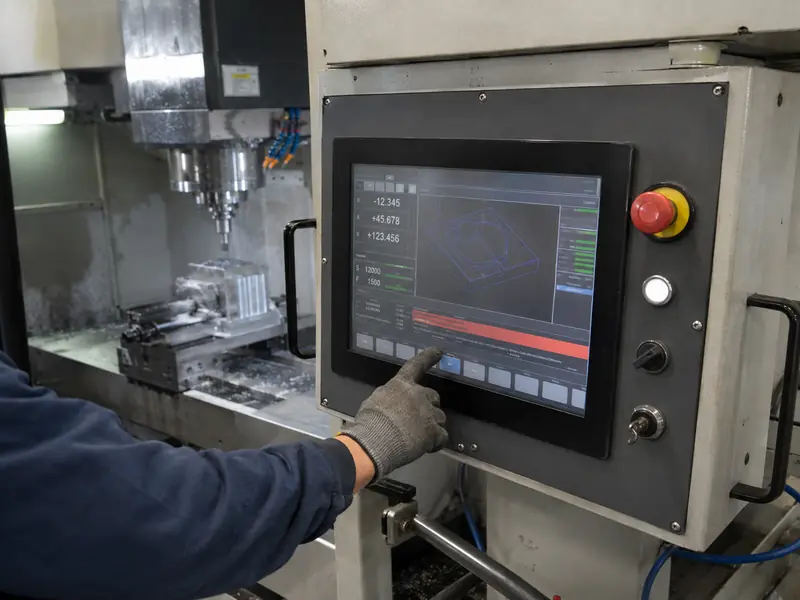
A CNC machine display is the working interface between the operator and the control system. It presents coordinates, programs, tool data, spindle and feed information, alarms, and maintenance screens while receiving operator input.
It must remain readable and responsive around coolant, oil mist, particles, gloves, vibration, electrical noise, and heat. It must match the controller, mechanical opening, software resolution, and service life.
A modern CNC interface must organize more information than individual buttons can present clearly. During setup, an operator may load a program, enter work offsets, check tool data, and set spindle or feed values. During production, it shows cycle progress, axis position, warnings, and diagnostics.
A touch display brings these functions into one HMI. It can simplify parameter entry and help operators identify alarms without a separate service terminal.
The display does not determine machining accuracy. That depends on the machine, motion control, tooling, calibration, and process. The display supports the operator by presenting the right information and providing controlled system access.
The CNC controller receives data from drives, sensors, and safety circuits, then manages machine functions. HMI software converts it into coordinates, status indicators, tool information, alarms, and operating pages. The display presents the interface, while its touch controller sends input to the host.
The hardware may be an LCD and touch assembly connected to an embedded controller, an industrial touch monitor connected to an external IPC or CNC controller, or a panel PC running the HMI software locally.
Touch should not automatically replace every physical control. Emergency stop and other safety-related functions need appropriate independent hardware and safety circuits. Frequently used controls may also remain physical when immediate tactile feedback is important.
Coolant, oil mist, and particles: Contamination can reach the operator panel during machining or cleaning. The front structure, gasket, glass edge, and openings must suit the protection requirement. A touch panel alone does not make the completed machine IP65; sealing depends on the installed monitor and enclosure.
Glove operation: Nitrile, cut-resistant, leather, and oil-covered gloves behave differently. The actual glove, glass, controller, and firmware must be tested together.
Vibration: A display mounted on the machine frame or moving pendant experiences repeated vibration. Brackets, fasteners, connectors, and cable restraint must prevent intermittent image or touch connections.
Electrical noise: Motors, servo drives, contactors, and VFDs can disturb video, USB touch, or PCAP sensing. Grounding, shielding, filtered power, cable routing, and tuning must be checked while the machine operates.
Heat and service life: A sealed cabinet may be much warmer than the workshop. Backlight power, airflow, and enclosure heat transfer affect operating temperature. Long-lived CNC equipment also requires LCD availability, revision control, and replacement planning.
| CNC condition | Practical starting point | What must be verified |
|---|---|---|
| Coolant or oil near the panel | Sealed front and suitable gasket | Completed installation, edges, openings, and cleaning method |
| Thick or non-conductive gloves | Five-wire resistive, or tuned PCAP when a glass front is required | Actual glove and operating gestures |
| PCAP near servo drives or VFDs | Grounding, shielding, controlled cable routes, and suitable tuning | Touch stability with motors and drives running |
| Existing 4:3 or 5:4 HMI | Match native resolution, aspect ratio, and active area | Scaling, image geometry, and touch mapping |
| Display in a sealed cabinet | Industrial LCD with suitable thermal design | Maximum internal temperature during continuous operation |
| Long production or field life | Controlled components and documented revisions | Replacement compatibility and change notification |
The configuration should follow the installed environment. High brightness, thick glass, or optical bonding may increase heat, cost, or integration difficulty when there is no defined need for them.
Projected capacitive touch suits a flat glass front, clear optics, frequent use, and modern graphical interfaces. Industrial PCAP can support gloves and water rejection, but performance depends on the complete stack-up and electrical environment. Thick glass, poor grounding, electrical noise, or unsuitable cabling can reduce sensitivity or cause false input.
Resistive touch responds to pressure and works with thick gloves or a non-conductive stylus. It remains practical for legacy CNC controls and simple single-touch interfaces. Its trade-offs are a flexible front surface, lower optical transmission, and mechanical wear.
Choose according to the real input and contamination. If coolant may remain on the surface, define whether touch must ignore droplets, accept wet-glove input, or temporarily reject input. These behaviours are different and must be tested separately.
Mechanical review should cover outside dimensions, panel cutout, viewing area, mounting holes, bezel overlap, installation depth, connector position, cable bend radius, and service access. Panel sealing also depends on a flat mounting surface and controlled gasket compression. Eagle Touch supplies panel-mount touch monitors for equipment panels and operator consoles.
Older CNC systems may use VGA, DVI, 4:3 or 5:4 displays, and resolutions such as 640 × 480, 800 × 600, 1024 × 768, or 1280 × 1024. A widescreen replacement may stretch, crop, or soften the HMI when source timing and native resolution do not match. See the 4:3 versus 16:9 industrial monitor guide for the mechanical and scaling differences.
New complete monitors may use HDMI, DisplayPort, DVI, or VGA; embedded LCD assemblies may use LVDS or eDP. Touch data may use USB, RS-232, or I²C. Confirm the controller output, operating-system support, cable length, connector locking, startup behaviour, sleep and wake recovery, and no-signal handling before approval.
A sample that works on a desk is not yet approved for a CNC machine. Test the finished display with the intended controller, power supply, cables, enclosure, grounding, and software.
The validation plan should include:
This follows good industrial automation display integration: reliability is determined by the display and machine working together.
For a new CNC machine, provide the screen size, resolution, mounting method, controller or IPC, video and touch interfaces, temperature, glove and coolant conditions, and expected quantity.
For a replacement, also send the existing display and LCD model numbers, front and rear photographs, cutout, dimensions, connectors, original resolution, and available drawings. Diagonal size alone is not enough.
Eagle Touch can review the mechanical structure, display format, touch method, interfaces, front protection, and lifecycle requirements before recommending a sample. Send the information through our contact page for an initial engineering review.
PCAP suits a sealed glass front and modern HMI. Resistive touch may suit thick gloves, a universal stylus, single-point input, or a legacy controller. Test either option in the completed machine.
Not necessarily. Size, active area, native resolution, timing, interfaces, mounting, and power must all be compatible.
Yes, for defined wet conditions, but sealing and touch behaviour are separate requirements. Test the required response to droplets, wet gloves, or pooled liquid on the final assembly.
An industrial panel PC is a computer with a built-in display, usually a touchscreen, designed for …

An embedded PC is a computer configured to work as part of a machine or larger …

Start with the software the panel PC must run and the conditions it must fit. Then …

Choosing an industrial panel PC IP rating starts with two questions: what dust and water exposure …
Share your application, requirements, or current challenge. Our team will review the details and recommend a practical way forward.