كمبيوتر لوحي يعمل بنظام أندرويد - متغير منصة كمبيوتر لوحي لعمليات نشر واجهة الإدارة العليا الصناعية الخاضعة للتحكم
جزء من كمبيوتر لوحي صناعي العائلة تم اختياره عند الحاجة صور النظام المؤمّنة, تعريف الإدخال/الإخراج, تدفقات عمل واجهة المستخدم المخصصة, و استقرار التوريد على المدى الطويل لمشاريع تصنيع المعدات الأصلية وتكامل الأنظمة.
ما هو (وما ليس كذلك)
أن كمبيوتر لوحي صناعي يعمل بنظام أندرويد هو متغير منصة الكمبيوتر الشخصي التي يتم التحكم فيها لـ HMI والمحطات الطرفية المخصصة. يتم اختياره عندما يكون نطاق النظام محددًا جيدًا ويعتمد الاستقرار طويل الأجل على التحكم في الصورة, اتساق الإدخال/الإخراج, و حوكمة دورة الحياة.
- أفضل ملاءمة: المحطات الطرفية التي تركز على المهام، وسير العمل القائم على واجهة المستخدم، وعمليات النشر الخاضعة للرقابة، وعمر الخدمة الطويل.
- غير مناسب: أعباء عمل أجهزة الكمبيوتر متعددة البرامج، والحوسبة الثقيلة، والتغييرات المتكررة في النطاق دون التحكم في التغيير.
كمبيوتر لوحة أندرويد: وظيفة مخصصة + قفل الإصدار + التحكم في واجهة المستخدم/سير العمل
لوحة ويندوز للكمبيوتر الشخصي: النظام البيئي لبرامج الكمبيوتر الشخصي + التوافق القديم + أعباء العمل متعددة التطبيقات
العودة إلى نظرة عامة على لوحة الكمبيوتر الشخصي →
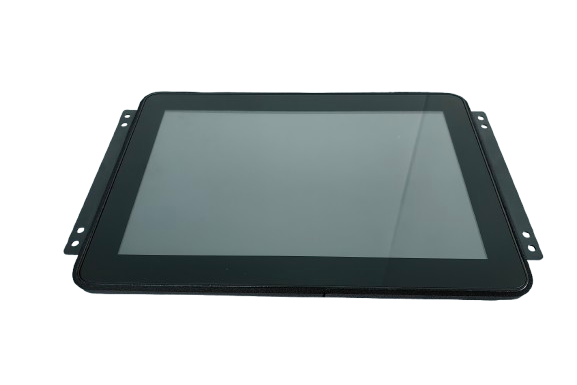
مصممة خصيصًا لتكامل HMI الخاضع للتحكم: صورة نظام تشغيل مؤمّنة + تخطيط ثابت للإدخال/الإخراج + تخطيط استبدال الخدمة.
من يختار أجهزة الكمبيوتر الشخصية التي تعمل بنظام Android
تحتاج إلى منصة طرفية مستقرة مع تخطيط محدد للإدخال/الإخراج للنشر الميداني والصيانة وتخطيط الاستبدال.
الحاجة إلى اتساق ميكانيكي وخط أساس برمجي مضبوط عبر دفعات إنتاج متعددة السنوات.
عمليات النشر التي يتم فيها اختيار المحطات الطرفية كجزء من نظام محكوم - وليس أجهزة استهلاكية قابلة للتبديل.
خيارات المنصة (نموذجي)
يتم تحديد التكوين النهائي بعد مراجعة هندسية لحدود التطبيق وقائمة الإدخال/الإخراج والبيئة وتوقعات دورة الحياة.
محدد المشروع: الختم، والسطوع، وتكديس الزجاج
- المقاسات: 7 بوصة / 10.1 بوصة / 12.1 بوصة / 15.6 بوصة / 21.5 بوصة (نموذجي)
- اللمس: PCAP (ضبط القفازات/الضبط الرطب اختياري)
- التركيب: حامل اللوحة / VESA / الأقواس المخصصة
- ختم أمامي: الخيارات الأمامية المصنفة IP (محددة حسب المشروع)
- البصريات: AG/AR/AF، خيارات الترابط (محددة حسب المشروع)
محدد المشروع: نطاق نظام دعم البرامج/السائق، ونموذج حوكمة اتفاقية التجارة الخارجية
- خط الأساس لنظام أندرويد: تحديد الإصدار وتأمينه (محدد المشروع)
- BSP / السائقين: محددة بواسطة الإدخال/الإخراج والقائمة الطرفية
- كشك/كشك الإغلاق: ميزات مقيدة، تدفق واجهة المستخدم المتحكم فيه
- سلوك التمهيد: أهداف الإقلاع السريع (محددة بالمشروع)
- نموذج التحديث: استراتيجية OTA المحددة حسب نموذج الملكية
محدد المشروع: درجات الحرارة العريضة، وعناصر التركيز EMC، وخيارات الاسترداد
- نهج تصميم العمل على مدار الساعة طوال أيام الأسبوع (الاستراتيجية الحرارية)
- خيارات درجة الحرارة الواسعة (محددة حسب المشروع)
- اعتبارات EMC/ESD (مدفوعة بالتكامل)
- خيارات المراقبة/الاسترداد التلقائي (محددة بالمشروع)
- حوكمة دورة الحياة: استقرار قائمة المنتجات + إشعارات النفقات الشخصية
هل لديك رسومات وأبعاد القواطع وقائمة كاملة بالإدخال/الإخراج؟ يمكننا تأكيد الجدوى ومخاطر التكامل في وقت مبكر.
مصفوفة الإدخال/الإخراج والواجهات (نموذجي)
يعتمد عدد المنافذ والتخطيط الدقيق على التطبيق الخاص بك وقيود الضميمة.
- الربط الشبكي: شبكة LAN (1/2)، Wi-Fi/BT (اختياري)
- USB: منافذ مضيف USB (محددة بالمشروع)
- متسلسل: RS232 / RS485 (محدد المشروع)
- الناقل الميداني: CAN (محدد المشروع)
- إدخال/إخراج رقمي: GPIO (محدد المشروع)
- الصوت / الكاميرا: محدد المشروع (إذا لزم الأمر)
لتخطيط السائق والتكامل، يُرجى إرسال القائمة الطرفية (الماسح الضوئي، والطابعة، والكاميرا، وأجهزة الاستشعار) والطرازات إذا كانت متوفرة.
تخطيط الإدخال/الإخراج المستقر جزء من عمليات النشر المضبوطة.
نتأكد من وضع الموصلات وقيود الحزام والوصول إلى الخدمة أثناء بدء المشروع لتجنب إعادة العمل.
حاسوب لوحة الأندرويد مقابل حاسوب لوحة x86 (ويندوز/لينكس)
في المشاريع الصناعية، القرار الحقيقي ليس بين أنظمة التشغيل, ولكن بين بنية المنصة ومسؤولية النظام.
- المحطات الطرفية الصناعية المخصصة أو التي تركز على المهام
- تدفقات عمل تتمحور حول واجهة المستخدم مع تفاعل المستخدم المتحكم فيه
- قفل صورة النظام كمتطلب أساسي للنشر
- انخفاض تعقيد النظام عندما يكون نطاق التطبيق ثابتًا
- فصل واضح بين ملكية الأجهزة/النظام وملكية التطبيق
عادةً ما يتم اختيارها عندما يكون الاستقرار طويل الأجل والتحديثات المضبوطة والسلوك الميداني المبسط أكثر أهمية من مرونة الكمبيوتر الشخصي.
- نفس منصة الأجهزة التي تدعم نظام التشغيل Windows أو Linux
- الأفضل لبرامج الكمبيوتر الشخصي أو البرامج الوسيطة أو حزم Linux المخصصة
- مرونة أعلى للبيئات متعددة التطبيقات
- مسؤولية أكبر عن نظام التشغيل، وبرامج التشغيل، والصيانة طويلة الأجل
- مناسب للمشاريع التي تتطلب توافقاً مع البرامج القديمة
يتم اختياره عادةً عندما يكون تعقيد التطبيق أو إعادة استخدام البرامج, أو عند الحاجة إلى التحكم في نظام التشغيل على المستوى الهندسي.
ملاحظة هندسية: حواسيب Android و x86 اللوحية ليست حلولاً قابلة للتبديل. يعتمد الاختيار الصحيح على نطاق التطبيق وتوقعات دورة الحياة, ومقدار المسؤولية على مستوى النظام الذي يخطط فريقك لامتلاكه.
حوكمة دورة الحياة: قفل الإصدار والتحكم في التغيير
يتم تحقيق الاستقرار طويل الأجل من خلال خطوط الأساس الخاضعة للرقابة - وليس التحديثات غير المنضبطة.
- تعريف خط الأساس: إصدار Android + kernel/BSP + مجموعة برامج التشغيل + تخطيط الإدخال/الإخراج
- قفل الإصدار: التحكم في صورة المصنع بما يتوافق مع سير عمل التحقق من الصحة
- استراتيجية التحديث: نموذج OTA المحدد من قبل الملكية + بوابات التحقق من الصحة (محدد المشروع)
- التحكم في التغيير: عملية ECO للتغييرات الهندسية؛ إخطارات النفقات غير المباشرة عند الاقتضاء
- تخطيط الاستبدال: ثبات الملاءمة الميكانيكية وإمكانية الخدمة عبر دفعات الإنتاج
أفق التخطيط النموذجي: المشاريع التي تتجاوز 3-5 سنوات تتطلب افتراضات واضحة لدورة الحياة.
- ملخص الصورة/الخط الأساسي (معرّفات الإصدار)
- قائمة التحقق من الصحة وملخص الاختبار (كما هو محدد)
- تتبع قائمة المواد التي يمكن تتبعها وتتبع المراجعة
- سجلات الفحص (IQC/IPQC/OPQC/OQC) حسب الحاجة
- مستندات الامتثال أو ملخصات التقارير (اتفاقية عدم الإفشاء إذا لزم الأمر)
يعتمد التوفر على الطراز/التكوين ومؤهلات المشروع.
تصميم أجهزة من الدرجة الصناعية
مصممة للتشغيل المستمر وعمليات النشر المضبوطة - حيث يكون الاستقرار الميداني أكثر أهمية من المواصفات المعملية فقط.
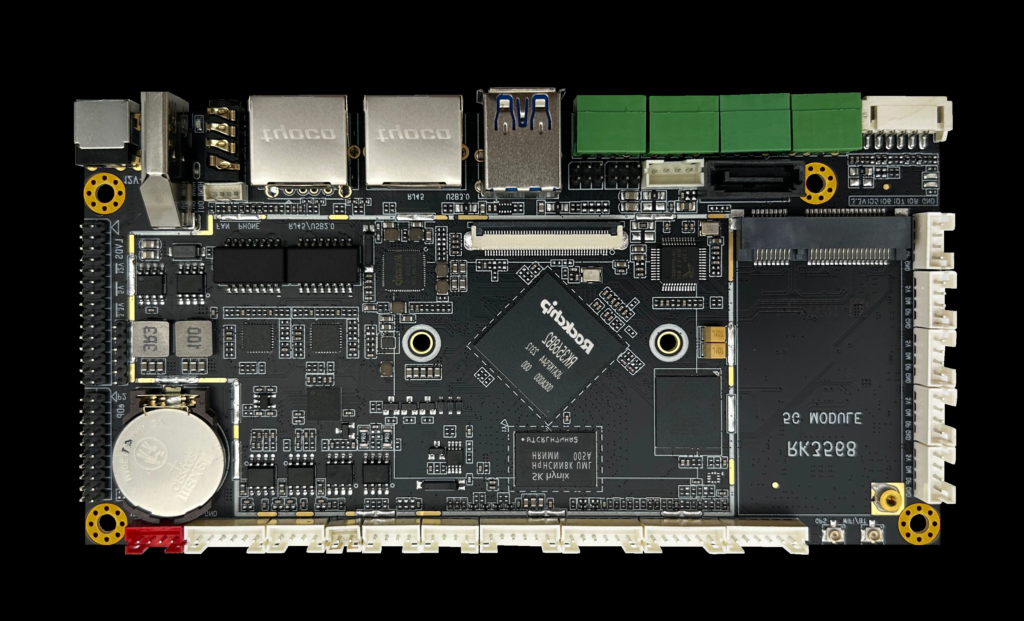
بنية صناعية مصممة للعمل المستمر والتكامل المستقر.
- استراتيجية حرارية تتماشى مع التشغيل على مدار الساعة طوال أيام الأسبوع
- اختيار المكونات من أجل استقرار عمر الخدمة
- اعتبارات EMC/ESD (مدفوعة بالنشر)
- تصميم ميكانيكي لتناسق التركيب
- تخطيط التوافر طويل الأجل (على أساس المشروع)
هذه المنصة مخصصة للنشر الصناعي متعدد السنوات، وليس للاستخدام الاستهلاكي قصير المدى.
قدرات التخصيص (الموجهة نحو المشاريع)
تتم إدارة التخصيص من خلال المراجعة الهندسية والتحكم في التغيير لحماية الاستقرار على المدى الطويل.
- الحجم / السطوع / الضبط باللمس
- خيارات زجاج الغطاء (AG/AR/AF حسب الحاجة)
- نهج الختم/بروتوكول الإنترنت الأمامي (محدد بالمشروع)
- التركيب والتركيب والتركيبات
- توسيع الإدخال/الإخراج حسب التطبيق
- اختيار إصدار Android وإغلاقه
- نطاق BSP ونطاق برنامج التشغيل (حسب القائمة الطرفية)
- تخصيص الكشك/الإغلاق وتخصيص التمهيد
- ضبط الأداء (محدد المشروع)
- تعريف استراتيجية OTA (الملكية + المصادقة)
- الاستلام الهندسي ومراجعة الجدوى الهندسية
- تخطيط العينة والتحقق من الصحة
- تجريبي → توسيع نطاق الإنتاج الضخم
- تثبيت قائمة المواد الخام والتحكم في التغيير
- تخطيط التوريد لحياة الخدمة
حدود المسؤولية (الشركة المصنعة مقابل مالك التطبيق)
تقلل الحدود الواضحة من مخاطر التكامل وتحمي استقرار النشر على المدى الطويل.
- نحن نقدم: الأجهزة الصناعية + الدعم على مستوى النظام (الصورة الأساسية، وبرامج التشغيل حسب النطاق، وملاحظات التكامل)
- تقوم بالتسليم: ملكية برمجيات التطبيقات ومنطق الأعمال
- نحن نصطف: افتراضات البنية، وتخطيط الإدخال/الإخراج، ومسؤوليات التحديث، وبوابات التحقق من الصحة
يدعم هذا التقسيم التسليم المستقر عبر النموذج الأولي → التجريبي → الإنتاج الضخم.
ملائمة جيدة: وظائف محددة + صور مضبوطة + خطة تحقق مشتركة.
تناسب سيء: نطاق متغير + تحديثات غير منضبطة + ملكية غير واضحة.
قائمة مراجعة تقييم المشروع (أرسل هذا للمراجعة الهندسية السريعة)
تقلل المدخلات الواضحة من التكرارات وتمنع مخاطر التكامل التي يمكن تجنبها.
- نوع التطبيق + الصناعة (ما تقوم به المحطة الطرفية)
- بيئة التشغيل (درجة الحرارة/التوافق الكهرومغناطيسي EMC/دورة التشغيل)
- دورة الحياة المتوقعة (بالسنوات) + توقعات الاستبدال
- متطلبات العرض/المس (الحجم/السطوع/السطوع/السطوع/التبليل بالقفازات)
- قائمة الواجهات وقائمة الإدخال/الإخراج (RS232/485/CAN/USB/USB/LAN/GPIO)
- قائمة الأجهزة الطرفية (ماسح ضوئي/طابعة/كاميرا/مستشعرات) + الطرازات إذا كانت متوفرة
- قيود التركيب + أبعاد الرسومات / الفتحة
- تفضيل استراتيجية التحديث (الملكية، بوابات التحقق من الصحة)
- الحجم المستهدف (تجريبي + التقدير السنوي) + الجدول الزمني
يجب أن يأتي التقييم الهندسي قبل قرارات الشراء.
تقييم سريع = عدد أقل من التكرارات
إرسال الرسومات + قائمة الإدخال/الإخراج + ملاحظات البيئة لتلقي توجيه التكوين وقائمة عناصر الخطر.
الأسئلة الشائعة (FAQ)
المراجعة الهندسية
أرسل تفاصيل طلبك. نرد عليك بتوجيهات التكوين والخطوات التالية.