INDUSTRIAL DISPLAY MONITORS · OEM / ODM

Industrial Display Monitor (Touch Optional)

Project-defined for OEM integration — Controlled BOM, PCN/ECN, Form-Fit-Function

To start: size, signal, mounting/cutout, environment, qty, timeline. We’ll return: structure recommendation + interface mapping notes + risk items.

OEM / ODM Form-Fit-Function PCN/ECN Ready

System-Level Display Components for OEM Integration

Industrial display monitors are HMI components integrated into equipment, terminals, and infrastructure systems where mechanical fit, signal compatibility, and controlled changes matter over the product lifecycle.

At Eagle Touch, we design and manufacture project-defined industrial display monitors for OEMs and system integrators. Not positioned for consumer retail or off-the-shelf SKU purchasing.

Designed for equipment programs where drawing review, interface mapping, and lifecycle control are required.

View Spec Ranges
Controlled BOM PCN/ECN Process Form-Fit-Function Documentation Support
Industrial display monitor integrated in EV charging infrastructure
SPEC SELECTOR

Key Specification Ranges

Typical ranges for OEM / system deployments. Final specs are defined per project (no retail SKUs).

We build industrial display monitors for OEM integration: common sizes from 7"–32"+, interfaces including HDMI/VGA/DVI/LVDS, with optional PCAP or resistive touch. Configuration is defined by enclosure mechanics, interface mapping, and lifecycle control (Controlled BOM + PCN/ECN).

Size: 7"–32"+ Touch:  Optional (PCAP/Resistive) Brightness: Standard / High-Brightness Temperature: Standard / Wide-Temp Mount: Open / Panel / VESA / Custom Signal: HDMI / VGA / DVI / LVDS Touch I/F: USB (project-defined) Front: Glass / Bezel / Sealing Strategy

Typical Engineering Map (Project-Defined)

Display size 7"–32"+ common OEM sizes
Resolution Defined per size & panel availability
السطوع Standard to high-brightness by application
اللمس PCAP or resistive (use-case driven)
Interfaces HDMI / VGA / DVI / LVDS; USB for touch
Mounting Open-frame, panel mount, VESA, or custom brackets
Lifecycle control Controlled BOM + PCN/ECN change notice

Send your drawing and interface details — we’ll propose a configuration and highlight integration risks early.

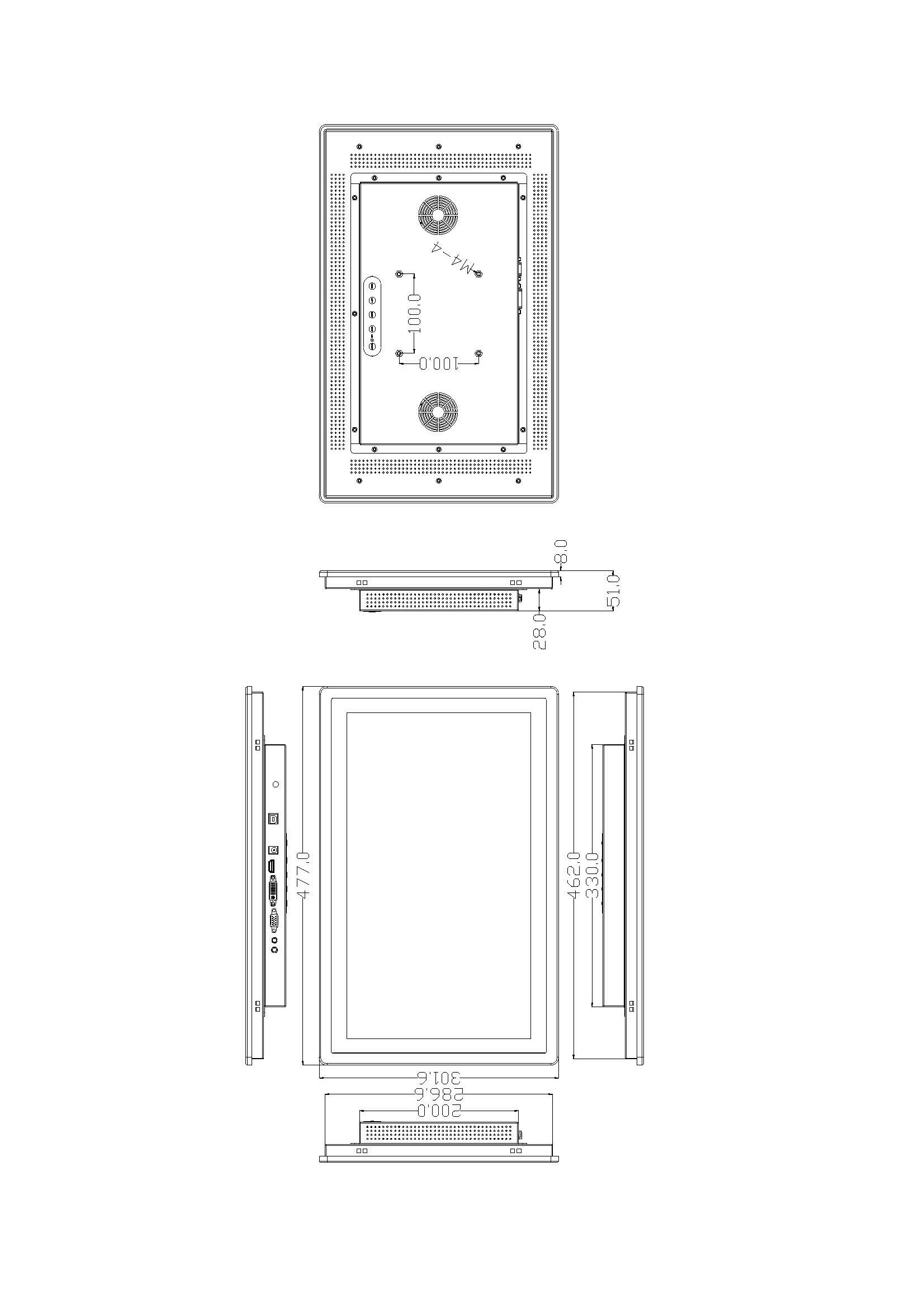
Industrial display monitor outline drawing for mechanical integration

Common Size Options (Quick Entry)

Select a size to view typical specs and integration notes. Final configuration remains project-defined.

Other sizes and configurations are defined by mounting/cutout, interface mapping, and lifecycle requirements.

Quick Selection Guide

A fast path to select the right structure based on enclosure integration and maintenance needs.

Step 1
Mechanical
Cutout / bracket / front sealing strategy
Step 2
Electrical
Signal mapping + touch HID/driver + grounding/EMI
Step 3
البيئة
Temperature / sunlight / dust-water / maintenance
Send your cutout or bezel drawing — we’ll return structure recommendation + interface mapping notes + integration risk items.
Decision

Inside a custom housing?

Start with Open Frame.

Decision

Locked to a panel cutout?

Start with Panel Mount.

Decision

Need VESA mounting?

Start with Open Frame (VESA pattern / bracket).

Decision

Outdoor / harsh environment?

Start with في الهواء الطلق.

Designed for Equipment & System Integration

Built for long-term deployments where uptime, consistency, and controlled changes matter — not consumer retail cycles.

24/7

Continuous Operation

Selected for uptime-focused duty cycles.

Self-Service

Unattended Terminals

Designed for kiosks and infrastructure systems.

Enclosed

Cabinet Integration

Mounting and cable routing aligned to enclosures.

Harsh

Environment Variation

Configured based on temperature, dust, and sunlight.

Built for OEM Program Responsibility

Industrial display monitors used in equipment programs are not evaluated only by specifications, but by how consistently those specifications are maintained over time.

For OEM and system integration projects, Eagle Touch treats display configuration as a controlled engineering deliverable, not a retail product.

  • Specification consistency: form-fit-function is maintained across production batches.
  • Change control: component or design changes follow a structured PCN/ECN process.
  • Supply continuity: sourcing and alternates are planned around program lifecycle.

Program Control (Project-Defined)

  • BOM Freeze Point: after sample approval, the approved configuration enters a controlled revision baseline.
  • PCN Lead Time: change notice timing is agreed per project (based on your validation and inventory requirements).
  • ECN Traceability: engineering changes are documented with revision and effective date linkage.

This approach reduces redesign risk, revalidation effort, and unexpected field issues in long-term equipment deployments.

Display Configuration Types

Common structural configurations used in OEM and system integration projects.

open frame monitor

شاشة مفتوحة الإطار تعمل باللمس

An open-frame display designed for internal mounting inside custom enclosures or housings.

Structure: rear-mounted / bracket-supported integration.

View Open Frame
panel mount touch monitor

شاشة تعمل باللمس مثبتة على اللوحة

A bezel-based display mounted directly into a panel or cabinet cutout.

Structure: front-side installation with mechanical retention.

View Panel Mount
VESA MOUNT TOUCH MONITOR

شاشة تثبيت VESA

A display configured with standard VESA mounting patterns for arm, bracket, or wall integration.

Structure: VESA pattern / bracket defined per enclosure and service access.

View VESA Options

For outdoor or harsh environments, see شاشة لمس خارجية تعمل باللمس configurations.

Outdoor & Harsh Environment Deployments

Outdoor installations introduce additional risk factors that must be defined and controlled at the system level rather than assumed by a single specification.

  • Brightness and optical stack are selected based on real sun exposure and viewing angle.
  • Temperature range and ventilation are evaluated with cabinet design.
  • Front protection and sealing strategy are reviewed with enclosure interfaces.

Outdoor configurations are treated as environment-defined projects, not generic SKUs.

View Outdoor Configurations
Outdoor touch display integrated in EV charging cabinet

Lifecycle Stability & Change Control

OEM equipment programs require continuity over multiple years. Industrial display monitors must remain consistent in form-fit-function across production batches, with changes handled through a controlled process rather than ad-hoc substitutions.

Lifecycle control is treated as an engineering requirement, not a marketing promise.

Controlled BOM PCN / ECN Approved Alternatives Batch Consistency
What We Control
  • BOM version control: key components tracked by revision and approved list.
  • PCN (Product Change Notification): formal notice when component changes are required.
  • ECN (Engineering Change Notice): documented engineering change with revision control.
  • Form-fit-function: alignment and interface compatibility maintained across batches.
To assess lifecycle risk, share: target service years, volume range, and your change tolerance requirements (PCN lead time expectations).
APPLICATIONS

Industrial Monitor Application Scope

Industrial display monitors are typically deployed as part of program-based systems where change control, documented integration, traceability, and long-term availability are required.

Energy & Infrastructure Terminals

Unattended outdoor infrastructure such as EV charging stations, parking terminals, and public access units.

KPI sunlight readability · IP-rated front · glove/wet operation
ATM MACHINE KIOSK
Financial & Regulated Equipment

Deployments where component consistency, documentation, and traceability support compliance requirements.

KPI traceability · documented integration · stable BOM
Access Control & Parking Systems

Programs requiring stable mechanical fit across multiple production batches and service cycles.

KPI mechanical consistency · batch-to-batch stability · replacement planning
Unattended Retail & Vending

24/7 operation where service access is limited and display failure impacts revenue and availability.

KPI 24/7 duty · limited service access · availability impact
Outdoor & Specialized
Smart Cabinets & Lockers

Long service-life deployments with defined replacement, upgrade, and lifecycle planning expectations.

KPI long-life program · serviceability · revision control
Control Cabinets & Panels
Industrial Automation Interfaces

HMI deployments where interface stability is tied to equipment qualification and validation processes.

KPI validation-linked stability · EMC/ESD considerations · stable BOM

These applications share a common requirement: displays are selected as part of a controlled system, not as interchangeable consumer components.

Have defined mounting, environment, and lifecycle constraints? Share your requirements and our engineering team will review them with you.

Trust Built on Process, Not Public Claims

In OEM and system integration programs, trust is established through documentation discipline, change transparency, and repeatable delivery — not through marketing statements.

Many programs we support operate under confidentiality and compliance requirements, so customer names and detailed deployments are typically not disclosed publicly. Instead, we provide verifiable, program-level documentation aligned to your review process.

Evidence Menu (Project-defined / NDA when required)

  • Engineering package: outline drawing, cutout reference, interface definition, stack-up notes
  • Configuration control: BOM revision record, approved alternatives list, effective dates
  • Change management: PCN/ECN notices with traceability to revisions
  • Production traceability: batch identification and consistency checkpoints (program-defined)
  • Compliance documents: provided under agreed scope when applicable and permitted

Send your requirements and review expectations — we’ll align deliverables and change notice rules to your program.

OEM WORKFLOW

An Engineering-Driven Workflow for Touch Monitors & Panel PCs

Clear inputs. Clear deliverables. Faster validation, fewer surprises, and a stable path to mass production.

Step 1 Kickoff & Fit Check
Requirements Review (Engineering Intake)

We align on your environment, target specs, interfaces, and mechanical constraints to confirm feasibility and surface key risks early (for both الشاشات التي تعمل باللمس و لوحة أجهزة الكمبيوتر الشخصية).


What we need (core)
  • Size / resolution / brightness
  • Touch type
  • Interface (HDMI/DP/LVDS/eDP)
  • Mounting
  • درجة حرارة التشغيل
What you get
  • Feasibility notes
  • Risk items
  • Recommended configuration direction

If Touch Monitor
  • Cover lens
  • Glove / wet use
  • Bonding preference
  • EMI concerns
  • Front IP target (if any)
If Panel PC
  • CPU platform / OS
  • I/O list (USB/LAN/COM/CAN/GPIO)
  • Power range & surge
  • Thermal limits
Step 2 Proposal & Validation
Proposal, BOM Direction & Sample

You receive a solution summary with BOM direction, quotation, lead time, and a sampling & test plan aligned with your deployment conditions—designed to reduce rework before pilot and mass production.


What you get
  • Quotation + solution summary
  • Sample schedule
  • Test checklist
Focus in validation
  • Display & touch performance in real conditions
  • Thermal / environment checks as required
  • Integration guidance and change-impact notes

  • Brightness / contrast check
  • Touch accuracy
  • Glove-wet test (if needed)
  • Temperature cycling
  • Vibration (if needed)
  • Basic EMI risk review
Touch Monitor notes
  • Touch stack-up notes
  • Bonding guidance
  • Optical / visibility validation items
Panel PC notes
  • I/O mapping
  • Thermal approach
  • OS image / BIOS options (as required)
Step 3 Pilot → Scale
Pilot Run → Mass Production

We run a pilot first to lock performance stability, then scale to mass production with QC checkpoints, controlled documentation, and shipping coordination—aiming for a stable BOM و predictable delivery.


What you get
  • Production schedule
  • IQC / IPQC / OQC inspection records
  • Packing & shipping support
Controls
  • BOM lock
  • ECO / change control when needed
  • Version traceability for long-term supply

Ready to start? Send your specs and we’ll return a technical direction & quotation after receiving complete inputs.

Best fit for: OEM/ODM projects, integration builds, mid-to-long term supply.   Not ideal for: one-time consumer-grade pricing requests or incomplete requirements.

Tip: Attach drawings, interface lists, and reference photos (installation + usage environment) to speed up evaluation.

Industrial Display Monitor FAQ

Concise answers to common OEM and system integration questions.

An industrial display monitor is selected as part of a system design, with controlled specifications, long-term availability planning, and documented change management, rather than as a retail SKU.

The choice depends on operating environment, input method, and UI expectations. PCAP is commonly used for modern interfaces, while resistive touch is selected for specific legacy or environmental constraints.

At minimum: target size, signal interface, touch type, mounting or cutout drawing, environmental conditions, operating platform, and expected volume range.

Outdoor readability is determined by brightness, optical stack, reflections, and installation conditions, not by a single brightness value. Evaluation is done in context of the enclosure and exposure.

Changes are managed through a structured PCN/ECN process, with BOM revisions and effective dates documented to maintain form-fit-function consistency across production batches.

Yes. Reviewing panel cutouts, bezel dimensions, and mounting constraints early helps reduce integration risk before sample builds.

System compatibility issues are most commonly caused by mismatched signal interface expectations, touch driver or HID mapping differences, grounding and EMI behavior, and mechanical alignment conflicts between the display and enclosure. Reviewing interface architecture and mechanical drawings early helps reduce integration delays.
الاتصال

هل أنت جاهز للمراجعة الهندسية؟

شارك طلبك ومتطلباتك الرئيسية لـ الشاشات التي تعمل باللمس أو لوحة أجهزة الكمبيوتر الشخصية. سوف يقوم مهندسونا بمراجعة الجدوى والمخاطر والتوصية باتجاه التكوين الصحيح.

الأنسب لمشاريع تصنيع المعدات الأصلية/التصنيع حسب الطلب والتكامل. استجابة نموذجية في غضون يوم عمل واحد (بتوقيت غرينتش+8).
بالنسبة لطلب عرض الأسعار، يُرجى تضمين الحجم/السطوع، وقائمة الواجهات، والتركيب، ودرجة حرارة التشغيل، وتاريخ التسليم المستهدف (إذا كان عاجلاً).