Guida all'acquisto dei fornitori di display industriali per le apparecchiature OEM

Introduzione Le interfacce uomo-macchina (HMI) sono ormai componenti standard delle moderne apparecchiature industriali. I display consentono agli operatori di ...
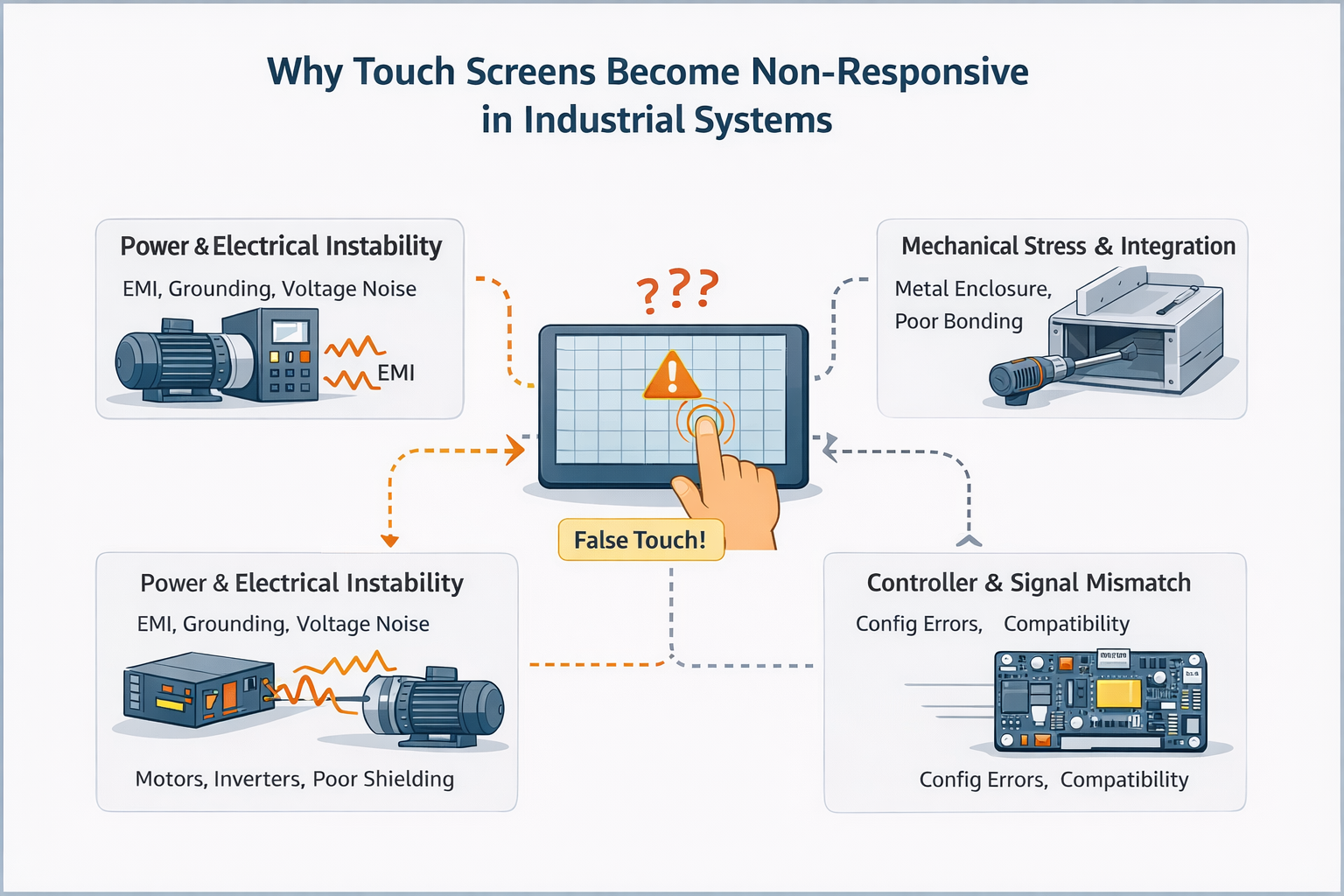
Un touch screen non reattivo si riferisce a una condizione in cui l'input tattile non viene rilevato correttamente, in modo incoerente o non viene rilevato affatto.
Nelle applicazioni industriali, questo comportamento è raramente causati da un singolo componente guasto.
A differenza dei dispositivi di consumo, i touch screen industriali funzionano come parte di un sistema di impianto elettrico e meccanico più grande, dove la qualità dell'alimentazione, la messa a terra, la configurazione dei controllori e il rumore ambientale giocano un ruolo fondamentale.
Di conseguenza, quello che sembra essere un touch screen “morto” o “fallito” è spesso una problema a livello di sistema piuttosto che un pannello difettoso.
Il comportamento non reattivo può presentarsi in diverse forme:
Questi sintomi indicano spesso integrazione o fattori ambientali, non un guasto hardware immediato.
Dal punto di vista ingegneristico, i touch screen non funzionanti rientrano tipicamente in una o più delle seguenti categorie.
I problemi legati all'alimentazione si manifestano spesso come comportamento intermittente o incoerente al tatto, piuttosto che un fallimento completo.
In questi casi, la sola sostituzione del pannello a sfioramento raramente risolve il problema.
L'interferenza elettromagnetica è una delle cause più comunemente sottovalutate del comportamento non reattivo o instabile del tatto nei sistemi industriali.
I problemi meccanici spesso producono non risposta localizzata piuttosto che un fallimento totale.
Un errore frequente durante la risoluzione dei problemi è quello di dare per scontato:
“Se il touch screen non risponde, il pannello deve essere difettoso”.”
Questo presupposto porta spesso a:
In molti casi, la sola ispezione dell'hardware di base non è in grado di rivelare integrità dell'alimentazione, accoppiamento EMI o problemi a livello di controllore.
Prima di concludere che un touch screen si è guastato, una valutazione a livello ingegneristico di solito considera:
L'obiettivo non è quello di “trovare un pezzo rotto”, ma quello di determinare se il sistema tattile è adatto all'ambiente di applicazione.
Un'ispezione visiva di base e la risistemazione dei connettori possono aiutare a identificare danni fisici evidenti.
Tuttavia, se un touch screen:
è improbabile che il problema si risolva con la sola sostituzione dell'hardware.
In questa fase, la continua risoluzione dei problemi per tentativi ed errori spesso ritarda la risoluzione anziché accelerarla.
Nelle implementazioni industriali, i problemi di mancata risposta al tocco sono più comunemente collegati a decisioni di integrazione del sistema, e non difetti isolati dei componenti.
I progetti che raggiungono un funzionamento stabile a lungo termine in genere valutano le prestazioni al tatto insieme a:
Questo approccio a livello di sistema riduce in modo significativo i problemi sul campo e i cicli ripetuti di risoluzione dei problemi.
Si raccomanda una revisione ingegneristica quando la domanda comporta:
La valutazione precoce aiuta a distinguere rischio di applicazione da guasto del componente, risparmiando tempo e denaro.
Il sistema presenta un comportamento non reattivo o instabile al tatto?
Condividete il vostro ambiente applicativo, l'architettura di potenza e le condizioni di integrazione con il nostro team di ingegneri per una valutazione della fattibilità e dei rischi.
Questo articolo è un riferimento tecnico per la comprensione del comportamento non reattivo del tocco nei sistemi industriali.
Si concentra sulla valutazione ingegneristica piuttosto che sulle procedure di riparazione passo dopo passo.
Introduzione Le interfacce uomo-macchina (HMI) sono ormai componenti standard delle moderne apparecchiature industriali. I display consentono agli operatori di ...

Introduzione I display industriali sono spesso utilizzati in ambienti in cui le condizioni di illuminazione sono difficili da controllare. Apparecchiature ...

Introduzione I display sono un componente di interfaccia fondamentale in molti tipi di apparecchiature industriali. Forniscono al sistema ...

Introduzione La visibilità del display è un parametro critico nella progettazione delle apparecchiature industriali. Gli operatori si affidano alle interfacce grafiche ...
Inviate i dettagli della vostra applicazione. Risponderemo con la direzione della configurazione e le fasi successive.