ブログ

How to Choose the Best Touchscreen Monitor for Industrial Use: An Engineer’s Perspective

出版された: 1月 14, 2026
工業用 セレクションガイド 統合ノート
How to Choose the Best Industrial Touchscreen Monitor | Engineer’s Guide

Touchscreen monitors are a critical human–machine interface (HMI) in industrial environments. Unlike consumer displays, industrial touchscreen monitors must operate reliably under harsh conditions such as vibration, dust, temperature extremes, and long operating hours.

From an engineer’s perspective, choosing the right industrial touchscreen monitor is not about appearance or brand popularity—it is about reliability, compatibility, and long-term stability. This guide explains how to make the right choice.


What Makes an Industrial Touchscreen Monitor Different?

Industrial touchscreen monitors are designed for environments where failure is not an option. Compared with commercial displays, they typically feature:

  • Industrial-grade components
  • Extended temperature operation
  • Enhanced EMC / EMI protection
  • Long product lifecycle support
  • Mechanical mounting options for control panels or kiosks

Selecting the wrong type can result in frequent downtime, integration issues, or costly redesigns.


Key Factors When Choosing an Industrial Touchscreen Monitor

1. Touch Technology Selection

The touch interface directly affects usability, durability, and compatibility.

Common industrial touch technologies include:

  • Projected Capacitive (PCAP)
    • Supports multi-touch and gesture input
    • Works with gloves (when properly tuned)
    • Long lifespan and sealed front surface
  • 抵抗膜式タッチ
    • Works with any object (stylus, gloves)
    • Lower cost
    • Less suitable for modern multi-touch interfaces

Engineering tip:
For most modern industrial HMIs, PCAP touchscreens are the preferred choice due to durability and user experience.


2.ディスプレイサイズと解像度

Industrial touchscreen monitors are commonly available from 7″ to 32″ and beyond.

サイズと解像度を選択する際は、考慮してください:

  • 視聴距離
  • UI element size (buttons, text)
  • Operator ergonomics

Avoid over-specifying resolution—Full HD is sufficient for most industrial applications and offers better long-term component availability.


3.明るさと視認性

Industrial environments often involve strong ambient light.

Recommended brightness levels:

  • 300–400 nits: Indoor factory environments
  • 800–1000 nits: High ambient light or semi-outdoor
  • 1000+ nits: Outdoor or direct sunlight environments

Optional features such as anti-glare coating そして optical bonding further improve visibility.


4. Mechanical Design and Mounting

Mounting is often overlooked but critical for integration.

Common mounting options include:

  • Panel mount
  • VESA mount
  • Open-frame design
  • Custom bracket integration

Engineering tip:
Ensure the monitor’s mechanical design aligns with enclosure tolerances before finalizing the specification.


5. Interface Compatibility

Industrial touchscreen monitors typically support:

  • HDMI
  • ディスプレイポート
  • VGA (legacy systems)
  • USB for touch interface

Always verify compatibility with the target industrial PC, PLC, or embedded controller.


6. Environmental Protection and Reliability

Industrial monitors should be evaluated for:

  • IP rating (IP65 front is common)
  • Vibration resistance
  • Operating temperature range
  • Continuous operation (24/7 duty cycle)

These factors directly affect system uptime and maintenance cost.


7. Long-Term Availability and Lifecycle Support

One of the biggest risks in industrial projects is component obsolescence.

Engineers should confirm:

  • Product lifecycle commitment (5–10 years)
  • Change notification process
  • Stable firmware and touch controller support

This is especially important for OEM and long-term industrial programs.


Standard vs. Custom Industrial Touchscreen Monitors

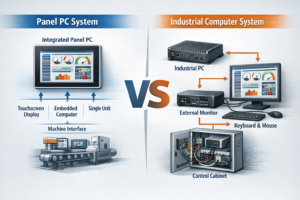
In many industrial systems, touchscreen monitors are integrated into industrial Panel PCs rather than used as standalone displays.
When planning a complete HMI solution, understanding how panel PCs are selected at the system level is equally important.

Many industrial projects require more than off-the-shelf solutions.

Customization may include:

  • Custom cover glass thickness or shape
  • Logo printing or labeling
  • Adjusted brightness levels
  • Interface changes
  • Custom mounting or enclosure integration

For OEM projects, working with a manufacturer that supports custom industrial touchscreen monitors can significantly reduce integration risk.


Common Mistakes Engineers Should Avoid

  • Choosing consumer-grade monitors for industrial use
  • Ignoring lifecycle and supply continuity
  • Over-specifying resolution or performance
  • Not validating touch performance with gloves or moisture
  • Treating display, touch, and enclosure as separate components

最終的な感想

Selecting the best touchscreen monitor for industrial use requires a balance between performance, durability, and long-term stability. Engineers should prioritize reliability, compatibility, and lifecycle support over short-term cost savings.

A well-chosen industrial touchscreen monitor can operate reliably for years, reducing downtime and total cost of ownership.

関連記事

コンタクト

エンジニアリング・レビューの準備はできていますか?

あなたのアプリケーションと主な要件を共有する タッチモニター または パネルPC. 当社のエンジニアは、実現可能性、リスクを検討し、適切な構成の方向性を提案します。.

OEM/ODMおよび統合プロジェクトに最適です。通常1営業日(GMT+8)以内に対応いたします。.
RFQには、サイズ/輝度、インターフェースリスト、取り付け、動作温度、目標納期(緊急の場合)を記載してください。.