Kopersgids voor industriële beeldschermleveranciers voor OEM-apparatuur

Inleiding Mens-machine-interfaces (MMI's) zijn tegenwoordig standaardcomponenten in moderne industriële apparatuur. Met displays kunnen operators ...
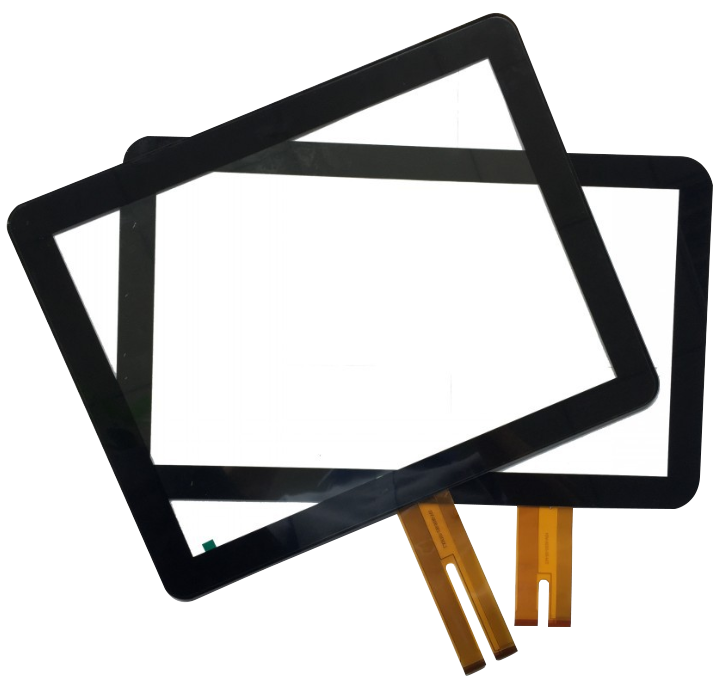
Geprojecteerde aanraakschermen - algemeen bekend als PCAP aanraakschermen-zijn een van de meest gebruikte aanraaktechnologieën in moderne interactieve schermen.
Van industriële aanraakschermen en kiosken naar medische hulpmiddelen en transportsystemen, PCAP-technologie heeft de voorkeur gekregen voor toepassingen die:
Deze gids legt het volgende uit hoe PCAP touch werkt, waarom het wordt gebruikt en waar het het beste werkt-met de nadruk op industriële en projectgebaseerde toepassingen.
Een geprojecteerd capacitief aanraakscherm is een type aanraakinterface dat gebruik maakt van een transparant geleidend rooster, meestal gemaakt van indiumtinoxide (ITO), ingebed in de glasstructuur.
In tegenstelling tot oppervlaktecapacitieve of resistieve aanraakschermen is PCAP-technologie projecteert een elektrostatisch veld door het dekglas, waardoor het aanrakingen kan detecteren zonder fysieke druk.
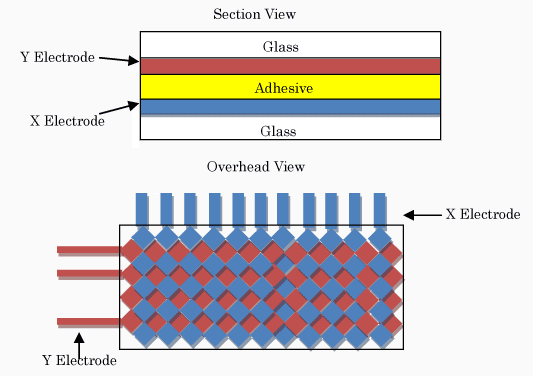
PCAP aanraakschermen werken door het detecteren van veranderingen in capaciteit wanneer een geleidend voorwerp, zoals een menselijke vinger, het oppervlak nadert.
Het proces werkt als volgt:
Omdat de detectielaag in het glas is ingebed, kunnen PCAP aanraakschermen het volgende ondersteunen multi-touch gebaren en een uitstekende optische helderheid te behouden.
PCAP-technologie ondersteunt geavanceerde bewegingen zoals:
Dit maakt het ideaal voor moderne grafische gebruikersinterfaces (GUI).
Omdat PCAP touch niet afhankelijk is van mechanische druk:
Dit is cruciaal voor industriële en publieke systemen.
PCAP aanraakschermen bieden:
Deze functies zorgen voor duidelijk zicht, zelfs in lichte omgevingen.
PCAP-technologie kan werken via dik gehard glas, waardoor:
Dit is een belangrijke reden waarom PCAP veel wordt gebruikt in kiosken en ticketautomaten.
| Functie | PCAP | Weerstand biedende aanraking | Infrarood Aanraking |
|---|---|---|---|
| Multi-touch | Ja | Geen | Ja |
| Glasoppervlak | Ja | Geen | Ja |
| Optische helderheid | Hoog | Medium | Hoog |
| Industriële afdichting | Uitstekend | Beperkt | Matig |
| Typisch gebruik | Industrieel / commercieel | Verouderd / Lage kosten | Grote displays |
Geprojecteerde capacitieve aanraakschermen worden vaak gebruikt in:
Hun combinatie van precisie, duurzaamheid en moderne UI-ondersteuning waardoor ze ideaal zijn voor langdurig industrieel gebruik.

Bij het selecteren van een PCAP aanraakscherm voor industrieel gebruik zijn belangrijke factoren:
Deze parameters moeten vroeg in OEM en projectgebaseerde ontwerpen.
Hoewel PCAP aanraakschermen krachtig zijn, hebben ze ook beperkingen:
Voor industriële projecten, technische validatie is essentieel voor massaproductie.
Bij het evalueren van een geprojecteerd capacitief aanraakscherm voor industrieel gebruik is het belangrijk om de belangrijkste technische parameters is essentieel.
Niet alle PCAP aanraakschermen presteren hetzelfde, ook al lijken ze op papier op elkaar.
Kritische parameters zijn onder andere:
Deze parameters bepalen samen hoe goed een PCAP aanraakscherm presteert in echte industriële omstandigheden, Niet alleen laboratoriumtests.
In OEM en projectgebaseerde toepassingen zijn PCAP aanraakschermen zelden “off-the-shelf” componenten.
Industriële projecten vereisen meestal:
Tijdens de OEM-ontwikkeling doorlopen PCAP aanraakschermen verschillende kritieke stadia:
Succesvolle PCAP-integratie is sterk afhankelijk van vroege engineering uitlijning, in plaats van op het laatste moment onderdelen te selecteren.
Hoewel PCAP touch-technologie krachtig is, brengt het ook uitdagingen met zich mee als het niet goed ontworpen is.
Standaard PCAP aanraakschermen kunnen moeite hebben met handschoenen of waterdruppels.
Dit kan worden aangepakt door:
Industriële omgevingen bevatten vaak motoren, voedingen en metalen structuren.
Zonder de juiste afscherming en afstemming kunnen de aanraakprestaties afnemen.
De oplossingen omvatten:
Dikker glas verbetert de duurzaamheid maar vermindert de aanraakgevoeligheid.
Evenwicht mechanische sterkte en aanraakgevoeligheid is een belangrijke technische taak in PCAP-projecten.
Bij het selecteren van het juiste PCAP aanraakscherm gaat het niet alleen om het kiezen van de nieuwste technologie, maar ook om het afstemmen van het ontwerp op de toepassing.
Belangrijke vragen om te overwegen zijn onder andere:
Voor industriële systemen verbetert een goed afgestemde PCAP touch-oplossing:
Een zorgvuldige selectie in de vroege ontwerpfase vermindert kostbare herontwerpen en vertragingen later in het project.
PCAP is een type capacitieve aanraaktechnologie, speciaal ontworpen om het detectieveld door glas te projecteren.
Ja. Met de juiste afstelling van de controller en een handschoencompatibel ontwerp kan PCAP het volgende ondersteunen industriële handschoenen.
Ja. Met schermen met een hoge helderheid, optische hechting en het juiste ontwerp van de behuizing worden PCAP aanraakschermen op grote schaal gebruikt in semi-buitenomgevingen.
Geprojecteerde capacitieve aanraaktechnologie is de dominante oplossing voor moderne industriële aanraakinterfaces.
Het vermogen om te combineren:
maakt PCAP aanraakschermen een fundamenteel onderdeel in industriële en publieke systemen van de volgende generatie.
Inleiding Mens-machine-interfaces (MMI's) zijn tegenwoordig standaardcomponenten in moderne industriële apparatuur. Met displays kunnen operators ...

Inleiding Industriële beeldschermen worden vaak gebruikt in omgevingen waar de lichtomstandigheden moeilijk te regelen zijn. Apparatuur ...

Inleiding Displays zijn een cruciale interfacecomponent in veel soorten industriële apparatuur. Ze bieden systeem ...

Inleiding De zichtbaarheid van schermen is een kritieke ontwerpparameter in industriële apparatuur. Operators vertrouwen op grafische interfaces ...
Stuur je aanvraaggegevens. We geven je een reactie met de richting van de configuratie en de volgende stappen.