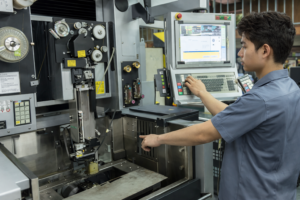
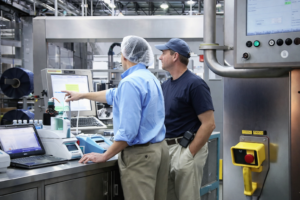
Touchscreen-Monitore sind eine wichtige Mensch-Maschine-Schnittstelle (HMI) in industriellen Umgebungen. Anders als bei Verbraucherbildschirmen, industrielle Touchscreen-Monitore müssen unter rauen Bedingungen wie Vibration, Staub, extremen Temperaturen und langen Betriebszeiten zuverlässig funktionieren.
Aus der Sicht eines Ingenieurs geht es bei der Wahl des richtigen industriellen Touchscreen-Monitors nicht um das Aussehen oder die Beliebtheit einer Marke, sondern um Zuverlässigkeit, Kompatibilität und langfristige Stabilität. Dieser Leitfaden erklärt, wie Sie die richtige Wahl treffen.
Was macht einen industriellen Touchscreen-Monitor aus?
Industrielle Touchscreen-Monitore sind für Umgebungen konzipiert, in denen ein Ausfall nicht in Frage kommt. Im Vergleich zu kommerziellen Bildschirmen zeichnen sie sich durch folgende Merkmale aus:
- Industrietaugliche Komponenten
- Erweiterter Temperaturbetrieb
- Verbesserter EMC / EMI-Schutz
- Unterstützung für einen langen Produktlebenszyklus
- Mechanische Befestigungsmöglichkeiten für Schalttafeln oder Kioske
Die Wahl des falschen Typs kann zu häufigen Ausfallzeiten, Integrationsproblemen oder kostspieligen Umgestaltungen führen.
Schlüsselfaktoren bei der Auswahl eines industriellen Touchscreen-Monitors
1. Auswahl der Touch-Technologie
Die Touch-Oberfläche wirkt sich direkt auf die Benutzerfreundlichkeit, Haltbarkeit und Kompatibilität aus.
Zu den gängigen industriellen Touch-Technologien gehören:
- Projiziert-kapazitiv (PCAP)
- Unterstützt Multi-Touch und Gesteneingabe
- Funktioniert mit Handschuhen (wenn sie richtig eingestellt sind)
- Lange Lebensdauer und versiegelte Frontfläche
- Resistive Berührung
- Funktioniert mit jedem Objekt (Stift, Handschuhe)
- Niedrigere Kosten
- Weniger geeignet für moderne Multitouch-Oberflächen
Technischer Tipp:
Für die meisten modernen industriellen HMIs, PCAP-Touchscreens sind aufgrund ihrer Langlebigkeit und ihrer Benutzerfreundlichkeit die erste Wahl.
2. Displaygröße und Auflösung
Industrielle Touchscreen-Monitore sind in der Regel erhältlich bei 7″ bis 32″ und darüber hinaus.
Berücksichtigen Sie bei der Auswahl von Größe und Auflösung:
- Betrachtungsabstand
- Größe der UI-Elemente (Schaltflächen, Text)
- Ergonomie des Bedieners
Vermeiden Sie eine Überspezifizierung der Auflösung - Full HD ist für die meisten industriellen Anwendungen ausreichend und bietet eine bessere langfristige Verfügbarkeit der Komponenten.
3. Helligkeit und Sichtbarkeit
In industriellen Umgebungen herrscht oft starkes Umgebungslicht.
Empfohlene Helligkeitsstufen:
- 300-400 nits: Innenräume von Fabriken
- 800-1000 nits: Starkes Umgebungslicht oder halb im Freien
- 1000+ nits: Im Freien oder bei direkter Sonneneinstrahlung
Optionale Merkmale wie Blendschutzbeschichtung und optische Bindung die Sichtbarkeit weiter verbessern.
4. Mechanische Konstruktion und Montage
Die Montage wird oft übersehen, ist aber entscheidend für die Integration.
Übliche Montageoptionen sind:
- Schalttafelmontage
- VESA-Halterung
- Offener Rahmen
- Integration kundenspezifischer Halterungen
Technischer Tipp:
Stellen Sie sicher, dass die mechanische Konstruktion des Monitors mit den Gehäusetoleranzen übereinstimmt, bevor Sie die Spezifikation fertigstellen.
5. Schnittstellen-Kompatibilität
Industrielle Touchscreen-Monitore unterstützen in der Regel:
- HDMI
- DisplayPort
- VGA (frühere Systeme)
- USB für Touch-Schnittstelle
Überprüfen Sie immer die Kompatibilität mit dem Ziel-Industrie-PC, der SPS oder dem Embedded Controller.
6. Umweltschutz und Verlässlichkeit
Industriemonitore sollten bewertet werden:
- IP-Schutzart (IP65 an der Vorderseite ist üblich)
- Vibrationsfestigkeit
- Betriebstemperaturbereich
- Kontinuierlicher Betrieb (24/7 Einschaltdauer)
Diese Faktoren wirken sich direkt auf die Betriebszeit des Systems und die Wartungskosten aus.
7. Langfristige Verfügbarkeit und Unterstützung des Lebenszyklus
Eines der größten Risiken bei Industrieprojekten ist Bauteilveralterung.
Die Ingenieure sollten dies bestätigen:
- Verpflichtung zum Produktlebenszyklus (5-10 Jahre)
- Prozess der Änderungsmeldung
- Stabile Firmware und Touch-Controller-Unterstützung
Dies ist besonders wichtig für OEM- und langfristige Industrieprogramme.
Standard- vs. kundenspezifische industrielle Touchscreen-Monitore
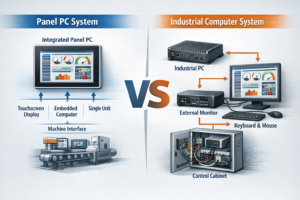
In vielen industriellen Systemen sind Touchscreen-Monitore integriert in Industrie-Panel-PCs und nicht als eigenständige Displays verwendet werden.
Bei der Planung einer kompletten HMI-Lösung ist es ebenso wichtig zu verstehen, wie die Panel-PCs auf Systemebene ausgewählt werden.
Viele Industrieprojekte erfordern mehr als nur Lösungen von der Stange.
Die Anpassung kann Folgendes umfassen:
- Individuelle Deckglasdicke oder -form
- Logodruck oder Beschriftung
- Angepasste Helligkeitsstufen
- Änderungen an der Schnittstelle
- Kundenspezifische Montage oder Gehäuseintegration
Bei OEM-Projekten ist die Zusammenarbeit mit einem Hersteller, der die kundenspezifische industrielle Touchscreen-Monitore kann das Integrationsrisiko erheblich verringern.
Häufige Fehler, die Ingenieure vermeiden sollten
- Auswahl von Verbrauchermonitoren für den industriellen Einsatz
- Ignorieren von Lebenszyklus und Lieferkontinuität
- Überspezifizierung von Auflösung oder Leistung
- Keine Validierung der Berührungsleistung mit Handschuhen oder Feuchtigkeit
- Behandlung von Display, Touch und Gehäuse als separate Komponenten
Abschließende Überlegungen
Bei der Auswahl des besten Touchscreen-Monitors für den industriellen Einsatz müssen folgende Faktoren berücksichtigt werden Leistung, Haltbarkeit und langfristige Stabilität. Ingenieure sollten Zuverlässigkeit, Kompatibilität und Unterstützung während des gesamten Lebenszyklus gegenüber kurzfristigen Kosteneinsparungen bevorzugen.
Ein gut gewählter industrieller Touchscreen-Monitor kann über Jahre hinweg zuverlässig arbeiten und so Ausfallzeiten und Gesamtbetriebskosten reduzieren.