Les écrans tactiles sont désormais indispensables dans les environnements industriels, commerciaux et publics. Qu'il soit utilisé dans IHM d'usine, kiosques extérieurs, terminaux de vente au détail ou systèmes médicaux, Le nettoyage régulier est essentiel pour lisibilité, hygiène, longévité et précision.
Ce guide explique comment nettoyer correctement un écran tactile, Les outils et les fournitures à utiliser, ainsi que la fréquence de nettoyage, sont déterminés en fonction de votre scénario d'utilisation.
L'importance d'un bon nettoyage des écrans tactiles
Les écrans tactiles industriels et commerciaux sont soumis à :
Huiles et salissures des doigts
Poussière et débris
Exposition chimique
Humidité et condensation
Contamination microbienne dans les lieux publics
Un nettoyage inadéquat peut être à l'origine de
Brouillard sur l'écran et visibilité réduite
Endommagement des revêtements de surface antireflet (AG), anti-traces de doigts (AF) ou anti-miroir (AR).
Problèmes de sensibilité tactile
Corrosion des bords et des joints
C'est pourquoi un procédé de nettoyage adapté aux écrans industriels est essentielle, tant pour les opérateurs que pour les équipes de maintenance.
Comment nettoyer un écran tactile : Étape par étape
Étape 1 - Préparer les bons produits de nettoyage
Avant de commencer, rassemblez-vous :
✔ Chiffon en microfibre (non pelucheux) ✔ Solution de nettoyage sans danger pour l'écran (sans alcool et sans ammoniaque) ✔ Eau distillée (facultatif) ✔ Flacon pulvérisateur - ne jamais vaporiser directement sur l'écran
⚠ Faire PAS utiliser des serviettes en papier, des chiffons abrasifs, des nettoyants pour vitres ou des désinfectants ménagers contenant de l'eau de Javel ou de l'alcool fort. Ceux-ci peuvent endommager les revêtements des écrans.
Étape 2 - Mise hors tension de l'appareil
Éteignez toujours l'écran tactile ou débranchez-le avant de le nettoyer. Cela permet d'éviter interférence statique et permet de voir clairement toutes les marques.
Étape 3 - Dépoussiérage
Utilisez un chiffon sec en microfibres pour enlever délicatement la poussière et les particules qui se détachent.
Commencez par le centre
Travailler dans la lumière mouvements circulaires
Éviter les pressions excessives
Le dépoussiérage préalable permet d'éviter les rayures lors de l'application de liquides.
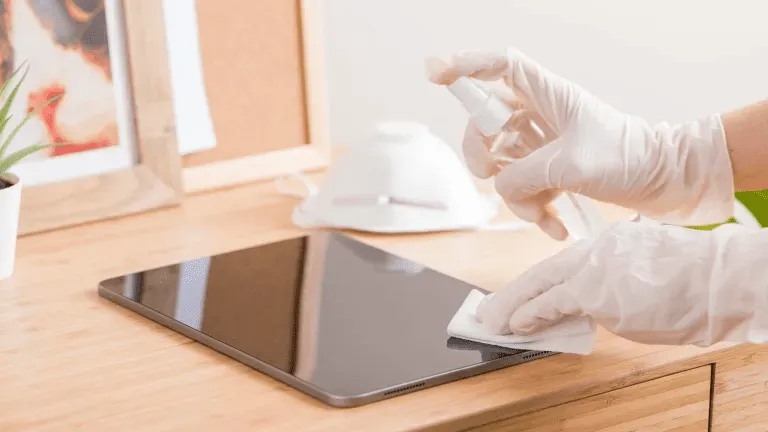
Étape 4 - Appliquer correctement la solution de nettoyage
Ne pas vaporiser le nettoyant directement sur l'écran. Au lieu de cela :
Vaporiser légèrement le chiffon en microfibres
Essuyez l'écran par touches légères et superposées.
Garder le liquide à l'écart des bords, des orifices et des joints étanches.
Cela permet de préserver la intégrité des capteurs tactiles et des revêtements en verre.
Étape 5 - Essuyage final et séchage
Après le nettoyage :
Utiliser une zone sèche en microfibre du chiffon
Polir en effectuant de légers mouvements circulaires
Éliminer toute trace ou humidité résiduelle
Pour les systèmes très sollicités, tels que les kiosques publics et les terminaux en libre-service, le nettoyage doit être répété quotidiennement ou plusieurs fois par équipe.
Meilleures solutions de nettoyage pour les écrans tactiles
Recommandé :
Spray de nettoyage industriel sans danger pour les écrans
Alcool isopropylique < 70%(uniquement si le fabricant le permet)
Mélanges d'eau distillée
Éviter :
❌ Nettoyants à base d'ammoniaque ❌ Nettoyants pour vitres à forte teneur en alcool ❌ Agents de lavage abrasifs ❌ Serviettes en papier ou mouchoirs en papier
L'utilisation d'une chimie de nettoyage adaptée garantit des performances à long terme et préserve les revêtements de surface protecteurs tels que Traitements du verre AG, AF et AR.
Fréquence de nettoyage : Quelle est la meilleure solution pour une utilisation industrielle ?
Environnement
Fréquence de nettoyage recommandée
Affichages publics à fort impact (kiosques, points de vente)
Quotidiennement
Panneaux tactiles médicaux ou de laboratoire
Après chaque utilisation / poste de travail
IHM d'usine ou d'atelier
Hebdomadaire
Affichages robustes pour l'extérieur
Toutes les deux semaines ou selon les besoins
Terminaux internes faciles à manipuler
Mensuel
L'optimisation des programmes de nettoyage permet d'améliorer le temps de fonctionnement, l'hygiène et la satisfaction des opérateurs.
Comment nettoyer les différents types d'écrans tactiles
Écrans capacitifs / Capacitifs projetés (PCAP)
Utiliser des chiffons doux
Éviter les désinfectants puissants
Idéal : sprays sans alcool et sans danger pour l'écran
Écrans tactiles résistifs
Plus durable, mais sensible aux rayures
La même procédure s'applique
Panel PC industriels et écrans d'extérieur
Vérifier les spécifications du fabricant
Les modèles d'extérieur peuvent tolérer des solutions de nettoyage plus robustes, tout en évitant les produits abrasifs.
Erreurs courantes et comment les éviter
❌ Pulvérisation de liquide directement sur l'écran ➡ Utiliser plutôt un chiffon humidifié.
❌ Utilisation d'un chiffon rugueux ou d'une serviette en papier ➡ Passez à la microfibre.
❌ Utilisation sans discernement de désinfectants puissants ➡ Utiliser uniquement des solutions approuvées.
❌ Ignorer les bords et les zones d'étanchéité ➡ Éviter que le liquide ne s'infiltre dans les coutures.
Comment entretenir les revêtements pour écrans tactiles (AG / AF / AR)
De nombreux cribles industriels comportent des traitements de surface tels que :
AG (Anti-Glare) - réduit la réflexion de la lumière
AF (anti-empreinte digitale) - résiste aux bavures
AR (antireflet) - réduit les reflets et améliore la clarté
Pour préserver ces revêtements :
✔ Utiliser nettoyants sans alcool ✔ Éviter les produits abrasifs ✔ Nettoyer doucement et régulièrement ✔ Suivre les directives du fabricant
Un entretien adéquat permet de prolonger la durée de vie des traitements de protection du verre et de conserver l'aspect neuf des vitrines.
Conseils supplémentaires pour les écrans tactiles publics très fréquentés
Pour les soins de santé et le commerce de détail
Utiliser des désinfectants approuvés pour les écrans
Nettoyer immédiatement après une utilisation intensive
Former le personnel à la technique correcte
Pour les terminaux et kiosques extérieurs
Dépoussiérer avant de nettoyer avec un liquide
Utiliser des nettoyants résistants aux intempéries
Éviter l'eau à haute pression
Résumé : Pratiques efficaces de nettoyage des écrans tactiles
Un bon nettoyage de l'écran tactile n'est pas seulement une question d'apparence - il permet d'améliorer les performances :
Lisibilité
Réactivité
Hygiène
Durabilité à long terme
En utilisant des solutions de nettoyage sûres et suivre un processus de nettoyage cohérent, Les écrans industriels restent fonctionnels plus longtemps et nécessitent moins d'entretien.
Introduction Dans la conception des systèmes industriels, le choix de l'architecture informatique appropriée affecte directement la fiabilité du système, la complexité de l'intégration, ...
Introduction Dans les équipements industriels, le sous-système d'affichage fait partie d'une interface homme-machine (IHM) plus large et d'un sous-système d'affichage. ...
Introduction Dans la conception des équipements industriels, l'interface homme-machine (IHM) a une incidence directe sur la facilité d'utilisation, la fiabilité et la maintenance du système ...
Introduction Les interfaces homme-machine (IHM) sont désormais des composants standard des équipements industriels modernes. Les écrans permettent aux opérateurs de ...
CONTACT
Examen de l'ingénierie
Envoyez les détails de votre demande. Nous vous répondrons en vous indiquant la configuration à suivre et les prochaines étapes.
Idéal pour les projets OEM/ODM et les projets d'intégration. Réponse type : dans un délai d'un jour ouvrable (GMT+8).
Pour l'appel d'offres, veuillez indiquer la taille/luminosité, les interfaces, le montage, la température de fonctionnement et la date de livraison prévue.