패널 PC와 산업용 컴퓨터: 아키텍처 및 통합의 차이점
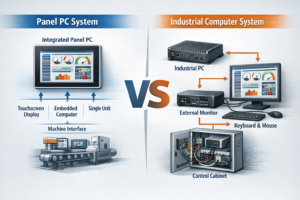
소개 산업용 시스템 설계에서 적절한 컴퓨팅 아키텍처를 선택하는 것은 시스템 안정성, 통합 복잡성에 직접적인 영향을 미칩니다, ...

터치스크린 모니터는 산업 환경에서 중요한 인간-기계 인터페이스(HMI)입니다. 소비자용 디스플레이와는 다릅니다, 산업용 터치스크린 모니터 는 진동, 먼지, 극한의 온도, 장시간 작동과 같은 열악한 조건에서도 안정적으로 작동해야 합니다.
엔지니어의 관점에서 올바른 산업용 터치스크린 모니터를 선택하는 것은 외관이나 브랜드 인기가 아니라 다음과 같은 요소에 달려 있습니다. 신뢰성, 호환성 및 장기적인 안정성. 이 가이드에서는 올바른 선택을 하는 방법을 설명합니다.
산업용 터치스크린 모니터는 고장이 발생할 수 없는 환경을 위해 설계되었습니다. 상업용 디스플레이와 비교할 때 일반적으로 다음과 같은 특징이 있습니다:
잘못된 유형을 선택하면 잦은 다운타임, 통합 문제 또는 비용이 많이 드는 재설계가 발생할 수 있습니다.
터치 인터페이스는 사용성, 내구성, 호환성에 직접적인 영향을 미칩니다.
일반적인 산업용 터치 기술은 다음과 같습니다:
엔지니어링 팁:
대부분의 최신 산업용 HMI에 적합합니다, PCAP 터치스크린 는 내구성과 사용자 경험으로 인해 선호되는 선택입니다.
산업용 터치스크린 모니터는 일반적으로 다음에서 구입할 수 있습니다. 7인치 ~ 32인치 그리고 그 이상.
크기와 해상도를 선택할 때는 다음 사항을 고려하세요:
해상도를 과도하게 지정하지 마세요. 대부분의 산업용 애플리케이션에는 Full HD로도 충분하며 장기적으로 더 나은 구성 요소 가용성을 제공합니다.
산업 환경은 종종 강한 주변광을 동반합니다.
권장 밝기 수준:
다음과 같은 선택적 기능 눈부심 방지 코팅 그리고 광학 본딩 가시성을 더욱 향상시킵니다.
마운팅은 종종 간과되지만 통합을 위해 매우 중요합니다.
일반적인 마운팅 옵션은 다음과 같습니다:
엔지니어링 팁:
사양을 확정하기 전에 모니터의 기계적 설계가 인클로저 공차에 맞는지 확인합니다.
산업용 터치스크린 모니터는 일반적으로 다음과 같은 기능을 지원합니다:
항상 대상 산업용 PC, PLC 또는 임베디드 컨트롤러와의 호환성을 확인합니다.
산업용 모니터는 다음 사항을 평가해야 합니다:
이러한 요소는 시스템 가동 시간과 유지 관리 비용에 직접적인 영향을 미칩니다.
산업 프로젝트에서 가장 큰 위험 중 하나는 구성 요소 노후화.
엔지니어가 확인해야 합니다:
이는 OEM 및 장기 산업 프로그램에서 특히 중요합니다.
많은 산업 시스템에서 터치스크린 모니터는 다음과 같이 통합됩니다. 산업용 패널 PC 독립형 디스플레이로 사용하지 않습니다.
완전한 HMI 솔루션을 계획할 때 시스템 수준에서 패널 PC를 선택하는 방법을 이해하는 것도 마찬가지로 중요합니다.
많은 산업 프로젝트에는 기성 솔루션 이상의 것이 필요합니다.
사용자 지정에는 다음이 포함될 수 있습니다:
OEM 프로젝트의 경우 다음을 지원하는 제조업체와 협력합니다. 맞춤형 산업용 터치스크린 모니터 를 사용하면 통합 위험을 크게 줄일 수 있습니다.
산업용에 가장 적합한 터치스크린 모니터를 선택하려면 다음 사항 간의 균형이 필요합니다. 성능, 내구성 및 장기 안정성. 엔지니어는 단기적인 비용 절감보다 안정성, 호환성 및 수명 주기 지원을 우선시해야 합니다.
산업용 터치스크린 모니터를 잘 선택하면 수년간 안정적으로 작동하여 다운타임과 총소유비용을 줄일 수 있습니다.
소개 산업용 시스템 설계에서 적절한 컴퓨팅 아키텍처를 선택하는 것은 시스템 안정성, 통합 복잡성에 직접적인 영향을 미칩니다, ...
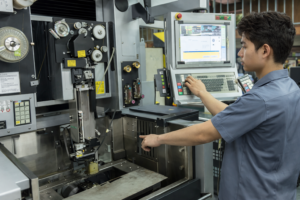
소개 산업용 장비에서 디스플레이 서브시스템은 광범위한 인간-기계 인터페이스(HMI)의 일부로, 다음과 같이 구성됩니다. ...
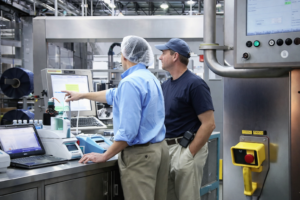
소개 산업용 장비 설계에서 인간-기계 인터페이스(HMI)는 시스템 사용성, 안정성 및 유지보수에 직접적인 영향을 미칩니다. ...

소개 인간-기계 인터페이스(HMI)는 이제 최신 산업 장비의 표준 구성 요소입니다. 디스플레이를 통해 작업자는 다음을 수행할 수 있습니다. ...
신청 세부 정보를 보내주세요. 구성 방향과 다음 단계로 답변해 드립니다.