Руководство для поставщиков промышленных дисплеев для OEM-оборудования

Введение Человеко-машинные интерфейсы (ЧМИ) сегодня являются стандартными компонентами современного промышленного оборудования. Дисплеи позволяют операторам ...
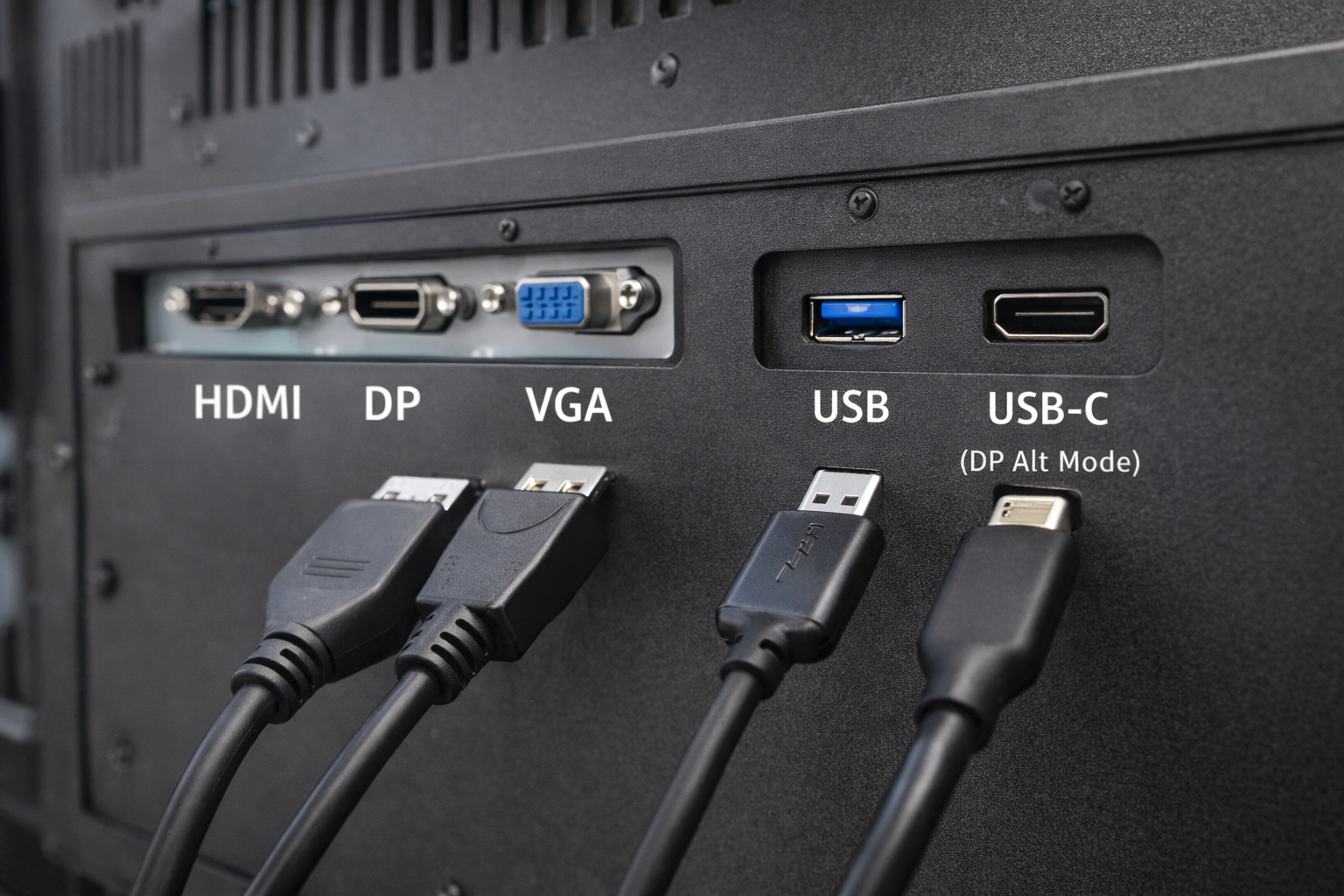
В промышленных и встраиваемых системах выбор интерфейса является одним из важнейших проектных решений.
Многие инженеры и системные интеграторы задают один и тот же вопрос:
Может ли порт USB работать в качестве видеовхода для промышленный монитор?
Короткий ответ таков: иногда - но не так, как ожидает большинство людей..
В этой статье рассказывается Когда USB можно использовать для видео, когда нельзя, и какие альтернативы лучше подходят для промышленных мониторов.
Порт USB (универсальная последовательная шина) предназначен в первую очередь для:
К распространенным вариантам использования USB относятся клавиатуры, мыши, устройства хранения данных и датчики.
Изначально USB не был разработан как собственный интерфейс передачи видео. например, HDMI или DisplayPort.
Понимание этого различия очень важно при разработке промышленных систем отображения информации.
Стандартный порт USB не могут передавать видеосигналы в естественном режиме так же, как HDMI, VGA или DisplayPort.
Однако видео через USB возможно. только с помощью специальных технологий и условий, которые часто понимают неправильно.
DisplayLink - это решение на основе сжатия, позволяющее выводить видео через USB.
Как это работает:
Ограничения для промышленного использования:
USB-C часто путают со стандартным USB.
Когда USB-C поддерживает Режим DisplayPort Alt, Он может передавать собственные видеосигналы.
Важные уточнения:
Для промышленных мониторов необходима поддержка видеосигнала USB-C четко определены и подтверждены.
| Интерфейс | Родное видео | Требуется водитель | Промышленная надежность |
|---|---|---|---|
| USB (стандарт) | ❌ Нет | Да | Низкий |
| USB + DisplayLink | ⚠️ Программное обеспечение | Да | Ограниченный |
| USB-C (режим DP Alt) | ✅ Да | Нет | Умеренный |
| HDMI / DP / VGA | ✅ Да | Нет | Высокий |
Для большинства промышленных применений, Специальные видеоинтерфейсы остаются предпочтительным выбором.
Промышленные мониторы расставляют приоритеты:
В видеорешениях на базе USB часто возникают проблемы:
В результате, HDMI, DisplayPort и VGA по-прежнему являются стандартными интерфейсами. в промышленных системах отображения информации.
Видео на базе USB иногда оценивается по достоинству:
Даже в этих случаях, инженерная проверка имеет решающее значение чтобы избежать проблем с надежностью.
Прежде чем выбрать USB в качестве видеоинтерфейса, спросите:
Для большинства промышленных проектов ответ сводится к следующему встроенные видеоинтерфейсы.
Нет. Стандартные порты USB не могут напрямую заменить родные видеоинтерфейсы.
Нет. Выводить видео могут только порты USB-C, поддерживающие режим DisplayPort Alt Mode.
Они могут работать в ограниченных случаях, но они, как правило, не рекомендуются для долгосрочного промышленного использования.
В то время как технология USB развивалась, он не является универсальной заменой традиционным видеоинтерфейсам в промышленных мониторах.
Видеорешения на базе USB зависят от программного обеспечения, драйверов или специфических конфигураций портов, что создает сложности и риски.
Для стабильного и длительного промышленного применения, Выделенные видеовходы, такие как HDMI и DisplayPort, остаются самым надежным выбором.
Введение Человеко-машинные интерфейсы (ЧМИ) сегодня являются стандартными компонентами современного промышленного оборудования. Дисплеи позволяют операторам ...

Введение Промышленные дисплеи часто используются в средах, где условия освещения трудно контролировать. Оборудование ...

Введение Дисплеи являются важнейшим компонентом интерфейса во многих типах промышленного оборудования. Они обеспечивают систему ...

Введение Видимость дисплея - важнейший параметр конструкции промышленного оборудования. Операторы полагаются на графические интерфейсы ...
Отправьте информацию о вашем приложении. В ответ мы сообщим направление конфигурации и дальнейшие шаги.