Industrie-Display-Lieferanten Einkaufsführer für OEM-Ausrüstung

Einleitung Mensch-Maschine-Schnittstellen (HMIs) sind heute Standardkomponenten in modernen Industrieanlagen. Displays ermöglichen dem Bediener ...
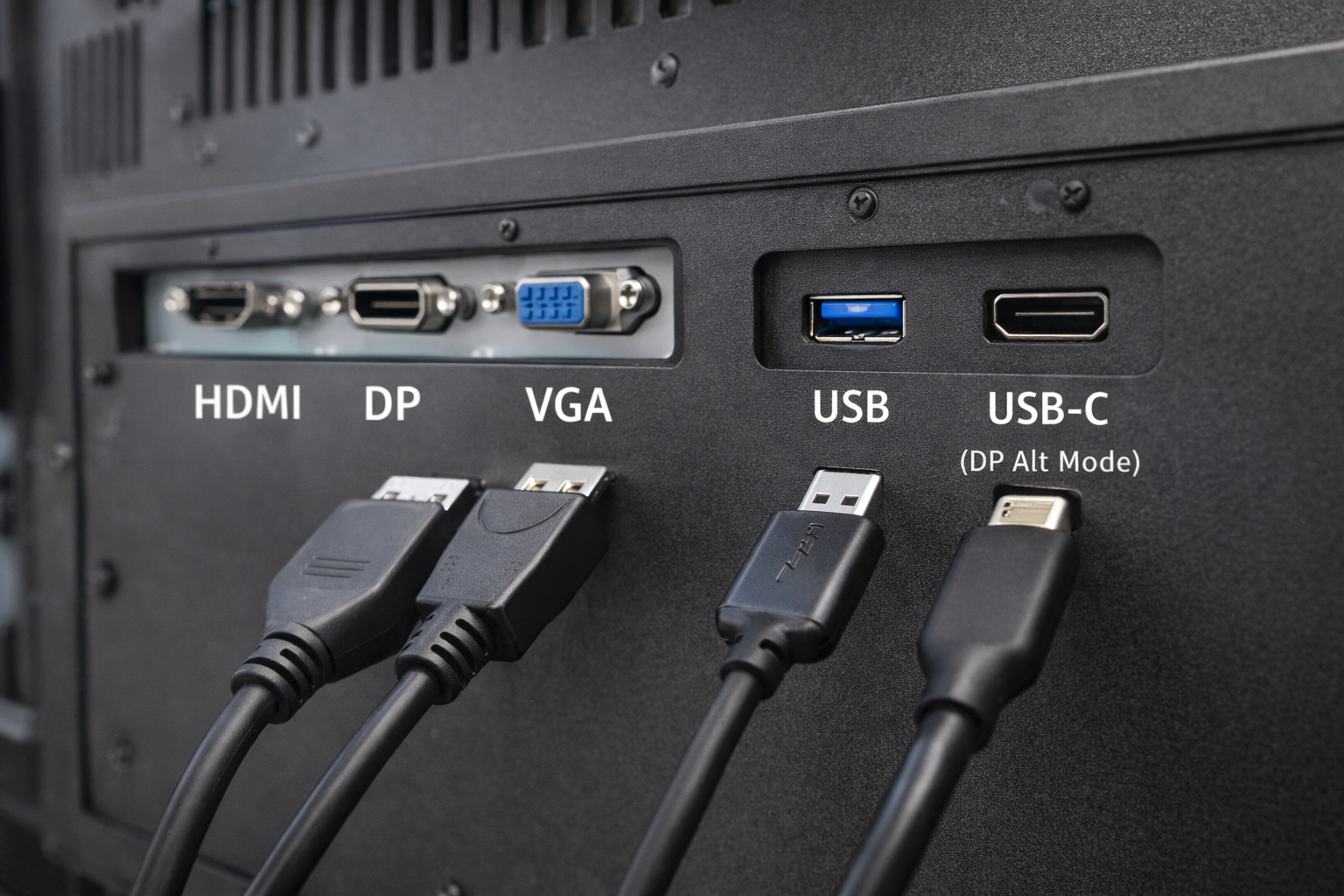
Bei industriellen und eingebetteten Systemen ist die Wahl der Schnittstelle eine wichtige Designentscheidung.
Viele Ingenieure und Systemintegratoren stellen eine häufig gestellte Frage:
Kann ein USB-Anschluss als Videoeingang für ein Industriemonitor?
Die kurze Antwort lautet: manchmal - aber nicht so, wie es die meisten Menschen erwarten.
Dieser Artikel erklärt wann USB für Video verwendet werden kann und wann nicht, und welche Alternativen für Industriemonitore besser geeignet sind.
Ein USB-Anschluss (Universal Serial Bus) ist in erster Linie für folgende Zwecke gedacht
Zu den üblichen USB-Anwendungsfällen gehören Tastaturen, Mäuse, Speichergeräte und Sensoren.
USB war ursprünglich nicht als native Videoübertragungsschnittstelle konzipiert wie HDMI oder DisplayPort.
Die Kenntnis dieses Unterschieds ist für die Entwicklung von industriellen Anzeigesystemen von entscheidender Bedeutung.
Ein Standard-USB-Anschluss können nicht nativ Videosignale übertragen auf dieselbe Weise wie HDMI, VGA oder DisplayPort.
Video über USB ist jedoch möglich nur durch spezifische Technologien und Bedingungen, die oft missverstanden werden.
DisplayLink ist eine kompressionsbasierte Lösung, die eine Videoausgabe über USB ermöglicht.
Wie es funktioniert:
Beschränkungen für die industrielle Nutzung:
USB-C wird oft mit Standard-USB verwechselt.
Wenn USB-C unterstützt DisplayPort-Alt-Modus, kann es native Videosignale übertragen.
Wichtige Klarstellungen:
Für Industriemonitore muss die USB-C-Videounterstützung ausdrücklich spezifiziert und validiert.
| Schnittstelle | Einheimisches Video | Fahrer erforderlich | Industrielle Verlässlichkeit |
|---|---|---|---|
| USB (Standard) | ❌ Nein | Ja | Niedrig |
| USB + DisplayLink | ⚠️ Software-basiert | Ja | Begrenzt |
| USB-C (DP-Alt-Modus) | ✅ Ja | Nein | Mäßig |
| HDMI / DP / VGA | ✅ Ja | Nein | Hoch |
Für die meisten industriellen Anwendungen, dedizierte Videoschnittstellen bleiben die bevorzugte Wahl.
Industriemonitore setzen Prioritäten:
USB-basierte Videolösungen werden oft eingeführt:
Das Ergebnis ist, HDMI, DisplayPort und VGA sind nach wie vor die Standardschnittstellen. in industriellen Anzeigesystemen.
USB-basiertes Video wird manchmal für ausgewertet:
Auch in diesen Fällen, technische Validierung ist entscheidend um Zuverlässigkeitsprobleme zu vermeiden.
Bevor Sie sich für USB als Videoschnittstelle entscheiden, sollten Sie sich fragen:
Für die meisten industriellen Projekte lautet die Antwort native Videoschnittstellen.
Nein. Standard-USB-Anschlüsse können native Videoschnittstellen nicht direkt ersetzen.
Nein. Nur USB-C-Anschlüsse, die den DisplayPort Alt Mode unterstützen, können Video ausgeben.
Sie können in bestimmten Fällen funktionieren, aber sie werden im Allgemeinen nicht für den langfristigen industriellen Einsatz empfohlen.
Die USB-Technologie hat sich zwar weiterentwickelt, es ist kein universeller Ersatz für herkömmliche Videoschnittstellen in industriellen Monitoren.
USB-basierte Videolösungen sind auf Software, Treiber oder spezielle Anschlusskonfigurationen angewiesen, die Komplexität und Risiken mit sich bringen.
Für stabile, langfristige industrielle Anwendungen, dedizierte Videoeingänge wie HDMI und DisplayPort sind nach wie vor die zuverlässigste Wahl.
Einleitung Mensch-Maschine-Schnittstellen (HMIs) sind heute Standardkomponenten in modernen Industrieanlagen. Displays ermöglichen dem Bediener ...

Einleitung Industrielle Bildschirme werden häufig in Umgebungen eingesetzt, in denen die Lichtverhältnisse schwer zu kontrollieren sind. Ausrüstung ...

Einleitung Displays sind eine wichtige Schnittstellenkomponente in vielen Arten von Industrieanlagen. Sie bieten System ...

Einleitung Die Sichtbarkeit von Displays ist ein entscheidender Konstruktionsparameter bei Industrieanlagen. Die Bediener verlassen sich auf grafische Schnittstellen ...
Senden Sie uns Ihre Anwendungsdetails. Wir antworten mit einer Konfigurationsanweisung und den nächsten Schritten.