Guide d'achat des fournisseurs d'écrans industriels pour les équipements OEM

Introduction Les interfaces homme-machine (IHM) sont désormais des composants standard des équipements industriels modernes. Les écrans permettent aux opérateurs de ...
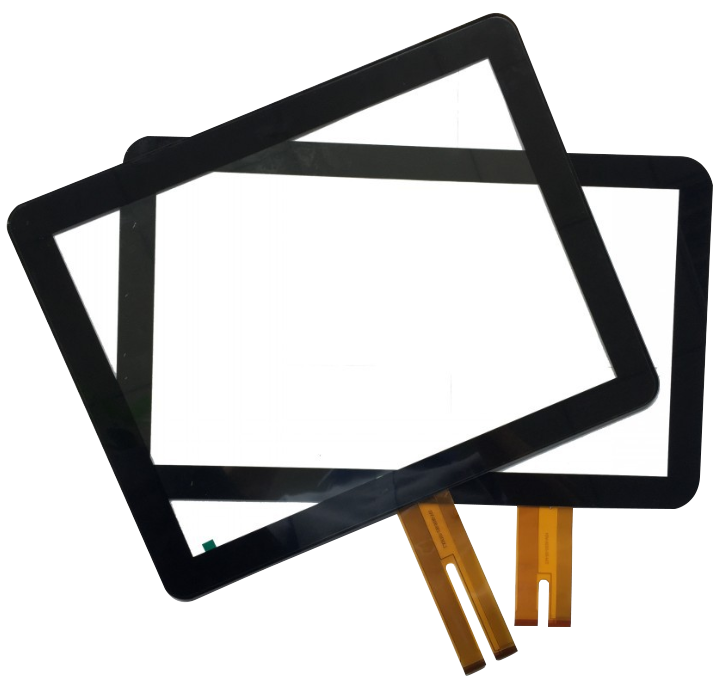
Écrans tactiles capacitifs projetés - plus communément appelés Écrans tactiles PCAP-sont l'une des technologies tactiles les plus utilisées dans les écrans interactifs modernes.
De moniteurs tactiles industriels et kiosques à dispositifs médicaux et systèmes de transport, La technologie PCAP est devenue le choix privilégié pour les applications qui requièrent :
Ce guide explique comment fonctionne le PCAP touch, pourquoi il est utilisé et où il est le plus efficace-en mettant l'accent sur les applications industrielles et les projets.
Un écran tactile capacitif projeté est un type d'interface tactile qui utilise un écran à cristaux liquides. grille conductrice transparente, La structure du verre est composée d'une couche d'oxyde d'indium et d'étain, généralement constituée d'oxyde d'indium et d'étain (ITO), intégrée à la structure du verre.
Contrairement aux écrans tactiles capacitifs ou résistifs, la technologie PCAP projette un champ électrostatique à travers le verre du couvercle, Il est donc capable de détecter le toucher sans pression physique.
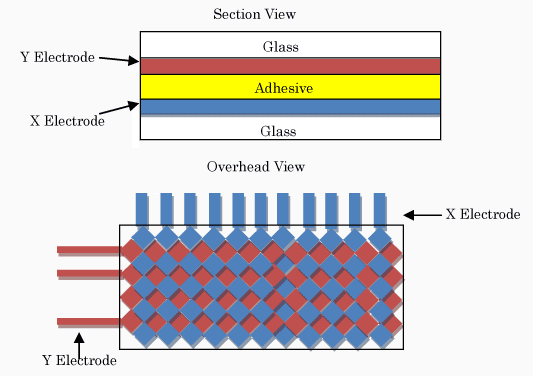
Les écrans tactiles PCAP fonctionnent en détectant les changements de capacité lorsqu'un objet conducteur - tel qu'un doigt humain - s'approche de la surface.
Le processus se déroule comme suit :
La couche sensible étant intégrée dans le verre, les écrans tactiles PCAP peuvent prendre en charge les éléments suivants gestes multi-touch et conservent une excellente clarté optique.
La technologie PCAP prend en charge des gestes avancés tels que
Il est donc idéal pour les interfaces graphiques modernes (GUI).
Le toucher PCAP ne repose pas sur une pression mécanique :
C'est essentiel pour les systèmes industriels et publics.
Les écrans tactiles PCAP offrent :
Ces caractéristiques garantissent visibilité claire même dans les environnements lumineux.
La technologie PCAP peut fonctionner par verre trempé épais, permettant :
C'est l'une des principales raisons pour lesquelles le PCAP est largement utilisé dans les kiosques et les distributeurs de billets.
| Fonctionnalité | PCAP | Touches résistives | Touches infrarouges |
|---|---|---|---|
| Multi-touch | Oui | Non | Oui |
| Surface du verre | Oui | Non | Oui |
| Clarté optique | Haut | Moyen | Haut |
| Étanchéité industrielle | Excellent | Limitée | Modéré |
| Utilisation typique | Industriel / Commercial | Héritage / Faible coût | Grands écrans |
Les écrans tactiles capacitifs projetés sont couramment utilisés dans :
Leur combinaison de précision, durabilité et prise en charge d'une interface utilisateur moderne les rend idéales pour un déploiement industriel à long terme.

Lors de la sélection d'un écran tactile PCAP pour une utilisation industrielle, les facteurs clés sont les suivants :
Ces paramètres doivent être définis au début de la procédure Conceptions OEM et projets.
Bien que puissants, les écrans tactiles PCAP présentent également des limites :
Pour les projets industriels, la validation technique est essentielle avant la production de masse.
Lors de l'évaluation d'un écran tactile capacitif projeté destiné à un usage industriel, il est important de comprendre les caractéristiques de l'écran. paramètres techniques clés est essentielle.
Tous les écrans tactiles PCAP n'ont pas les mêmes performances, même s'ils semblent similaires sur le papier.
Les paramètres critiques sont les suivants
L'ensemble de ces paramètres définit les performances d'un écran tactile PCAP dans les domaines suivants les conditions industrielles réelles, et pas seulement des tests de laboratoire.
Dans les applications OEM et les projets, les écrans tactiles PCAP sont rarement des composants prêts à l'emploi.
Les projets industriels nécessitent généralement :
Au cours du développement OEM, les écrans tactiles PCAP passent par plusieurs étapes critiques :
La réussite de l'intégration du PCAP dépend fortement des éléments suivants l'alignement précoce de l'ingénierie, plutôt qu'une sélection de composants de dernière minute.
Bien que la technologie tactile PCAP soit puissante, elle présente également des difficultés si elle n'est pas correctement conçue.
Les écrans tactiles PCAP standard peuvent éprouver des difficultés avec des gants ou des gouttes d'eau.
Ce problème peut être résolu par les moyens suivants
Les environnements industriels contiennent souvent des moteurs, des blocs d'alimentation et des structures métalliques.
En l'absence d'un blindage et d'un réglage adéquats, les performances tactiles peuvent se dégrader.
Les solutions comprennent
Un verre plus épais améliore la durabilité mais réduit la sensibilité tactile.
Équilibre résistance mécanique et réactivité au toucher est une tâche d'ingénierie essentielle dans les projets PCAP.
Choisir le bon écran tactile PCAP, ce n'est pas seulement opter pour la technologie la plus récente, c'est aussi adapter le design à l'application.
Les questions clés à prendre en compte sont les suivantes :
Pour les systèmes industriels, une solution tactile PCAP bien adaptée améliore la situation :
Un choix judicieux dès le début de la conception permet de réduire les modifications coûteuses et les retards à un stade ultérieur du projet.
Le PCAP est un type de technologie tactile capacitive, Le champ de détection est projeté à travers le verre.
Oui. Avec un réglage correct du contrôleur et une conception compatible avec les gants, le PCAP peut prendre en charge gants industriels.
Oui. Avec des écrans à haute luminosité, un collage optique et une conception de boîtier appropriée, les écrans tactiles PCAP sont largement utilisés dans les domaines suivants environnements semi-extérieurs.
La technologie tactile capacitive projetée est devenue la solution dominante pour les interfaces tactiles industrielles modernes.
Sa capacité à combiner :
fait Écrans tactiles PCAP une composante fondamentale de la systèmes industriels et publics de nouvelle génération.
Introduction Les interfaces homme-machine (IHM) sont désormais des composants standard des équipements industriels modernes. Les écrans permettent aux opérateurs de ...

Introduction Les écrans industriels sont souvent déployés dans des environnements où les conditions d'éclairage sont difficiles à contrôler. L'équipement ...

Introduction Les écrans sont des composants d'interface essentiels dans de nombreux types d'équipements industriels. Ils fournissent au système ...

Introduction La visibilité de l'affichage est un paramètre essentiel de la conception des équipements industriels. Les opérateurs s'appuient sur des interfaces graphiques ...
Envoyez les détails de votre demande. Nous vous répondrons en vous indiquant la configuration à suivre et les prochaines étapes.