産業用ディスプレイOEM機器サプライヤーバイヤガイド

はじめに ヒューマン・マシン・インターフェース(HMI)は、現代の産業機器の標準的な構成要素となっている。ディスプレイにより、オペレーターは以下のことが可能になる。 ...
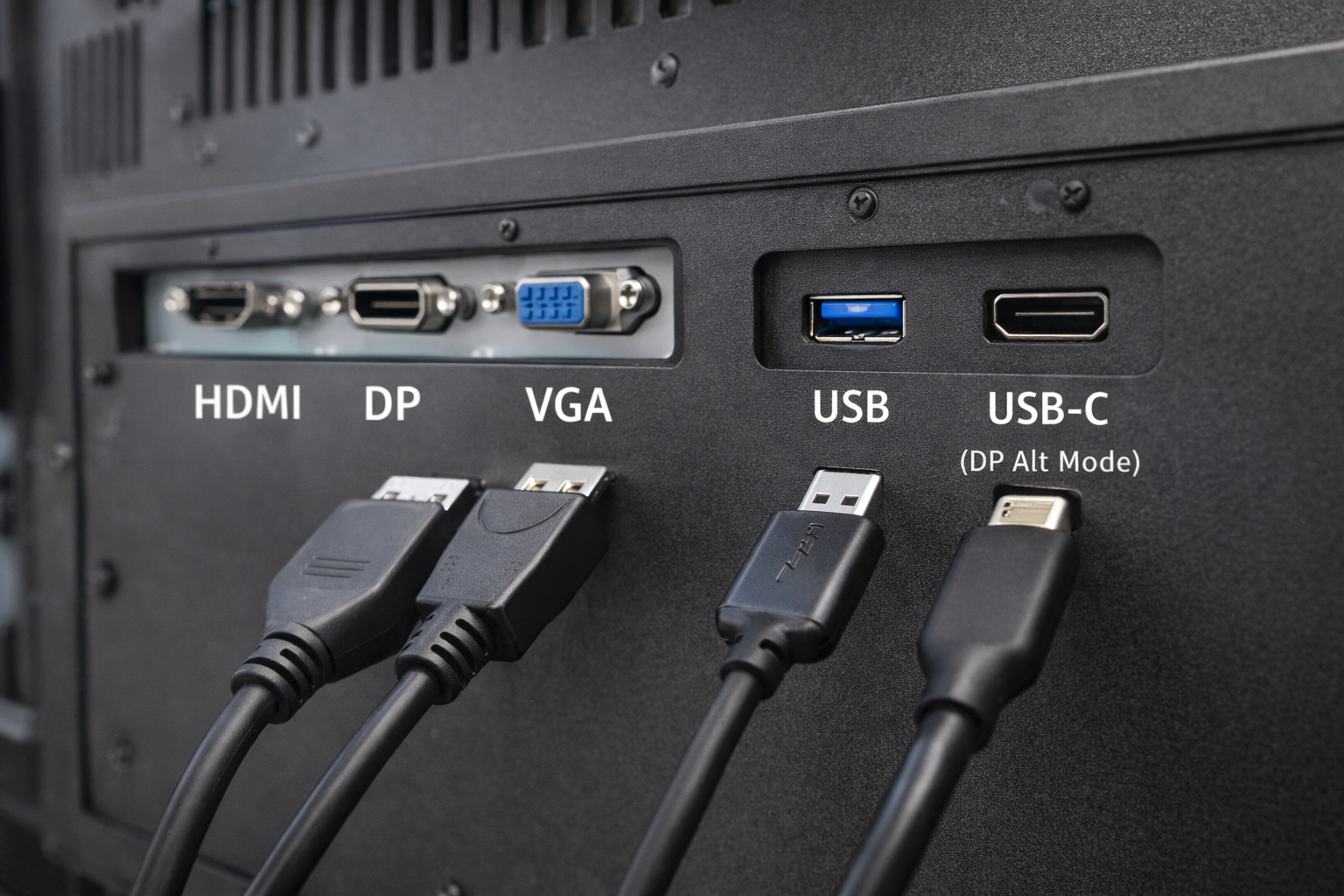
産業用システムや組込みシステムでは、インターフェイスの選択は重要な設計上の決定事項である。.
多くのエンジニアやシステムインテグレーターが、よくある質問をする:
USBポートがビデオ入力として機能するか? 産業用モニター?
短い答えだ: しかし、多くの人が期待しているような形ではない。.
この記事では、次のように説明している。 USBをビデオに使用できる場合、使用できない場合、産業用モニターにはどのような選択肢が適しているか。.
USB(Universal Serial Bus)ポートは、主に以下の目的で設計されている:
一般的なUSBの使用例としては、キーボード、マウス、ストレージ・デバイス、センサーなどがある。.
USBはもともと、ネイティブなビデオ伝送インターフェースとして設計されたわけではない HDMIやDisplayPortのように。.
この違いを理解することは、産業用ディスプレイシステムを設計する際に不可欠である。.
標準的なUSBポート ビデオ信号をネイティブに伝送できない HDMI、VGA、DisplayPortと同じように。.
ただし、USB経由のビデオは可能です 特定の技術と条件によってのみ, これは誤解されがちだ。.
DisplayLinkは、USB経由でのビデオ出力を可能にする圧縮ベースのソリューションである。.
どのように機能するのか:
工業用途の制限:
USB-Cはしばしば標準的なUSBと混同される。.
USB-Cがサポートする場合 DisplayPort Altモード, ネイティブのビデオ信号を伝送することができる。.
重要な説明
産業用モニターでは、USB-C ビデオをサポートする必要があります。 明示的に指定され、検証される.
| インターフェース | ネイティブ・ビデオ | ドライバーが必要 | 産業の信頼性 |
|---|---|---|---|
| USB(標準) | いいえ | はい | 低い |
| USB + DisplayLink | ⚠️ ソフトウェアベース | はい | 限定 |
| USB-C(DPオルトモード) | はい | いいえ | 中程度 |
| HDMI/DP/VGA | はい | いいえ | 高い |
ほとんどの産業用途に対応、, ビデオ専用インターフェースは、依然として好ましい選択である.
産業用モニターは優先順位をつける:
USBベースのビデオソリューションはしばしば導入される:
その結果だ、, HDMI、DisplayPort、VGAは現在でも標準的なインターフェースです。 産業用ディスプレイシステムにおける.
USBベースのビデオが評価されることもある:
このような場合でもだ、, エンジニアリングの検証が重要 信頼性の問題を避けるためである。.
ビデオ・インターフェースとしてUSBを選択する前に、こう尋ねてください:
ほとんどの産業プロジェクトでは、その答えは次のようになる。 ネイティブ・ビデオ・インターフェース.
いいえ。標準的なUSBポートは、ネイティブのビデオインターフェイスを直接置き換えることはできません。.
いいえ。DisplayPort Alt ModeをサポートするUSB-Cポートだけがビデオを出力できます。.
限られたケースでは有効かもしれないが 一般的に、長期的な産業展開には推奨されない。.
USB技術は進化している、, 従来のビデオインターフェイスに取って代わる万能なものではない。 産業用モニターで.
USBベースのビデオソリューションは、ソフトウェア、ドライバ、または特定のポート構成に依存しているため、複雑さとリスクが生じます。.
安定した長期間の産業用アプリケーション向け、, HDMIやDisplayPortなどの専用ビデオ入力は、依然として最も信頼できる選択肢です。.
はじめに ヒューマン・マシン・インターフェース(HMI)は、現代の産業機器の標準的な構成要素となっている。ディスプレイにより、オペレーターは以下のことが可能になる。 ...

はじめに 産業用ディスプレイは、照明条件の制御が困難な環境に設置されることが多い。設備 ...

はじめに ディスプレイは、多くの種類の産業機器において重要なインターフェース・コンポーネントである。システム ...

はじめに ディスプレイの視認性は、産業機器において非常に重要な設計パラメータである。オペレータはグラフィカル・インターフェース ...
アプリケーションの詳細をお送りください。構成の方向性と次のステップを返信します。.