산업용 패널 PC란 무엇인가? 구성 요소, 종류 및 적용 분야

산업용 패널 PC는 디스플레이(대개 터치스크린)가 내장된 컴퓨터로, 다음 용도로 설계된 것입니다. ...
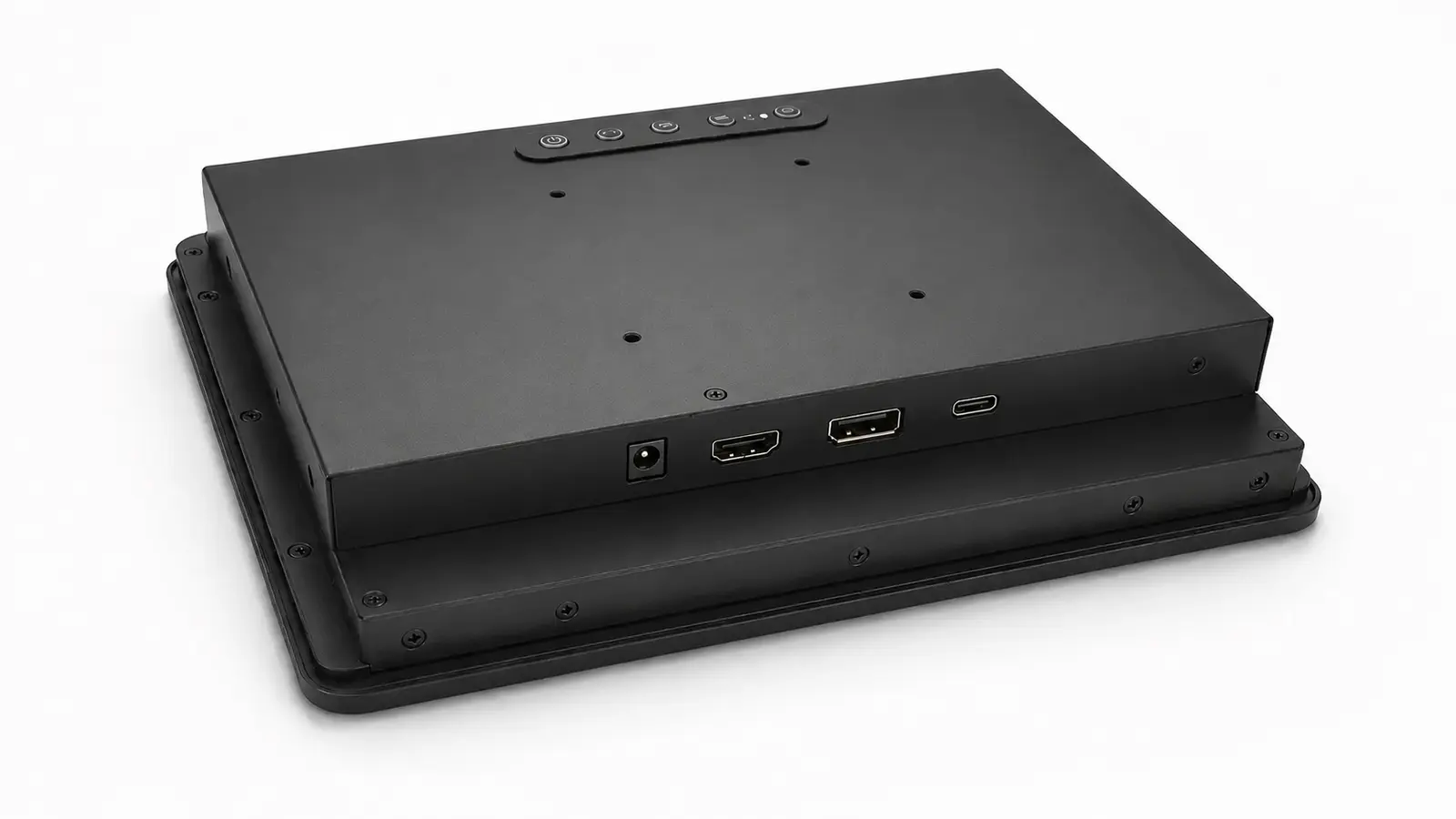
고객들은 종종 산업용 장비에 가장 신뢰할 수 있는 디스플레이 인터페이스가 무엇인지 묻곤 합니다. 실제로는 호스트 컴퓨터가 이미 그 결정의 절반을 내려놓은 경우가 많습니다.
호스트가 안정적인 HDMI 출력을 제공하는 경우, DisplayPort나 USB-C로 변경한다고 해서 시스템 성능이 개선되는 경우는 거의 없습니다. 산업용 PC에 이미 DisplayPort가 탑재되어 있다면, 이를 HDMI로 변환할 경우 테스트하고 제어해야 할 구성 요소가 하나 더 늘어납니다. USB-C는 하나의 케이블로 장비 구성이 실질적으로 간소화되고, OEM이 호스트, 모니터, 케이블 및 전원 설계를 종합적으로 승인할 수 있는 경우에 고려해 볼 가치가 있습니다.
대부분의 단일 화면 산업용 기계의 경우, 별도의 USB 터치 연결을 갖춘 네이티브 HDMI 방식이 여전히 제작, 테스트 및 유지보수를 수행하기에 가장 간편한 구성입니다.
| 프로젝트 상황 | 실용적인 출발점 |
|---|---|
| HDMI 출력이 지원되는 임베디드 컨트롤러 | 비디오용 HDMI, 터치용 USB |
| DisplayPort가 탑재된 산업용 PC 또는 워크스테이션 | 네이티브 DisplayPort |
| 승인된 호스트가 하나 연결된 소형 단말기 | 전체 시스템 테스트를 마친 후의 USB-C |
| 다양한 고객의 컴퓨터와 함께 사용되는 모니터 | HDMI 및 DisplayPort |
| VGA 또는 DVI를 지원하는 기존 장비 | 기존 인터페이스를 유지하거나, 하나의 고정 변환기를 검증합니다. |
이 기사에서는 호스트와 전체 시스템 간의 외부 연결에 대해 다룹니다. 산업용 디스플레이 모니터. LVDS와 eDP는 LCD 패널과 마더보드 또는 디스플레이 컨트롤러 간의 내부 연결 방식입니다.
HDMI는 임베디드 컴퓨터, 산업용 PC, 미디어 플레이어 및 싱글보드 컴퓨터에서 흔히 사용됩니다. 교체용 케이블과 테스트 장비도 쉽게 구할 수 있습니다.
일반적인 산업용 터치 모니터는 다음 세 가지 별도의 연결 방식을 사용합니다:
케이블 배치가 가장 깔끔한 편은 아니지만, 구조는 한눈에 파악하기 쉽습니다. 화면이 표시되지 않을 경우, 터치 연결을 건드리지 않고도 영상 경로를 확인할 수 있습니다. 터치 반응이 멈출 경우, USB 케이블과 터치 컨트롤러를 각각 따로 테스트해 볼 수 있습니다.
일반 HDMI 커넥터는 제자리에 고정되지 않습니다. 진동에 노출되거나 반복적인 유지보수 작업이 이루어지거나 케이블이 당겨지는 환경에서는 케이블 클램프나 스트레인 릴리프를 사용해야 합니다.
검증해야 할 또 다른 사항은 시작 시 동작입니다. 일부 호스트와 디스플레이 컨트롤러 조합은 HDMI 케이블을 다시 연결하면 작동하지만, 두 장치가 동시에 전원이 켜지면 작동하지 않는 경우가 있습니다. 이는 일반적으로 EDID 교환, 핫플러그 감지 또는 컨트롤러 초기화와 관련이 있습니다. 테스트 대상 제품은 반복적인 콜드 부팅, 전원 복구, 절전 및 깨우기 주기를 통해 테스트해야 합니다.
시스템이 이미 DisplayPort 출력을 지원하는 산업용 PC, 워크스테이션 또는 그래픽 플랫폼을 기반으로 구축된 경우, DisplayPort는 당연한 선택입니다.
또한 멀티 디스플레이 시스템에서도 유용하지만, 멀티 스트림 전송(Multi-Stream Transport)은 소스, 모니터 및 전체 연결 경로가 이를 지원할 때만 작동합니다. DisplayPort 커넥터만으로는 데이지 체인 연결이 보장되지 않습니다.
더 높은 대역폭은 종종 DisplayPort를 선택해야 하는 주된 이유로 제시됩니다. 1920 × 1080 해상도와 60Hz로 작동하는 일반적인 산업용 HMI의 경우, 대역폭이 결정적인 요인이 되는 경우는 거의 없습니다. 호스트와의 기본 호환성, 커넥터 고정성, 안정적인 재시작 성능이 더 중요합니다.
어댑터에는 각별한 주의가 필요합니다. DisplayPort-HDMI 변환 어댑터와 HDMI-DisplayPort 변환 어댑터는 서로 자동으로 호환되지 않습니다. 연결 방향, 변환 회로, 지원되는 타이밍 및 전원 요구 사항이 다를 수 있습니다. 프로젝트에 어댑터가 필요한 경우, 특정 모델을 승인하고 이를 생산 BOM에 포함시켜야 합니다.
일부 풀사이즈 DisplayPort 플러그에는 래치가 달려 있습니다. 모든 커넥터가 동일한 고정 방식을 사용하는 것은 아니므로, 실제 케이블을 확인해 보시기 바랍니다.
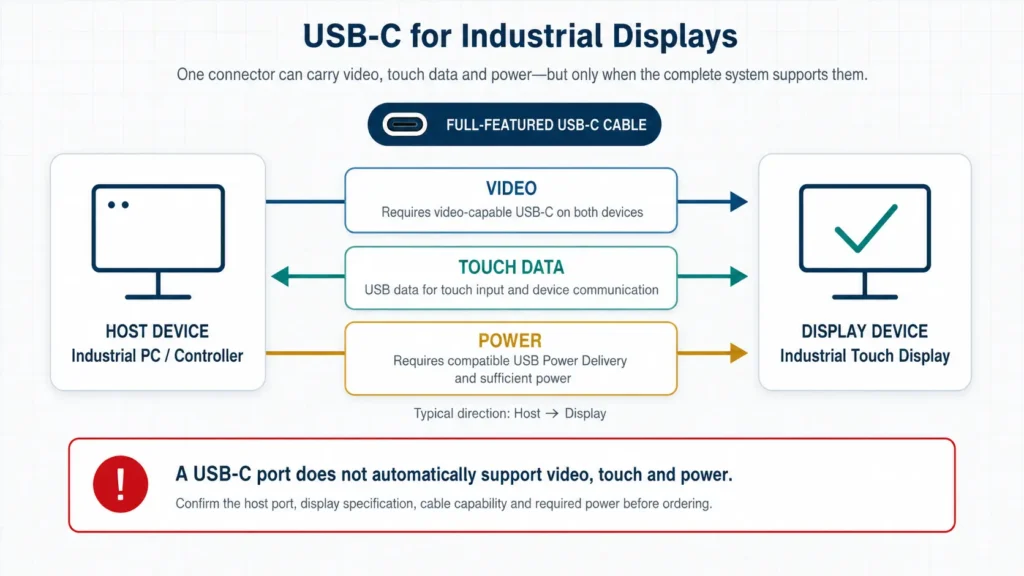
USB-C는 커넥터를 지칭하는 용어입니다. 이 용어만으로는 해당 포트가 어떤 기능을 제공하는지 알 수 없습니다.
USB-C 연결을 통해 다음을 전송할 수 있습니다:
또한 USB 데이터 전송이나 충전 기능만 제공할 수도 있습니다. 모양이 같은 두 개의 포트라도 작동 방식이 다를 수 있습니다.
비디오의 경우, 호스트는 일반적으로 DisplayPort 대체 모드 또는 호환되는 USB4 구현을 지원해야 합니다. 모니터는 해당 신호를 수신할 수 있도록 설계되어야 하며, 선택한 케이블은 필요한 기능을 지원해야 합니다.
터치 기능은 또 다른 데이터 경로를 도입합니다. 디스플레이의 터치 컨트롤러는 USB 연결을 통해 호스트와 통신해야 합니다. 두 기능이 동일한 케이블을 공유하더라도 이 통신은 영상 신호와 별도로 이루어집니다.
전원 공급에는 별도의 확인 절차가 필요합니다. USB-C를 통해 디스플레이에 전원을 공급할 것으로 예상하기 전에 다음 사항을 확인하십시오:
USB-C는 장비 제조업체가 호스트, 모니터 전자 부품, 케이블 및 펌웨어를 모두 제어하는 폐쇄형 OEM 플랫폼에서는 원활하게 작동합니다. 반면, 모니터가 알 수 없는 고객의 노트북, 도킹 스테이션 및 대체 케이블을 수용해야 하는 경우에는 적합하지 않습니다.
일반 USB-C 플러그의 경우 기계적 고정력도 제한적입니다. 케이블이 진동이나 잦은 움직임에 노출될 경우, 스트레인 릴리프나 승인된 잠금 장치를 사용하십시오.
기존 USB 포트가 비디오를 전송할 수 있는지 확인해야 하는 경우, 다음을 참조하십시오. USB 포트를 산업용 모니터의 비디오 입력으로 사용할 수 있나요?
현장 작업에서 연결 단자 유형이 영상 불안정의 유일한 원인이 되는 경우는 거의 없습니다. 전체 연결 상태를 점검해야 합니다.
모든 변환기, 도크, 분배기 및 신호 연장기는 호환성 문제를 일으킬 가능성을 하나씩 더합니다. 가능하면 호스트 기기의 기본 출력 단자를 사용하십시오.
커넥터가 동일한 두 케이블이라도 지원하는 대역폭, USB 데이터 전송 기능 또는 Power Delivery 기능이 다를 수 있습니다. 특히 USB-C 프로젝트의 경우, 승인된 케이블을 관리 대상 부품으로 취급해야 합니다.
케이블을 수동으로 다시 연결한 후 정상 작동하는 디스플레이라도, 정전이나 호스트 재시작 후에는 여전히 오작동할 수 있습니다. 해당 시스템에서 실제로 사용되는 시작 순서를 테스트해 보십시오.
HDMI, DisplayPort, USB-C는 커넥터 모양이 서로 다르지만, 어느 것도 부적절한 케이블 배선을 보완할 수는 없습니다. 충분한 여유 공간, 스트레인 릴리프, 그리고 유지보수 접근성을 확보하십시오.
전압 강하, 전원 공유, 부적절한 접지 및 모터 간섭은 비디오 인터페이스 오류로 보일 수 있습니다. 문제가 발생하는 동안 디스플레이로 공급되는 전력을 측정하십시오.
| 애플리케이션 | 권장 방향 | 왜 |
|---|---|---|
| 내장형 HDMI를 갖춘 키오스크, 전기차 충전기 또는 자판기 | HDMI + USB 터치 | 통합 및 교체가 간편합니다 |
| 공장 작업대 또는 검사대 | 디스플레이 포트 | 다양한 산업용 PC 플랫폼과 호환됩니다 |
| 다중 모니터 제어 데스크 | 토폴로지 테스트 후 DisplayPort | PC 그래픽 시스템에 더 적합함 |
| 고정형 하드웨어를 갖춘 소형 OEM 단말기 | USB-C | 케이블 및 커넥터 수를 줄일 수 있습니다 |
| 고객이 제공한 컴퓨터에 연결된 모니터 | HDMI 및 DisplayPort | 서로 다른 호스트 간에 더 예측 가능함 |
| 케이블 경로가 길거나 전기적 노이즈가 심한 캐비닛 | 전체 케이블 시스템을 테스트하십시오 | 인터페이스 이름만으로는 안정성을 보장할 수 없다 |
실제 운영에 사용할 호스트, 케이블 및 전원 공급 장치를 사용하십시오. 다른 노트북과 짧은 사무실용 케이블을 사용하여 테스트하는 것은 완성된 장비의 상태를 반영하지 않습니다.
승인 전:
USB-C의 경우, 영상, 터치 데이터 및 전원 공급을 동시에 확인하십시오. 영상 테스트만 통과하는 것만으로는 충분하지 않습니다.
모니터에서 이미 간헐적으로 화면이 꺼지거나 신호가 없는 상태가 나타난다면, 다음을 사용하십시오. 산업용 디스플레이 검은 화면 진단 가이드 디스플레이를 교체하기 전에.
일반적으로는 아닙니다. HDMI와 DisplayPort는 영상과 오디오 신호를 전송합니다. 터치 데이터는 대개 USB나 RS232를 사용합니다.
네, 하지만 호스트, 모니터, 케이블이 이 세 가지 기능을 모두 지원하는 경우에만 가능합니다. 또한 전원 공급 능력과 방향도 명확히 정의되어야 합니다.
꼭 그렇지만은 않습니다. 어댑터를 통해 연결된 DisplayPort보다 HDMI로 직접 연결하는 것이 더 안정적일 수 있으며, 그 반대의 경우도 마찬가지입니다. 전체 신호 경로가 중요합니다.
아니요. 승인된 호스트 플랫폼 및 서비스 플랜에서 요구하는 입력 사항을 포함하십시오. 커넥터가 늘어나면 보드의 복잡성이 증가하고 테스트해야 할 구성도 늘어납니다.
네이티브 HDMI 출력이 지원되는 단일 화면 기기의 경우, 영상은 HDMI를, 터치 기능은 USB를 사용하십시오. 이는 널리 알려져 있으며 유지보수도 간단합니다.
산업용 PC 또는 다중 디스플레이 아키텍처와 호환되는 경우 DisplayPort를 사용하십시오.
케이블 수를 줄이는 것이 실질적인 기계적 이점을 제공하고, OEM이 전체 하드웨어 구성을 제어할 수 있는 경우에는 USB-C를 선택하십시오.
샘플을 주문하기 전에 호스트 모델, 필요한 해상도, 터치 연결 방식, 케이블 길이, 전원 입력 사양 및 인클로저 도면을 보내 주시기 바랍니다. Eagle Touch는 다음의 일환으로 이러한 사항을 검토할 수 있습니다. 맞춤형 산업용 터치 디스플레이 프로젝트.
산업용 패널 PC는 디스플레이(대개 터치스크린)가 내장된 컴퓨터로, 다음 용도로 설계된 것입니다. ...

임베디드 PC는 기계나 더 큰 시스템의 일부로 작동하도록 구성된 컴퓨터입니다. ...

먼저 패널 PC에서 실행해야 하는 소프트웨어와 충족해야 할 조건부터 살펴봅시다. 그런 다음 ...

산업용 패널 PC의 IP 등급을 선택할 때는 먼저 다음 두 가지 질문부터 고려해야 합니다. 어떤 종류의 먼지와 물에 노출되는지 ...
귀사의 신청 내용, 요구 사항 또는 현재 직면한 과제를 알려주세요. 저희 팀이 세부 사항을 검토한 후 실질적인 해결 방안을 제안해 드리겠습니다.