ما هو الكمبيوتر اللوحي الصناعي؟ المكونات والأنواع والتطبيقات

الكمبيوتر اللوحي الصناعي هو جهاز كمبيوتر مزود بشاشة مدمجة، عادةً ما تكون شاشة تعمل باللمس، مصمم من أجل ...
فريق الهندسة في إيجل تاتش
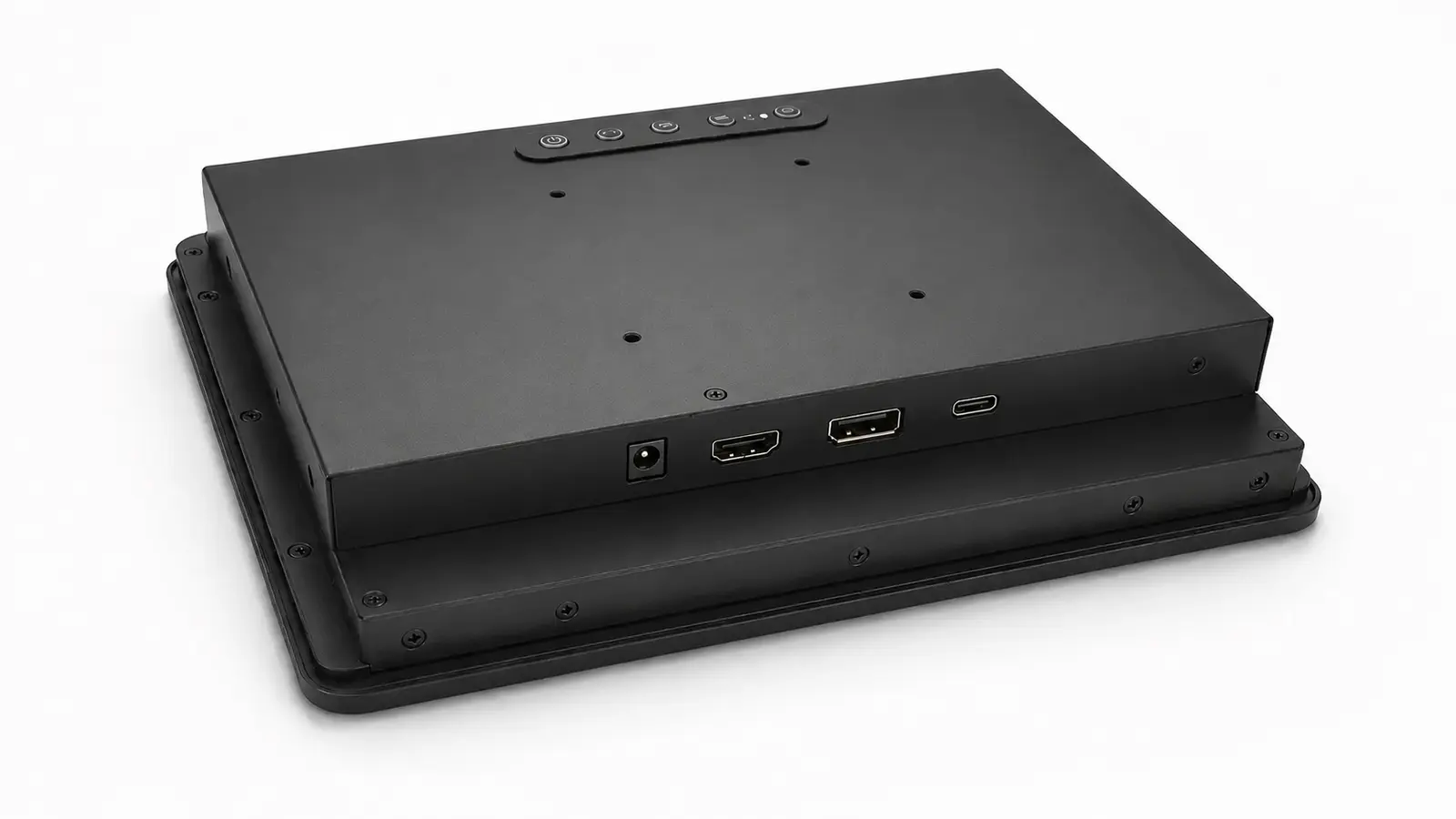
غالبًا ما يسأل العملاء عن واجهة العرض الأكثر موثوقية للمعدات الصناعية. وفي الواقع، يكون الكمبيوتر المضيف قد اتخذ بالفعل نصف هذا القرار.
إذا كان الجهاز المضيف يوفر مخرج HDMI مستقرًا، فإن التحول إلى DisplayPort أو USB-C نادرًا ما يؤدي إلى تحسين أداء النظام. وإذا كان الكمبيوتر الصناعي مزودًا بالفعل بواجهة DisplayPort، فإن تحويلها إلى HDMI يضيف مكونًا إضافيًا يجب اختباره والتحكم فيه. ويستحق USB-C النظر فيه عندما يؤدي كابل واحد فعليًّا إلى تبسيط المعدات، ويكون بإمكان الشركة المصنعة للمعدات الأصلية (OEM) الموافقة على تصميم كل من الجهاز المضيف والشاشة والكابل ومصدر الطاقة معًا.
بالنسبة لمعظم الآلات الصناعية ذات الشاشة الواحدة، يظل استخدام منفذ HDMI الأصلي مع وصلة USB منفصلة للشاشة التي تعمل باللمس هو الترتيب الأسهل من حيث التصنيع والاختبار والصيانة.
| حالة المشروع | نقطة انطلاق عملية |
|---|---|
| وحدة تحكم مدمجة مزودة بمخرج HDMI | HDMI للفيديو، وUSB لللمس |
| كمبيوتر صناعي أو محطة عمل مزودة بمنفذ DisplayPort | منفذ DisplayPort الأصلي |
| محطة مدمجة مزودة بجهاز مضيف واحد معتمد | USB-C بعد إجراء اختبار شامل للنظام |
| شاشة تُستخدم مع أجهزة كمبيوتر مختلفة تابعة للعملاء | HDMI و DisplayPort |
| الأجهزة الحالية المزودة بواجهة VGA أو DVI | الاحتفاظ بالواجهة الأصلية أو التحقق من صحة محول واحد ثابت |
يتناول هذا المقال الوصلات الخارجية بين المضيف ونظام كامل شاشة عرض صناعية. يُعد كل من LVDS و eDP وصلات داخلية بين شاشة LCD واللوحة الأم أو وحدة التحكم في العرض.
تُعد واجهة HDMI شائعة الاستخدام في أجهزة الكمبيوتر المدمجة وأجهزة الكمبيوتر الصناعية ومشغلات الوسائط وأجهزة الكمبيوتر أحادية اللوحة. كما يسهل العثور على الكابلات البديلة ومعدات الاختبار.
تستخدم شاشة اللمس الصناعية النموذجية ثلاثة توصيلات منفصلة:
ليس هذا أفضل ترتيب للكابلات، لكنه سهل الفهم. في حال انقطاع الصورة، يمكن فحص مسار الفيديو دون المساس باتصال شاشة اللمس. وإذا توقفت شاشة اللمس عن الاستجابة، يمكن اختبار كابل USB ووحدة التحكم في شاشة اللمس بشكل منفصل.
لا تثبت موصلات HDMI القياسية في مكانها. لذا، يجب استخدام مشبك كابل أو جهاز تخفيف الضغط في الأجهزة المعرضة للاهتزازات أو عمليات الصيانة المتكررة أو شد الكابلات.
النقطة الأخرى التي يجب اختبارها هي سلوك الجهاز عند بدء التشغيل. تعمل بعض مجموعات أجهزة الاستضافة ووحدات التحكم في الشاشة بعد إعادة توصيل كابل HDMI، لكنها تفشل عند تشغيل الجهازين معًا. ويرتبط هذا عادةً بتبادل بيانات EDID، أو الكشف عن التوصيل السريع، أو تهيئة وحدة التحكم. ويجب اختبار العينة من خلال عمليات بدء التشغيل البارد المتكررة، واستعادة الطاقة، ودورات السكون والاستيقاظ.
يُعد DisplayPort الخيار الطبيعي عندما يكون النظام مبنيًّا على جهاز كمبيوتر صناعي أو محطة عمل أو منصة رسومات توفر بالفعل مخرج DisplayPort.
كما أنه مفيد لأنظمة الشاشات المتعددة، على الرغم من أن تقنية «Multi-Stream Transport» لا تعمل إلا عندما يدعمها كل من المصدر والشاشات ومسار الاتصال بأكمله. ولا يضمن موصل DisplayPort وحده إمكانية التوصيل التسلسلي.
غالبًا ما يُقدَّم النطاق الترددي الأعلى باعتباره السبب الرئيسي لاختيار DisplayPort. وبالنسبة لواجهة HMI صناعية نموذجية تعمل بدقة 1920 × 1080 وتردد 60 هرتز، نادرًا ما يكون النطاق الترددي هو العامل الحاسم. فالتوافق الأصلي مع المضيف، والحفاظ على الموصل، وسلوك إعادة التشغيل المستقر، كلها عوامل أكثر أهمية.
تحتاج المحولات إلى عناية خاصة. فمحولات DisplayPort إلى HDMI ومحولات HDMI إلى DisplayPort ليست قابلة للتبادل تلقائيًا. فقد تختلف الاتجاهات، ودوائر التحويل الإلكترونية، ومتطلبات التوقيت والطاقة المدعومة. إذا كان المشروع يحتاج إلى محول، فيجب الموافقة على طراز محدد وإدراجه في قائمة مواد الإنتاج (BOM).
تحتوي بعض موصلات DisplayPort ذات الحجم الكامل على مزلاج. تحقق من الكابل نفسه، لأن تصميم التثبيت يختلف من موصل لآخر.
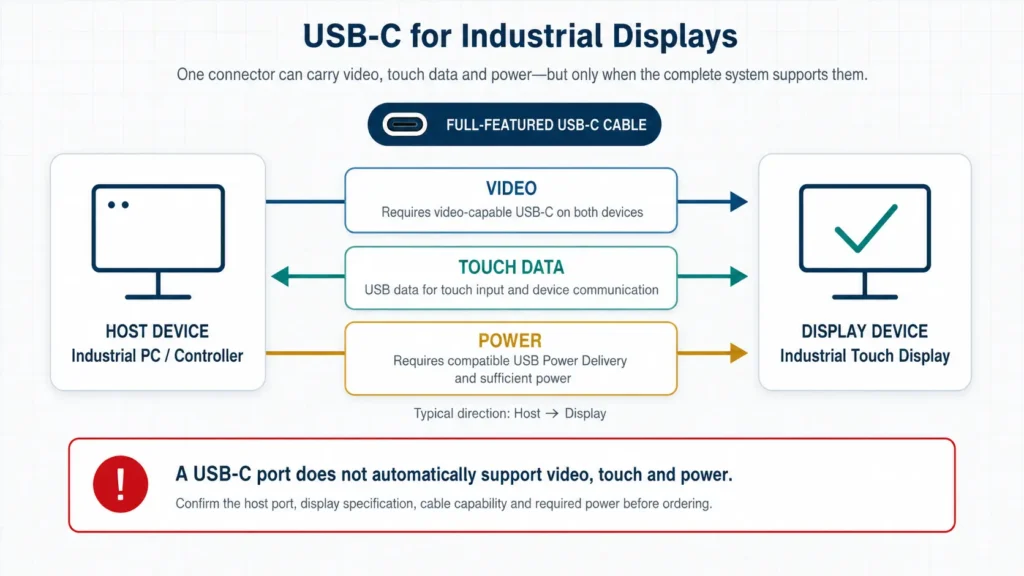
يُشير مصطلح «USB-C» إلى نوع الموصل. لكنه لا يوضح الوظائف التي يوفرها المنفذ.
قد ينقل اتصال USB-C ما يلي:
كما قد يقتصر دوره على نقل البيانات عبر USB أو الشحن فقط. وقد يختلف أداء منفذين لهما نفس الشكل عن بعضهما البعض.
بالنسبة للفيديو، يحتاج الجهاز المضيف عادةً إلى «الوضع البديل لـ DisplayPort» (DisplayPort Alternate Mode) أو تطبيق USB4 متوافق. ويجب أن تكون الشاشة مصممة لاستقبال الإشارة المقابلة، كما يجب أن يدعم الكابل المختار الوظائف المطلوبة.
تضيف تقنية اللمس مسارًا آخر لنقل البيانات. يجب أن تتواصل وحدة التحكم باللمس الخاصة بالشاشة مع الجهاز المضيف عبر وصلة USB. ويكون هذا الاتصال منفصلاً عن إشارة الفيديو حتى عندما تشترك الوظيفتان في نفس الكابل.
يتطلب تزويد الشاشة بالطاقة إجراء بعض الخطوات للتحقق. قبل توقع أن يقوم منفذ USB-C بتزويد الشاشة بالطاقة، تحقق مما يلي:
يعمل منفذ USB-C بشكل جيد في منصة OEM مغلقة، حيث يتحكم مصنع المعدات في الجهاز المضيف، والإلكترونيات الخاصة بالشاشة، والكابل، والبرامج الثابتة. أما عندما يتعين على الشاشة قبول أجهزة الكمبيوتر المحمولة غير المعروفة الخاصة بالعملاء، ومحطات الإرساء، والكابلات البديلة، فإن هذا المنفذ يكون أقل ملاءمةً.
كما أن قابس USB-C القياسي يتمتع بقدرة محدودة على التثبيت الميكانيكي. استخدم جهاز تخفيف الشد أو نظام قفل معتمد إذا كان الكابل سيتعرض للاهتزاز أو للحركة المتكررة.
إذا كنت بحاجة إلى تحديد ما إذا كان منفذ USB موجودًا قادرًا على نقل الفيديو، فراجع هل يمكن استخدام منفذ USB كمدخل فيديو للشاشات الصناعية؟
في المشاريع الميدانية، نادرًا ما يكون نوع الموصل هو السبب الوحيد لعدم استقرار الصورة. لذا، يجب مراجعة التوصيل بالكامل.
كل محول أو قاعدة توصيل أو مقسم أو موسع يزيد من احتمالية حدوث مشكلة في التوافق. استخدم المخرج الأصلي للجهاز المضيف كلما أمكن ذلك.
قد يدعم كابلان مزودان بنفس الموصلات نطاقات تردد مختلفة، أو وظائف نقل البيانات عبر USB، أو وظائف تزويد الطاقة. وبالنسبة لمشاريع USB-C على وجه الخصوص، يجب التعامل مع الكابل المعتمد باعتباره مكونًا خاضعًا للرقابة.
قد تستمر الشاشة التي تعمل بعد إعادة توصيل الكابل يدويًّا في التعطل بعد انقطاع التيار الكهربائي أو إعادة تشغيل الجهاز المضيف. قم باختبار تسلسل التشغيل الفعلي المستخدم في الجهاز.
تختلف أشكال موصلات HDMI وDisplayPort وUSB-C عن بعضها البعض، لكن لا يمكن لأي منها تعويض سوء توجيه الكابلات. لذا، يجب توفير مسافة كافية، وتجهيز نظام لتخفيف الضغط، وإتاحة إمكانية الوصول للصيانة.
قد يبدو انخفاض الجهد الكهربائي، ومصادر الطاقة المشتركة، وسوء التأريض، وتداخل المحركات وكأنها أعطال في واجهة الفيديو. قم بقياس الطاقة التي تصل إلى الشاشة أثناء ظهور المشكلة.
| التطبيق | الاتجاه الموصى به | لماذا |
|---|---|---|
| كشك، أو شاحن سيارات كهربائية، أو آلة بيع مزودة بمنفذ HDMI مدمج | شاشة تعمل باللمس مزودة بمدخلات HDMI وUSB | سهل الدمج والاستبدال |
| محطة عمل بالمصنع أو محطة فحص | منفذ العرض | يتوافق مع العديد من منصات أجهزة الكمبيوتر الصناعية |
| منضدة التحكم متعددة الشاشات | منفذ DisplayPort بعد اختبار التوبولوجيا | أكثر ملاءمة لأنظمة الرسومات في أجهزة الكمبيوتر الشخصية |
| جهاز طرفي صغير الحجم من تصنيع الشركة المصنعة للمعدات الأصلية (OEM) مزود بأجهزة ثابتة | USB-C | يمكن أن يقلل من عدد الكابلات والموصلات |
| شاشة متصلة بأجهزة الكمبيوتر التي يوفرها العميل | HDMI و DisplayPort | أكثر قابلية للتنبؤ بها عبر مضيفات مختلفة |
| مسار كابل طويل أو خزانة بها تشويش كهربائي | اختبار نظام الكابلات بالكامل | اسم الواجهة وحده لا يضمن الاستقرار |
استخدم جهاز الاستضافة المخصص للإنتاج، والكابل، ومصدر الطاقة المخصصين. فالاختبار باستخدام جهاز كمبيوتر محمول آخر وكابل مكتبي قصير لا يعكس حالة الجهاز النهائية.
قبل الموافقة:
بالنسبة لمنفذ USB-C، تحقق من عمل الفيديو وبيانات اللمس والطاقة في آن واحد. فاجتياز اختبار الصورة وحده لا يكفي.
إذا كانت الشاشة تعاني بالفعل من فقدان متقطع للصورة أو من حالة «عدم وجود إشارة»، فاستخدم دليل تشخيص مشاكل الشاشة السوداء في شاشات العرض الصناعية قبل استبدال الشاشة.
في العادة، لا. فواجهات HDMI وDisplayPort تنقل الصورة والصوت. أما بيانات اللمس فتستخدم عادةً واجهة USB أو RS232.
نعم، ولكن فقط عندما يدعم المضيف والشاشة والكابل هذه الوظائف الثلاث جميعها. كما يجب تحديد قدرة الطاقة واتجاهها.
ليس بالضرورة. قد يكون الاتصال المباشر عبر HDMI أكثر موثوقية من استخدام DisplayPort عبر محول، والعكس صحيح أيضًا. فمسار الإشارة الكامل له أهمية كبيرة.
لا. قم بتضمين المدخلات المطلوبة من قبل المنصات المضيفة المعتمدة وخطة الخدمة. فكلما زاد عدد الموصلات، زادت تعقيد اللوحة وازدادت التكوينات التي يجب اختبارها.
بالنسبة للأجهزة ذات الشاشة الواحدة والمزودة بمخرج HDMI أصلي، استخدم HDMI للفيديو وUSB لللمس. فهذه الطريقة معروفة على نطاق واسع وسهلة الاستخدام.
استخدم واجهة DisplayPort عندما تتوافق مع الكمبيوتر الصناعي أو بنية الشاشات المتعددة.
اختر منفذ USB-C عندما يوفر تقليل عدد الكابلات ميزة ميكانيكية حقيقية ويتمكن مصنع المعدات الأصلية (OEM) من التحكم في التكوين الكامل للأجهزة.
قبل طلب عينة، يرجى إرسال طراز الجهاز المضيف، والدقة المطلوبة، ووصلة الشاشة التي تعمل باللمس، وطول الكابل، ومدخل الطاقة، ورسم الهيكل. يمكن لشركة Eagle Touch مراجعة هذه النقاط كجزء من مشروع شاشة تعمل باللمس صناعية مخصصة.
الكمبيوتر اللوحي الصناعي هو جهاز كمبيوتر مزود بشاشة مدمجة، عادةً ما تكون شاشة تعمل باللمس، مصمم من أجل ...

الكمبيوتر المدمج هو جهاز كمبيوتر تم تهيئته ليعمل كجزء من آلة أو نظام أكبر ...

ابدأ بالبرنامج الذي يجب أن يعمل عليه الكمبيوتر اللوحي والشروط التي يجب أن يستوفيها. ثم ...

يبدأ اختيار تصنيف IP لجهاز الكمبيوتر اللوحي الصناعي بطرح سؤالين: ما مدى التعرض للغبار والماء ...
شاركنا بطلبك أو متطلباتك أو التحدي الذي تواجهه حالياً. سيقوم فريقنا بمراجعة التفاصيل و تقديم توصية بشأن السبل العملية للمضي قدماً.