¿Qué es un PC industrial tipo panel? Componentes, tipos y aplicaciones

Un PC de panel industrial es un ordenador con pantalla integrada, normalmente táctil, diseñado para ...
Equipo de ingeniería de Eagle Touch
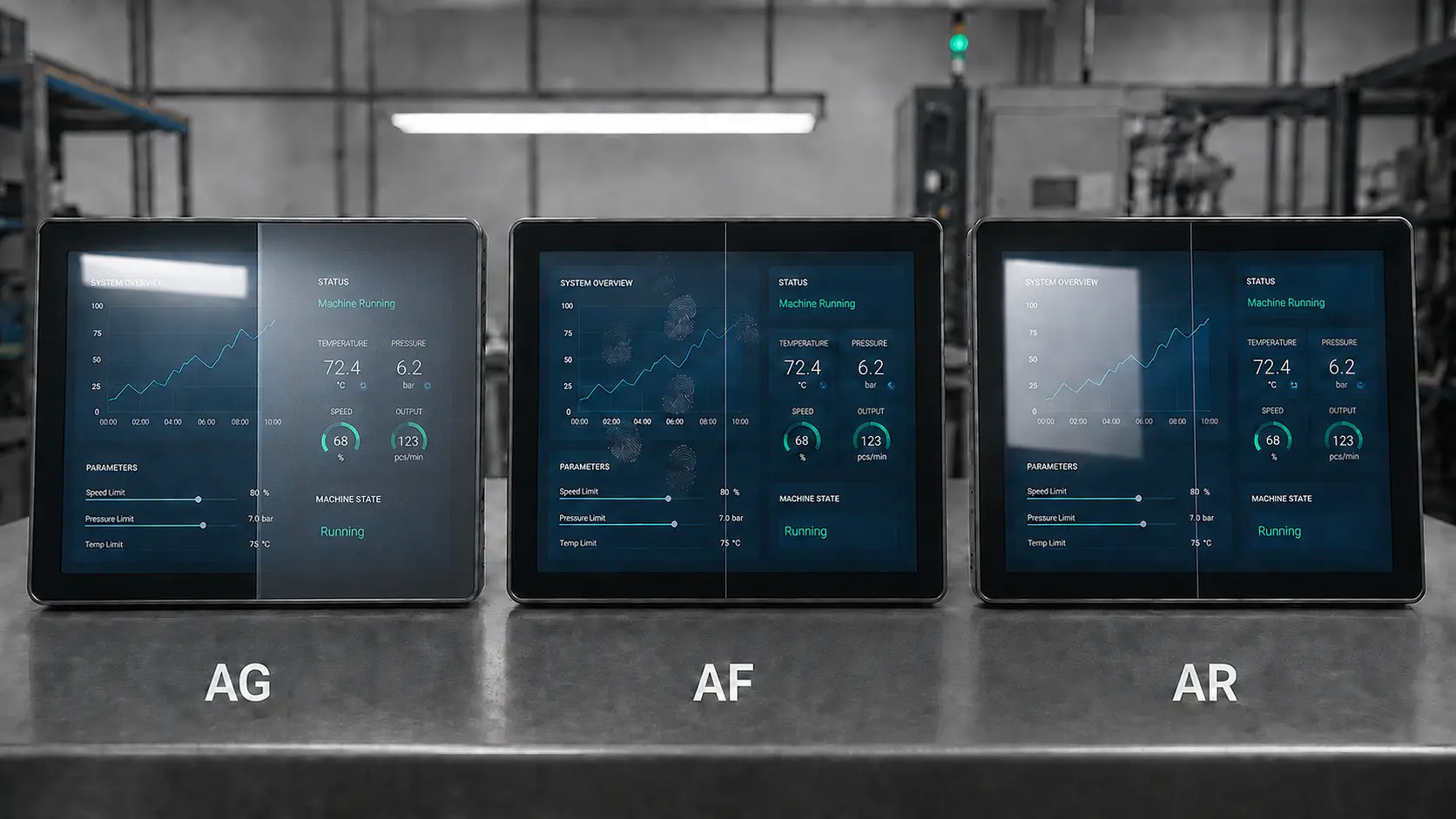
Las siglas AG, AF y AR suelen aparecer juntas en las especificaciones de un cristal de cubierta, pero tienen funciones diferentes.
El tratamiento AG reduce los molestos reflejos al difuminar la luz reflejada. El tratamiento AF facilita la eliminación de huellas dactilares y manchas de grasa. El tratamiento AR reduce la cantidad de luz que refleja el cristal. Ninguno de ellos es automáticamente mejor que los demás, y combinar los tres no garantiza una pantalla de mejor calidad.
En el caso de una pantalla táctil industrial, hay que partir del problema que debe resolver el equipo una vez terminado. Hay que tener en cuenta la iluminación, la interfaz de usuario, el método de limpieza, la estructura del cristal protector y la vida útil requerida. A continuación, hay que evaluar el tratamiento en una muestra representativa.
| Tratamiento | Objetivo principal | Un buen punto de partida para | Principal dilema |
|---|---|---|---|
| AG — Antirreflejos | Difumina los reflejos intensos de las lámparas, las ventanas y los objetos del entorno | Interfaces hombre-máquina (HMI), paneles de control y equipos de fábrica bajo iluminación direccional | Un efecto de neblina excesivo puede difuminar el texto y los gráficos de trazo fino |
| AF — Antihuellas | Reduce la adherencia del aceite y facilita la limpieza de la superficie | Pantallas táctiles públicas, paneles médicos, quioscos y interfaces hombre-máquina (HMI) que se tocan con frecuencia | Por sí solo, no ofrece protección contra golpes ni arañazos |
| AR — Antirreflectante | Reduce la reflectancia de la superficie sin perder nitidez de la imagen | Interfaces de alta nitidez, pantallas profesionales y sistemas para exteriores seleccionados | Un coste más elevado y unos requisitos más estrictos en cuanto al recubrimiento, la manipulación y la durabilidad |
| AG + AF | Combina el control del deslumbramiento con una limpieza más sencilla | Interfaces hombre-máquina (HMI) industriales, quioscos y terminales públicas | Es necesario comprobar tanto el resultado óptico como la durabilidad del enfoque automático. |
| AR + AF | Combina un bajo nivel de reflexión con una limpieza más sencilla | Pantallas táctiles para uso médico, de alta calidad y de gran nitidez | El proceso completo de recubrimiento requiere un procesamiento controlado y una validación |
En resumen, es sencillo: AG para el deslumbramiento, AF para las marcas táctiles y AR para los reflejos. Las especificaciones definitivas siguen dependiendo de la pantalla completa.
El tratamiento AG (antideslumbrante) confiere al cristal una superficie de textura fina. En lugar de reflejar una imagen nítida de una lámpara del techo o de una ventana cercana, la superficie difunde la luz reflejada por una zona más amplia. El reflejo se vuelve menos definido y distrae menos al conductor.
La tecnología AG resulta útil cuando un reflejo visible se desplaza por la pantalla a medida que el operador cambia de posición, especialmente en interfaces hombre-máquina (HMI) instaladas bajo una iluminación intensa.
No siempre es mejor que haya más neblina. Una superficie difusora más intensa puede suprimir los reflejos, pero también puede dispersar la luz procedente de la pantalla LCD. El resultado puede ser un texto más difuso, un contraste reducido, un brillo visible o una menor legibilidad del código QR.
El riesgo es mayor con pantallas de alta resolución, texto pequeño y líneas finas. En lugar de solicitar el mayor nivel de opacidad disponible, compara las muestras utilizando el contenido final de la pantalla y la distancia de visión habitual. Comprueba también el brillo y los destellos cuando sea pertinente.
El AG puede obtenerse mediante el grabado del vidrio o la aplicación de un recubrimiento superficial. La elección depende del objetivo óptico, del material del vidrio, del proceso de limpieza y de la exposición a la abrasión. Identifica el proceso y valida una muestra representativa de la producción; no todos los productos que se comercializan como “vidrio AG” tienen el mismo aspecto ni la misma vida útil.
«AF» significa «anti-huellas». Normalmente se trata de un tratamiento oleofóbico de la superficie que reduce la tendencia de la grasa de la piel y las huellas dactilares a extenderse y permanecer visibles. Aunque pueden seguir apareciendo marcas, suelen ser más fáciles de limpiar.
Esto es importante en terminales públicas y paneles de control que se limpian varias veces al día. El ángulo de contacto con el agua se utiliza a menudo como indicador de control de calidad del AF, pero un valor inicial no refleja la vida útil. Cuando la durabilidad sea un factor importante, se debe definir el método de ensayo y el resultado requerido tras los ciclos de abrasión o limpieza.
El AF no hace que el cristal sea resistente a los arañazos ni aumenta su resistencia a los impactos. Esas propiedades dependen del material del cristal, su grosor, su refuerzo, el soporte de los bordes, la unión y la carcasa. Si el producto necesita una clasificación IK, considéralo como un elemento independiente Requisitos de diseño del cristal de protección. Prueba también el paño y los productos químicos de limpieza concretos; la compatibilidad de los recubrimientos varía.
El tratamiento AR (antirreflectante) suele utilizar finas capas ópticas para que las ondas de luz reflejadas se anulen parcialmente entre sí. De este modo, pasa más luz de la pantalla a través del cristal protector y llega menos luz ambiental al espectador.
En condiciones de incidencia normal, una interfaz aire-vidrio sin tratar suele reflejar aproximadamente un 4% de la luz visible. Una lámina de vidrio individual tiene más de una interfaz óptica, por lo que la reflexión total depende de la estructura completa. Por lo tanto, el rendimiento del tratamiento antirreflectante debe indicarse junto con las condiciones de medición.
El AR resulta útil cuando un proyecto requiere un bajo nivel de reflexión sin el efecto de suavizado de la imagen asociado a una superficie altamente difusora, como es el caso de los equipos médicos, las interfaces hombre-máquina (HMI) de alta resolución y determinadas pantallas para exteriores.
“El ”recubrimiento AR» no es una especificación completa. Pide al proveedor que especifique:
Un valor bajo en una longitud de onda no equivale a una reflexión media baja en todo el espectro visible. Comprueba el aspecto desde ángulos de visión normales. Si se va a unir una superficie recubierta, comprueba la compatibilidad entre el recubrimiento y el adhesivo.
AG y AR no son dos niveles del mismo tratamiento.
La función AG modifica el aspecto del reflejo. Una imagen nítida de una lámpara se convierte en una mancha amplia y difusa. La función AR reduce la intensidad del reflejo y, por lo general, mantiene una mayor nitidez aparente.
| Factor decisivo | Vidrio AG | Vidrio AR |
|---|---|---|
| Acción óptica principal | Difunde la luz reflejada | Reduce la luz reflejada |
| Aspecto de la superficie | Mate o satinado | Transparente, normalmente brillante |
| Detalle de la imagen | Puede suavizarse si aumenta la turbidez | Normalmente conserva mejor la claridad |
| Lámpara de techo potente | A menudo, una opción práctica | Puede ser útil, pero es posible que el coste no esté justificado |
| Interfaz de alta resolución | Utiliza AG de baja opacidad y bajo brillo y pruébalo | A menudo es preferible cuando la claridad es fundamental |
| Uso exterior | Puede reducir las imágenes especulares que distraen | Puede mejorar el contraste reduciendo el reflejo |
| Riesgo principal de calificación | Niebla, destellos y pérdida de detalle | Uniformidad de la reflectancia, color y durabilidad del recubrimiento |
En el caso de los equipos para actividades al aire libre, hay que empezar por el sistema óptico completo. El brillo de la pantalla LCD, los reflejos internos, unión óptica, el cristal protector, el ángulo y el sombreado influyen en la legibilidad. El tratamiento antirreflejos (AR) no puede compensar una retroiluminación insuficiente, y el tratamiento antirreflejos (AG) por sí solo no hace que una pantalla sea legible a la luz del sol.
Sí, pero la combinación debe tener un objetivo claro.
Los tratamientos pueden aplicarse a diferentes superficies o disponerse en una pila controlada. Confirma el orden de los recubrimientos, la compatibilidad de los procesos y los requisitos de adhesión. Un mayor número de tratamientos aumenta el coste y el trabajo de validación; no mejoran automáticamente la calidad de la pantalla.
| Aplicación | Un punto de partida práctico | Confirmar antes de aprobar |
|---|---|---|
| Interfaz hombre-máquina (HMI) de fábrica bajo iluminación cenital | AG | Orientación de la lámpara, neblina, brillo, claridad del texto y uso de guantes |
| Quiosco para exteriores o cargador de vehículos eléctricos | AG, AG + AF o una solución AR validada | Brillo de la pantalla LCD, unión óptica, orientación de la luz solar, sombreado de la carcasa y limpieza |
| Pantalla táctil de autoservicio para el público | AF o AG + AF | Frecuencia de uso, huellas dactilares, método de limpieza y resistencia a la abrasión |
| Panel táctil médico | AF o AR + AF | Compatibilidad con desinfectantes, nitidez de la imagen y duración del recubrimiento |
| Interfaz hombre-máquina (HMI) profesional de alta resolución | AR o AG de baja neblina | Calidad del texto, color, reflectancia y ángulo de visión |
| Pantalla táctil con clasificación IK | Primero, el diseño mecánico | Espesor del cristal, refuerzo, soporte de los bordes, adhesión y ajuste táctil |
| Pantalla táctil para exteriores | AG o AR, según el problema de reflexión | Brillo, conjunto óptico, ángulo de instalación y diseño térmico |
Dos máquinas que utilicen la misma pantalla LCD pueden necesitar cristales protectores diferentes, ya que una está orientada hacia una ventana y la otra hacia una pared. Las condiciones de uso deben determinar el tratamiento a aplicar.
No te limites a indicar “se requiere vidrio AG” o “se requiere recubrimiento AR”. Facilita al proveedor la información suficiente para que pueda recomendarte y presupuestarte la estructura adecuada.
Facilita primero la información de la solicitud:
Para AG, solicite la gama de opacidad o brillo, el tipo de proceso, el requisito de bajo brillo y las muestras. Para AF, indique el método de ensayo del ángulo de contacto, la compatibilidad con la limpieza y la durabilidad. Para AR, indique el valor objetivo de reflectancia, el rango de longitudes de onda, el ángulo de medición, la cara recubierta y si el valor se aplica por superficie o al cristal completo.
Valora el rendimiento cuantificable y una muestra representativa, no solo la etiqueta.
Una pieza suelta de cristal tratado bajo la iluminación de la oficina no puede considerarse representativa del producto final. Prueba la pila completa de pantallas siempre que sea posible, utilizando el mismo contenido y el mismo nivel de brillo en todas las muestras. Compruébala bajo iluminación normal, bajo lámparas de techo potentes y a la luz del día cuando sea pertinente, desde la posición del operador y desde ángulos fuera del eje realistas.
Utiliza pantallas oscuras para detectar reflejos y, a continuación, examina el texto pequeño, las líneas finas y los códigos QR para detectar si presentan opacidad o destellos. En las muestras de AR, busca restos de color y irregularidades en el recubrimiento.
Si el producto requiere el uso de cristal grueso, guantes, limpieza en húmedo o contacto con los bordes, comprueba esas condiciones en la estructura terminada. Por último, utiliza el paño de limpieza y los productos químicos que se vayan a emplear realmente. Un revestimiento que tenga un aspecto excelente el primer día puede fallar tras limpiezas repetidas.
Un mayor nivel de neblina puede reducir un reflejo intenso, pero también dificultar la lectura de textos pequeños, gráficos detallados y códigos QR. Elige el nivel de neblina probando la interfaz real.
La RA puede reducir el reflejo en la superficie, pero la legibilidad en exteriores sigue dependiendo de la luminosidad, la unión óptica, los reflejos internos y la instalación. Consulta la información completa Guía para elegir monitores legibles a la luz del sol antes de dar el toque final al cristal.
El AF mejora la facilidad de limpieza. No sustituye al vidrio reforzado, a un grosor adecuado ni a un diseño resistente a los impactos mecánicos.
El cristal, el recubrimiento, el sensor táctil, la unión, la pantalla LCD y la carcasa funcionan como un único sistema. La solidificación prematura de un componente conlleva riesgos ópticos, mecánicos y táctiles innecesarios.
El tratamiento AG difumina los reflejos molestos, el AF reduce la adherencia de huellas dactilares y grasa, y el AR reduce la cantidad de luz que refleja el cristal. Estos tratamientos abordan problemas distintos y deben especificarse por separado.
No en general. El tratamiento antirreflejos direccional (AG) suele ser práctico cuando el problema principal es el deslumbramiento direccional. El tratamiento antirreflejos (AR) resulta útil cuando se priorizan un bajo nivel de reflexión y la nitidez de la imagen. Compara muestras completas de pantallas bajo la iluminación real de la instalación.
Sí. Las combinaciones funcionales AG + AF y AR + AF son habituales, mientras que las combinaciones AG + AR y las pilas de tres tratamientos requieren una validación óptica y de procesos minuciosa. Utiliza una combinación únicamente cuando cada tratamiento resuelva un requisito definido.
No. La tecnología AR puede mejorar el contraste en exteriores al reducir el reflejo de la superficie, pero la legibilidad a la luz del sol también depende del brillo de la pantalla LCD, del empalme óptico, de los reflejos internos, de la sombra y del diseño térmico.
AG, AF y AR no son mejoras en un único aspecto. AG controla los reflejos molestos, AF facilita la limpieza y AR reduce el reflejo de la superficie. La elección adecuada es aquella que permite que la pantalla siga siendo legible, táctil y fácil de mantener una vez instalada en la máquina real.
Para un proyecto OEM, envía a Eagle Touch el tamaño de la pantalla, las condiciones de iluminación, el brillo de la pantalla LCD, el grosor del cristal protector, el método de unión, el proceso de limpieza y la cantidad prevista. Podemos recomendarte un tratamiento adecuado y preparar una muestra representativa para su evaluación antes de la producción en serie.
Un PC de panel industrial es un ordenador con pantalla integrada, normalmente táctil, diseñado para ...

Un ordenador integrado es un ordenador configurado para funcionar como parte de una máquina o de un sistema más amplio ...

Empieza por el software que debe ejecutar el PC de panel y las condiciones que debe cumplir. A continuación, ...

Para elegir el índice de protección IP de un PC de panel industrial, hay que empezar por plantearse dos preguntas: ¿a qué tipo de exposición al polvo y al agua ...
Cuéntanos cuál es tu solicitud, tus necesidades o el reto al que te enfrentas actualmente. Nuestro equipo analizará los detalles y te recomendará una solución práctica.