How to Choose the Right Operating System for Industrial Panel PCs
Introduction Industrial panel PCs are a core component of modern HMI (Human-Machine Interface) systems, enabling visualization, …
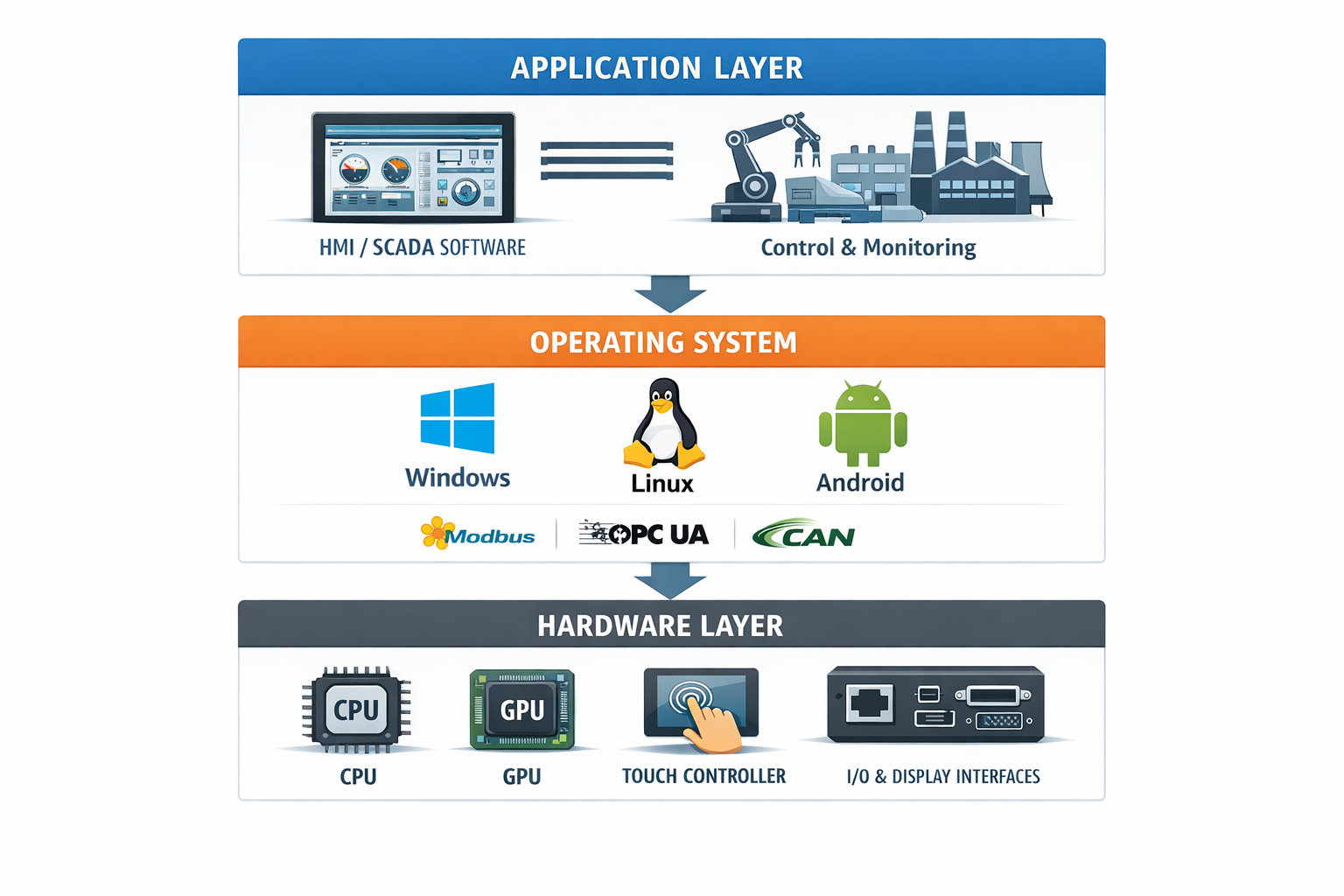
Industrial panel PCs are a core component of modern HMI (Human-Machine Interface) systems, enabling visualization, control, and communication in industrial environments.For a broader understanding of system architecture, see our industrial panel PC guide,which explains how hardware, operating systems, and applications are structured in industrial deployments.
Selecting the right industrial panel PC operating system is a critical engineering decision. It directly impacts software compatibility, system reliability, lifecycle management, and integration complexity.
An unsuitable OS choice can lead to:
For OEMs and system integrators, the operating system should be evaluated as part of the overall system architecture rather than as a standalone software decision.
The main operating systems used in industrial panel PCs include:
| Criteria | Windows (IoT / Pro) | Linux (Ubuntu / Yocto) | Android |
|---|---|---|---|
| Typical use | SCADA / PLC systems | Embedded / OEM systems | UI terminals |
| Software compatibility | High | Moderate (may require porting) | Limited (industrial) |
| Customization | Low | High | Moderate |
| Stability | High (with update control) | Very high | Moderate |
| Licensing | Commercial | Open-source | Open-source |
| Boot time | Medium | Fast | Fast |
In most industrial deployments, the decision is primarily between Windows and Linux, depending on application compatibility and lifecycle requirements.
Use the following guidelines to narrow down your OS choice:
Windows is suitable when:
Linux is suitable when:
Android is suitable when:
RTOS or no OS is suitable when:
An industrial panel PC operating system functions as a middleware layer between hardware and application software.
It is responsible for:
The OS bridges:
This layer directly determines system responsiveness, hardware compatibility, and long-term stability.
In most industrial systems, OS selection is determined by application requirements:
Selecting an OS before validating application compatibility is a common integration risk.
Driver reliability directly affects system uptime.
Critical components include:
Linux provides flexibility but requires validation, especially for custom hardware platforms.
Industrial deployments typically require 5–10 years of operation.
Linux is often preferred for long-term OEM deployments.
Industrial systems must tolerate:
Mitigation strategies include:
These approaches reduce the risk of data corruption.
This is critical for motion control, safety monitoring, and time-sensitive data acquisition.
Fast startup and recovery are important in:
Linux systems can be optimized for fast boot and automated recovery using watchdog mechanisms.
In practical industrial deployments, the operating system must be validated together with hardware to ensure stable operation.
This typically includes:
Pre-configured OS images and validated driver support are commonly used to reduce integration risk and improve system consistency.
Selecting an industrial panel PC operating system is a system-level engineering decision that directly affects:
In most applications:
The appropriate choice depends on application requirements, system architecture, and long-term deployment strategy.
Not sure which operating system fits your application?
Provide the following details:
A validated OS and hardware configuration can then be defined based on system requirements to reduce integration risk.
1. What is the most common OS for industrial panel PCs?
Windows and Linux are the most widely used, depending on compatibility and customization requirements.
2. Linux vs Windows: which is better for industrial use?
Windows is preferred for compatibility, while Linux is suitable for customization and long lifecycle deployments.
3. Can industrial panel PCs run Android?
Yes, mainly for UI-based systems such as kiosks, but with limited industrial protocol support.
4. How long does an industrial OS last?
Typically 5–10 years depending on long-term support and update strategy.
5. Does the OS affect touch performance?
Yes. Driver stability and OS-level input handling directly affect responsiveness and accuracy.
Introduction Industrial panel PCs are a core component of modern HMI (Human-Machine Interface) systems, enabling visualization, …

Introduction In industrial system design, panel PC I/O ports are a primary factor in determining how …
Introduction In industrial system design, selecting between an embedded PC and a panel PC is primarily …
Introduction In OEM equipment development, selecting an industrial panel PC supplier is not simply a purchasing …
Send your application details. We respond with configuration direction and next steps.