What Is an Industrial Panel PC? Components, Types and Applications

An industrial panel PC is a computer with a built-in display, usually a touchscreen, designed for …
Eagle Touch Engineering Team
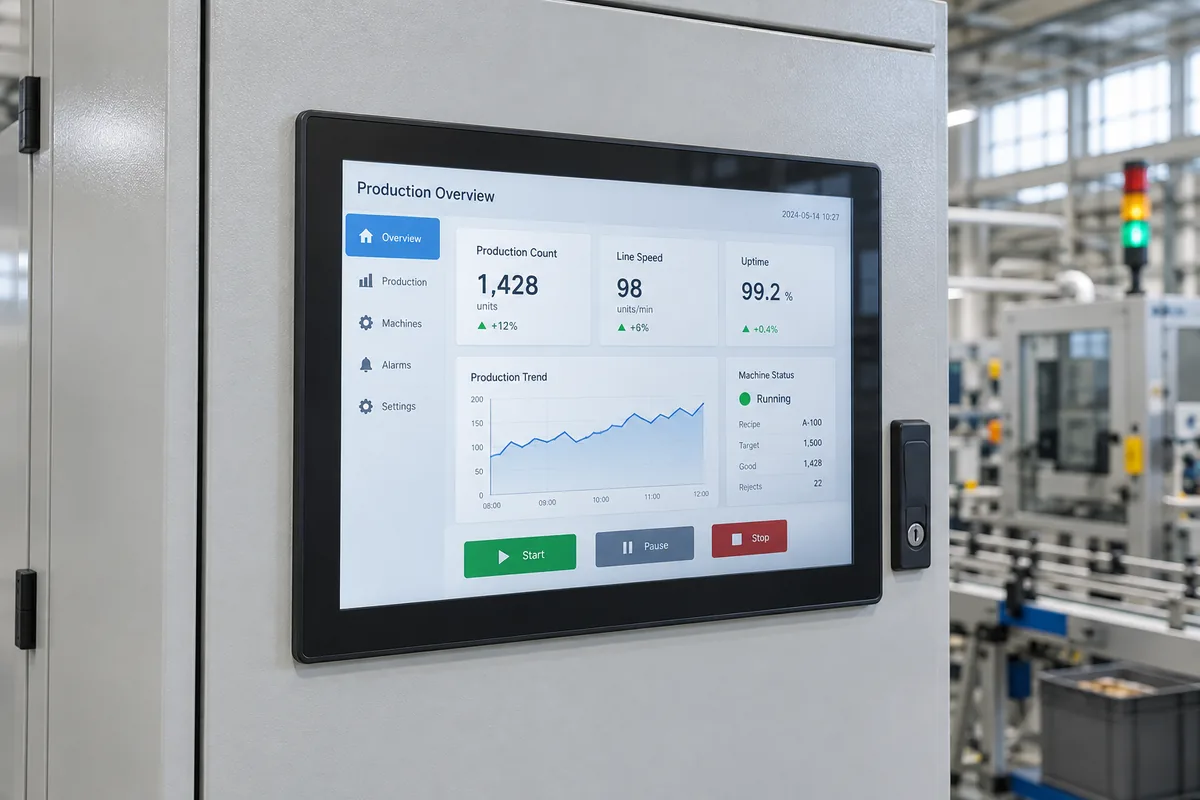
An industrial panel PC is a computer with a built-in display, usually a touchscreen, designed for installation in industrial equipment or work areas. It combines computing hardware and an operator interface in one assembly. Depending on the application, it can display machine status, accept operator commands, record production data or run equipment software.
Unlike a touch monitor, a panel PC has its own processor, memory and storage. It runs the application locally rather than relying on a separate computer to generate the screen content.
Behind the screen are the computing hardware, power circuitry and connections needed to run the application and communicate with other equipment.
| Component | What it does |
|---|---|
| Display and backlight | Produce the visible image, including controls, alarms, instructions and process data. |
| Touch sensor and controller | Detect touch input and pass it to the computer. Projected capacitive and resistive touch are common options. |
| Processor and mainboard | Run the operating system and application, process data and manage connected devices. Platforms include x86 and ARM designs. |
| Memory and storage | RAM holds working data. An SSD or embedded storage holds the operating system, applications and saved files. |
| Power circuitry | Converts the specified input supply into the voltages required internally. Input range and protection features vary by model. |
| Communication interfaces | Connect networks, controllers and peripherals through interfaces such as Ethernet, USB and serial ports. |
| Housing and cooling components | Support the assembly, provide mounting points and carry heat away from internal components. |
The hardware also needs a supported operating system, drivers and application software. Windows, Linux and Android are available on different platforms, but they are not interchangeable on every unit.
Connections require software support too. An Ethernet port provides a network connection; it does not automatically make the panel PC compatible with every industrial communication protocol.
Consider a packaging machine with a panel PC installed in its cabinet door. The operator selects a recipe, enters a target quantity and starts a production run.
The panel PC provides the interface between the operator and the application. The exact division of work depends on the system: some units run local software, while others display a browser-based application hosted elsewhere.
A panel PC is not automatically a PLC replacement. PC-based machine control requires suitable control software, I/O and timing behaviour. Safety functions also require an appropriate safety control architecture; an ordinary touchscreen application does not provide that by itself.
An office all-in-one computer also combines a display and processor. An industrial panel PC is designed around the installation, operating conditions and support needs of industrial equipment.
The assembly may fit through a cabinet cutout, mount inside a kiosk or attach to a support arm. Its bezel, fixing points, connector positions and installation depth affect how it becomes part of the machine.
On a cabinet-mounted model, the operator may see only a sealed front bezel, while the computer, connectors and cooling surfaces remain inside the cabinet.
Depending on the model, features can include front-panel sealing, extended operating temperature ranges and resistance to specified vibration conditions.
These capabilities have defined limits. A front IP65 rating does not establish the same protection for the rear housing and connectors. An ingress rating alone also does not establish resistance to cleaning chemicals, condensation or prolonged outdoor exposure.
Fanless models transfer heat through heat spreaders, heatsinks or the housing. Fan-cooled models use airflow to help remove it.
Both arrangements need somewhere for that heat to go. A computer installed behind a cabinet door operates in the air surrounding its rear enclosure, which may be considerably warmer than the room.
Equipment manufacturers may need the same hardware configuration across successive production batches, along with supported drivers, service documentation and notice of component changes.
These provisions help maintain a machine design over time, but they should be confirmed with the supplier. The word “industrial” does not guarantee a particular service life, supply period or operating temperature.
Panel PCs are commonly described by their enclosure and installation arrangement. These categories can overlap.
| Type | Installation arrangement | What the description tells you |
|---|---|---|
| Panel-mount | Fits through a cutout, leaving the bezel visible at the front and the computing section behind the panel. | Designed for integration into a panel or cabinet. Front sealing depends on the specified installation. |
| Open-frame | Mounts inside a machine or kiosk using a frame or dedicated fixing points. | Intended for integration into the equipment builder’s surrounding structure. Required environmental protection must be addressed in the final assembly. |
| Fully enclosed | Has a finished housing for exposed installation, often on a bracket or support arm. | The computer is enclosed, but the actual ingress rating still needs to be confirmed. |
VESA describes a mounting interface, not a protection category. A unit can have both panel-mount features and VESA mounting holes. Likewise, “fanless” describes the cooling arrangement rather than the enclosure’s waterproof performance.
The application determines what the panel PC does. Similar-looking units can perform quite different tasks.
A panel PC can run human-machine interface (HMI) software for recipe selection, parameter entry, alarm history and maintenance screens. It allows operators to interact with the machine’s control system from a fixed operating position.
At an assembly station, the application might display work instructions, receive input from a barcode scanner and record completed operations against a part number. The panel PC connects the operator’s work with the production record.
A panel PC can display measurements, guide an operator through a test sequence and store results. With suitable processing hardware and software, it may also analyse inspection data locally. Cameras and measuring instruments remain separate system components.
In a kiosk, the panel PC runs the user interface and communicates with devices such as scanners, printers and payment terminals.
The installation still determines the environmental requirements. A terminal indoors and one exposed to sunlight and rain may perform the same transaction while needing very different displays, cooling arrangements and enclosures.
A panel PC is useful when the display and computing hardware belong at the same operating point. It can reduce separate mounting work and eliminate the external video and touch cables between a monitor and host computer. Power, network and peripheral connections are still needed.
A separate computer and monitor may be more practical when processing hardware needs a different location, frequent upgrades or independent replacement. Integrated units also vary in serviceability; a failed component does not necessarily require replacing the entire panel PC.
If you are deciding whether computing should be built into the display, see our panel PC vs touch monitor comparison. For equipment layout and maintenance considerations, read the panel PC vs box PC comparison.
Once the system arrangement is clear, use the industrial panel PC selection guide to work through software, installation requirements and sample validation.
For an OEM project, Eagle Touch can review the display, computing platform, interfaces and mounting arrangement together. Explore our custom industrial panel PC solutions, or share your application and equipment drawing to begin a configuration review.
An industrial panel PC is a computer with a built-in display, usually a touchscreen, designed for …

An embedded PC is a computer configured to work as part of a machine or larger …

Start with the software the panel PC must run and the conditions it must fit. Then …

Choosing an industrial panel PC IP rating starts with two questions: what dust and water exposure …
Share your application, requirements, or current challenge. Our team will review the details and recommend a practical way forward.