PCAP vs Resistive Touch Screen in Industrial Equipment

Introduction Industrial Touch Screen are widely used in industrial control systems and embedded equipment. Operator panels, …

Industrial Touch Screen are widely used in industrial control systems and embedded equipment. Operator panels, self-service kiosks, EV charging stations, and smart infrastructure devices frequently rely on touch displays instead of mechanical buttons.
When selecting a touch interface, engineers typically compare PCAP vs resistive touch screen technologies. Each sensing method has different characteristics that influence system design, including:
Industrial equipment environments differ significantly from consumer electronics. Systems may operate under conditions such as:
Because industrial platforms often remain in service for many years, selecting the appropriate touch technology requires understanding how each sensing method performs under real operating conditions.

Both technologies allow users to interact directly with a display surface, but their sensing principles and mechanical structures are fundamentally different.

Resistive touch screens detect input through mechanical pressure applied to two conductive layers.
A typical resistive touch screen structure includes:
When pressure is applied, the flexible top layer bends and contacts the conductive layer below. The controller measures voltage changes across the layers to determine the touch location.
Because the sensing mechanism relies on pressure rather than electrical conductivity, resistive touch screens can detect input from:
For this reason, resistive displays have historically been common in industrial automation systems and medical equipment.

Projected capacitive (PCAP) touch screens detect input through changes in an electrostatic field.
A PCAP display contains a grid of transparent conductive electrodes embedded within the glass structure. These electrodes generate a capacitive sensing field across the surface.
When a conductive object, such as a human finger, approaches the display surface, it alters the capacitance at specific points within the grid. The touch controller detects these variations and calculates the touch position.
PCAP systems support several capabilities that are difficult to achieve with resistive technology, including:
Because the sensing electrodes are protected inside glass layers, PCAP displays generally provide higher surface durability compared with film-based technologies.
Understanding how each sensing architecture works helps explain differences in performance, reliability, and integration requirements.
Resistive touch screens are typically implemented using:
Industrial systems commonly use 5-wire resistive designs.
In this configuration:
When pressure connects the two layers, the controller measures voltage gradients along the X and Y axes to determine touch coordinates.
This architecture provides:
However, the flexible top layer is subject to mechanical wear after long-term usage.
PCAP touch screens use a matrix of indium tin oxide (ITO) electrodes arranged in rows and columns.
Two sensing approaches are typically used:
Most industrial PCAP displays rely on mutual capacitance sensing, where the controller scans intersections between electrode rows and columns.
Changes in capacitance at these intersections indicate the presence and location of a touch event.
This architecture allows PCAP displays to detect multiple simultaneous touch points, enabling modern graphical interfaces.
Both resistive and PCAP systems require dedicated touch controller integrated circuits.
Resistive controllers measure voltage differences across conductive layers and convert them into touch coordinates.
PCAP controllers are more complex. They continuously scan the electrode matrix and perform signal processing to filter environmental noise.
Industrial PCAP implementations often include:
These features are important when integrating PCAP touch screens into industrial systems with high electrical noise or outdoor exposure.
When evaluating PCAP vs resistive touch screen technologies, engineers should consider several environmental and operational factors.
Resistive touch screens detect pressure and can reliably register input from:
This makes them suitable for equipment used in factories, laboratories, and workshops.
PCAP screens typically require a conductive object such as a finger. Some industrial PCAP controllers support glove mode, but performance depends on glove material and thickness.
Resistive displays use a flexible PET film as the top layer. Over time this layer may experience:
PCAP displays use tempered glass surfaces, which provide higher resistance to:
For equipment installed in public or high-use environments, glass surfaces typically offer longer service life.
The additional film layer used in resistive screens slightly reduces light transmission.
PCAP displays generally offer higher optical clarity and brightness, because the sensing electrodes are embedded inside the glass layers.
This difference becomes more noticeable in systems that use:
Industrial touch interfaces must operate reliably under challenging environmental conditions.
Key environmental factors include:
Resistive screens generally tolerate water droplets well because activation requires physical pressure.
PCAP screens may occasionally detect water as unintended touch input. However, modern industrial controllers include filtering algorithms that significantly reduce this issue.
Resistive touch screens contain flexible mechanical layers that gradually wear over time.
Industrial resistive displays are typically rated for several million touch activations.
PCAP touch screens have no flexible sensing layer and typically offer longer mechanical durability.
However, PCAP systems depend more heavily on controller electronics and firmware configuration. When integrated into panel PCs or embedded systems, compatibility with operating systems and drivers should be verified.
| Feature | PCAP Touch Screen | Resistive Touch Screen |
|---|---|---|
| Input method | Finger or conductive object | Finger, stylus, tool |
| Multi-touch support | Yes | Typically single-touch |
| Surface material | Glass | PET film |
| Scratch resistance | High | Moderate |
| Glove compatibility | Limited (controller dependent) | Excellent |
| Optical clarity | Higher | Slightly reduced |
| Integration complexity | Higher | Lower |
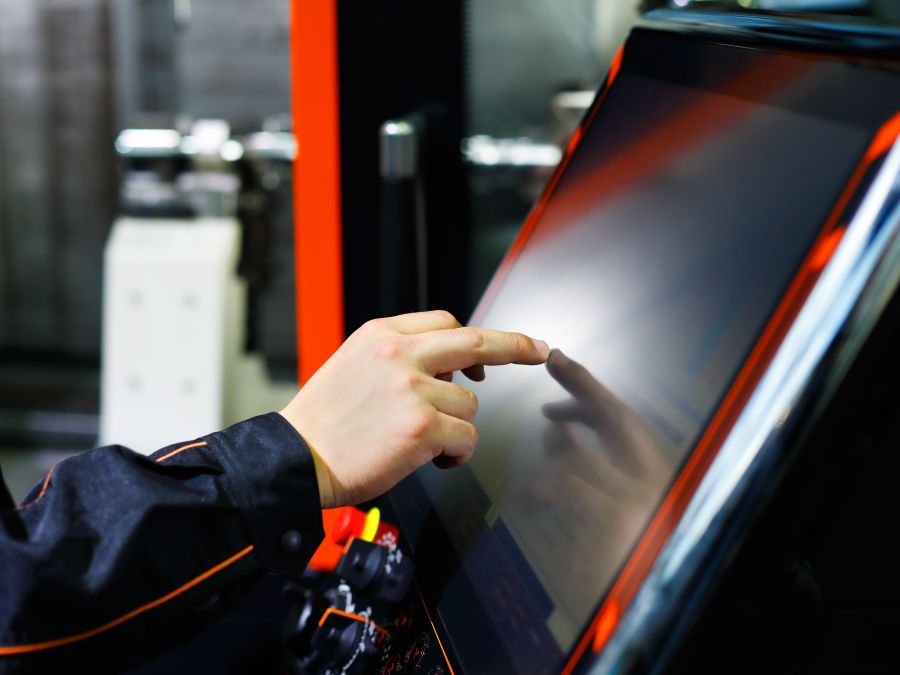
Resistive touch screens remain common in:
Operators often interact with these systems while wearing gloves or using styluses.
Public EV charging terminals increasingly adopt PCAP displays.
Glass surfaces provide improved durability in outdoor environments and support modern graphical interfaces.
Ticket machines, parking terminals, and information kiosks often use PCAP touch screens because the glass surface withstands frequent public interaction and regular cleaning.
Control rooms and monitoring stations often integrate industrial monitors or panel PCs with touch capability.
The choice between PCAP and resistive technologies depends on operator input requirements and environmental conditions.
When choosing between PCAP vs resistive touch screen technologies, engineers can use the following guidelines.
PCAP touch screens are often suitable when systems require:
Typical examples include kiosks, smart infrastructure devices, and public terminals.
Resistive touch screens may be preferable when systems require:
These characteristics are common in factory equipment and industrial control systems.
Selecting between PCAP vs resistive touch screen technologies is an important design decision in industrial equipment development.
Resistive touch screens provide reliable operation with gloves and styluses and remain widely used in machine control interfaces.
PCAP displays offer improved surface durability, higher optical clarity, and support for multi-touch interaction.
For OEM equipment designers and system integrators, the most suitable solution depends on:
Careful evaluation of these factors helps ensure stable and reliable touch interaction throughout the equipment’s service life.
What is the lifespan of a resistive touch screen?
Industrial resistive touch screens are typically rated for several million touch activations before the flexible surface layer begins to wear.
Can PCAP touch screens work with gloves?
Some industrial PCAP controllers support glove operation modes, but performance depends on glove thickness and material.
Does water affect capacitive touch screens?
Water droplets can alter the capacitive field and may cause unintended inputs. Industrial PCAP controllers typically include filtering algorithms to reduce this effect.
Are PCAP touch screens more durable than resistive screens?
PCAP displays generally use tempered glass surfaces, which provide better resistance to scratches and surface wear.
Which touch technology is easier to integrate?
Resistive touch screens typically require simpler controller electronics. PCAP systems may require additional tuning to manage environmental noise and sensitivity.
Introduction Industrial Touch Screen are widely used in industrial control systems and embedded equipment. Operator panels, …
Introduction In EV charging equipment, the display system is more than a graphical interface. It is …
Introduction Industrial equipment interfaces have evolved as control systems have become increasingly software-driven. Traditional operator panels …
Engineering Considerations Beyond Basic Signal Compatibility In industrial Panel PC and monitor projects, LCD interface selection …
Send your application details. We respond with configuration direction and next steps.