What Is an Industrial Panel PC? Components, Types and Applications

An industrial panel PC is a computer with a built-in display, usually a touchscreen, designed for …
Eagle Touch Engineering Team
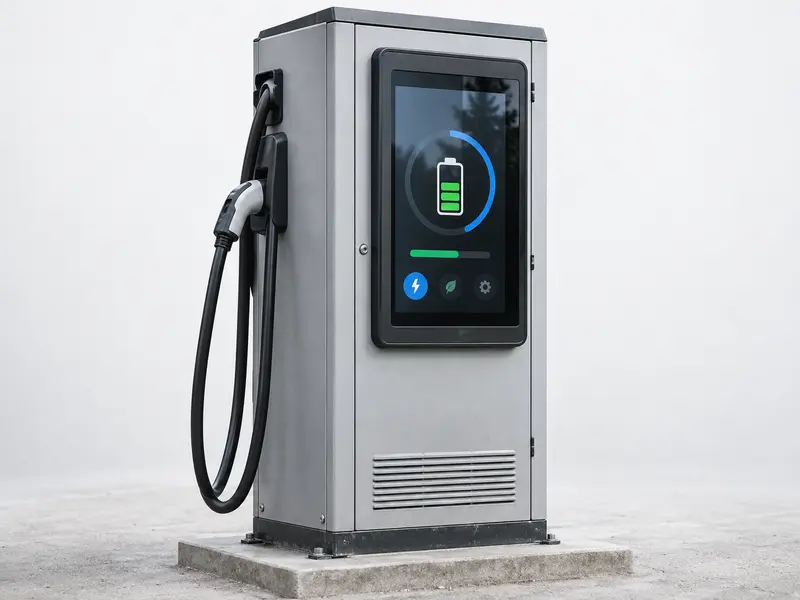
An EV charger display should be selected as part of the charging system, not as a standalone screen. A compact AC charger may need only a small touch LCD module for status information and QR guidance. A public DC charger often needs a high-brightness industrial touch monitor for authentication, payment, charging data and fault messages.
The correct solution depends on the user workflow, sunlight and rain exposure, touch conditions, cabinet structure, host interface, thermal load and service plan. For an OEM or system integrator, the important question is not simply how many nits the display has. It is what the display must do inside the finished charger and what conditions it must withstand during operation.
An EV charger combines a public-facing user interface with industrial electrical equipment. The display must give clear instructions to drivers who may be unfamiliar with the charger, while operating beside power modules, contactors, communication hardware and cooling components.
This creates requirements that do not apply to a standard indoor monitor:
The display is responsible for visual output and user interaction. Charging control, power conversion, payment services and backend communication remain functions of the charger controller or industrial computer. In a typical design, the host provides the image through HDMI, DisplayPort or an LCD interface, while touch data returns through USB, I²C or another defined connection. A panel PC is suitable when the computing platform also needs to be integrated with the display.
Start with the charger architecture. The display format should match the existing controller, the available cabinet space and the way the equipment will be serviced.
| Display format | When it fits | Points to confirm |
|---|---|---|
| Touch LCD module | The charger manufacturer already has a controller board and wants to integrate the LCD and touch panel behind a custom front structure. | LCD signal, touch controller, cover-glass stack, cable routing, mounting support and sealing. |
| Industrial touch monitor | The charger host provides a video signal and the project needs a complete display assembly for open-frame or panel-mount installation. | Video input, touch interface, DC input, installation depth, connector direction, front protection and service access. |
| Panel PC | The display must run the user interface, local application or network functions together with an embedded computer. | Operating system, processor, memory, storage, software image, heat dissipation, power consumption and field replacement. |
For many outdoor charging projects, an outdoor touch monitor is a practical starting point because the display, touch interface, front structure and power input can be reviewed together. Projects with an existing main board may be better served by a touch LCD module. Eagle Touch’s broader EV charging display solutions can then be compared with the cabinet and production plan.
Outdoor readability is not determined by brightness alone. Many public outdoor projects begin around 1,000 nits, but the final requirement depends on the installation angle, direct-sun exposure, glass reflection, contrast, surface treatment and cabinet temperature.
Review the complete front stack whenever possible. A high-brightness LCD behind reflective glass can still be difficult to read. Optical bonding may reduce internal reflections between the LCD and touch assembly, while AG or AR treatment changes how external light is reflected. These options should be selected together with the viewing angle and enclosure design. See the sunlight-readable monitor range for additional outdoor display considerations.
PCAP touch is often suitable for a sealed, flat front surface, but outdoor performance depends on the complete touch stack. A controller that works well with a bare finger on a bench may respond differently through thick glass, a winter glove or a film of water.
Glove sensitivity and water rejection should be evaluated with the final cover glass, grounding method, metal cabinet and cable arrangement. If heavy gloves or pressure-based input are central to the application, resistive touch may also be considered. The choice should follow the actual user conditions rather than a general preference for one touch technology.
Power conversion modules, contactors and power supplies can heat the display compartment, especially inside a sealed cabinet exposed to the sun. A high-brightness backlight or integrated computer adds its own thermal load. Check the display’s operating temperature at the intended brightness; the storage-temperature range is not a substitute.
Electrical integration deserves the same attention. Poor grounding, an unstable DC supply or unshielded cables can cause false touches, image flicker, intermittent USB connections or resets when the charger switches power. Cable routing, connector security, shielding and separation from high-current wiring should be reviewed with the display installed in the final cabinet.
Public chargers may be touched, cleaned, scratched or struck repeatedly. If the project specifies IK10, the glass alone is not enough to prove compliance. The cover glass, frame, support, gasket and mounting condition form the impact-resistant assembly and should be tested in the agreed configuration. The IK10 touchscreen guide explains why the complete structure matters.
Front IP65 is also different from whole-charger protection. The display-to-cabinet joint, gasket compression, frame flatness and cable openings all need to be considered. The protection rating should describe the assembled product that will be installed, not an isolated component.
Before fixing the model, confirm the cabinet opening, mounting depth, bracket position, cable direction and connector clearance. A display that fits the front opening but blocks internal components or cannot be removed through the service door is not a finished solution.
For long-life charging equipment, the display should be replaceable without disturbing the high-power section. The LCD, touch controller, connectors and mechanical revision should remain controlled during repeat production so that a field replacement does not become a new engineering project.
The display requirement changes with the user workflow and the operating environment. The following table provides a design direction, not a fixed specification.
| Charger type | Typical display use | Main design direction |
|---|---|---|
| Compact AC charger | Basic status, QR guidance, connection instructions and simple local operation. | Compact touch LCD module or small touch monitor, with attention to cabinet space, power consumption and straightforward service access. |
| Public DC fast charger | Connector selection, authentication, payment, charging progress, pricing and fault instructions. | High-brightness industrial touch monitor with stronger attention to sunlight, wet/glove touch, impact protection, heat and electrical interference. See the detailed DC fast charger touch monitor guide. |
| Fleet charging system | Local status, user confirmation and service access, often supported by centralized management. | Choose the display around the required local workflow, host interface and maintenance method rather than adding unnecessary interface complexity. |
| Residential charging equipment | Basic indicators or limited local information, with many functions handled through a mobile application. | A full graphical touch display may be optional. If one is used, compact size, low power and cost control may matter more than public-use protection. |
The final choice should still be checked against the viewing distance, cabinet drawing, host system and production plan.
A desk sample does not reproduce the conditions inside a working charger. Install the engineering sample in the intended cabinet and confirm:
Agree on the test method, responsibility and acceptance criteria before sampling. A certificate for one component does not automatically cover the complete charger assembly.
A supplier can recommend the right display more accurately when the first enquiry includes:
A cabinet drawing, cutout dimension or reference photograph is often enough for an initial engineering review. Eagle Touch can assess the display format, optical stack, touch configuration, mounting structure and validation risks as part of a custom touch solution.
There is no single value for every installation. Many outdoor projects begin around 1,000 nits, but the final target should be checked with the completed glass, surface treatment, bonding method, viewing angle and cabinet temperature.
No. Public chargers with payment, authentication or local diagnostics commonly need a graphical touch interface. Residential or centrally managed fleet equipment may use a mobile application, indicator lights or a simpler local display.
No. The requirement depends on public access, impact risk and the cost of field failure. When IK10 is specified, verify the complete display and mounting assembly under the agreed test method.
No. It is most useful when direct sunlight, temperature cycling, thick protective glass or expensive field replacement makes internal reflection and condensation a concern. A shaded installation with easy service access may justify a different structure.
Send the display size, cabinet drawing or current specification for review. Eagle Touch can recommend whether the project is better suited to a touch LCD module, an industrial touch monitor or a panel PC, then confirm the key display, touch, mechanical and validation requirements.
An industrial panel PC is a computer with a built-in display, usually a touchscreen, designed for …

An embedded PC is a computer configured to work as part of a machine or larger …

Start with the software the panel PC must run and the conditions it must fit. Then …

Choosing an industrial panel PC IP rating starts with two questions: what dust and water exposure …
Share your application, requirements, or current challenge. Our team will review the details and recommend a practical way forward.