What Is an Industrial Panel PC? Components, Types and Applications

An industrial panel PC is a computer with a built-in display, usually a touchscreen, designed for …
Eagle Touch Engineering Team
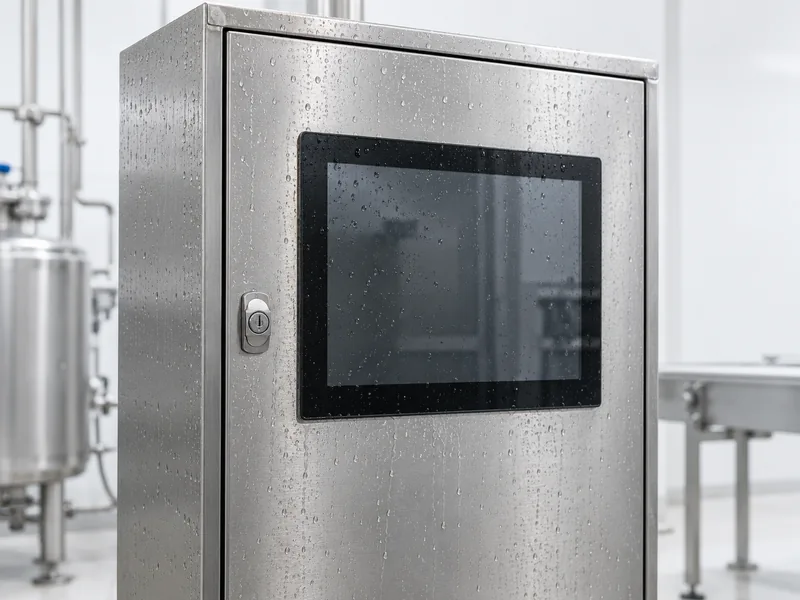
Choosing an industrial panel PC IP rating starts with two questions: what dust and water exposure will the equipment face, and which parts will be exposed? A unit installed through a control-cabinet door faces different conditions from a terminal with its rear housing and cables exposed to cleaning water.
For cabinet installations, front IP65 protection may be sufficient when the rear is protected and the specified mounting conditions are met. Exposed installations require attention to the whole enclosure and its connections. Powerful jets, temporary immersion and hot, high-pressure cleaning need different evidence of protection.
Before comparing quotations, describe the installation and cleaning method. “Waterproof panel PC” leaves too much open to interpretation.
An IP code describes enclosure protection under defined test conditions. The first digit concerns access to hazardous parts and solid-object ingress; for the ratings below, 6 indicates dust-tight protection. The water-protection designation identifies the applicable water test.
| Rating | Water exposure addressed | What buyers should check |
|---|---|---|
| IP65 | Water jets | Whether the rating covers the exposed face or complete enclosure |
| IP66 | Powerful water jets | Whether the cleaning method falls within the tested conditions |
| IP67 | Temporary immersion under specified conditions | Test depth, duration and separate evidence for any required jet protection |
| IP69 / IP69K | High-pressure, high-temperature water jets under the applicable standard | Exact standard, designation and configuration tested |
IP67 is not a substitute for confirmed water-jet protection. A device required to withstand both powerful jets and temporary immersion should have evidence for both, such as an IP66/IP67 rating.
For IP69 or IP69K claims, ask for the exact test standard and designation: IEC 60529 and ISO 20653 use different test specifications.
A front-rated panel PC protects the exposed front assembly under its specified installation conditions. Its rear housing, ventilation openings and standard USB or Ethernet ports may have a different rating.
The cabinet protects those rear components. Its doors, cable entries and other openings therefore matter too. A front IP65 panel PC does not give the finished cabinet an IP65 rating automatically.
This arrangement can suit machine control panels where only the operator-facing surface is exposed. Confirm the cutout, panel thickness, gasket and mounting requirements before releasing the cabinet drawing.
A terminal mounted on an arm or stand may expose its front, back and cable connections to the same environment. Check protection across the complete installed assembly.
An enclosure rating may depend on specified mating connectors, tightened cable glands and caps on unused ports. A connector’s appearance alone is insufficient: an M12 connection, for example, must use the correct mating parts and assembly method.
For the mechanical choices behind these arrangements, see our panel PC mounting guide.
A dry assembly line cleaned with a cloth has different needs from equipment washed with a hose. Front IP65 may fit a cabinet-mounted operator panel, provided the cabinet also keeps dust away from the rear electronics. Low water exposure does not remove the need for dust protection.
Rain does not automatically call for IP67. Wind-driven water, splash direction, pooling around the bezel and exposed connections determine what protection is needed. Jet protection and immersion protection should be assessed separately against those conditions.
An outdoor kiosk with a protected rear compartment can use a different arrangement from a freestanding terminal exposed on every side.
Record water pressure, flow, temperature, nozzle distance and cleaning duration. Compare these conditions with the product’s test evidence and permitted cleaning instructions. IP65 and IP66 address different jet conditions; neither label authorizes every hose or pressure-washer setting.
Where cleaning involves close-range hot, high-pressure jets, investigate appropriately tested IP69 or IP69K equipment. Also review cleaning chemicals, seals, surface finishes and areas that trap residue.
A food-processing location alone does not determine the rating. A terminal outside the washdown zone may face very different exposure from one beside an open processing line.
Where flooding could submerge the unit, the expected depth and duration become part of the specification. IP67 addresses temporary immersion under defined conditions, including the tested connection arrangement. It does not provide blanket approval for underwater operation.
A correctly specified panel PC can still leak through an unsuitable installation. Check these points during sample assembly:
Validate the production-intent installation, including its cables. Testing a bare unit with every port capped does not establish protection for a different configuration used in the field.
IP protection addresses ingress. Several other requirements need separate checks:
| Requirement | What to verify |
|---|---|
| Touch operation with water present | Droplet rejection, wet-finger response and acceptable behavior during cleaning |
| Condensation | Humidity and temperature changes inside the installed enclosure |
| Chemical resistance | Compatibility with the actual cleaner, concentration and contact time |
| Thermal performance | Continuous workload at the expected cabinet or ambient temperature |
A sealed design can dissipate heat effectively when engineered for its workload. The IP number alone does not predict CPU performance or operating temperature.
For water-related touch behavior, see our waterproof touch screen design guide. For cooling choices, refer to fanless vs fan-cooled industrial PCs.
Ask the supplier to confirm these items against the proposed configuration:
If your sample differs from the tested model, ask how the change affects the claim. A different connector arrangement or enclosure opening deserves review before approval.
Agree on sample acceptance checks before production, using the final installation and functional checks after exposure. Add thermal or cleaning validation where the application requires it.
A useful inquiry describes the arrangement before requesting a rating. For example:
The panel PC will be mounted in a cabinet door. Only the front face is exposed to routine cleaning; the rear connectors remain inside the cabinet. Please confirm the front protection rating, installation requirements and permitted cleaning conditions.
Attach the actual cleaning method and mounting drawing so the supplier can evaluate the exposure.
Not necessarily. Standard rear connectors may be suitable inside an adequately protected cabinet. Exposed connections need protection appropriate to their environment.
Follow the manufacturer’s instructions. An ingress rating does not establish that powered cleaning is permitted or that touch input will remain stable. Prevent unintended commands during cleaning.
It can. Connector seals, cable diameter, gland fit and tightening all affect the installed protection. Use approved replacements or confirm equivalence before fitting them.
For industrial panel PC projects, send Eagle Touch your installation drawing and exposure requirements, together with the required interfaces and quantity. Contact our team to review a suitable configuration and agree on validation before sampling.
An industrial panel PC is a computer with a built-in display, usually a touchscreen, designed for …

An embedded PC is a computer configured to work as part of a machine or larger …

Start with the software the panel PC must run and the conditions it must fit. Then …

Choosing an industrial panel PC IP rating starts with two questions: what dust and water exposure …
Share your application, requirements, or current challenge. Our team will review the details and recommend a practical way forward.