What Is an Industrial Panel PC? Components, Types and Applications

An industrial panel PC is a computer with a built-in display, usually a touchscreen, designed for …
Eagle Touch Engineering Team
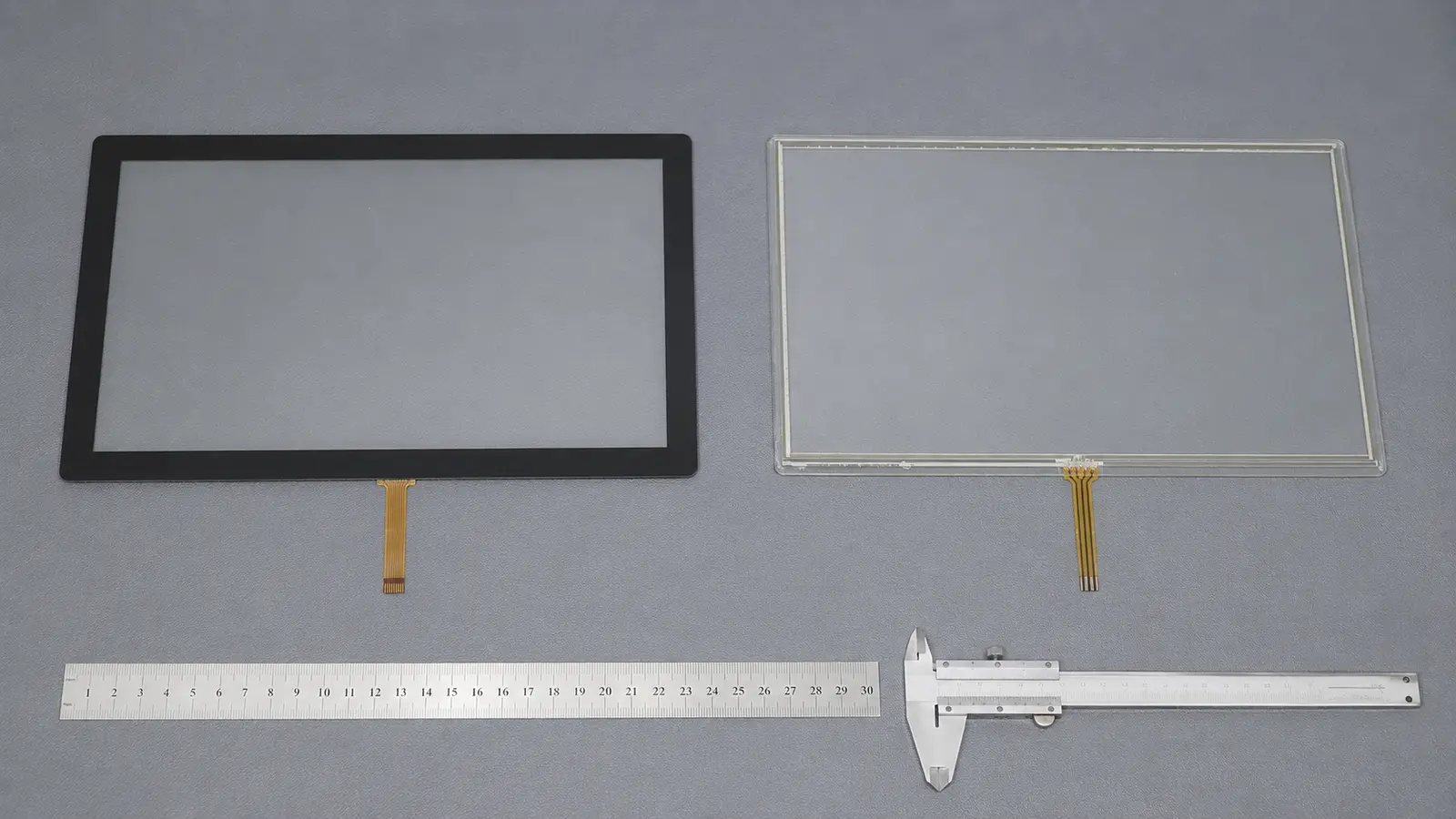
For most new industrial HMIs with a sealed glass front, PCAP is the practical starting point. It offers better optical clarity, a durable front surface and support for multi-touch interfaces.
Resistive touch is still the safer choice when the operator must use thick non-conductive gloves, a plastic stylus or almost any firm object. It is also useful for legacy equipment where changing the original touch technology would add unnecessary integration risk.
The decision should not be based on which technology is newer. It should be based on the operator, environment, enclosure and control system.
| Requirement | Projected Capacitive (PCAP) | Resistive Touch |
|---|---|---|
| Touch method | Light touch from a finger or compatible conductive stylus | Physical pressure from a finger, glove, stylus or firm object |
| Multi-touch | Normally supported | Conventional 4-wire and 5-wire designs are normally single-touch |
| Thick non-conductive gloves | Possible only with a suitable sensor, controller and tuning | Normally the more predictable choice |
| Surface | Usually a rigid glass or polymer cover lens | Flexible polyester film on conventional film/glass designs |
| Scratch resistance | Generally higher with a suitable glass cover | Lower because the exposed film can be scratched |
| Optical clarity | Generally better, depending on the complete stack | Lower transmission and more haze from the flexible layers |
| Water on the surface | Behaviour must be defined and tuned | Droplets normally do not create pressure input, but edge sealing is essential |
| Electrical noise | More dependent on grounding, shielding and controller signal margin | Generally less sensitive to electrical noise |
| Calibration | Normally not required during routine use | Usually requires initial calibration and may need recalibration |
| Custom front design | Well suited to printed cover glass, logos, holes and shaped outlines | More constrained by the active area, tail and actuation structure |
| Wear mechanism | No flexible sensing surface to press repeatedly | Film and spacer structure wear mechanically over time |
| Integration | Requires controller matching and final-assembly validation | Electrically simpler, but bezel pressure and calibration must be controlled |
| Project cost | Depends on sensor structure, cover lens, controller, tuning, customization and quantity | Depends on size, 4-wire or 5-wire structure, materials, customization and quantity |
These are starting points, not guarantees. Test the production glove and seal the finished assembly rather than relying on a component description.
A PCAP sensor uses a pattern of transparent conductive electrodes formed on glass or film. The controller scans the electrode grid and detects a change in capacitance when a finger or another compatible conductive object approaches the surface.
PCAP responds to a light touch, supports multi-touch and can operate through a cover lens. Its performance, however, depends on the complete stack. Glass thickness, gloves, water, LCD noise, power, cables, grounding and nearby metal can all change the available signal margin. Read the industrial PCAP touch screen guide for the deeper integration details.
A conventional resistive touchscreen has two transparent conductive surfaces separated by spacer dots. Its upper polyester layer bends under pressure and contacts the lower layer. The controller measures the resulting voltage and calculates the touch coordinates.
Because it responds to pressure, a gloved finger, plastic stylus or other firm object can operate it. Four-wire and five-wire designs have different coordinate-measurement and wear characteristics. If resistive touch is already the likely choice, see the 4-wire vs 5-wire resistive touchscreen guide.
“Glove operation” is not a complete specification. Thin nitrile gloves, leather work gloves, coated cut-resistant gloves and insulated winter gloves do not behave the same way.
Industrial PCAP can support many gloves, but the sensor, cover lens and firmware must provide enough signal margin. Test the actual glove on the final assembly; simply increasing sensitivity can introduce jumping coordinates or false touches.
Choose resistive touch when operation with a thick non-conductive glove or an ordinary plastic stylus is mandatory and multi-touch is not required. Choose PCAP when a light, familiar finger interface and gesture support matter more.
For glove-specific testing, use the glove-compatible touch screen guide.
Water requirements must describe behaviour, not just exposure. The equipment may need to:
Water changes the capacitive field, so each behaviour requires different PCAP firmware. Resistive touch does not normally react to a stationary droplet because pressure is required, but liquid ingress around the sensor edge can still damage the assembly.
Neither technology gives the finished equipment an IP rating by itself. The front gasket, adhesive, bezel, openings and enclosure determine ingress protection.
For public kiosks, EV chargers and equipment cleaned many times per day, a continuous PCAP cover lens usually offers the better front surface. Glass resists abrasion better than the exposed film used on a conventional resistive touchscreen and is easier to integrate into a flush front panel.
The cover lens still needs the correct material, strengthening method, edge support and chemical compatibility. Thicker glass does not automatically produce a higher IK rating; test the completed assembly. See the touch screen cover glass design guide. Sharp tools, repeated operation in one small area and aggressive cleaning can shorten the life of a resistive top film.
Motors, inverters, switch-mode power supplies, long cables and poor grounding can disturb a PCAP signal. A loose PCAP sample may work perfectly on a bench and become unstable after it is installed behind the LCD and connected to the production power supply.
PCAP can still be used, but grounding, shielding, cable routing and controller tuning become part of the touch design. If ghost touches or coordinate jumps appear, follow a structured touch screen interference check before increasing sensitivity.
Analog resistive touch is generally less sensitive to this type of interference. It can be the lower-risk option for a simple single-touch HMI in an electrically noisy legacy machine.
For a new glass-front HMI, PCAP normally provides more design freedom. The cover lens can extend beyond the LCD, carry printed borders and logos, and form part of a sealed front panel.
For a replacement project, match the original technology first. Changing from resistive to PCAP may affect the interface, driver, bezel, opening, calibration and software. For an existing resistive panel, confirm the outline, active area, viewing area, tail direction, pinout, connector and controller.
Multi-touch matters only when the software uses it. PCAP suits scrolling, zooming, drag actions and two-finger gestures. Resistive touch remains practical for large buttons, numeric entry, stylus use and legacy single-point interfaces.
| Application | Practical Starting Point | What Must Be Verified |
|---|---|---|
| EV charger or outdoor public terminal | PCAP | Wet behaviour, cover glass, sunlight readability, sealing and temperature |
| Self-service kiosk | PCAP | Cleaning chemicals, touch frequency, front sealing and vandal resistance |
| New industrial HMI with a modern graphical interface | PCAP | Glove type, grounding, EMC and required gestures |
| CNC or machine control with thick gloves | Resistive, or tuned PCAP if a glass front is essential | Actual glove, smallest button size and electrical environment |
| Test or measurement instrument using a plastic stylus | Resistive | Stylus tip, accuracy, calibration and surface wear |
| Legacy touchscreen replacement | Match the original technology first | Dimensions, FPC, pinout, controller, driver and calibration |
| High-use interface requiring frequent chemical cleaning | PCAP with a compatible cover lens | Chemical resistance, edge sealing and wet-touch behaviour |
| Electrically noisy equipment with simple single-touch control | Resistive is often the lower-risk starting point | Grounding, host interface and system-level EMC performance |
The application name alone should never make the decision. Two factory HMIs can require different touch technologies because one uses a bare finger behind a sealed glass front while the other uses thick gloves and a plastic stylus.
Before requesting a sample or quotation, provide:
Start with PCAP for a new industrial product that needs a durable glass front, clear optics and a modern interface. Start with resistive touch when universal pressure input, a thick non-conductive glove, plastic stylus compatibility or straightforward legacy replacement is the priority.
Do not release either choice for production from a specification sheet alone. Test the exact input method, glass, LCD, power supply, enclosure and environmental conditions together.
For an OEM project, send Eagle Touch the LCD drawing, input method, environment, interface and expected quantity. We can review the custom industrial touch screen structure and recommend a practical prototype configuration before tooling or volume production.
PCAP normally has better surface-wear and scratch resistance because it sits behind a rigid cover lens. A resistive screen’s flexible outer film remains a mechanical wear surface.
Sometimes. Performance depends on the glove, glass, sensor, controller, firmware and electrical noise. Resistive touch is more predictable with a thick non-conductive glove.
There is no universal answer. PCAP suits a sealed glass front but needs defined rain behaviour. Resistive is less likely to react to stationary droplets, but its film and edges still need protection. Brightness, UV, temperature and enclosure design also matter.
Conventional analog resistive touch normally requires initial coordinate calibration. PCAP does not normally need routine user calibration, although its controller and coordinate mapping must still match the system.
Conventional 4-wire and 5-wire resistive touchscreens are designed mainly for single-point input. Specialized multi-touch resistive technologies exist, but they are not the standard choice for most industrial OEM projects.
An industrial panel PC is a computer with a built-in display, usually a touchscreen, designed for …

An embedded PC is a computer configured to work as part of a machine or larger …

Start with the software the panel PC must run and the conditions it must fit. Then …

Choosing an industrial panel PC IP rating starts with two questions: what dust and water exposure …
Share your application, requirements, or current challenge. Our team will review the details and recommend a practical way forward.