What Is an Industrial Panel PC? Components, Types and Applications

An industrial panel PC is a computer with a built-in display, usually a touchscreen, designed for …
Eagle Touch Engineering Team
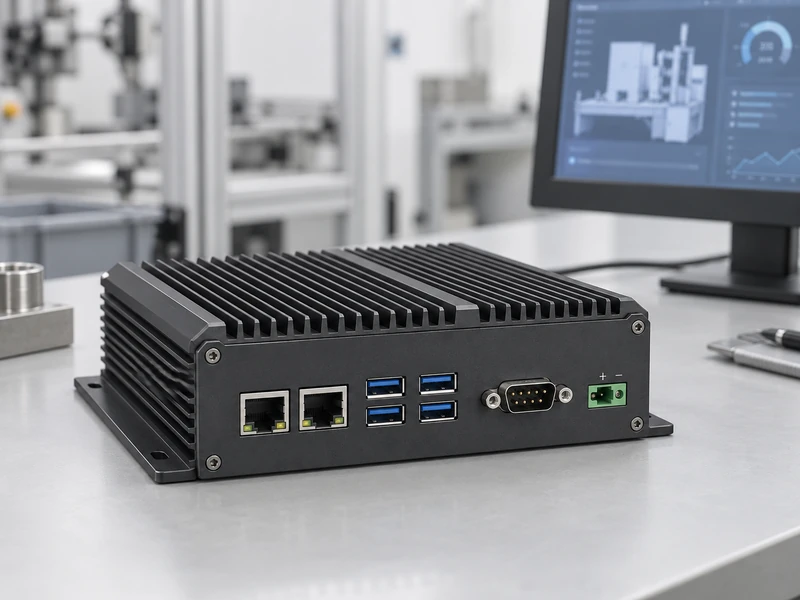
An embedded PC is a computer configured to work as part of a machine or larger system. It runs the equipment’s software and handles tasks such as operator interfaces, data collection, device communication and local processing. Its processor, memory, storage and connections are selected for those tasks.
You might find one behind a packaging machine’s touchscreen, inside a self-service terminal or in a cabinet collecting production data. It can operate without a display, connect to a separate monitor or form part of an integrated panel PC.
“Embedded” describes the computer’s role. It does not, by itself, guarantee fanless cooling, waterproof construction or a particular operating temperature.
An embedded system is the broader combination of hardware and software that performs defined functions within a device. It may use a microcontroller, a dedicated processor or a PC platform. An embedded PC is one way to provide computing within that system.
A simple sensor controller may need only a microcontroller and firmware. A terminal running a Windows application, maintaining production records and connecting to several peripherals may need a PC platform. Microcontrollers can also run operating systems; the useful distinction is the software, processing, memory and interface support the application requires.
Consider a packaging line with an operator touchscreen, barcode scanner, label printer and programmable logic controller (PLC). The embedded PC could run the interface application and manage production information, while the PLC handles the machine’s control sequence.
| Task | What the embedded PC could do |
|---|---|
| Operator interface | Display the selected job, production count and controller alarms |
| Device communication | Receive barcode data and send label content to the printer |
| Data recording | Store batch numbers, timestamps and production results |
| Local processing | Check scanned information against the active order |
| Network communication | Exchange job and production data with the factory system |
For example, the operator selects a job on the touchscreen. The PC application loads the order details. When a barcode is scanned, the software checks it against that order. A match can trigger a print request and a saved production record; a mismatch can display an error and withhold the label. These responses depend on the application’s programmed logic.
The touchscreen supplies input, the PC processes information and the printer produces the label. Any request affecting machine movement passes through the defined control interface, with safety functions handled by the machine’s safety system.
A kiosk uses a similar arrangement to coordinate user input and peripherals. A monitoring gateway may collect data without a screen, while a vision station processes camera images locally.
The computer can be supplied as a board, an enclosed host or part of a touch terminal.
| Arrangement | Where it fits | What the equipment builder must confirm |
|---|---|---|
| Board-level computer | Inside the equipment’s own enclosure | Mechanical support, power, cooling, cabling and complete-system validation |
| Enclosed box PC | On a suitable mounting surface inside or alongside the machine | Space, cooling clearance, connector access and cable routing |
| Industrial panel PC | At the operator position, with display and computing combined | Screen requirements, mounting depth, protection scope and service access |
Board-level integration leaves the equipment builder responsible for mounting, power and cooling. An enclosed host needs less assembly but still requires validation after installation.
A separate host can serve an existing display or run without one. A panel PC is useful when the machine needs a local touch interface in one assembly. For the detailed trade-offs, see our Panel PC vs Box PC guide.
Start with the software and a list of connected devices. Together, they explain what the computer must support before a processor or enclosure is selected.
The application’s supported operating system, processor architecture and drivers narrow the hardware options. A terminal displaying machine status has different demands from one also processing inspection images.
Describe the tasks that run together and set a measurable requirement, such as interface response time or inspection throughput. This gives the supplier a useful performance target and the sample test a clear pass condition.
For the packaging line, the scanner, printer, PLC and display each bring their own requirements. A scanner appearing in the operating system does not prove that the application receives and interprets its data correctly.
Record the device models, connections and required drivers. Serial links need compatible electrical standards and settings. Industrial network protocols may require additional hardware, software or licences. Isolation and connector retention should reflect the installation conditions.
A compact computer can still be difficult to install once plugs and cable bends are included. A drawing should show the mounting position, connector access and space around the cooling surfaces.
Use the expected temperature at the installed unit, including nearby heat sources. Also identify which parts face dust, oil mist or water. A protected cabinet and an exposed operator panel place different demands on the computer’s enclosure.
The available supply determines the required input range, but recovery deserves equal attention. After power returns, the packaging terminal may need to reload the correct job and reconnect to the printer before work resumes.
Automatic startup alone does not establish that recovery is complete. Define the required application behaviour and discuss how records being written during an interruption will be protected, including whether backup power is needed.
A replacement computer is useful only if the technician can restore the application, settings and licences. Establish a service procedure and responsibility for software updates and remote access.
For repeat orders, agree the supplied configuration and how hardware changes will be communicated. A processor or motherboard substitution may require driver checks and renewed application testing, even when the enclosure looks identical.
Test the proposed sample with the actual software and peripherals in the intended installation, with covers and cabinet doors in their normal positions. Include the busiest expected workload and the relevant operating temperatures.
Check that:
Save the test conditions, results, hardware details and software versions for checking later orders and software updates.
Some platforms support PC-based control, but replacement requires suitable control software, I/O, timing performance and fault handling. An ordinary interface application is not a substitute for a validated machine control or safety system.
Many can, depending on the processor platform and available support. Confirm the exact operating system release, drivers and application compatibility for the proposed configuration before ordering.
If your project needs an integrated operator terminal, explore Eagle Touch’s industrial panel PC solutions. If the computing platform is already selected, review our industrial touch monitors.
Share your application, software platform, screen size, connected devices, installation drawing, operating environment and expected quantity. Eagle Touch can review the touch display or panel PC requirements for your equipment.
An industrial panel PC is a computer with a built-in display, usually a touchscreen, designed for …

An embedded PC is a computer configured to work as part of a machine or larger …

Start with the software the panel PC must run and the conditions it must fit. Then …

Choosing an industrial panel PC IP rating starts with two questions: what dust and water exposure …
Share your application, requirements, or current challenge. Our team will review the details and recommend a practical way forward.