IPS vs TN Industrial Displays: How to Choose for Your Application
IPS vs TN — Which should you choose? Choose IPS for: multi-angle viewing, outdoor environments, touch-based …
Can a commercial LCD display be used in industrial equipment to reduce cost?
This is a common question for OEM designers and system integrators when selecting display components for HMI systems.
Choosing the wrong display type can result in early failure, increased maintenance cost, and unplanned product redesign.
While commercial LCDs may appear suitable based on datasheet specifications, their limitations often become evident under real operating conditions.
This article examines industrial LCD vs commercial LCD displays from an engineering and lifecycle perspective, focusing on reliability, deployment conditions, and total cost of ownership.
For a broader overview of how displays are selected in real systems, including interface types, enclosure design, and mounting considerations, refer to our guide on industrial display monitors.
Industrial LCD displays are designed for reliability in harsh environments, extended lifecycle (5–10+ years), and stable long-term supply.
Commercial LCD displays are designed for cost efficiency, indoor use, and shorter product lifecycles.
The core difference is not display technology, but environmental tolerance, lifecycle stability, and system-level risk.
The key difference is not the LCD technology itself, but how the display is designed for:
LCD (Liquid Crystal Display) technology is fundamentally the same in both categories. The distinction lies in engineering design, validation processes, and lifecycle support.
Typically designed for:
Key characteristics:
Designed for:
Typical integration scenarios:
Key design priorities:
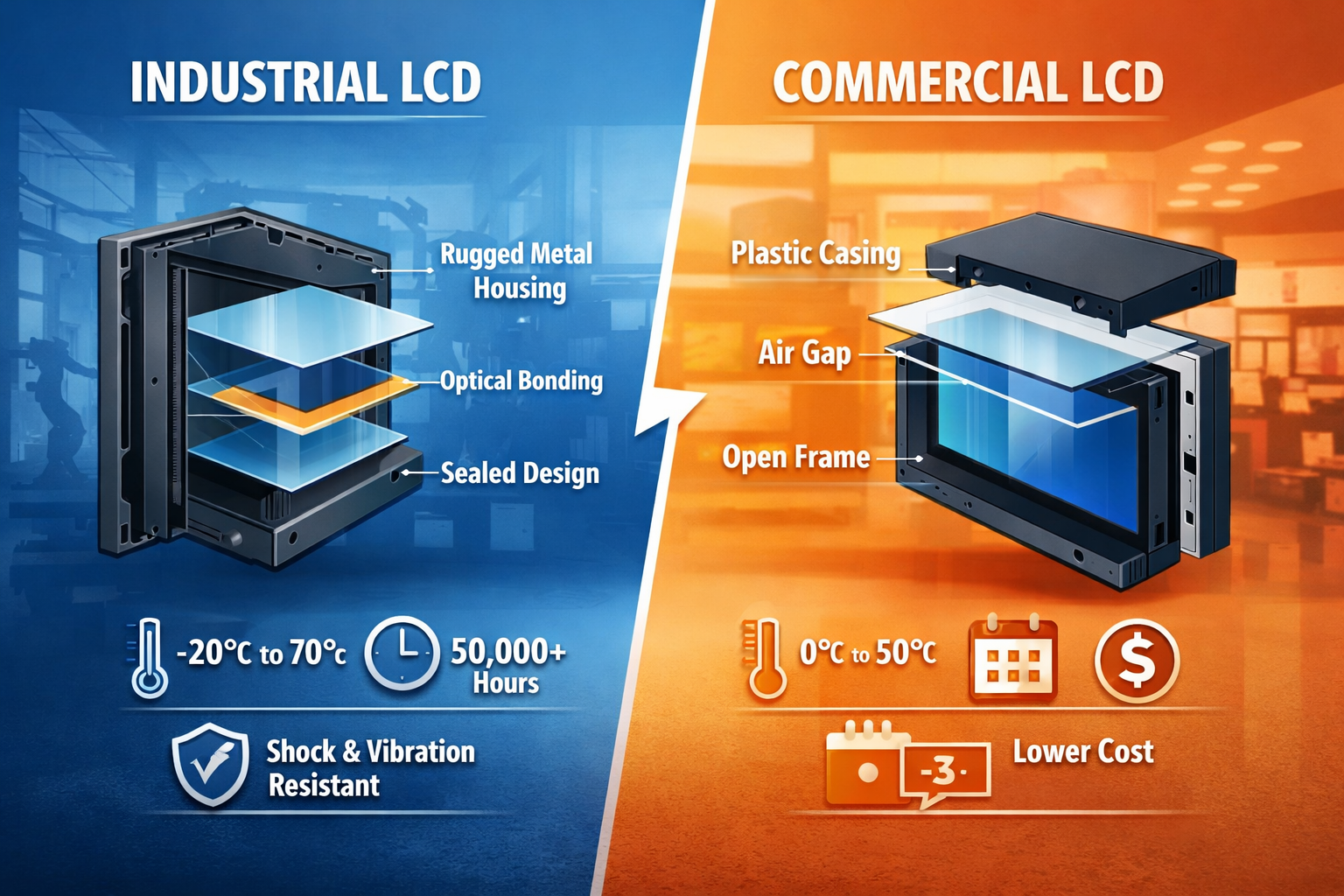
| Feature | Industrial LCD | Commercial LCD |
|---|---|---|
| Operating Temperature | -20°C to 70°C | 0°C to 50°C |
| Typical Lifespan | 50,000+ hours | 15,000–30,000 hours |
| Brightness | High, sunlight-readable options | Standard indoor brightness |
| Mechanical Durability | Designed for vibration and shock | Limited protection |
| Supply Lifecycle | Long-term availability | Frequent model changes |
| Construction | Reinforced, often metal housing | Lightweight plastic |
| Cost Structure | Higher upfront | Lower upfront |
From an engineering perspective, the difference is primarily about risk, lifecycle predictability, and deployment reliability, rather than display performance.
Industrial LCDs use higher-grade LED backlight systems with:
This is critical for systems operating continuously or in outdoor environments.
Optical bonding removes the air gap between the LCD and cover glass.
Engineering impact:
Commercial displays typically retain an air gap, which limits performance in high-light or high-vibration conditions.
Industrial touch systems are designed for non-ideal operating conditions:
These are standard requirements in industrial touch screen systems.
Industrial display programs emphasize:
Commercial LCDs often have short lifecycles, increasing redesign and validation risk.
Industrial LCDs operate across extended temperature ranges and include compensation mechanisms for:
Commercial displays may exhibit performance degradation or failure outside standard indoor ranges.
Industrial applications often involve:
Industrial displays incorporate reinforced structures and secure internal design to maintain reliability.
Industrial displays can support sealed front designs (e.g., IP65 or higher), enabling use in:
Commercial displays typically lack these protections.
Industrial LCD advantages:
Commercial LCD limitations:
Industrial LCD displays are commonly deployed in:
These systems require stable performance under environmental stress and long operational lifecycles.
In most OEM systems, the decision should be based on total lifecycle cost rather than initial component cost.
A frequent issue in OEM projects is selecting a commercial LCD based on upfront cost.
Example:
A semi-outdoor kiosk using a consumer-grade display experienced:
Impact:
In practice, initial savings are often offset by lifecycle costs.
In real deployments, the choice between industrial and commercial LCD is driven by risk tolerance.
If display failure leads to:
Then a commercial LCD introduces higher long-term risk.
For industrial systems, reliability is a design requirement—not an optimization.
Display selection in industrial systems is a system-level engineering decision.
Commercial LCDs may reduce upfront cost, but industrial LCDs provide:
In deployed systems, the dominant cost factor is typically failure and downtime, not component price.
1. Can commercial LCDs be used in industrial equipment?
Yes, but only in controlled environments with low environmental stress and limited lifecycle requirements.
2. What is the lifespan difference?
Industrial LCDs typically exceed 50,000 hours, while commercial displays have shorter effective lifespans under continuous use.
3. Why is optical bonding important?
It improves optical performance, reduces reflection, and increases mechanical durability.
4. Are industrial LCDs always brighter?
Not always, but they more commonly support high-brightness configurations for outdoor use.
5. How does supply stability affect OEM design?
Stable supply reduces redesign cycles, certification effort, and long-term maintenance complexity.
Need help selecting the right display for your application?
Avoid costly design mistakes. Share your operating conditions (temperature, environment, usage hours), and our engineering team will recommend a reliable industrial display solution based on lifecycle and total cost — not just specifications.
IPS vs TN — Which should you choose? Choose IPS for: multi-angle viewing, outdoor environments, touch-based …
Introduction Can a commercial LCD display be used in industrial equipment to reduce cost? This is …
Introduction In industrial system design, the industrial display monitor is not just a visualization component—it is …

Quick Answer: How Industrial Touch Screens Work Industrial touch screens detect input using pressure (resistive), capacitance …
Send your application details. We respond with configuration direction and next steps.