What Is an Industrial Panel PC? Components, Types and Applications

An industrial panel PC is a computer with a built-in display, usually a touchscreen, designed for …
Eagle Touch Engineering Team
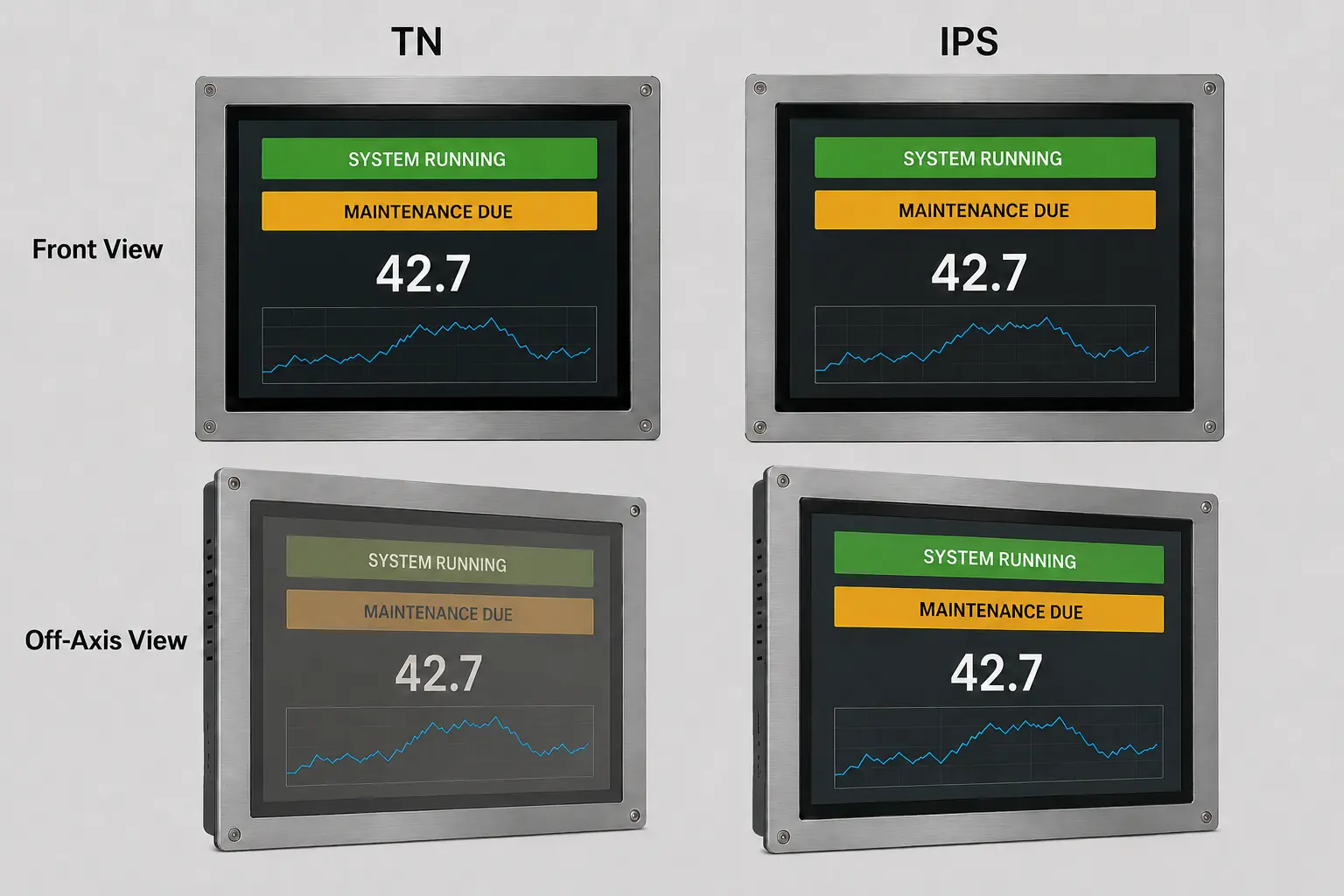
IPS is usually the safer choice when an industrial display must be read from different heights, directions or operating positions. TN remains a practical option when the user looks at the screen from a fixed, predictable angle and cost is tightly controlled.
That is the short answer—but it is not the whole selection rule.
IPS does not automatically make a display sunlight-readable. It does not improve touch sensitivity, and it does not guarantee a wider operating-temperature range or a longer service life. Those results depend on the exact LCD model and the complete display design.
For an industrial project, the first question should not be “Which technology is better?” It should be:
From where will the operator actually view the screen after it is installed?
Once that is clear, color stability, response time, brightness, power, supply continuity and cost can be compared without paying for performance the application does not need.
Both IPS (In-Plane Switching) and TN (Twisted Nematic) are active-matrix TFT LCD technologies. The difference lies in how the liquid crystals change orientation to control light. That difference has its strongest practical effect on viewing-angle behavior.
| Selection Factor | IPS | TN | What It Means in Industrial Use |
|---|---|---|---|
| Viewing angle | Wide, with more stable color and gray scale | More dependent on viewing direction | Check operator position, mounting height and screen tilt |
| Gray-scale stability | Generally better off-axis | May show gray-scale inversion from an unfavorable direction | Important when alarms and status levels must remain unambiguous |
| Color consistency | Generally more stable from different angles | More likely to shift off-axis | Relevant to graphical HMIs, inspection and image-based interfaces |
| Response time | Depends on the exact panel | Traditionally faster | Compare actual values, especially at low temperature |
| Power consumption | Model-dependent | Often, but not always, lower | The backlight usually accounts for most LCD module power |
| Cost | Often higher | Often lower in mature, high-volume sizes | Compare the exact models, quantities and lifecycle—not a fixed percentage |
| Touch compatibility | PCAP and resistive compatible | PCAP and resistive compatible | Touch performance is not determined by IPS or TN |
| Outdoor readability | Requires suitable brightness and optical design | Requires suitable brightness and optical design | Panel mode alone does not make a screen sunlight-readable |
| Operating life | Model-specific | Model-specific | Check LED lifetime, temperature rating and supply status |
The practical conclusion is straightforward: IPS has a clear advantage when viewing position changes. Outside that requirement, the choice must return to the individual panel specifications.
An LCD installed in a machine is rarely viewed like a desktop monitor. The operator may stand above a control panel, approach a kiosk from the side, sit below an overhead display or move around a production line. A screen may also be tilted inside the enclosure or rotated from landscape to portrait.
IPS panels generally maintain more consistent brightness, contrast and color under these conditions. This is why IPS is commonly selected for:
TN panels can work very well when the installation geometry is known. A fixed operator terminal, measurement instrument or built-in controller viewed close to straight-on may gain little practical value from the wider viewing envelope of IPS.
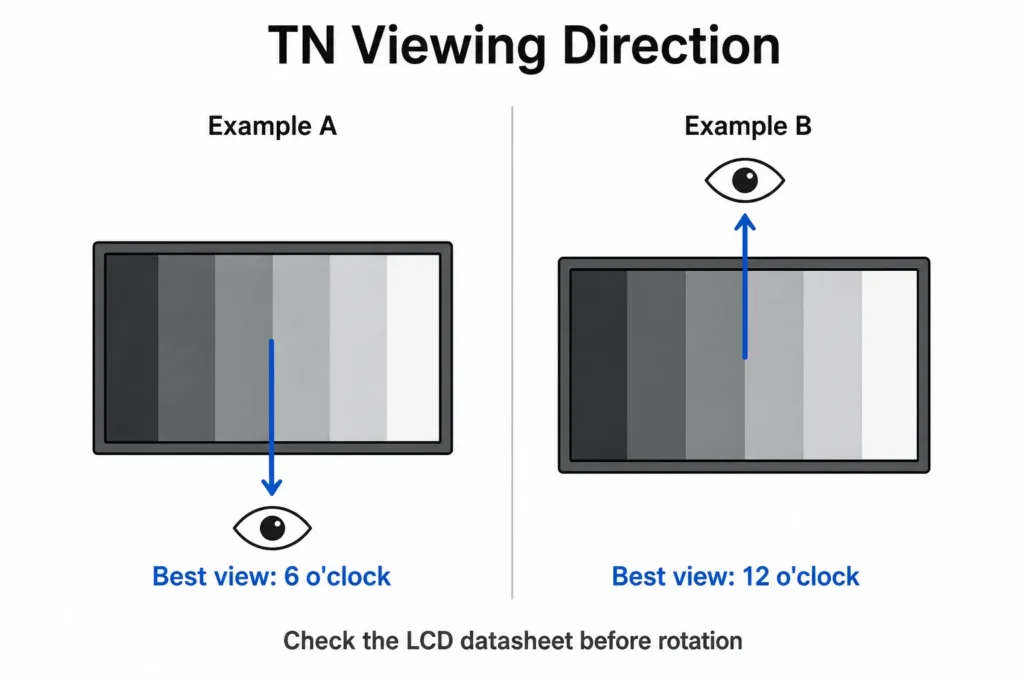
A TN data sheet may specify a preferred or optimum viewing direction, commonly described by a clock position such as 6 o’clock or 12 o’clock. This identifies the direction from which the panel provides its most favorable viewing behavior. It is panel-specific—not a universal rule for all TN displays.
From the unfavorable vertical direction, a TN panel can show a strong gamma shift or gray-scale inversion. Dark gray areas may become unexpectedly light, and different gray levels may become difficult to distinguish. In an industrial HMI, that matters more than whether a photograph looks attractive. A warning state, disabled control or process level must not become ambiguous because the operator is standing in the wrong position.
Rotation changes this geometry. A TN panel that works correctly in landscape may behave differently after a 90-degree portrait rotation. Before approving the mechanical design, compare the data-sheet viewing direction with the real position of the user.
No.
Many IPS data sheets list viewing angles of 178° horizontally and vertically. These limits are commonly specified at a minimum contrast-ratio threshold, often CR ≥ 10, rather than at a point where color and gamma remain identical to the front view.
Two panels carrying the same 178°/178° headline specification can still differ in:
Use the viewing-angle number as a screening specification, not as proof that two displays look the same. For a safety-relevant interface or an unusual installation angle, evaluate a sample in the intended enclosure and orientation.
IPS is generally associated with better color consistency, but “better color” is too vague to guide an industrial purchase.
For a basic controller showing numbers, text and simple buttons, wide color gamut may offer no operational benefit. Stable gray scale and readable status colors are more important. For medical-related interfaces, inspection systems, test equipment or image-rich HMIs, color consistency may carry much more weight.
Contrast ratio should also be checked on the exact panel. IPS and TN describe liquid-crystal switching modes; they do not guarantee one universal contrast value. Backlight design, polarizers, cell structure and measurement conditions all affect the result.
The useful question is not “Does IPS have better color?” It is “Will the operator interpret the interface correctly from every required position?”
TN technology is known for fast switching and may still be preferred where rapid motion rendering is genuinely important. Most industrial HMIs, however, display menus, numerical data, alarms and relatively slow process graphics. Modern IPS panels are normally fast enough for these interfaces.
The more important industrial issue is temperature.
Liquid-crystal response slows as temperature falls. A panel that looks clean at 25°C may show visible trailing or sluggish transitions at –20°C. The room-temperature response-time figure therefore cannot describe every field condition.
For cold-storage equipment, outdoor terminals, vehicles or unheated machinery:
Do not choose TN solely because “TN is faster,” and do not assume every industrial IPS panel will behave identically in the cold. Compare actual panel models under the conditions that matter.
IPS can improve off-axis image stability outdoors, but it does not create sunlight readability by itself.
An outdoor display must produce enough usable contrast against reflected ambient light. That depends on the complete optical and thermal design, including:
A high-brightness TN panel with well-controlled reflections can be more readable in direct light than a standard-brightness IPS panel behind reflective cover glass. Conversely, IPS is often the more practical choice when an outdoor kiosk must remain readable for users approaching from different directions.
For more detail, see our guides to sunlight-readable industrial monitors, industrial display brightness and optical bonding for outdoor displays.
The selection order should be:
Not in terms of touch detection.
Both IPS and TN LCDs can be integrated with projected capacitive (PCAP) or resistive touchscreens. Touch accuracy, glove operation, water rejection and electromagnetic-noise immunity depend mainly on the touch sensor, controller, firmware, cover-glass thickness, grounding and electrical environment—not on the LCD being IPS or TN.
IPS is frequently used in modern touch HMIs for a practical reason: people do not always remain centered while touching the screen. They may stand above it, reach from the side or share it with another operator. IPS preserves the image more consistently during that movement.
Adding a touch panel and cover glass can reduce transmitted light and add reflections to either LCD type. Optical bonding can reduce internal reflection for both IPS and TN; it is not exclusive to IPS.
If the touch technology itself is still undecided, compare the input method and environment in our PCAP vs resistive touch screen guide.
TN is often described as the low-cost, low-power option. That can be true, but it should not be treated as a fixed rule.
The LED backlight usually consumes most of the power in a TFT LCD module. Screen size, brightness and backlight efficiency can outweigh the difference between IPS and TN cell structures. Compare the typical and maximum current of the exact LCD modules at the required brightness.
There is no reliable universal statement that TN is a fixed percentage cheaper. Price depends on size, resolution, brightness, interface, temperature range, order quantity and current panel availability. In a mature high-volume size, TN may offer a meaningful saving. In another size, the difference may be small.
For an OEM product expected to remain in production for years, availability can matter more than a small unit-price difference. Review:
Neither IPS nor TN guarantees long-term supply. The selected panel family and supplier plan do.
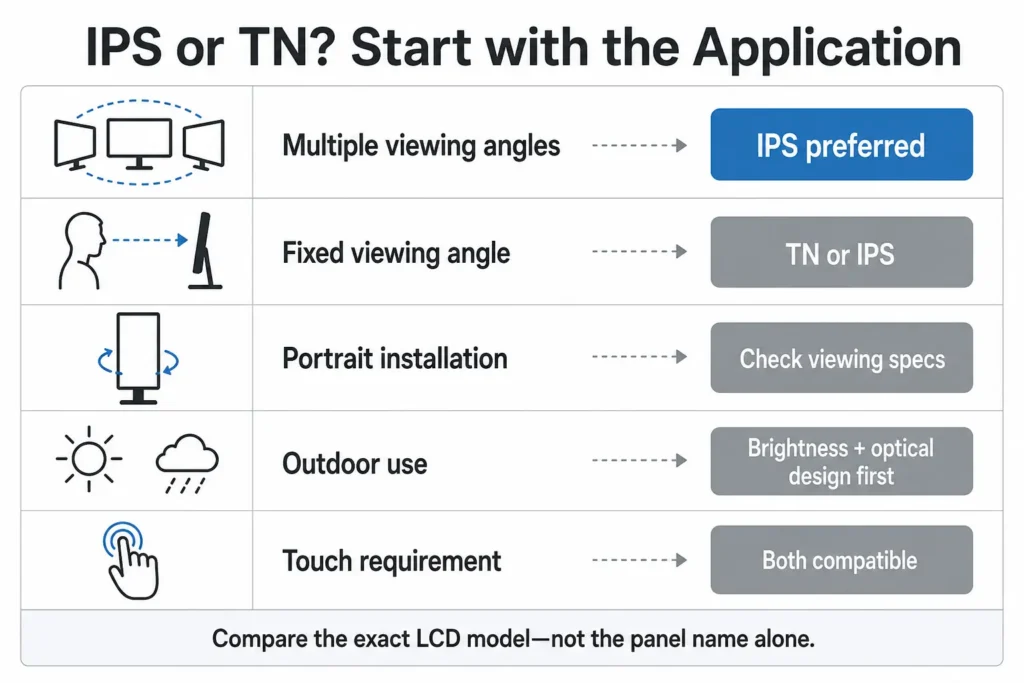
IPS is normally the stronger choice when:
Typical applications include public kiosks, EV chargers, shared factory HMIs, medical-related equipment, inspection systems, transportation terminals and higher-end operator interfaces.
TN remains a valid engineering choice when:
Typical examples include embedded measurement instruments, enclosed controllers, fixed machine terminals and cost-sensitive indoor equipment.
Choosing TN in these conditions is not a downgrade. It is avoiding a specification that does not improve the actual product.
IPS is usually preferred because users approach at different heights and angles. Outdoor readability still requires suitable luminance, reflection control, bonding, thermal management and cover-glass design. “IPS + 1000 nits” alone is not a complete outdoor specification.
If one operator stands in a defined position directly in front of the machine, either technology may work. If the display is mounted low, tilted upward or shared across a work cell, IPS reduces viewing-angle risk.
A small indoor instrument with a fixed front viewing position and a simple numeric interface may not benefit from IPS. A qualified TN panel can be the more economical and entirely adequate solution.
IPS is normally safer because user height varies and the screen is rotated. A TN panel should be used only after its preferred viewing direction and gray-scale behavior have been verified in the final portrait orientation.
Do not approve a display from the words “IPS” or “TN” alone. Review the following information for the exact LCD model:
Then test the sample in the real enclosure. Cover glass, touch layers, mounting angle, portrait rotation, ambient light and temperature can reveal problems that are invisible when a bare LCD is evaluated flat on a workbench.
For most industrial displays with variable viewing positions, IPS is the lower-risk choice. Its advantage is not that it makes every other display specification better; its advantage is stable visual performance across a wider viewing envelope.
TN remains appropriate when that viewing envelope is controlled. It can meet the requirements of many fixed-position industrial devices without unnecessary cost.
The most reliable selection process is therefore:
If you are selecting an LCD for a new OEM monitor or replacing an existing panel, send us the screen size, current LCD model, installation drawing, viewing position, brightness, temperature range, touch requirement and estimated quantity. Eagle Touch can review the panel together with the enclosure and optical structure and recommend an industrial display monitor configuration that fits the actual application.
No. IPS is generally better when the display is viewed from different angles or when color and gray-scale stability are important. TN can be fully suitable for fixed-angle, cost-sensitive industrial equipment.
Yes. Sunlight readability depends mainly on brightness, optical reflection, bonding, surface treatment and installation conditions. A TN display can be designed for outdoor readability, although its off-axis performance remains more direction-dependent.
No. Touch sensitivity is governed by the touch sensor, controller, firmware, cover glass, grounding and electrical environment. Both IPS and TN displays can support PCAP or resistive touch.
No. Optical bonding can be applied to IPS or TN LCDs. It reduces internal reflection and removes the air gap between optical layers, but it does not change the LCD’s underlying viewing-angle characteristics.
No. The headline angle may be measured at a specified minimum contrast ratio. Color, gamma, black level and contrast can still vary between panel models at off-axis positions.
IPS is often safer because its viewing behavior is less directional. TN can also be installed in portrait, but its optimum viewing direction and gray-scale performance must be checked after rotation.
Neither technology has an automatic lifetime advantage. Service life depends on the LCD design, LED backlight, operating temperature, brightness setting, thermal management and component quality.
An industrial panel PC is a computer with a built-in display, usually a touchscreen, designed for …

An embedded PC is a computer configured to work as part of a machine or larger …

Start with the software the panel PC must run and the conditions it must fit. Then …

Choosing an industrial panel PC IP rating starts with two questions: what dust and water exposure …
Share your application, requirements, or current challenge. Our team will review the details and recommend a practical way forward.