What Is an Industrial Panel PC? Components, Types and Applications

An industrial panel PC is a computer with a built-in display, usually a touchscreen, designed for …
Eagle Touch Engineering Team
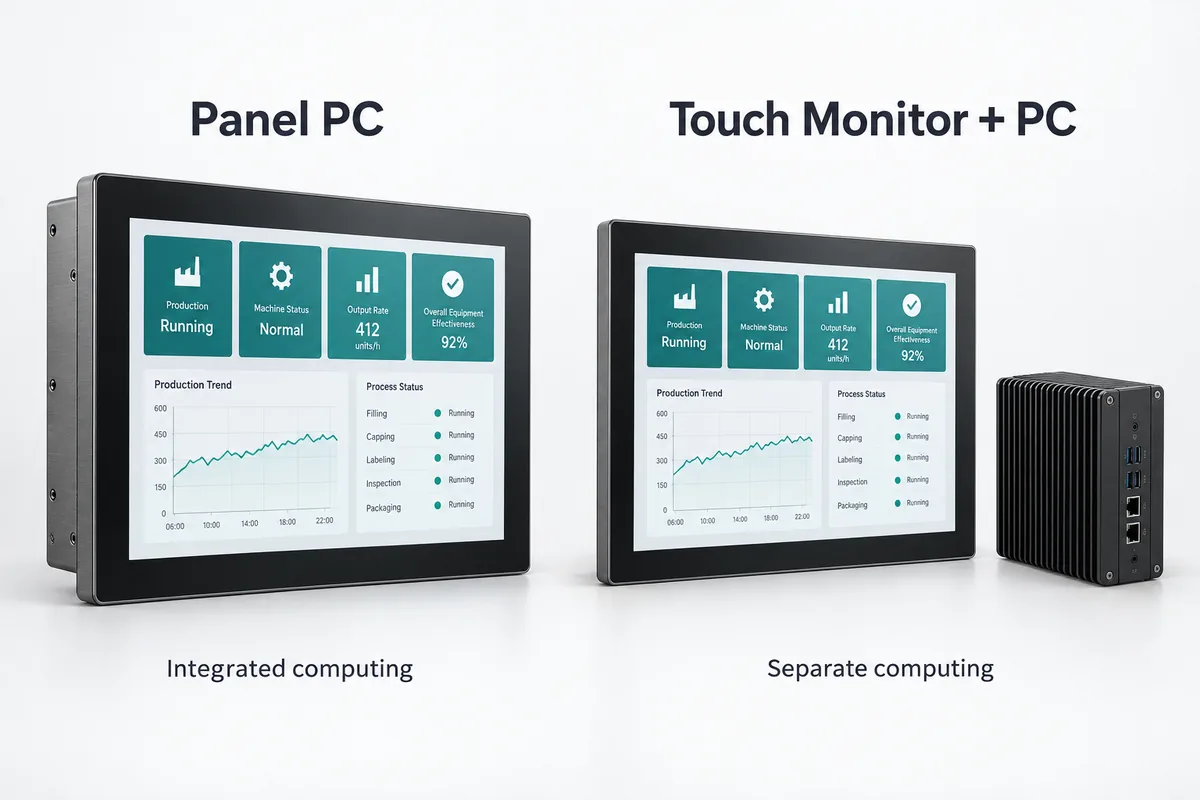
A panel PC and a touch monitor can look almost identical from the front. The important difference is behind the screen: a panel PC includes a computer; a conventional touch monitor needs an external host to run the application.
If your equipment already has a compatible industrial PC, a touch monitor may be all you need. If the operator terminal must run its own software, a panel PC puts the display, touch interface and computing hardware in one enclosure. The better choice depends on the equipment you already have, the space available and how you plan to service it.
For a fair comparison, consider a panel PC against a touch monitor plus its external computer, rather than comparing the two screens alone.
| Factor | Panel PC | Touch monitor + external PC |
|---|---|---|
| Application software | Runs on the built-in computer | Runs on the external PC |
| Operating system | Installed on the built-in computer | Installed on the external PC |
| Video and touch connections | Usually connected internally | Must connect between monitor and host |
| Installation | One integrated unit, with rear clearance required | Separate locations for screen and computer |
| Heat sources | Display and computer share the unit | Display and computer can be located separately |
| Maintenance | Depends on component access and service design | Screen and host can be replaced separately |
| Upgrades | Depend on the model’s accessible components | Host can be upgraded while retaining a compatible monitor |
Neither format determines brightness, touch performance or environmental protection. Compare those specifications separately for the proposed models.
Start with the software already selected for the project.
If it runs on an existing industrial PC, check that the host has a suitable video output and supports the monitor’s touch input. Adding a second computer at the screen may offer little benefit if the existing host already handles the required application.
If the terminal needs to run the application locally, a panel PC is worth considering. Confirm the software’s operating system, processor architecture, memory, storage and driver requirements before choosing hardware. A Windows application cannot simply be installed on an Android panel PC because both have touchscreens.
For available hardware configurations, see our standard industrial panel PC models.
Already have a PLC? Check the interface arrangement. A PLC alone does not necessarily provide video output or accept USB touch input. A conventional touch monitor cannot replace a dedicated HMI terminal by itself. You need a device running the operator-interface software, with the correct communication support for the PLC. That may be a dedicated HMI, a panel PC or a separate industrial PC and monitor.
A panel PC reduces the need to mount a separate computer, but its rear housing must fit behind the equipment panel. Allow space for connectors, cable bends, ventilation and access to mounting clamps. The enclosure drawing matters more than the screen diagonal.
A touch monitor lets you position the computer elsewhere in the cabinet. This can help when space behind the operator panel is shallow, provided there is a suitable location for the host and a practical cable route.
For a separate monitor, verify three connections:
With a typical HDMI-and-USB setup, HDMI carries the picture and USB carries touch data. A USB-C connection can combine functions only when the host, monitor and cable support the required features. Our guide to USB video input on industrial monitors explains the distinction.
If the host is several metres away, validate the complete video and touch path. Cable capability depends on the interface, signal requirements and extension hardware; there is no single distance limit that applies to every installation.
Separating the computer from the screen gives you more freedom to position heat sources. It does not remove their heat from the cabinet. A box PC placed next to a hot power supply may have worse operating conditions than a properly cooled panel PC.
Likewise, a panel PC is not automatically unsuitable for a warm environment. Check the specified operating conditions and test it inside the intended enclosure at the expected workload and screen brightness. Fanless and actively cooled designs both require an effective path for heat to leave the equipment. For enclosure-level checks, see our industrial display thermal management guide.
Then consider an actual service visit. Can the technician reach the connectors? Can the screen be removed without disturbing other equipment? Will replacement require software restoration?
A separate monitor can usually be changed while retaining the host and its software environment, although resolution and touch settings may need checking. A panel PC may offer replaceable storage or other accessible components; serviceability varies by design.
Where rapid replacement matters, a spare panel PC with a tested system image can also be practical. Agree on the replacement procedure, configuration backup and software licensing arrangements before production.
Ask for quotations against the same display, computing and environmental requirements. Include:
An existing, suitable host can make a touch monitor the economical choice. For a new machine, a panel PC may reduce separate mounting and external wiring work. Neither option is consistently cheaper once the complete installation is included.
Also consider what will change first. If computing requirements are likely to grow while the display remains suitable, a separate host provides an independent upgrade path. If the terminal has a fixed workload and a defined replacement plan, that flexibility may be less valuable.
| Project situation | Start by evaluating | Confirm before ordering |
|---|---|---|
| An existing IPC already runs the operator interface | Touch monitor | Video output, touch support and cable route |
| A new terminal must run software locally | Panel PC | Software compatibility, rear clearance and cooling |
| Screen and computer need separate replacement cycles | Touch monitor + PC | Replacement compatibility and service access |
| A compact machine should avoid a separately mounted host | Panel PC | Complete installation dimensions and external I/O |
Yes, if its graphics outputs, operating system and application support the intended arrangement. Touch input must be mapped to the correct display. Also distinguish between duplicating one screen, extending a desktop and providing independent operator sessions; these have different software requirements.
Often, yes. Confirm video compatibility, resolution support and touch-controller support on the new operating system. Test the actual monitor with the replacement host before committing to a production change.
Share your application software or existing host model, screen size, installation drawing, operating environment and expected quantity with Eagle Touch. These details help us review whether a panel PC or a separate touch monitor is the more practical fit for your equipment.
An industrial panel PC is a computer with a built-in display, usually a touchscreen, designed for …

An embedded PC is a computer configured to work as part of a machine or larger …

Start with the software the panel PC must run and the conditions it must fit. Then …

Choosing an industrial panel PC IP rating starts with two questions: what dust and water exposure …
Share your application, requirements, or current challenge. Our team will review the details and recommend a practical way forward.