How to Choose the Right Operating System for Industrial Panel PCs
Introduction Industrial panel PCs are a core component of modern HMI (Human-Machine Interface) systems, enabling visualization, …
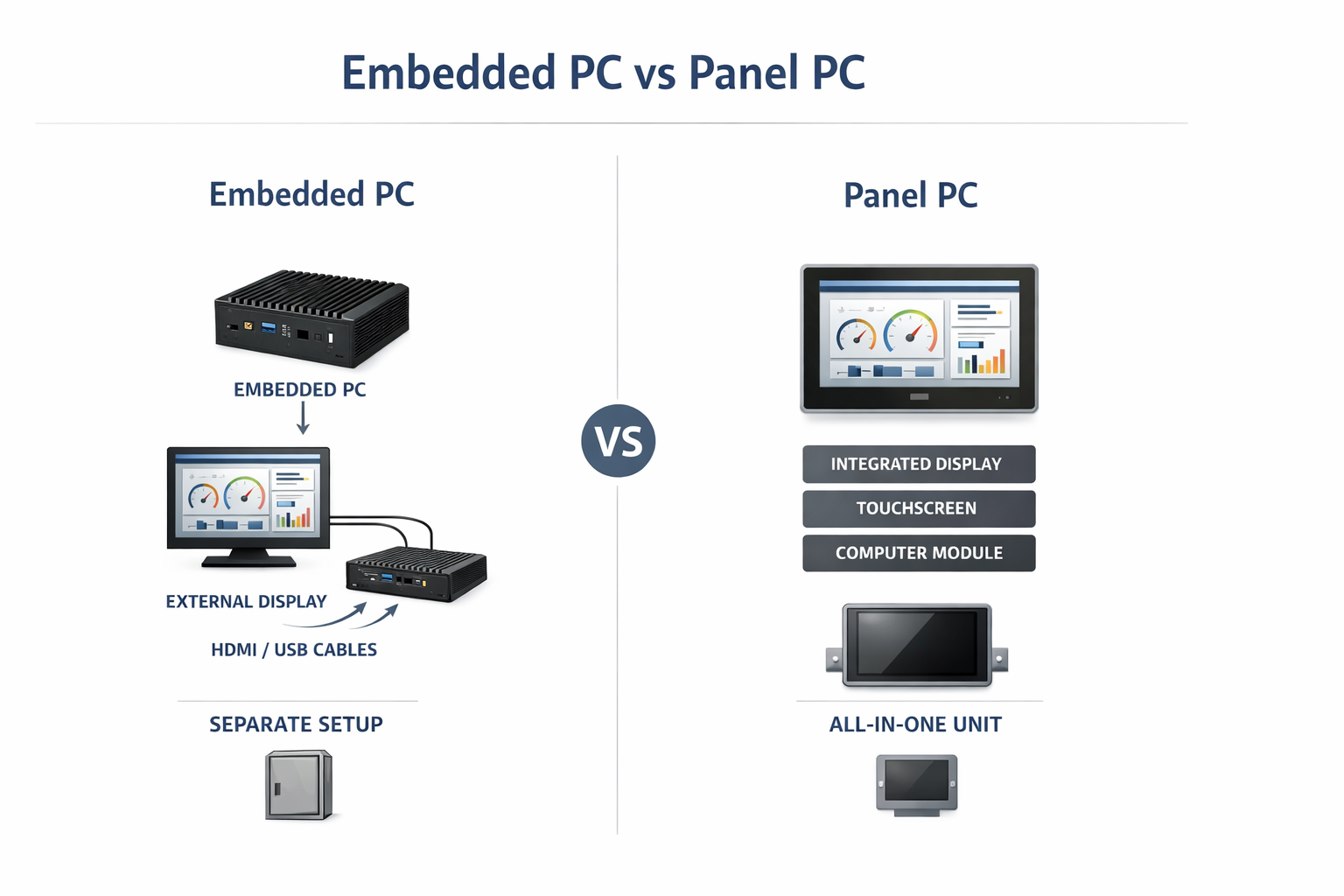
In industrial system design, selecting between an embedded PC and a panel PC is primarily an architectural decision rather than a simple hardware choice.
Both platforms provide industrial-grade computing capability, but they differ in how computing, display, and user interaction layers are organized. This distinction affects enclosure design, wiring complexity, thermal performance, and long-term maintenance strategy.
This decision is often part of a broader industrial HMI architecture. For a system-level perspective, refer to this industrial HMI system architecture guide .
An embedded PC is a standalone computing unit designed for integration into a larger system. It typically operates without a built-in display and relies on external devices for visualization and input.
A panel PC integrates multiple subsystems into a single enclosure:
This creates a self-contained HMI device.
From a system architecture perspective:
This architectural difference directly impacts installation, scalability, and serviceability.
Embedded PCs are optimized for flexibility and system integration:
They are commonly paired with external industrial displays, allowing independent selection of display size, brightness, and optical performance.
Panel PCs combine computing and display subsystems into a single unit:
This reduces system complexity but introduces constraints in thermal management and component replacement.
Display subsystem design is a critical factor, particularly for panel PCs. Key technologies include:
In embedded PC systems, these display technologies can be selected independently, which allows greater flexibility for specialized environments.
Thermal behavior differs significantly between the two architectures.
Embedded PC systems:
Panel PCs:
In outdoor deployments, high-brightness displays increase power consumption, further raising internal temperatures.
Panel PCs:
Embedded PCs:
This makes panel PCs more suitable for exposed HMI interfaces, while embedded PCs offer enclosure design flexibility.
Embedded PC systems require:
This increases wiring complexity and introduces potential failure points.
Panel PCs provide:
This is advantageous in space-constrained systems or when minimizing installation time is critical.
Lifecycle planning differs significantly.
Embedded PC:
Panel PC:
This is particularly relevant for systems with 7–10 year deployment requirements.
Failure modes vary by architecture.
Embedded PC systems:
Panel PC systems:
Understanding these failure mechanisms is important for high-availability system design.
These benefit from modular design and separation of computing and interface layers.
These applications require direct human interaction and benefit from integrated HMI hardware.
The choice between an embedded PC and a panel PC should be based on system-level design priorities rather than individual component specifications.
Embedded PCs provide modularity, flexibility, and lifecycle advantages, particularly in protected environments.
Panel PCs simplify deployment and reduce integration complexity, making them suitable for operator-facing systems.
Key decision factors include thermal conditions, maintenance strategy, environmental exposure, and overall system architecture.
Q1: Can an embedded PC be used for HMI systems?
Yes, but it requires external display and touch components, increasing integration complexity.
Q2: Are panel PCs suitable for outdoor use?
Yes, when designed with proper sealing, optical bonding, and high-brightness displays.
Q3: Which option supports longer lifecycle management?
Embedded PCs, due to independent upgrade of computing and display subsystems.
Q4: Do panel PCs have higher thermal risk?
Yes, due to sealed enclosures and combined heat sources.
Q5: When is an embedded PC preferred?
In modular systems where computing and visualization layers are separated.
Introduction Industrial panel PCs are a core component of modern HMI (Human-Machine Interface) systems, enabling visualization, …

Introduction In industrial system design, panel PC I/O ports are a primary factor in determining how …
Introduction In industrial system design, selecting between an embedded PC and a panel PC is primarily …
Introduction In OEM equipment development, selecting an industrial panel PC supplier is not simply a purchasing …
Send your application details. We respond with configuration direction and next steps.