Fanless vs Fan Industrial PC: Thermal Design Guide
Introduction Thermal management is a primary constraint in industrial computing system design. Whether developing embedded controllers …
Thermal management is a primary constraint in industrial computing system design. Whether developing embedded controllers or integrated HMI platforms, engineers must balance processing performance, environmental exposure, and long-term reliability.
A key architectural decision is the selection between fanless and fan-based industrial PCs. This impacts enclosure design, ingress protection (IP rating), maintenance intervals, and system lifecycle.
In many deployments, industrial PCs are integrated into display systems as part of an industrial HMI system architecture guide. As a result, thermal strategy must be evaluated at the system level rather than at the component level.
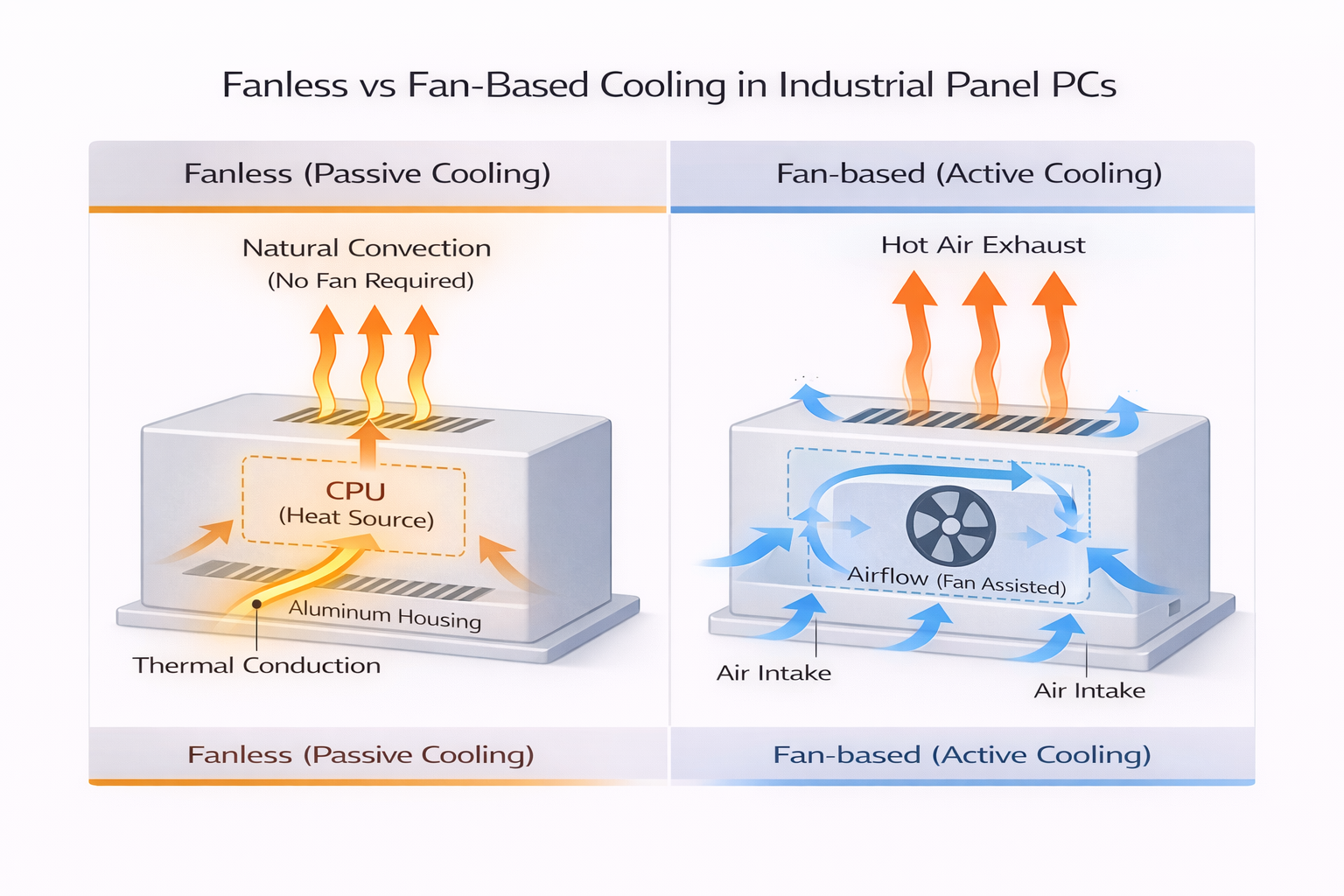
Fan-based industrial PCs use active cooling with internal fans to generate airflow across heat-producing components such as CPUs and power modules.
Fanless industrial PCs use passive cooling. Heat is transferred through conduction to heat sinks and external enclosures, where it dissipates into the surrounding environment.
In panel PC based HMI systems, fanless designs are commonly used because they support sealed enclosures and reduce maintenance requirements. Fan-based systems remain relevant in applications requiring higher computational performance or sustained processing loads.
Fanless systems rely on:
Fan-based systems rely on:
Thermal design is closely tied to processor selection.
This determines whether the system can sustain continuous high-load processing without thermal throttling.
Fanless systems require:
Fan-based systems require:
Fanless systems support sealed designs (IP65 and above), making them suitable for harsh environments.
When combined with industrial touch screen solutions, these systems can operate in environments with dust, moisture, or contaminants.
Fan-based systems require airflow openings, which limit achievable ingress protection unless an additional enclosure is used.
Fanless systems eliminate moving parts associated with cooling, reducing mechanical failure risks.
Fan-based systems introduce components with finite lifespans:
These factors must be considered in lifecycle planning.
Fanless systems are typically used in:
Fan-based systems are more appropriate for:
Fanless systems are limited by passive heat dissipation capacity. Under sustained high load, insufficient heat transfer can lead to:
Fan-based systems provide stable thermal performance under higher loads due to active airflow.
Fanless systems:
Fan-based systems require:
In systems using rugged industrial touch monitors, fanless designs simplify sealing and improve durability.
Display subsystems contribute to total thermal load, particularly in:
These factors must be included in total thermal calculations.
Cooling architecture selection should be based on defined system constraints:
| Design Condition | Recommended Architecture | Engineering Rationale |
|---|---|---|
| Outdoor deployment (IP65+) | Fanless | Enables sealed enclosure |
| Ambient temperature > 45°C | Fanless (with validation) | Avoids airflow dependency |
| CPU TDP ≤ 25W | Fanless | Passive cooling sufficient |
| CPU TDP ≥ 35W | Fan-based | Requires active cooling |
| 24/7 unattended operation | Fanless | Eliminates wear components |
| High-performance workloads | Fan-based | Supports sustained load |
| Controlled cabinet environment | Fan-based | Airflow manageable |
In most outdoor or semi-outdoor deployments, fanless architecture is typically the baseline due to sealing and reliability requirements, unless processing demands require active cooling.
In fan-based systems:
This can result in:
Fans degrade over time due to mechanical wear, leading to:
Fanless systems may encounter issues if thermal design is underestimated:
This is especially critical in outdoor installations with solar exposure.
Before selecting a cooling architecture, the following parameters should be defined:
Cooling strategy should be validated against these inputs to ensure stable operation.
Fanless systems are commonly used due to sealed outdoor requirements and integrated touch interfaces.
Fanless systems are used for operator interfaces, while fan-based systems support higher-performance computing tasks.
Fanless systems reduce maintenance requirements and improve deployment reliability.
Applications such as ticketing and parking systems rely on fanless systems for long-term unattended operation.
Suitable when:
Suitable when:
The choice between a fanless vs fan industrial PC should be based on system-level thermal constraints, environmental exposure, and processing requirements.
In most industrial deployments, enclosure design and environmental conditions are the primary factors influencing the cooling architecture. Processor selection and workload profile then determine whether passive or active cooling is appropriate.
1. What CPU range is suitable for fanless industrial PCs?
Typically up to 25W TDP, depending on enclosure design and ambient conditions.
2. Are fan-based industrial PCs less reliable?
They include mechanical components such as fans, which require maintenance and have finite lifespans.
3. Can fanless industrial PCs be used outdoors?
Yes. They are commonly used in sealed outdoor systems with appropriate thermal design validation.
4. What limits fanless system performance?
Passive heat dissipation capacity under sustained load.
5. Do displays affect thermal design?
Yes. High-brightness and optically bonded displays increase total system heat load and must be included in calculations.
Introduction Thermal management is a primary constraint in industrial computing system design. Whether developing embedded controllers …
Introduction In industrial equipment design, selecting between a panel PC vs touch monitor directly affects system …
Introduction Processor architecture selection directly affects system stability, lifecycle cost, and integration complexity in industrial HMI …
Introduction In industrial system design, selecting the appropriate computing architecture directly affects system reliability, integration complexity, …
Send your application details. We respond with configuration direction and next steps.