What Is an Industrial Panel PC? Components, Types and Applications

An industrial panel PC is a computer with a built-in display, usually a touchscreen, designed for …
Eagle Touch Engineering Team
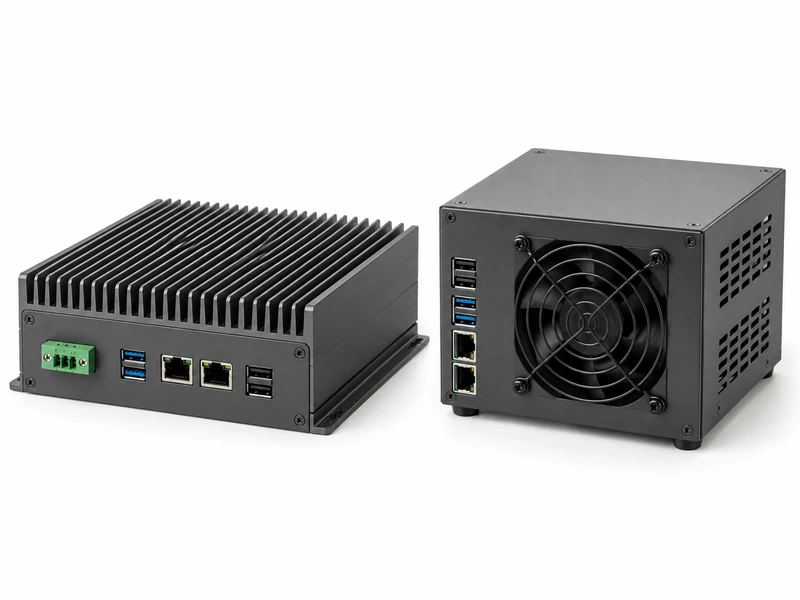
A fanless industrial PC is worth considering when dust, noise or difficult maintenance access makes a cooling fan undesirable. A fan-cooled industrial PC can be a better fit for sustained computing loads when adequate airflow and regular servicing are available.
Neither choice works independently of its installation. A fanless computer still needs somewhere to release heat, while a fan-cooled unit needs air cool enough to carry heat away. Choose the system that maintains your required application performance in the finished machine.
| Factor | Fanless industrial PC | Fan-cooled industrial PC |
|---|---|---|
| Heat removal | Conducts heat to a heatsink or chassis, then releases it to the surroundings | Uses fans to move air across heat-producing components and heatsinks |
| Sustained performance | Depends on passive cooling capacity, power settings and ambient conditions | Can accommodate higher heat loads in a suitable design; airflow restrictions still matter |
| Dust exposure | Ventless construction can reduce contamination; check actual enclosure protection | Through-chassis airflow can carry contamination inside; filtration may need servicing |
| Installation space | Needs the specified clearance around cooling surfaces | Needs unobstructed intake and exhaust paths |
| Maintenance | No cooling fan to replace; external surfaces still need inspection | Fans, filters and airflow paths need periodic attention |
| Noise | Eliminates cooling-fan noise | Noise varies with fan design, speed and workload |
Ask each supplier to show how the proposed configuration performs at your expected cabinet temperature. Compare the workload and installation conditions behind those results, not just the cooling label.
In a typical fanless industrial PC, thermal interfaces and metal structures conduct heat from components to a heatsink or enclosure. Heat then leaves through natural convection, radiation and, in some installations, conduction into an approved mounting structure.
A fan-cooled PC increases convection by moving air over hot components. Many designs draw air through the chassis; others use internal circulation or separate cooling paths. Check the actual arrangement before making assumptions about sealing.
Both approaches must ultimately transfer heat out of the space around the computer. A fan moving increasingly hot air inside a closed cabinet cannot, by itself, remove that cabinet’s combined heat load.
For a modest HMI workload in a dusty machine with difficult service access, start by evaluating a ventless fanless unit. For continuous vision processing in a clean, accessible cabinet, compare fan-cooled systems early. Use these as starting points, then confirm that the proposed system meets the performance and installation requirements below.
Describe what the computer must do throughout a working cycle. A touchscreen running an operator interface and logging production data has different demands from a system continuously processing several camera streams.
Write down the response time, processing rate or number of simultaneous streams the application needs. Ask whether the proposed system maintains that performance after warming up. A short benchmark may show a speed that the machine cannot sustain throughout production.
There is no universal CPU wattage limit for fanless operation. Cooling capacity depends on the complete system design, configured power limits and installation conditions. Fan cooling may accommodate more heat within a given space, but it does not guarantee unrestricted sustained performance.
An “i5” or “i7” label is not enough. Ask for the exact processor, configured power limits and sustained performance with your software. Include storage, graphics and expansion hardware in the assessment.
Use the expected air temperature at the installed unit, including the hottest operating conditions. The workshop temperature may be considerably lower than the temperature behind a cabinet door.
Fanless cooling needs a suitable path from the housing to its surroundings. Fan cooling needs an effective intake and exhaust arrangement. Neither is automatically the better choice simply because the environment is hot.
Check nearby drives and power supplies, mounting orientation, clearance and possible hot-air recirculation. Follow the selected model’s installation instructions for mounting orientation and heatsink clearance.
If the cabinet cannot release its total heat load, review cabinet cooling alongside computer selection. Where contamination or sealing rules out ventilation, an appropriately designed heat exchanger or enclosure cooling unit may be necessary.
For an existing unit that slows down or shuts down after warming up, use our industrial panel PC overheating troubleshooting guide.
A ventless fanless design can reduce contamination from air passing through the electronics. However, fanless computers may still have ventilation openings. Check the enclosure construction and the stated protection rating separately.
For conductive dust, oil mist or washdown exposure, specify the required protection and check its scope. A panel PC with front IP65 protection may still have an unprotected rear housing and connectors.
If the application needs high computing performance in dirty air, discuss the computer and cabinet together. One option is a fan-cooled computer inside a suitably protected and cooled cabinet. Another is a fanless system that delivers the required throughput. Compare the space, heat removal and servicing requirements of both proposals.
Think about how a technician will reach the cooling components after installation. Replacing an accessible fan in one machine is different from arranging service visits to hundreds of unattended terminals.
Fanless construction can remove that fan replacement task and avoid through-chassis filter servicing on ventless models. It still requires checks for dirt or obstructions on cooling surfaces.
Fan-cooled equipment is practical when service access, replacement parts and a realistic maintenance schedule are available. Compare purchase price together with cleaning time, service travel and downtime. For remote installations, the cost of reaching the machine can matter more than the price of a replacement fan.
A panel PC puts the display and computer in one assembly. Its thermal assessment must include the backlight, display electronics and computing hardware at the intended operating brightness. A CPU-only test does not establish complete panel PC performance.
Installation changes the conditions too. The screen may face the operator while the rear cooling surfaces sit inside a warm cabinet. A unit tested on an open bench may behave differently after panel mounting.
Check the mechanical drawing before ordering. Allow for the cooling clearance, connector depth and cable routing, especially where the rear housing sits close to another surface. Our panel PC mounting guide covers the mounting options; use the selected model’s drawing for exact dimensions and clearances.
Before choosing a sample, ask the supplier for the conditions behind the specification.
| Request | What it should establish |
|---|---|
| Exact hardware configuration | CPU, memory, storage and expansion hardware match the proposed supply |
| Complete-system temperature rating | Relevant power settings, load restrictions and component limitations are identified |
| Installation requirements | Mounting orientation, clearances and airflow conditions fit the machine |
| Available thermal and performance records | Test workload, ambient conditions and configuration are stated |
| Protection and maintenance information | Sealing scope, service access and replacement requirements suit the site |
Then test the sample in the intended installation, with cabinet doors and covers in their normal positions. Run the actual application, connected peripherals and intended display brightness.
Agree acceptance criteria before testing: required response time or processing throughput, permitted component temperatures and absence of thermal faults. Record temperature trends, application performance and available throttling indicators through warm-up and representative operating cycles. Arrange testing for the hottest expected conditions; successful operation in a cool office does not demonstrate summer performance.
Keep the accepted configuration and mounting arrangement documented for repeat orders.
No. Removing the fan eliminates one potential failure point, but reliability also depends on thermal design, component quality and installation. A fanless system operating beyond its cooling capacity is not a reliable substitute for a properly specified fan-cooled system.
No. Both designs can support continuous operation when specified for the workload and environment. Maintenance access and the performance required over that operating period should guide the choice.
For an OEM panel PC project, send Eagle Touch your application workload, cabinet layout, expected local temperature, screen brightness and protection requirements. We can review industrial panel PC configurations for your equipment and agree the sample details before you commit to production.
An industrial panel PC is a computer with a built-in display, usually a touchscreen, designed for …

An embedded PC is a computer configured to work as part of a machine or larger …

Start with the software the panel PC must run and the conditions it must fit. Then …

Choosing an industrial panel PC IP rating starts with two questions: what dust and water exposure …
Share your application, requirements, or current challenge. Our team will review the details and recommend a practical way forward.