Fanless vs Fan Industrial PC: Thermal Design Guide
Introduction Thermal management is a primary constraint in industrial computing system design. Whether developing embedded controllers …
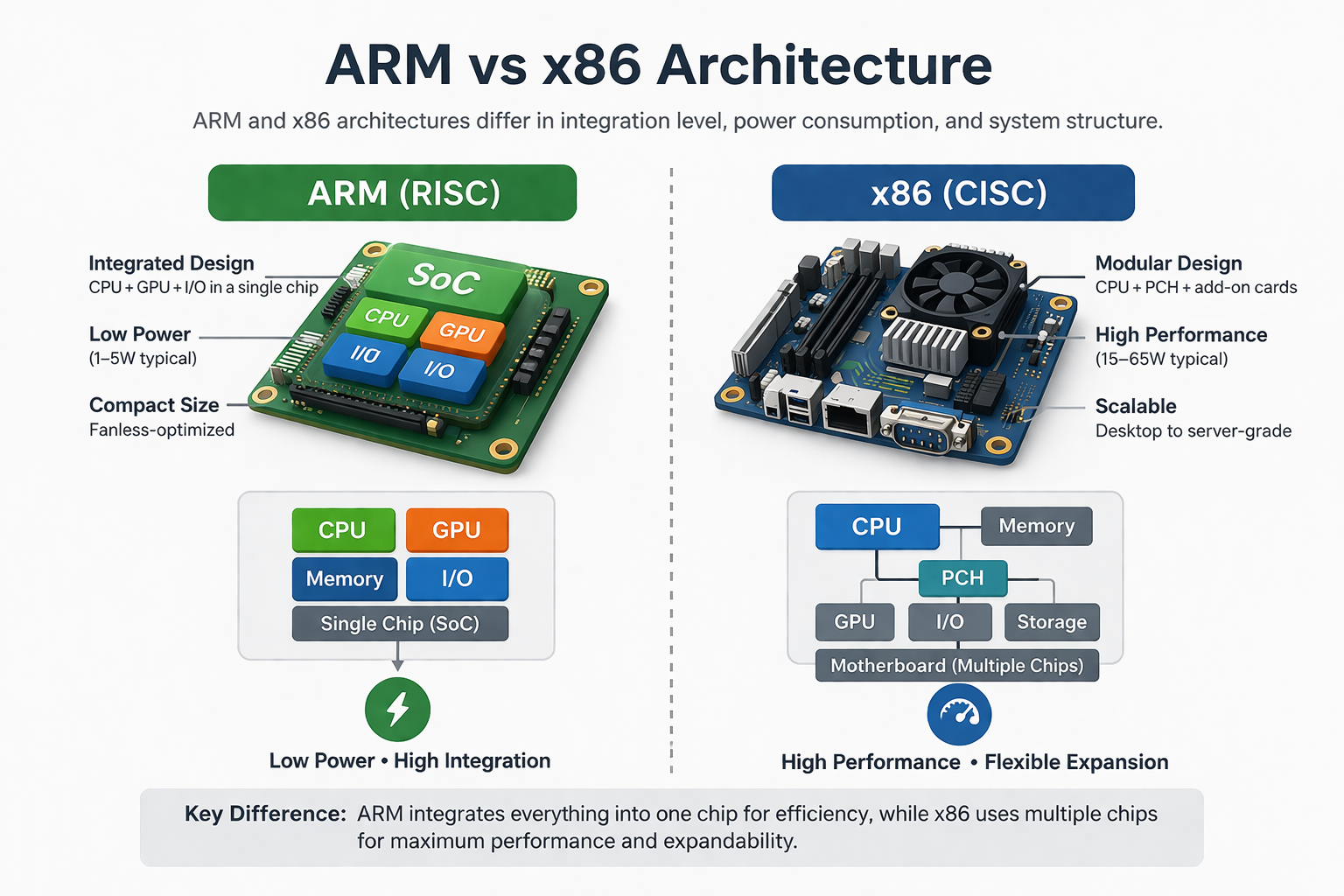
Processor architecture selection directly affects system stability, lifecycle cost, and integration complexity in industrial HMI systems. In industrial panel PCs, this decision extends beyond computing performance to include thermal design, operating system compatibility, and long-term maintainability.
As discussed in industrial HMI system architecture design, Industrial panel PCs function as both user interface and edge processing units (see our Industrial Panel PC overview).. The processor architecture therefore influences enclosure sealing, display integration, and system-level power budgeting.
In practice, ARM and x86 architectures serve different roles in industrial deployments. Selecting the appropriate platform early in the design phase helps reduce redesign risk and improve long-term reliability.
Industrial panel PCs integrate computing hardware, display, and touch interface into a single enclosure. The computing core is typically based on either ARM or x86 processor architectures.
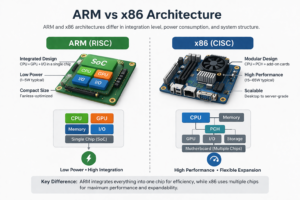
ARM-based panel PCs use highly integrated SoC platforms designed for power efficiency and compact embedded systems.
x86-based panel PCs use modular processor platforms with broader compatibility for industrial software environments and higher computational workloads.
In industrial panel PCs, processor selection directly impacts:
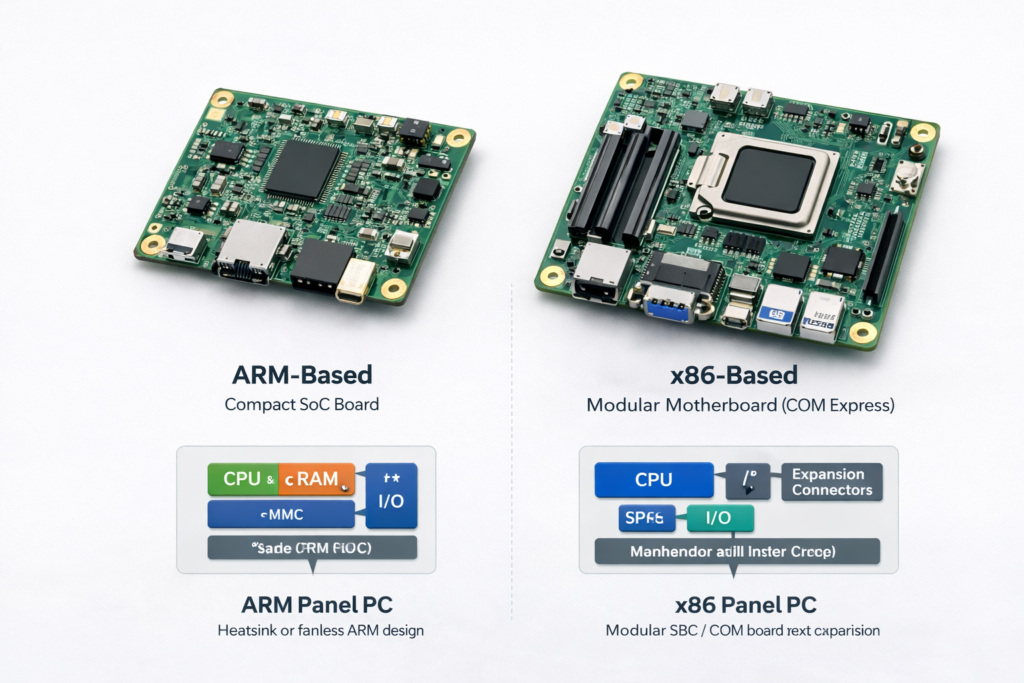
ARM architectures are based on RISC instruction sets with high levels of integration.
Typical characteristics:
ARM systems are typically deployed with Linux or Android and optimized for dedicated functions.
x86 architectures use CISC instruction sets and support a wide range of operating systems.
Typical characteristics:
These systems are commonly required when legacy or proprietary software cannot be ported.
Both architectures interface with industrial touch screens using technologies such as PCAP (projected capacitive) touch.
However, integration complexity differs:
For outdoor or high-brightness systems, GPU capability and display pipeline support are critical, particularly when implementing optical bonding and sunlight-readable displays.
Thermal behavior is often a primary factor in architecture selection.
In sealed or outdoor enclosures:
Fanless x86 systems require careful processor selection and heat dissipation design. Without proper thermal management, performance throttling and reduced lifespan may occur.
Power constraints directly influence platform selection.
ARM systems are typically preferred when:
x86 systems:
Software requirements often determine architecture selection.
x86 advantages:
ARM considerations:
In long lifecycle systems, BSP dependency must be evaluated carefully.
Failure characteristics differ between architectures.
ARM systems:
x86 systems:
In high-vibration or dusty environments, fanless systems can reduce failure risks.
x86 platforms provide:
ARM platforms:
In many OEM projects, custom panel PC or display integration is required to align computing, enclosure, and touch system design.
In real-world deployments, processor selection is rarely made in isolation. It is typically evaluated together with mechanical, thermal, and display requirements.
Industrial OEM designs often require customization in:
As a result, many industrial systems use custom OEM panel PCs or integrated display solutions rather than standard off-the-shelf products.
Architecture selection is typically constraint-driven.
Some applications require balancing multiple constraints:
Processor selection should be evaluated alongside enclosure, display, and software architecture.
ARM for thermal efficiency and sealed design; x86 for advanced features.
x86 for control systems; ARM for distributed HMIs.
ARM for Android-based systems; x86 for enterprise software.
ARM for efficiency-focused deployments; x86 where higher compute is required.
ARM panel PCs:
x86 panel PCs:
ARM and x86 architectures address different engineering constraints in industrial panel PC design.
ARM platforms provide power efficiency and simplified thermal design, while x86 platforms offer higher performance and broader software compatibility.
In practice, processor selection should be evaluated together with enclosure design, display integration, and software architecture to ensure long-term system stability.
1. Is ARM replacing x86 in industrial panel PCs?
No. ARM is expanding in embedded applications, but x86 remains essential for many systems.
2. Can ARM handle industrial HMI workloads?
Yes, for most HMI, communication, and control tasks.
3. Why is x86 still widely used?
Due to Windows compatibility and legacy software requirements.
4. Are ARM systems more reliable?
They can be more thermally stable, but reliability depends on system design.
5. What is the biggest risk when choosing ARM?
Software compatibility and long-term BSP support.
If your project involves:
Engineering evaluation is typically required early in the design phase.
You can contact our team to review your system constraints and determine whether ARM or x86 is more suitable for your application.
Introduction Thermal management is a primary constraint in industrial computing system design. Whether developing embedded controllers …
Introduction In industrial equipment design, selecting between a panel PC vs touch monitor directly affects system …
Introduction Processor architecture selection directly affects system stability, lifecycle cost, and integration complexity in industrial HMI …
Introduction In industrial system design, selecting the appropriate computing architecture directly affects system reliability, integration complexity, …
Send your application details. We respond with configuration direction and next steps.