Industrial Display Black Screen: 7 Causes, Fast Fix & How to Solve It Without Replacement
Quick Answer An industrial display black screen is typically caused by: Power supply instability LED backlight …
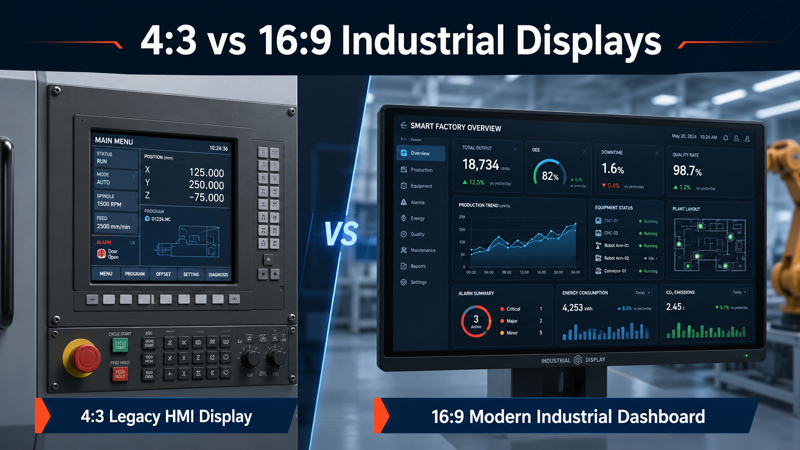
Can a 4:3 industrial display be replaced with a 16:9 display without redesign?
In most industrial systems, the answer is no.
A 16:9 display may look more modern,When comparing 4:3 resolution vs 16:9 monitors, the right choice depends on the application, replacement requirements, mounting structure and software interface.
In simple words, if the screen shape changes, the machine may also need to change.
This is why aspect ratio is an important selection factor for industrial displays. It is not only about how the screen looks. It is about whether the display can fit the equipment, work with the software, and remain stable during long-term use.
4:3 industrial displays are still widely used in legacy systems, CNC machines, industrial automation HMIs, medical equipment, control cabinets, and SCADA systems. These applications often have fixed mechanical openings and software layouts.
16:9 industrial displays are more common in new OEM equipment, smart factory dashboards, EV charging stations, self-service kiosks, transportation terminals, and modern control systems. These applications usually need wider layouts, dashboard interfaces, or more visual information on one screen.
For engineers, system integrators, and procurement teams, the real question is not simply:
Which aspect ratio is better?
The better question is:
Which aspect ratio can be integrated with the lowest risk?
If the wrong aspect ratio is selected, the project may face:
These problems are often not found during initial sourcing. They usually appear after samples arrive, during prototype assembly, or when the display is installed into the final machine.
For a broader understanding of display selection, including mounting, interface, enclosure design, and application requirements, you can also review our industrial display monitors guide.
The main difference between 4:3 and 16:9 industrial displays is the screen shape, but in real industrial projects, the impact goes much deeper.
A 4:3 industrial display has a more square-like format. It is often used in older systems where the enclosure, software interface, and operator workflow were designed many years ago.
A 16:9 industrial display has a wider format. It is more suitable for new equipment where the user interface can be designed around a wider screen from the beginning.
In many projects, 4:3 is chosen for compatibility.
16:9 is chosen for new design flexibility.
Neither one is always better. The right choice depends on the equipment.
Aspect ratio defines the relationship between screen width and height.
For consumer monitors, this may mainly affect the viewing experience. For industrial monitors, it can affect the entire system design.
In an OEM system, aspect ratio can influence:
For example, a 10.4 inch 4:3 display with 1024×768 resolution may be used in a machine control panel. If it is replaced with a 16:9 display, the new screen may be wider but shorter. Even if the signal interface can work, the display may not fit the original opening. The HMI buttons may also become stretched or misaligned.
This is why industrial display replacement should not be judged only by screen size or resolution. The full system needs to be checked.
Use a 4:3 industrial display when:
Use a 16:9 industrial display when:
A simple rule is:
4:3 is usually safer for replacement projects.
16:9 is usually better for new designs.
For replacement projects, many customers still look for 4:3 industrial displays because their machines were originally designed around this format.
Common 4:3 or legacy-format sizes include:
These sizes are often used in CNC control panels, automation machines, control cabinets, power systems, and medical or laboratory equipment.
For new OEM equipment, 16:9 industrial displays are more common because they support wider interface layouts.
Common 16:9 sizes include:
These sizes are often used in EV chargers, kiosks, smart factory dashboards, transportation terminals, machine vision systems, and modern industrial control equipment.
If the project needs a complete display solution with touch panel, controller board, enclosure, and mounting structure, an industrial touch monitor is usually easier to integrate than a bare LCD panel.
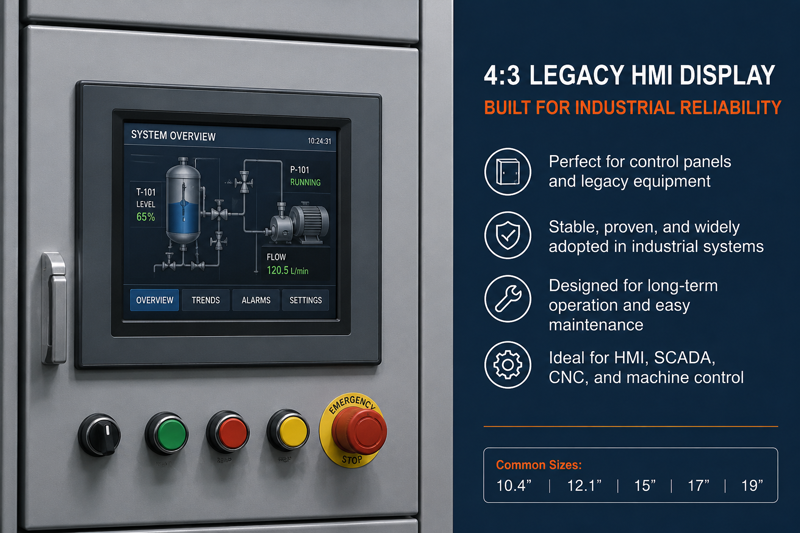
4:3 industrial displays remain important because many industrial machines have long service lives.
Unlike consumer products, industrial equipment may remain in use for many years. A factory machine, medical device, or control system may need the same display format again for maintenance, repair, or repeat production.
This is one reason why 4:3 displays are still used in industrial applications.
Typical resolutions include:
These resolutions are common in older HMI systems, PLC control panels, SCADA interfaces, and machine operation screens.
The 4:3 format is suitable for layouts with:
In a retrofit project, keeping the same aspect ratio can reduce many risks.
A 4:3 display may help maintain:
For this reason, 4:3 is often not chosen because it is “old”, but because it is safer for the existing system.
A cheaper or newer widescreen display is not always the lower-cost solution if it causes mechanical redesign, software rework, or delayed installation.
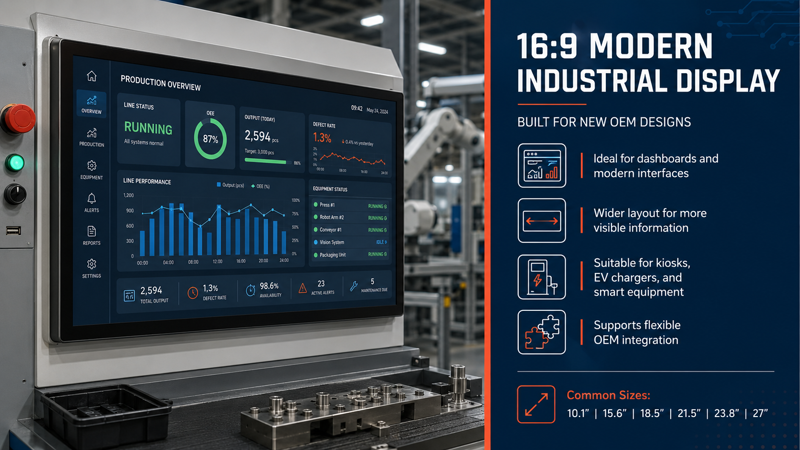
16:9 industrial displays are widely used in new equipment because they offer more horizontal space.
For modern industrial software, this can be useful. A wider screen can show more information at the same time, such as charts, camera images, operation menus, alarms, production data, and system status.
Typical resolutions include:
The 16:9 format is suitable for applications where the interface is designed from the beginning around a wider layout.
16:9 industrial displays are commonly used in:
For these applications, the display is usually part of a new product design. The enclosure, software, and interface can be designed together.
That is the best situation for using 16:9.
| Factor | 4:3 Industrial Display | 16:9 Industrial Display |
|---|---|---|
| Best Use | Replacement and legacy systems | New OEM equipment |
| Mechanical Fit | Better for fixed panel cutouts | Better for new enclosure design |
| Software Fit | Suitable for legacy HMI / SCADA | Suitable for modern UI frameworks |
| Interface Layout | Vertical and structured | Horizontal and dashboard-style |
| Replacement Risk | Lower in existing systems | Higher if replacing 4:3 directly |
| Typical Sizes | 10.4″, 12.1″, 15″, 17″, 19″ | 10.1″, 15.6″, 18.5″, 21.5″, 23.8″, 27″ |
| Main Advantage | Compatibility | Flexibility |
The key point is simple:
4:3 helps reduce risk in existing systems.
16:9 gives more design space in new systems.
Changing from 4:3 to 16:9 should not be treated as a simple upgrade.
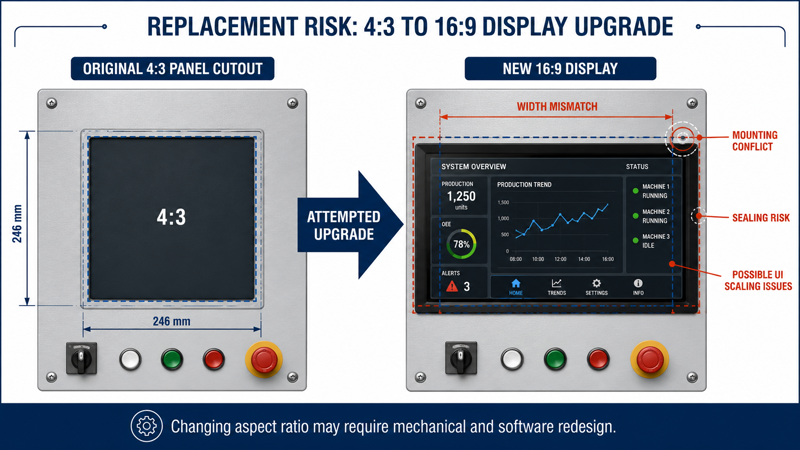
Even when the LCD interface is compatible, the full machine may not be compatible.
The new display may not fit the existing opening. A 16:9 screen is wider and shorter than a 4:3 screen of similar size.
This may affect:
In industrial equipment, even a small mechanical mismatch can create a big problem.
Many legacy HMI programs were designed for fixed resolutions.
If the screen ratio changes, the interface may not scale correctly. Buttons may become stretched, text may move, and some fields may not display properly.
For operators, this is not only a visual issue. It may affect daily operation and safety.
If the touchscreen is not mapped correctly after the display change, the touch position may not match the visual buttons.
This is especially important for industrial touch monitors used in machine control, medical devices, or outdoor terminals.
If the original software cannot adapt to the new resolution, the HMI layout may need to be redesigned.
This can add extra engineering time, testing, and validation.
A display that looks easy to replace during sourcing may become difficult during integration.
It is much easier to check these details before ordering samples than to redesign the front panel after the display has arrived.
If you are not sure whether your current 4:3 screen can be replaced by a 16:9 model, prepare the current display size, resolution, interface, panel cutout drawing, and installation photos before contacting a supplier. These details help the engineering team judge whether a standard model is suitable or whether a custom industrial monitor is needed.
In one retrofit project for an industrial control system, the customer wanted to replace a 10.4 inch 4:3 display with a widescreen panel.
At first, the replacement looked possible. The new display had a higher resolution, and the signal interface seemed compatible.
But after integration started, several problems appeared.
The customer expected the replacement to be simple because:
The existing enclosure was designed for a 4:3 display. The new widescreen panel did not match the original front opening.
The HMI software was also designed for 1024×768 resolution. After switching to a different aspect ratio, some interface elements became stretched and misaligned.
The customer then had to modify the mechanical structure and redesign part of the software layout.
The display itself was not the biggest cost. The real cost came from redesign, testing, and project delay.
When replacing an industrial display, aspect ratio should be checked together with:
In many retrofit projects, keeping the original 4:3 format is the safer choice.
Aspect ratio is often connected with the mounting structure.
For example, an old machine may use a fixed front panel opening. In this case, a 4:3 display may be easier to replace.
A new kiosk, EV charger, or machine control system may use a different structure. In this case, a 16:9 display can be designed into the product from the beginning.
Common industrial monitor structures include:
If the mechanical design is not fixed yet, it is better to choose the aspect ratio and mounting structure together. This helps avoid redesign later.
Before selecting an industrial display, check these questions first.
If it is a replacement project, start with the original aspect ratio.
If it is a new OEM design, 16:9 may offer more flexibility.
If the panel cutout and mounting holes are already fixed, the display format must match the existing structure as closely as possible.
If the HMI or SCADA software was designed for 4:3, changing to 16:9 may require software adjustment.
Outdoor, semi-outdoor, industrial cabinet, kiosk, medical, and machine control applications may have different requirements for brightness, touch function, cover glass, sealing, and working temperature.
For industrial equipment, the first order is not the only thing to consider. The same display may need to be supplied again for future repair, maintenance, or repeat production.
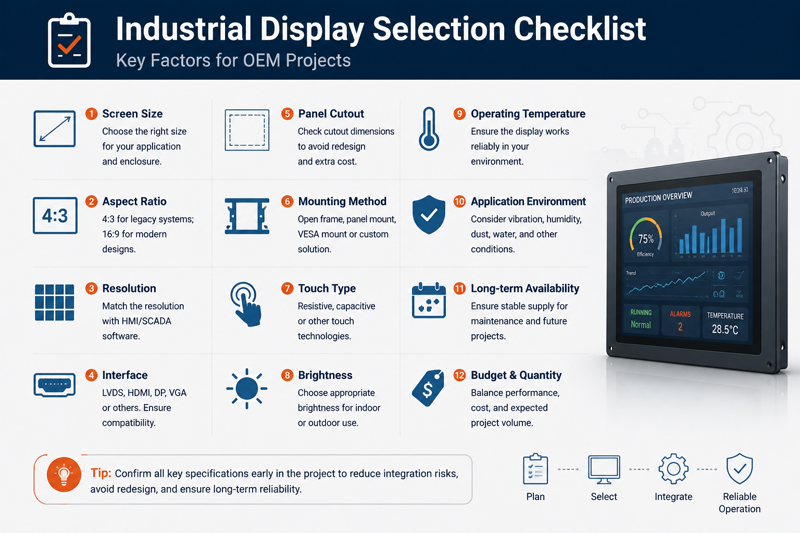
Before confirming a display model, it is useful to check:
For procurement teams, this helps avoid selecting a display only based on unit price.
A lower display price may not save money if it creates enclosure changes, software rework, or delayed product launch.
Aspect ratio in industrial displays is not just a visual choice. It is a compatibility decision.
4:3 industrial displays are still important for legacy systems, retrofit projects, fixed panel cutouts, and long-lifecycle equipment.
16:9 industrial displays are a better choice for new OEM designs, modern UI layouts, dashboards, visualization systems, and applications that need wider screen space.
For replacement projects, keeping the original aspect ratio usually reduces risk.
For new designs, selecting the aspect ratio early gives engineers more freedom.
Before choosing between 4:3 and 16:9, it is important to check the mechanical structure, software layout, interface, touch function, mounting method, and expected product lifecycle.
The right display is not always the newest or widest one. It is the one that fits the system with the least risk.
Usually not directly. The panel cutout, HMI layout, touch mapping, and software resolution may need to be changed. A full compatibility check is recommended before replacement.
Yes. 4:3 industrial displays are still used in many long-lifecycle industrial systems, including CNC machines, automation HMIs, control cabinets, medical equipment, and SCADA systems.
16:9 is usually better for new OEM equipment because it supports modern UI layouts, dashboards, and wider visual content. However, the final choice should still depend on the mechanical design and software requirements.
Many industrial systems were designed around fixed enclosures and fixed software resolutions. Keeping 4:3 helps reduce redesign risk and makes replacement easier.
It is helpful to provide the current display size, resolution, interface, LCD model number, panel cutout drawing, mounting method, touch type, application environment, and estimated quantity.
If you are selecting a display for replacement or new equipment design, prepare the key project details before evaluation.
Useful information includes:
With these details, it is easier to check whether a standard industrial monitor can be used, or whether a customized industrial display solution is safer for the project.
For industrial systems, early checking is always better than late redesign.
Quick Answer An industrial display black screen is typically caused by: Power supply instability LED backlight …
Introduction Industrial display flickering often appears unexpectedly in real deployments such as EV charging stations, factory …

Introduction Outdoor displays are designed for harsh environments, but outdoor industrial display overheating remains one of …

Introduction In OEM system design, touchscreen integration failures are often caused by incorrect assumptions about iOS …
Share your application, requirements, or current challenge. Our team will review the details and recommend a practical way forward.