What Is an Industrial Panel PC? Components, Types and Applications

An industrial panel PC is a computer with a built-in display, usually a touchscreen, designed for …
Eagle Touch Engineering Team
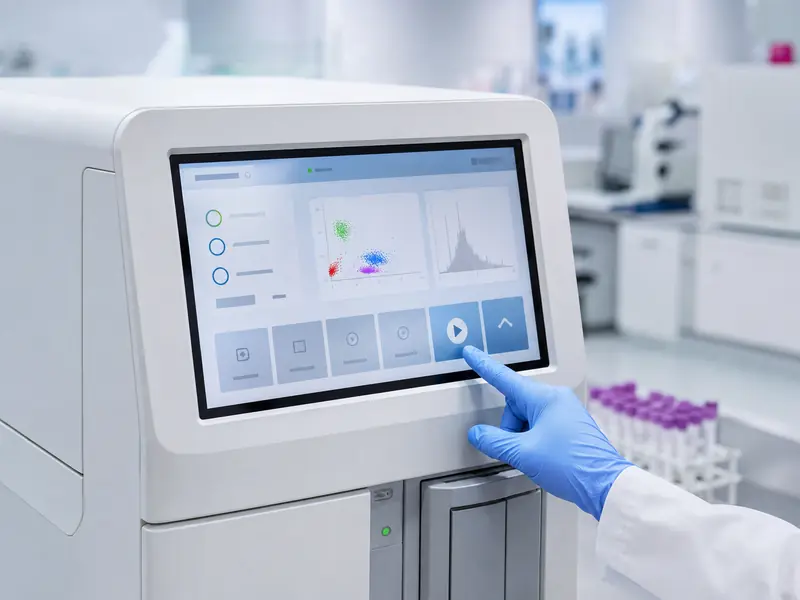
A touchscreen display for medical equipment presents patient data, system status and alarms while giving the operator direct control. It can replace a separate keyboard, mouse or group of mechanical buttons, but it also becomes part of the equipment’s operating interface.
The display may be cleaned many times a day, operated with gloves, exposed to liquid or gel and used continuously. It must therefore be selected around the real application, not simply by screen size and resolution.
Medical systems often present several types of information in limited panel space. A patient monitor may show waveforms, values and alarms; a laboratory analyzer may guide sample preparation and testing; and an ultrasound system may use touch controls for measurements and image settings.
Direct touch lets the operator select an on-screen function without moving to another input device. The interface can also change with the operating mode, language or software version.
Touch control should not automatically replace every physical control. Emergency stops, power isolation and other safety-critical functions may still require dedicated hardware. The touchscreen should be designed as part of the complete user interface and risk-control strategy.
Different medical applications place different demands on the display. “For healthcare use” is not a complete specification.
| Application | Typical role of the touchscreen | Main display concerns |
|---|---|---|
| Patient monitor | View data, acknowledge alarms and adjust settings | Accurate touch, wide viewing angle, 24/7 operation |
| Ultrasound or imaging system | Select functions, enter measurements and review images | Optical clarity, low reflection, responsive control |
| Laboratory analyzer | Enter sample information and operate test workflows | Chemical exposure, glove use, cleaning and reliability |
| Medical cart or bedside terminal | Access records and enter patient information | Frequent disinfection, mounting, cable management |
| Patient check-in terminal | Registration, consent and wayfinding | Simple operation, durability and privacy |
This distinction matters. A check-in kiosk in a hospital lobby does not have the same safety, image-quality or cleaning requirements as a display integrated into a device used near a patient.
A flat glass front is easier to wipe than a raised bezel with buttons and joints. However, cleaning performance depends on the complete front structure, including the glass edge, gasket, adhesive, housing and openings.
Repeated exposure to alcohol, diluted bleach or another approved disinfectant may affect printing, seals, plastics and surface coatings. The equipment manufacturer should define the agent, concentration, contact time and cleaning frequency, then verify them on the production-intent sample.
Antimicrobial material, when specified and validated, does not replace routine cleaning. The surface must withstand cleaning without allowing liquid to enter the equipment.
For general handling guidance, see How to Clean a Touch Screen Monitor Safely.
Thin nitrile gloves, thick protective gloves and a stylus are different input conditions. A projected capacitive touchscreen can be tuned for glove operation, but performance depends on the glove, cover glass, sensor, controller settings and grounding.
Water, cleaning solution, saline or conductive gel can change the signal seen by a PCAP controller. The required behaviour must be defined: ignore droplets, accept a wet finger, or suspend touch during heavier liquid exposure. Increasing sensitivity can also increase false-touch risk.
Where a non-conductive stylus or heavy gloves are essential, resistive touch may remain practical. Selection should follow the actual input and cleaning requirements. Our glove-compatible touchscreen guide explains the variables to test.
On continuously operated equipment, the touch interface must recover correctly after power cycles, standby and host restarts. Edge accuracy, repeated input and stable USB or I²C communication matter more than the advertised number of touch points.
Critical actions may require confirmation, adequate button spacing or a defined press duration. These software decisions should be tested with the final screen size, gloves and operator position.
Hospital lighting and examination lamps can create reflections. Brightness alone is not the solution; contrast, viewing angle, cover-glass reflection and touch-sensor transmission also affect readability.
AG treatment can diffuse reflections but may introduce sparkle on fine text. Optical bonding can reduce internal reflection and improve perceived contrast, although it does not increase native brightness. See our air bonding vs optical bonding guide for the practical differences.
A display used to control a device is also different from a diagnostic imaging display. If accurate interpretation of radiological images is required, luminance stability, calibration and applicable imaging standards must be defined separately.
The LCD, touch controller, cover glass, display board, power supply, cables and enclosure form one system.
Open-frame or panel-mount structures suit embedded equipment, while a VESA-mounted industrial display monitor may fit a medical cart or workstation. Drawings should define dimensions, viewing area, cutout, mounting points, rear clearance and connector direction before enclosure production.
“IP65 front” describes the protected front surface in the tested installation, not the rear housing, connectors or complete monitor. Sealing also depends on the gasket, enclosure flatness, mounting pressure and openings.
Interfaces must match the host. A monitor may use HDMI or DisplayPort with USB touch, while an embedded module may use LVDS or eDP with I²C. Cable length, connector retention, grounding and electrical noise should be checked in the final assembly, not only on a laboratory bench.
For an overview of available product levels, see our industrial touch screen guide for OEM equipment.
The term “medical-grade” should not be based only on an industrial LCD, sealed glass or 24/7 operation. Medical electrical equipment may need to meet IEC 60601-1 for basic safety and essential performance, while IEC 60601-1-2 addresses electromagnetic disturbances. Particular standards may also apply.
The compliance path depends on intended use, patient proximity, target market and system architecture. A display component does not make the completed device compliant. Applicable standards should be identified early so that power supply, leakage current, insulation, grounding, EMC, materials and documentation can be considered.
If certification is required, the exact product configuration and responsibility for testing should be agreed before quotation and sample approval.
A production-intent sample should use the planned LCD, glass, touch controller, firmware, cables, power supply and enclosure. Validation should include:
Relevant tests should be repeated after changing the LCD, cover glass, controller, firmware, power supply or mechanical structure. In regulated equipment, an uncontrolled component substitution can create more cost than selecting a stable platform at the beginning.
To evaluate a custom touchscreen for medical equipment, provide the equipment type, screen size, resolution, product level, mounting drawing, glove or stylus type, expected liquid exposure, cleaning agent, operating hours, interfaces, power input, applicable standards, annual quantity and required supply lifetime.
Eagle Touch develops custom industrial display solutions for OEM equipment, including customized cover glass, touch tuning, optical bonding, mounting structures and interface options. If you are developing a medical or healthcare device, send us your installation drawing and operating requirements. Our engineering team can review whether a standard platform, modified monitor or custom display assembly is the most practical starting point.
An industrial panel PC is a computer with a built-in display, usually a touchscreen, designed for …

An embedded PC is a computer configured to work as part of a machine or larger …

Start with the software the panel PC must run and the conditions it must fit. Then …

Choosing an industrial panel PC IP rating starts with two questions: what dust and water exposure …
Share your application, requirements, or current challenge. Our team will review the details and recommend a practical way forward.