What Is an Industrial Panel PC? Components, Types and Applications

An industrial panel PC is a computer with a built-in display, usually a touchscreen, designed for …
Eagle Touch Engineering Team
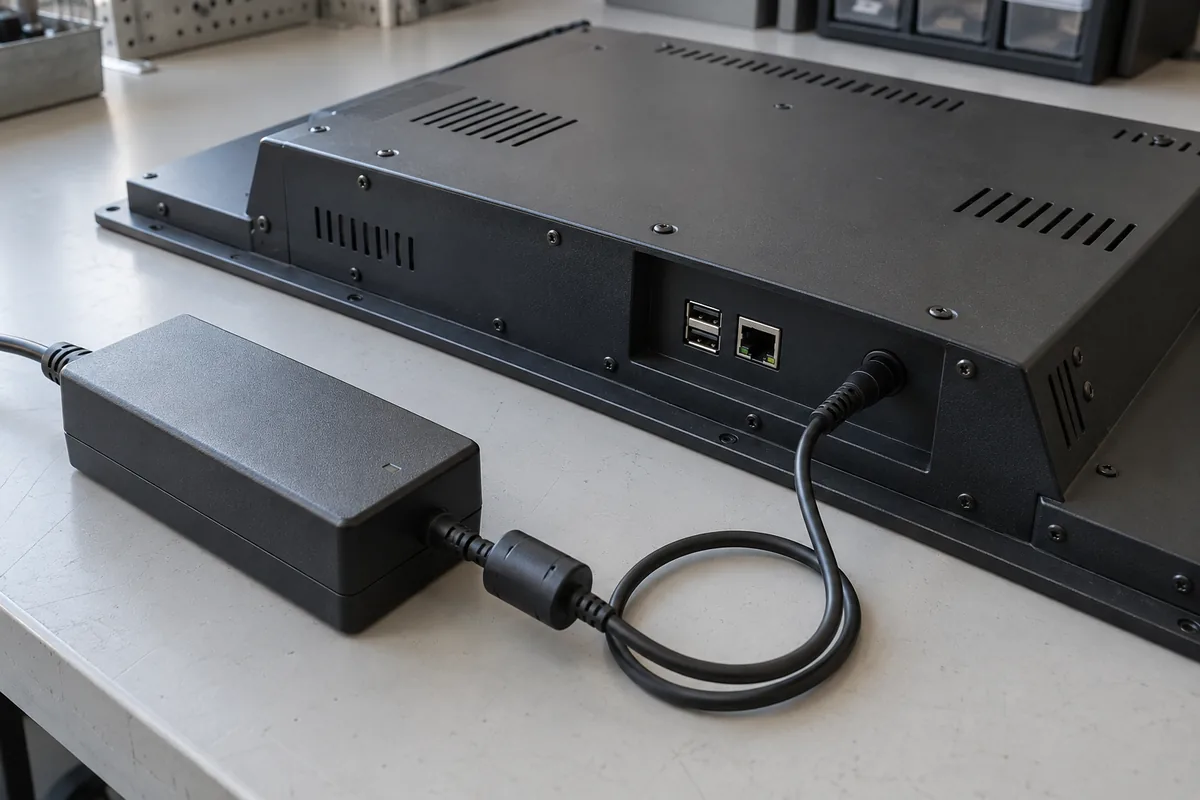
The right power input depends on what your machine already supplies. Before choosing a panel PC, confirm whether it will connect to AC mains, an external adapter or the machine’s DC power supply.
For DC systems, 12V can be a sensible choice when a suitable 12V supply is already available. A 24V-compatible unit fits many control cabinets. Wide-range input is useful when the same computer must work across different supplies or a larger voltage variation. None of these labels, by itself, establishes power capacity or protection capability.
When selecting a panel PC for an industrial application, power input is only one of the configuration factors to consider. You should also consider the display size, touch technology, computing platform, installation method, and other application requirements. For a broader overview of available configurations, see our industrial panel PC solutions.
The distinction is straightforward once you follow the cable.
Direct AC input. The panel PC contains an AC-DC power supply and accepts AC at its designated inlet. Check the complete unit’s rated voltage and frequency; do not assume every AC-input model accepts every mains supply. This arrangement removes the separate adapter, but the internal supply still needs space, cooling and service access.
External AC-DC adapter. AC enters the adapter, and its DC output connects to the panel PC. The computer itself is a DC-input device. For example, an adapter marked “100–240VAC input, 12VDC output” does not make the computer’s DC connector suitable for mains voltage. Match the adapter’s output voltage, capacity, polarity and connector to the unit.
Cabinet DC supply. A cabinet-mounted power supply converts AC to DC upstream, or the equipment already provides a DC bus. The panel PC connects to that DC source. Check the available capacity after other loads are included, particularly when the supply is shared with equipment that draws brief current peaks.
Choose the arrangement around the machine’s power distribution and maintenance needs. An external adapter may be convenient in a standalone installation; an existing cabinet DC supply may make a separate adapter unnecessary.
Read the permitted operating range before choosing a voltage. “12V DC” is a nominal rating with a tolerance that must be specified. “9–36V DC” describes a continuous operating range, subject to the manufacturer’s conditions. “12V/24V” is ambiguous: it may describe alternative versions rather than one unit that accepts both.
| Input option | When it fits | What to check |
|---|---|---|
| 12V DC | Equipment already has a suitable regulated 12V supply | Allowed tolerance, available current and cable losses |
| 24V DC | A control cabinet already distributes 24V | Actual bus limits, shared loads and connector ratings |
| Wide-range DC | One configuration must accommodate different nominal supplies or wider variation | Exact operating limits, current at the lowest voltage and specified protections |
These options overlap: a 9–36V unit may work on both 12V and 24V systems. That does not mean it tolerates every disturbance on either bus.
Outdoor location alone does not require wide input. A kiosk supplied by a well-regulated adapter may have different needs from a battery-powered terminal. Vehicle power also needs separate evaluation: a nominal 12V battery system can experience starting dips and transients outside a panel PC’s operating range. Texas Instruments’ automotive power design guidance explains why those conditions require specific consideration.
A suitable converter can let a 12V-only panel PC operate from a 24V supply. This can be practical when retaining an existing computer or meeting a particular isolation requirement.
Confirm the converter’s input range, regulated output, startup capability and continuous output at the installation temperature. Include its conversion losses, mounting space and wiring in the comparison. If a directly compatible panel PC is available, compare both complete arrangements rather than judging only the computer’s purchase price.
CPU TDP is not the panel PC’s input power requirement. The display backlight, motherboard, storage, cooling fans and powered peripherals also draw power.
Ask for maximum input power and startup requirements for the ordered configuration. A reading taken at idle or reduced brightness is not enough to size the supply. Check its available output at the expected cabinet temperature and leave the margin recommended for the application.
A higher current rating does not normally force extra current into the computer. A regulated supply with greater current capacity can be suitable, provided its voltage, polarity, connector and other requirements match.
Consider an illustrative operating point of 60W at the panel PC’s DC input:
For the same cable resistance, the lower current produces less voltage drop and cable heating. This does not mean the computer consumes half the power at 24V, or that a 12V-only model can accept 24V.
Allow for both outgoing and return conductors, cable length, wire size and connection resistance. The voltage reaching the computer must remain within its rated range under the relevant load conditions. Wide-input models may draw their highest input current near the low end of the range.
For an existing unit that fails to start, follow the panel PC not powering on troubleshooting guide rather than changing the supply voltage by guesswork.
A wide input range tells you the voltages at which the unit can operate. It does not tell you whether the computer can withstand a voltage surge, tolerate reversed DC wiring or keep running when power briefly disappears. Confirm those capabilities separately. If electrical isolation between the supply and the computer is required, specify it explicitly.
For direct AC input, follow the manufacturer’s requirements for the inlet, protective earthing where applicable, disconnection and installation. For DC input, confirm polarity and pin assignment from the wiring drawing. Do not assume a DC return terminal is interchangeable with protective earth.
Choose connectors and cable retention for the installation. A plug that fits is not proof of electrical compatibility; terminal blocks also need the specified wire size and tightening requirements.
If the computer must keep running through a brief power interruption, specify how long it needs to operate and at what load. A compatible backup power solution, such as a UPS, may be needed. Automatic restart when power returns is a separate function; confirm it if the equipment operates unattended.
You do not need to know every electrical parameter before requesting a quotation. Provide the equipment conditions, then ask the supplier to confirm the matching specifications.
| Information to provide | Confirmation to request |
|---|---|
| AC supply, regulated DC bus or battery source | Supported supply arrangement and exact input range |
| Known voltage limits and disturbances | Compatibility and any additional power conditioning needed |
| Screen, computer configuration and powered peripherals | Maximum input power and startup requirements |
| Cable length and installation layout | Cable and connector requirements, polarity and pinout |
| Ambient conditions and power-interruption needs | Temperature limits, protection details and recovery behavior |
Before releasing a production order, validate the selected unit with the intended supply, cable and peripherals in representative operating conditions. If you are looking for a ready-to-configure industrial computer rather than a fully customized solution, you can also explore our standard industrial panel PCs, available in multiple screen sizes, processor options, touch technologies, and mounting configurations.
For the other configuration decisions, see our industrial panel PC selection guide. Send Eagle Touch a photo of your power supply label, the required panel PC configuration and the approximate cable length. If the supply has not yet been selected, share the available AC or DC source instead. We can then review the power input requirements before quotation.
An industrial panel PC is a computer with a built-in display, usually a touchscreen, designed for …

An embedded PC is a computer configured to work as part of a machine or larger …

Start with the software the panel PC must run and the conditions it must fit. Then …

Choosing an industrial panel PC IP rating starts with two questions: what dust and water exposure …
Share your application, requirements, or current challenge. Our team will review the details and recommend a practical way forward.