What Is an Industrial Panel PC? Components, Types and Applications

An industrial panel PC is a computer with a built-in display, usually a touchscreen, designed for …
Eagle Touch Engineering Team
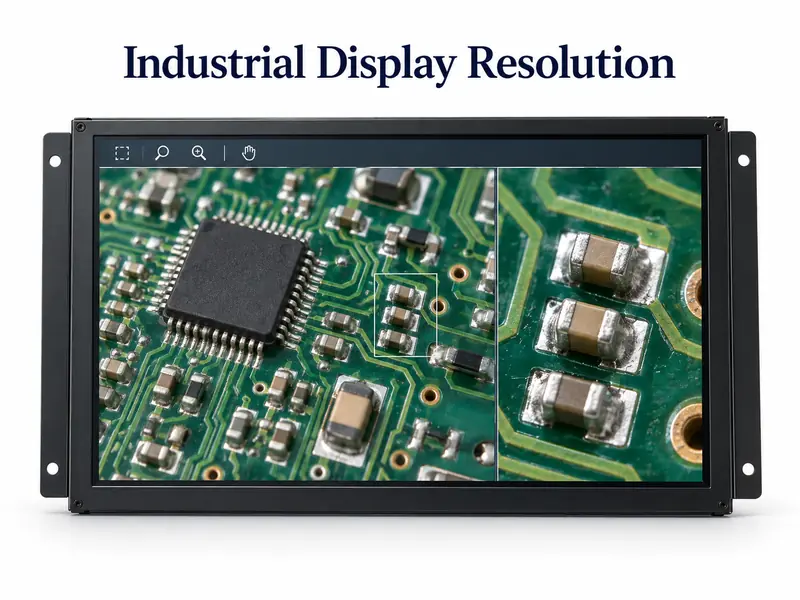
A higher-resolution LCD is worth specifying when operators need image detail or workspace that the existing display cannot provide. It is less useful when the interface still consists of a few large buttons and status values. Industrial display resolution should follow the task, not simply the highest specification available.
Before comparing panels, separate native resolution from supported input resolution. Native resolution is the LCD’s physical pixel grid. Input resolution is the video signal the monitor accepts. A 1280 × 800 panel does not become a Full HD panel because its controller accepts a 1920 × 1080 signal; the image must be scaled to fit. Acceptance of that signal is also controller-dependent, not guaranteed. EIZO’s explanation of native resolution describes why this distinction matters.
For an OEM project, the useful question is: what will the operator actually see and do differently after the resolution changes?
A higher-resolution panel can show more detail from a sufficiently detailed source image. This matters when an operator examines a camera view, checks a component edge or reviews an inspection result.
The image window matters as much as the full screen. A high-resolution camera feed squeezed into a small dashboard tile is still downscaled. If close inspection is necessary, provide a larger view or a zoom function. Increasing display resolution does not improve the camera’s captured data or the machine-vision algorithm’s detection accuracy.
Trend charts, alarms and equipment status can benefit from being visible together. More pixels may allow a useful side-by-side layout instead of repeated page changes.
That benefit depends on scaling. If the software enlarges every element to preserve its physical size, the extra pixels may improve smoothness rather than increase the number of items on screen. Both outcomes can be useful, but they are different requirements.
At the same physical screen size, more pixels can make text, diagonal lines and curves appear finer, provided the software renders them appropriately. Enlarging an old bitmap interface does not create new detail.
For a simple control screen, these improvements may be modest. For a dense diagnostic page, they may justify the change.
A display can look sharp on a desk and still be awkward to operate on a machine.
Consider two same-size, same-shape panels. If one has twice as many pixels across its width, a button kept at the same physical-pixel width becomes half as wide on that panel. Proper UI scaling can restore its physical size, but the application must support it.
Modern frameworks can separate interface coordinates from physical display pixels; Qt’s high-DPI documentation explains this approach. Older HMI software, fixed-size graphics and mixed software components still need checking on the target system.
Evaluate the interface from the intended operating position. Can the operator read an alarm without leaning forward? Are adjacent controls sufficiently separated? Does the layout remain usable with the required gloves?
Touch accuracy is not determined by LCD resolution alone. The touch sensor, controller, calibration and coordinate mapping also matter. Smaller visible buttons may make operation harder even when the touchscreen reports positions correctly.
Nor will more pixels solve washed-out text caused by reflection or insufficient brightness. Treat those as separate visibility requirements.
For a separate industrial monitor, the external computer renders the interface. In a panel PC, that computer is built into the unit. The distinction matters when diagnosing slow graphics or evaluating heat.
A 1920 × 1080 image contains about 2.64 times as many pixels as 1024 × 768. That is a pixel-count comparison—not a prediction that GPU load, latency or power will increase by 2.64 times.
Actual performance depends on refresh rate, animation, video decoding, graphics acceleration and software design. A platform capable of displaying a static desktop may behave differently with several live video windows. Test the intended workload rather than judging capability from the processor family alone.
Confirm the complete signal path: host output, adapters, cable, monitor controller and LCD. Each must support the intended resolution and refresh rate. A matching connector is not sufficient evidence.
For complete monitors, request supported input timings and native panel resolution separately. For embedded LCD assemblies, confirm the panel interface and timing requirements. Our industrial display interface guide covers the wider connection choices.
Additional rendering work can affect host power and temperature. Panel and controller consumption must also be checked, but resolution alone does not establish whether a system will overheat. Compare actual power data and validate the assembled equipment under its expected workload.
Likewise, compare specific LCD models for price, lead time and supply plans. Do not assume that lower resolution always means lower cost or longer availability. Include any controller changes, software work and requalification in the upgrade budget.
Use the display task to narrow the choice. These are decision starting points, not fixed resolution rules for each industry.
| Display task | A reason to increase resolution | A reason to retain the current resolution |
|---|---|---|
| Basic machine controls | Labels or diagnostic content no longer fit clearly | Existing buttons, values and alarms are readable and complete |
| Trends and multi-window monitoring | Operators need more information visible together | Scaling makes the additional information too small to use |
| Camera and inspection views | Source detail is lost in the current display area | The source image or small viewing window remains the limiting factor |
| Existing fixed-layout HMI | Software and hardware are being redesigned together | The current application depends on a fixed pixel layout and works well |
There is no universal threshold at which an industrial screen becomes “high resolution.” Full HD may be a substantial change from an older XGA interface; another project may need QHD, 2560 × 1440, or UHD, 3840 × 2160. Specify the exact pixel dimensions rather than relying on “2K” or “high resolution.”
For replacement equipment, resolution is only one compatibility check. If the change also alters screen shape or dimensions, review our 4:3 vs 16:9 industrial monitor guide before treating it as a direct replacement.
Use the final host, software build and approved cables. A desktop wallpaper is not an adequate sample test.
Record the approved LCD, controller, software settings and video mode so repeat orders can be checked against the same configuration.
It can be. The deciding factors are the content, physical screen size, viewing distance and software layout. A simple HMI may need less; an image-heavy workstation may benefit from more.
Not necessarily. A fixed-resolution interface may be interpolated or displayed within part of the screen. Sharper rendering usually requires the software to generate suitable text and graphics for the new display.
No. Continuous-operation suitability depends on the selected components and system design. Resolution alone is not a reliability rating.
Send Eagle Touch your target screen size, host output resolution, video interface, HMI screenshot and sample or production quantity. We can use these details for an initial review of resolution and video compatibility, and discuss possible industrial display monitor configurations.
Before recommending a complete monitor, we will also need to confirm the mounting dimensions and operating environment.
An industrial panel PC is a computer with a built-in display, usually a touchscreen, designed for …

An embedded PC is a computer configured to work as part of a machine or larger …

Start with the software the panel PC must run and the conditions it must fit. Then …

Choosing an industrial panel PC IP rating starts with two questions: what dust and water exposure …
Share your application, requirements, or current challenge. Our team will review the details and recommend a practical way forward.