What Is an Industrial Panel PC? Components, Types and Applications

An industrial panel PC is a computer with a built-in display, usually a touchscreen, designed for …
Eagle Touch Engineering Team
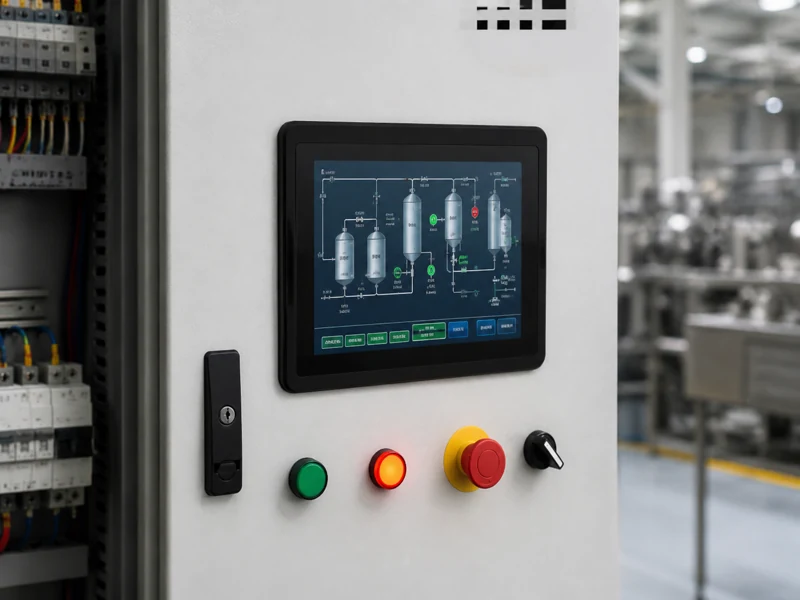
An industrial touchscreen monitor gives operators a direct way to see and interact with an automated machine. It displays the interface generated by an industrial PC or embedded controller and sends touch input back to that host system. Operators use it to select recipes, adjust permitted settings, acknowledge alarms, check production status and support maintenance.
This is why an industrial touchscreen monitor for automation should be specified as part of the machine, not treated as a desktop accessory.
Automation reduces manual work, but it does not remove human decisions. Someone still has to start a run, review alarms, change a product format, confirm an inspection result or enter maintenance mode.
A touch monitor brings these functions into one visual interface. The same screen can show production data during normal operation, fault details during an alarm and service information during maintenance. This reduces panel clutter and lets the machine builder update much of the interface through software. Emergency stops, safety interlocks and other safety functions, however, must not depend on an ordinary touchscreen; they require the appropriate safety-rated control design.
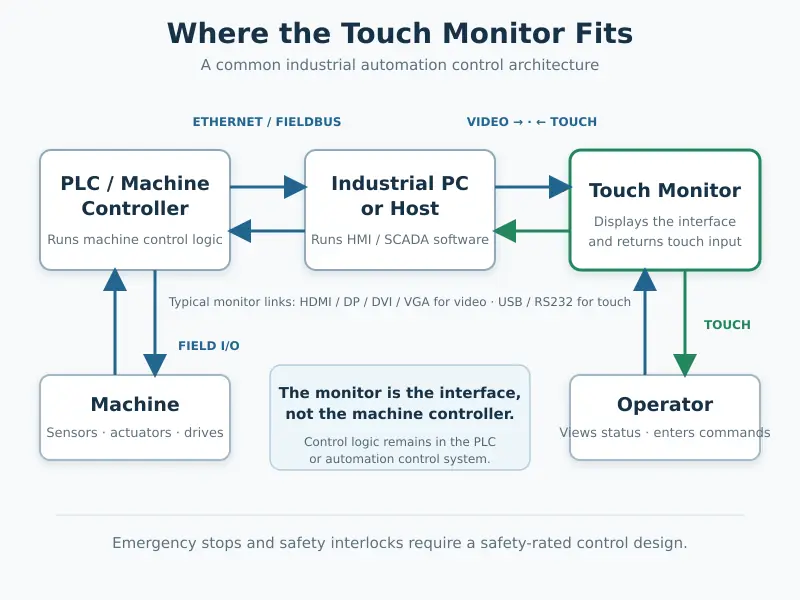
A touch monitor is a display and input device. It normally does not run the HMI application or control the machine by itself.
In a common architecture, the PLC controls the machine, while an industrial PC runs the visualization software. The host sends video through HDMI, DisplayPort, DVI or VGA, and the monitor returns touch coordinates through USB or, in some legacy systems, RS232.
This separation keeps the computer protected inside the cabinet while the screen is positioned for the operator. It may also allow the monitor to be replaced without replacing the control computer or rewriting the program, provided its dimensions, resolution and interfaces remain compatible.
The terms are often mixed together, but the products are not the same:
| Device | What it contains | Best fit |
|---|---|---|
| Touch monitor | Display, touch sensor, display controller and interfaces | A separate IPC or controller already runs the software |
| Panel PC | Display, touch and complete computer | Computing and display are required in one unit |
| Dedicated HMI | Hardware and vendor-specific HMI runtime | A defined PLC ecosystem and HMI project are being used |
If the project needs local processing, storage, an operating system or software installed directly behind the screen, an industrial panel PC is usually the more appropriate starting point.
Setup and changeover: Settings, recipes and instructions can share one screen. Operators no longer have to move between a display, keyboard and separate control panel—useful on equipment with frequent product changes.
Alarm response: A lamp shows that something is wrong; an HMI screen can show where the fault occurred, what triggered it and what to check. The monitor does not diagnose the machine, but it makes the controller’s diagnostic information usable.
Panel space and consistency: Status, navigation and permitted input can occupy one location, while physical controls remain for safety or frequently used manual functions. A common screen layout can also be reused across similar machines and adapted for language, workflow or permission changes.
The challenge is keeping the display readable and touch input stable after installation in the finished machine.
Gloves, oil and moisture: Glove thickness, water, grounding and cover-glass thickness all affect PCAP performance. Resistive touch remains practical for pressure input, heavy gloves or a stylus. Test with the actual operator input rather than choosing from a specification sheet alone.
Motors and electrical noise: Inverters, relays, switching supplies and poor grounding can cause missed input or ghost touches. Cable routing, shielding, power quality, grounding and touch-controller tuning must be evaluated in the finished machine.
Heat and long operating hours: Cabinet temperature can be much higher than room temperature. Backlight life, component ratings, ventilation and heat from nearby devices matter for extended-shift or 24/7 equipment.
Vibration and maintenance: Check secure mounting, connector clearance, cable bend, strain relief and the space needed to remove the unit. Matching screen size alone does not confirm mechanical fit.
Long equipment life: A change to the LCD, touch controller or display board can affect mounting, firmware and touch behavior. Controlled revisions and a validated replacement plan can be more valuable than the lowest initial price.
For a broader view of these application conditions, see industrial automation displays for machine control.
Start with the machine and operator, not a list of maximum specifications.
| Actual condition | What to confirm |
|---|---|
| Operator wears gloves | Glove material and thickness; tuned PCAP or resistive touch |
| Oil, dust or occasional water reaches the front | Front sealing, gasket and suitable cover-glass surface |
| Monitor is close to a motor or inverter | Grounding, shielding, cable routing, power quality and EMC validation |
| Equipment runs 24/7 | Operating temperature, backlight target and thermal conditions inside the cabinet |
| Existing square HMI opening must be retained | Aspect ratio, active area, cut-out, resolution and mounting points |
| Monitor is installed from the cabinet front | Panel-mount touch monitor structure and service access |
| Display is built behind the machine’s own bezel | Open-frame monitor dimensions, brackets and connector clearance |
| Host computer is several metres away | Video standard, cable length, touch cable and signal testing in the final layout |
| Product will be built for several years | Approved configuration, change notification and replacement control |
Brightness should follow the viewing environment. A normal indoor panel does not automatically need a sunlight-readable display, while strong ambient light may justify higher brightness, reflection control or optical bonding. Extra brightness adds heat and power consumption, so it should solve a real visibility problem.
Industrial touch monitors serve machine control panels, MES terminals, robot cells, inspection stations, packaging equipment and material-handling systems. A packaging screen may handle recipes and alarm history; an inspection display prioritizes image detail and pass/fail information; a robot-cell screen supports status, job selection and maintenance access. The task should determine the display format, mounting and touch behavior.
For CNC machine projects, see our CNC machine display guide for application-specific guidance on coolant exposure, glove operation, legacy resolutions, and VFD interference.
Once these operating conditions are clear, browse our industrial display monitor range. This helps avoid paying for unnecessary specifications or discovering too late that a standard monitor does not fit the machine.
A separate touch monitor suits a project that already has an industrial PC or embedded host. It is less suitable when no computer is available to run the HMI software, local processing is required at the screen or a PLC supplier’s dedicated HMI platform is mandatory. The choice is about architecture: a monitor offers flexibility, a panel PC combines computing and display, and a dedicated HMI fits a defined automation ecosystem.
Before sampling, confirm screen size and native resolution, HMI layout, video and touch interfaces, operator input, mounting drawing, rear space, power, temperature, contamination, cleaning and expected production life. Test the sample in the real machine with the final cables, grounding, gloves and software—not only on an office desk.
Eagle Touch develops industrial touchscreen monitors for OEM automation equipment in panel-mount, open-frame and custom configurations. Send us your machine drawing, controller interfaces, operating conditions and estimated quantity. We can review the practical fit before the sample is built.
An industrial panel PC is a computer with a built-in display, usually a touchscreen, designed for …

An embedded PC is a computer configured to work as part of a machine or larger …

Start with the software the panel PC must run and the conditions it must fit. Then …

Choosing an industrial panel PC IP rating starts with two questions: what dust and water exposure …
Share your application, requirements, or current challenge. Our team will review the details and recommend a practical way forward.