What Is an Industrial Panel PC? Components, Types and Applications

An industrial panel PC is a computer with a built-in display, usually a touchscreen, designed for …
Eagle Touch Engineering Team
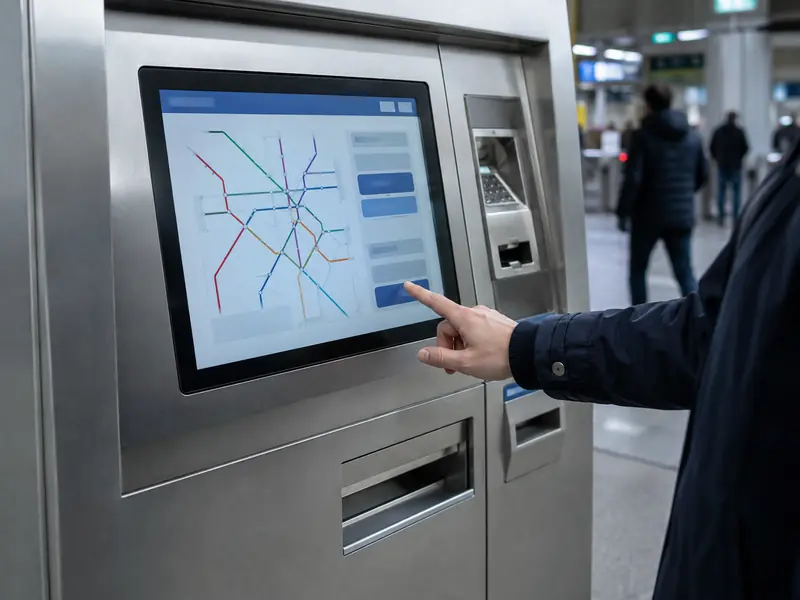
A touch monitor is the main passenger interface in a ticket vending machine (TVM). It presents ticket options, accepts selections and shows each transaction step. If the display is hard to read, registers the wrong input or does not recover after a restart, the passenger may be unable to buy a ticket even when the payment and printing modules are working.
For this reason, a TVM monitor should be selected around the passenger transaction, installation environment and complete machine—not from screen size or brightness alone.
A TVM must handle more choices than a practical arrangement of mechanical buttons can support. Destinations, fares, languages and service information can change without altering the front panel. A touch monitor combines this changing information with passenger input and guides unfamiliar users one decision at a time. The benefit is not simply “fewer buttons”; it makes a multi-step ticket transaction manageable.
A typical passenger journey includes:
The monitor displays the TVM software and sends touch coordinates to the host. It does not authorise payment or print the ticket, but it must show the status of those modules. A delayed update, double selection or unreadable error can leave the passenger unsure whether payment was accepted.
The operating conditions of a TVM create requirements that do not apply to an ordinary office display.
| TVM characteristic | What it means for the touch monitor |
|---|---|
| Many passengers are occasional users | Text, buttons and transaction status must be clear and easy to touch accurately. |
| Fares and payment details require confirmation | Prices and error messages need clear presentation at native resolution. |
| Users differ in age and language | Size, viewing angle and contrast matter; accessibility also depends on UI design and installation height. |
| The interface is public | The front surface must tolerate frequent use and cleaning, with secure support. |
| Some TVMs are unattended | Touch, video, restart and wake-up behaviour must remain reliable without an operator present. |
| Locations range from halls to outdoor platforms | Brightness, reflection, temperature, water and glove requirements vary. |
| Several modules share one cabinet | Depth, connectors, grounding and cables must be checked in the complete machine. |
| Equipment remains in service for years | Dimensions, interfaces, firmware and replacement access matter. |
Each monitor feature should solve a defined TVM condition.
For most new machines, an open-frame monitor with projected capacitive touch is a practical starting point. For projects that require different mounting formats, brightness levels, or interface options, you can also review our industrial display monitor range before the TVM enclosure is finalized. It fits behind the front panel and connects to the host through video and USB touch.
PCAP provides light finger operation through continuous glass. Wet- and glove-touch performance depends on the sensor, controller, glass, firmware, grounding and enclosure. Specify the actual glove because a thin glove and an insulated winter glove are different inputs.
Resistive touch remains useful for existing resistive designs or operation with almost any glove or plastic stylus. Outdoor installation alone is not a reason to select it. See the PCAP and resistive touch comparison.
Glass thickness alone does not prove an IK rating because impact performance belongs to the tested assembly. Likewise, a sealed monitor front does not make the complete TVM IP65 when card slots, printers and service doors remain part of the enclosure.
An indoor station machine may work well at 300–500 nits. One facing a glass entrance can need more brightness or reflection control, while a sheltered platform may still encounter changing daylight, humidity and low temperatures.
For an outdoor TVM, 1,000 nits is a common starting point, not a readability guarantee. Reflection, air gaps, screen angle and sun direction also matter. Optical bonding reduces internal reflections, while AG and AR treatments address different glare conditions. Evaluate a sunlight-readable monitor under representative light.
High-brightness backlights and direct sun add cabinet heat, so test brightness and temperature together. For exposed installations, review the outdoor touch monitor and front-panel design as one system.
A monitor can pass a desktop test and fail after installation because the cabinet, power supply, peripherals and cables change its operating environment.
Before releasing the enclosure, check:
Test inside a representative TVM with the intended computer, power supply, cables and front structure.
If IP or IK is required, test the defined final assembly to the agreed standard.
Send the cabinet drawing, opening size, screen size, resolution, environment, brightness target, touch conditions, interfaces, operating system, temperature range and quantity. This allows the display to be checked before enclosure changes become expensive.
Eagle Touch supplies displays for transportation and ticketing equipment and can review the cabinet, interfaces and operating conditions before recommending a configuration.
An open-frame PCAP monitor is the usual starting point for a new TVM. The final configuration depends on the cabinet, lighting, touch conditions, host system and maintenance plan.
Sometimes, but not automatically. Reflection, optical construction, screen angle, displayed content and enclosure temperature also affect outdoor performance.
Yes, when the sensor, controller, glass, firmware, grounding and enclosure are matched to the required conditions. Test the actual glove and defined water condition on the complete machine.
A reliable TVM monitor is not defined by brightness, glass thickness or touch technology alone. It must help passengers complete the transaction, remain readable at the installation site, respond correctly under expected conditions and fit a cabinet that technicians can service. Define those requirements before approving the monitor sample.
An industrial panel PC is a computer with a built-in display, usually a touchscreen, designed for …

An embedded PC is a computer configured to work as part of a machine or larger …

Start with the software the panel PC must run and the conditions it must fit. Then …

Choosing an industrial panel PC IP rating starts with two questions: what dust and water exposure …
Share your application, requirements, or current challenge. Our team will review the details and recommend a practical way forward.