What Is an Industrial Panel PC? Components, Types and Applications

An industrial panel PC is a computer with a built-in display, usually a touchscreen, designed for …
Eagle Touch Engineering Team
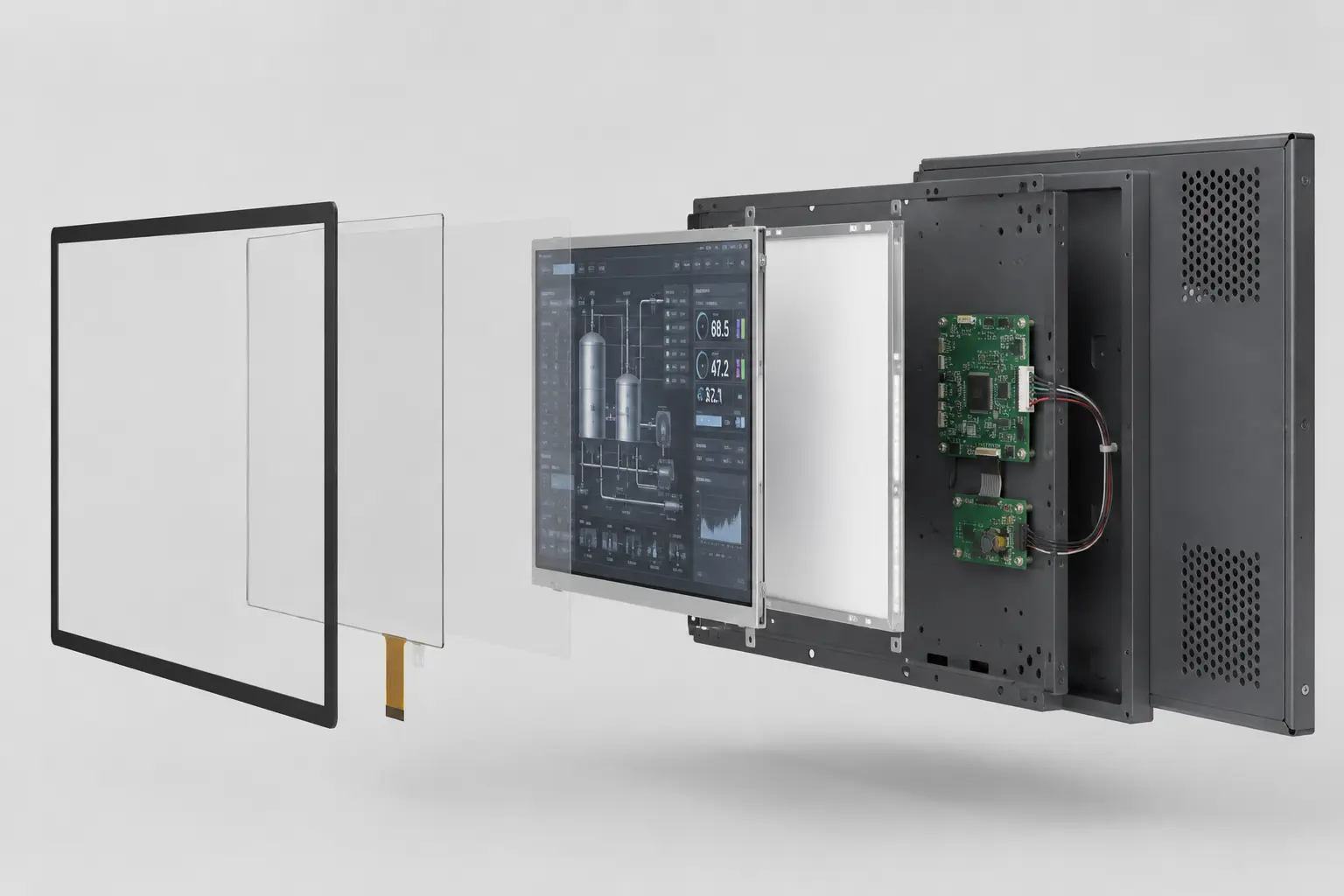
An industrial display is not a single component. Depending on the supplier and project, “display” may refer to a TFT LCD module, a bonded touch display, a complete industrial monitor or a panel PC.
This difference matters. A TFT LCD cannot normally accept HDMI by itself. A bonded display assembly may still need a video controller, power circuit, mounting structure and rear housing. A complete industrial monitor already includes those parts.
This guide follows a typical industrial touch display from the front glass to the rear cover, explaining what each component does and what OEM engineers should check before approving a sample.
A complete industrial touch display may include:
Not every project needs every component. The correct structure depends on what the host system already provides and how the display will be installed.
Before discussing brightness, touch or mounting, confirm exactly what is being supplied.
| Product level | What it normally includes | What the OEM provides |
|---|---|---|
| TFT LCD module | LCD cell, backlight, panel electronics and metal frame | Compatible LCD interface, power control, touch and mechanical integration |
| Touch display assembly | TFT LCD, touch sensor and cover glass, with optional optical bonding | Display controller, power circuit, mounting and enclosure |
| Industrial display monitor | LCD, touch, controller board, video inputs, power circuit and mounting structure | External computer or embedded controller |
| Panel PC | Display, touch, computer, storage, I/O and enclosure | Application software and equipment installation |
This definition prevents a common sourcing problem: the buyer expects a complete HDMI monitor while the quotation covers only an LCD and touch assembly.
For complete monitor specifications, see our industrial display monitor selection guide.
The following construction is typical of a projected-capacitive industrial touch display. The exact design changes with touch technology, installation method and environmental requirements.
The cover glass is the operator-facing surface. It protects the touch sensor and becomes the visible front of the equipment.
The drawing should define:
AG, AR and AF treatments solve different problems. AG reduces glare, AR reduces surface reflection, and AF makes fingerprints and oil easier to clean.
Glass thickness should be selected from the actual impact and touch requirements. Increasing thickness adds weight and may reduce PCAP sensitivity, especially when gloves are also required. The touch sensor and controller must therefore be tested with the final production glass.
In most PCAP designs, the sensor is laminated to the cover glass to form one touchscreen assembly. A resistive touchscreen is different because its flexible top layer must remain accessible to pressure; it should not simply be placed behind a rigid cover glass.
The touch sensor detects the operator’s input. The touch controller filters the signal, calculates the coordinates and communicates with the host.
The controller may be located on the touch FPC or on a separate small PCB. USB is common for complete industrial monitors, while I²C is often used when the touch panel connects directly to an embedded mainboard.
The FPC position and exit direction should be confirmed before the cover glass and cabinet drawings are released. An incorrectly positioned FPC can interfere with brackets, controller boards or the enclosure wall.
PCAP performance should also be checked after the display is installed in the final equipment. Cover-glass thickness, grounding, metal structures, electrical noise, gloves and water can all affect touch behavior.
For touch technology selection, refer to our industrial touch screen guide.
The touchscreen and LCD can be assembled in two main ways.
In an air-gap structure, the touchscreen is attached around its perimeter with tape, foam or a mechanical frame. A small air space remains between the touchscreen and LCD.
In an optically bonded structure, a transparent adhesive fills the viewing area between the two surfaces.
| Structure | Main advantage | Main limitation |
|---|---|---|
| Air gap | Lower initial cost and easier separation during repair | More internal reflection and an exposed cavity if sealing is poor |
| Optical bonding | Lower internal reflection and stronger mechanical coupling | More process control and greater rework difficulty |
Optical bonding removes the air cavity between the bonded surfaces, but it does not automatically make the complete monitor waterproof. The front gasket, bezel, cable exits, connectors and rear housing still determine the final protection level.
More information is available in our optical bonding guide.
The TFT LCD creates the image by controlling how much backlight passes through each pixel.
A commercial TFT LCD module normally includes:
The LCD determines the native resolution, viewing direction, contrast, response time and supported panel interface. Depending on the panel, the internal interface may be LVDS, eDP, RGB or MIPI.
The brightness listed on the LCD datasheet is not always the finished-display brightness. Light is also lost through the touch sensor, cover glass, bonding material and surface treatment.
The backlight is normally integrated into the TFT LCD module, although it is shown separately in an exploded structure drawing to explain its function. Higher brightness usually increases power consumption and heat, so the finished assembly should be checked for temperature, uniformity, dimming behavior and long-term brightness loss.
Outdoor readability also depends on reflection, bonding and surface treatment. A higher nit value alone does not guarantee a readable outdoor display.
See our industrial LCD backlight guide for backlight-specific selection and testing.
The metal frame or rear support plate connects the display assembly to the final equipment.
Its purpose is to:
The LCD must not be used as a structural support. Uneven pressure from a bracket, screw, gasket or warped housing can cause bright spots, dark areas, light leakage, mura or permanent panel damage.
Stamped steel is commonly used where cost and rigidity are important. Aluminum provides good heat spreading and corrosion resistance, but may increase material or machining cost.
The support plate should be checked for flatness after forming, machining and surface treatment. A plate that bends after fastening can transfer stress into the LCD or bonded touchscreen.
A complete industrial monitor normally includes several electronic functions.
| Component | Function | What must match |
|---|---|---|
| Video controller board | Converts HDMI, DP, DVI or VGA into the LCD signal | Resolution, timing, panel voltage and LVDS/eDP configuration |
| Backlight driver | Supplies controlled current to the LED backlight | LED voltage, current, dimming and power sequence |
| Power circuit | Converts and protects the input power | Input voltage, load and protection requirements |
| OSD board | Controls brightness, contrast, source and menus | Button position, cable length and service access |
| Touch controller | Processes touch signals | Sensor design, cover glass, firmware and host interface |
A controller supporting the correct resolution is not automatically compatible with every LCD using that resolution. Panel timing, voltage, LVDS mapping, firmware and backlight control must also match.
Cable length and exit direction matter mechanically. Connectors must remain accessible after installation, and FPCs should not be folded beyond their specified bend radius.
For standard video inputs, see our guide to HDMI, DisplayPort and USB-C for industrial displays.
The front gasket forms a seal between the cover glass or bezel and the customer’s panel. It should contact a stable surface without placing concentrated pressure on the LCD.
Too little compression may leave gaps. Excessive or uneven compression can bend the cover glass, frame or LCD assembly.
The rear housing is the outer metal cover behind the controller boards and support plate. It protects the boards, connectors and internal cables, and may also provide shielding and heat spreading.
Ventilation openings can improve cooling, but they also mean the rear section is not sealed. Front IP65 therefore does not mean the complete monitor is IP65. It normally describes the front interface after correct installation into the customer’s panel.
| Component | What to confirm | Common problem |
|---|---|---|
| Cover glass | Dimensions, thickness and printing | Cabinet interference or unsuitable touch sensitivity |
| Touch sensor | FPC position, controller and firmware | False touches, dead areas or poor glove response |
| Bonding structure | Bond area and material | Bubbles, delamination or internal contamination |
| TFT LCD | Interface, brightness and temperature | Host incompatibility or insufficient visibility |
| Metal frame | Flatness and mounting points | LCD pressure or assembly misalignment |
| Controller board | Panel configuration and power behavior | No image, wrong colors or unstable startup |
| Cables | Length, direction and clearance | Connector stress or blocked service access |
| Gasket | Position and compression | Leakage or uneven pressure |
A display may work correctly on a test bench but develop problems after installation. The final cabinet can introduce pressure, heat, electrical noise and cable restrictions that were not present during initial testing.
The equipment opening must not cover the LCD active area. Allow for LCD, touchscreen, printing and assembly tolerances instead of designing the opening exactly to the nominal viewing area.
Confirm the hole position, diameter, bracket direction, screw length, installation depth and tool access. A screw that is too long can contact the LCD, backlight or controller board.
Mounting points should support the metal structure without twisting it or applying pressure to the LCD.
Allow enough space to insert, bend and remove the cables. A connector may fit in the CAD model but still be impossible to disconnect after the monitor is installed.
Sharp metal edges should not contact FPCs or cables. In vibrating equipment, cables should be secured so movement does not pull directly on the connectors.
Consider which components may need replacement during the product lifetime. A design that requires removing the entire front panel to replace one cable or controller board increases field-service time and the risk of damage.
Grounding, thermal management and sealing should not be designed separately.
A metal chassis can spread heat and provide a shielding path, but only when the grounding points are deliberately defined. Paint, anodizing and loose mechanical contact may interrupt an assumed electrical connection.
PCAP touch behavior can change after the display is installed in a grounded metal cabinet. Touch testing should therefore be repeated in the final equipment rather than approved only on an open workbench.
Sealing the enclosure also reduces airflow. High-brightness LCDs and controller boards need a defined thermal path into the metal structure or equipment enclosure. For outdoor products, thermal testing should include expected ambient temperature and solar heating.
The sample should be tested inside the actual equipment with production-intent cables, power supply, grounding, gasket and software.
No. A TFT LCD module normally accepts an internal panel interface such as LVDS or eDP. A complete industrial monitor adds the controller required for HDMI, DisplayPort, DVI or VGA.
Functionally, yes. In practice, commercial TFT LCD modules are normally supplied with the LED backlight already integrated.
Sometimes, but the PCAP sensor and firmware must support the final glass thickness. Gloves, water, grounding and electrical noise may require additional tuning.
No. Air-gap construction remains suitable for many controlled indoor applications. Bonding becomes more valuable when reflection, internal contamination or mechanical stability is a concern.
No. The LCD should not be treated as a structural support. Mounting and sealing loads should pass through the cover glass, bezel and metal frame without concentrating force on the LCD active area.
Start by defining whether the project needs a TFT LCD module, a touch display assembly, an industrial monitor or a panel PC. Then review the complete structure from the front glass to the rear housing.
The best structure is not the one with the most components. It is the one that fits the host system, cabinet, operating environment and maintenance plan without placing unnecessary stress on the display.
For a new OEM project, send Eagle Touch the cabinet drawing, host interface, operating environment and expected quantity. Our team can review the display stack, mounting points, glass, electronics, cables and thermal constraints before sampling.
An industrial panel PC is a computer with a built-in display, usually a touchscreen, designed for …

An embedded PC is a computer configured to work as part of a machine or larger …

Start with the software the panel PC must run and the conditions it must fit. Then …

Choosing an industrial panel PC IP rating starts with two questions: what dust and water exposure …
Share your application, requirements, or current challenge. Our team will review the details and recommend a practical way forward.