What Is an Industrial Panel PC? Components, Types and Applications

An industrial panel PC is a computer with a built-in display, usually a touchscreen, designed for …
Eagle Touch Engineering Team
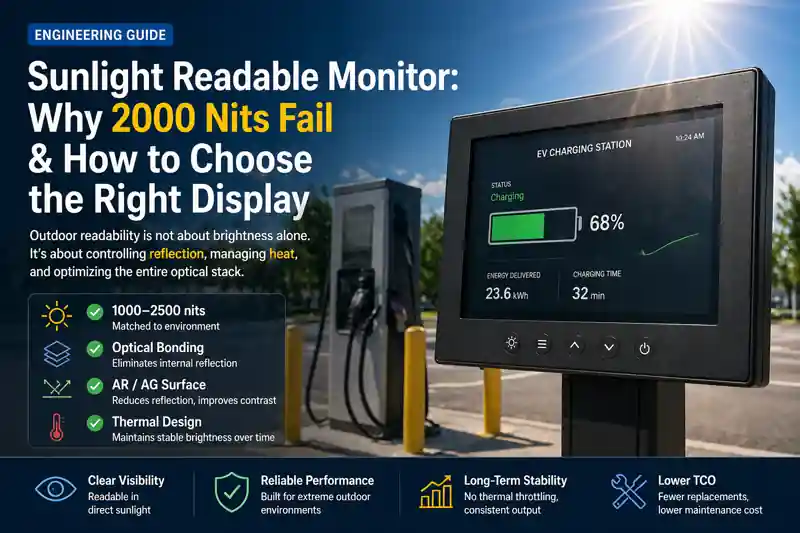
A sunlight readable monitor should not be selected by brightness alone.
A 2000-nit LCD can still be difficult to read outdoors if the front glass reflects too much light, an air gap reduces contrast, or the backlight cannot maintain full output once the enclosure heats up.
For an outdoor machine, the better question is:
Will the finished monitor remain readable, touchable and thermally stable in the environment where it will actually operate?
That means looking beyond the LCD specification and checking the complete display stack: brightness, optical bonding, cover glass, surface treatment, touch performance, sealing and thermal design.
For available configurations, see our sunlight readable monitor solutions.
Brightness is a useful starting point, but it should not be the final selection rule.
| Installation | Practical Starting Range | What to Check Next |
|---|---|---|
| Normal indoor | 250–350 nits | Viewing angle and ambient lighting |
| Bright indoor / factory | 350–500 nits | Glare and installation angle |
| Semi-outdoor / shaded | 500–800 nits | AG glass and reflection |
| Outdoor daylight | 800–1500 nits | Optical bonding and cover glass |
| Direct sunlight | 1000–2000+ nits | Reflection, heat and sustained brightness |
| Severe direct-sun / high-reflection environment | 1500–2500+ nits | Complete optical and thermal validation |
These ranges are not fixed rules.
A well-bonded 1000–1200-nit display can outperform a brighter non-bonded display when reflections are better controlled.
Before approving a specification, ask one important question:
Is the quoted brightness measured at the LCD, or through the finished touch panel and cover glass?
That difference can be significant.
Nits measure luminance. They do not measure how much sunlight is reflected back toward the operator.
This is why two monitors with the same rated brightness can look very different outdoors.
Final readability depends on several factors:
Increasing backlight power helps only up to a point.
If the front surface reflects a large amount of ambient light, simply increasing the LCD brightness becomes an inefficient way to solve the problem.
A bright screen behind highly reflective glass can still behave like a mirror.
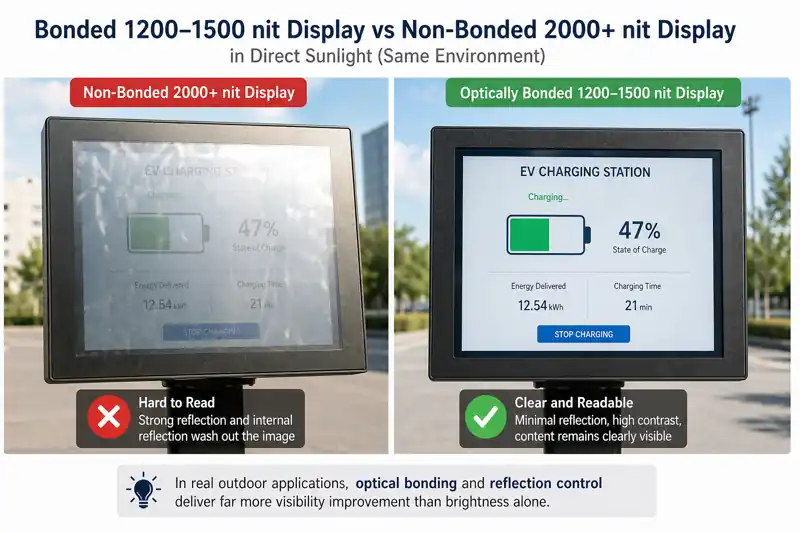
This is one of the most common sourcing mistakes.
A supplier may quote:
1200 nits
but that value may come from the bare LCD panel.
Once the display is assembled, light still has to pass through:
LCD → bonding material → touch sensor → cover glass → surface treatment
Each layer affects the final optical result.
For an outdoor OEM project, ask whether the brightness specification refers to:
The last one is the most useful when comparing finished monitors.
This becomes even more important when your equipment has an additional protective window or front glass.
If an extra air gap or glass layer is added after sample approval, outdoor readability can change substantially.
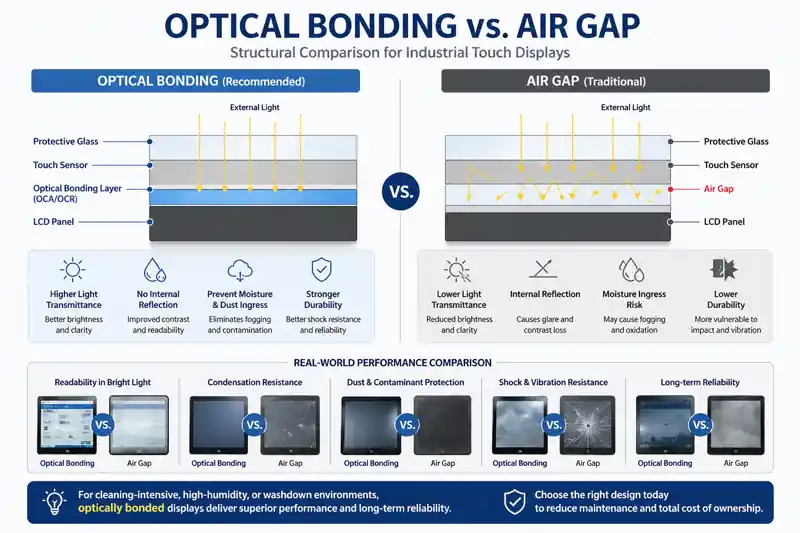
An air gap creates additional reflective interfaces between the LCD, touch sensor and cover glass.
Under normal indoor lighting, the difference may not look dramatic.
Under strong sunlight, it can.
Optical bonding replaces the air gap with a transparent bonding material. This can reduce internal reflections and help preserve contrast in bright ambient conditions.
But the term optical bonding needs clarification.
| Structure | What It Means | Outdoor Consideration |
|---|---|---|
| Air gap | Air remains between display layers | More internal reflection |
| LCD-to-touch bonding | LCD bonded to touch sensor | Better optical performance |
| Full-stack optical bonding* | LCD, touch sensor and cover glass form one bonded optical stack | Preferred for demanding outdoor applications |
| Additional front glass with air gap | Separate protective glass installed in front | Can introduce new reflections |
*Bonding terminology varies between suppliers. Always confirm exactly which interfaces are bonded.
That question is more useful than simply asking:
“Do you offer optical bonding?”
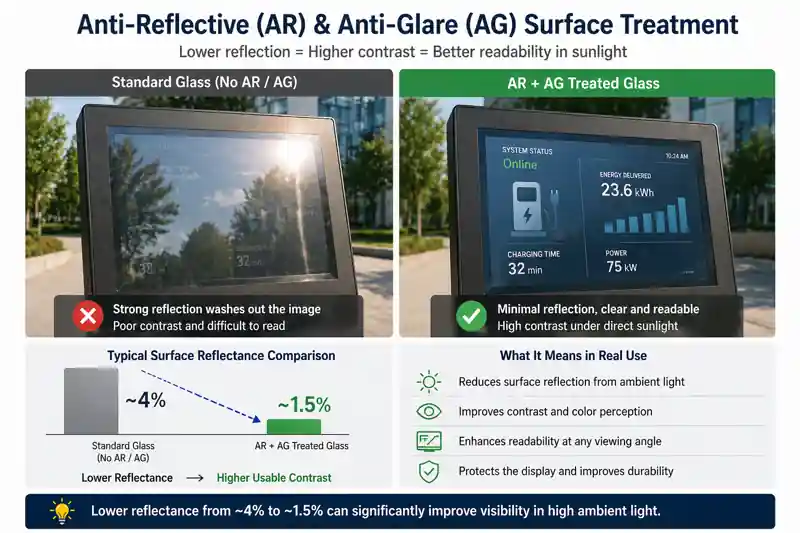
AG and AR are often grouped together, but they solve different optical problems.
AG diffuses reflected light so the surface produces less mirror-like glare.
It is useful where operators may see strong reflections from the sky, overhead lighting or nearby objects.
Too much haze, however, can reduce perceived image sharpness.
AR coating is designed to reduce the amount of light reflected from the surface.
It can retain a clearer image than a high-haze AG surface while improving outdoor contrast.
Some projects use a combination of AG and AR.
| Surface | Main Benefit | Main Consideration |
|---|---|---|
| Standard glass | Simple and economical | Strong reflections outdoors |
| AG | Reduces visible glare | Haze can soften the image |
| AR | Reduces surface reflection | Coating quality and durability matter |
| AG + AR | Controls both glare and reflection | Useful for demanding outdoor installations |
For a custom project, ask for the actual front glass specification rather than accepting a general statement such as “outdoor glass.”
Check:
This is one specification buyers often overlook.
A high-brightness display may reach its rated output immediately after power-on under room-temperature conditions.
That does not automatically mean it can hold the same output after operating for several hours inside a sealed outdoor enclosure.
High-brightness LED backlights generate heat.
Direct sunlight adds another thermal load.
A waterproof cabinet may restrict airflow.
The important question is therefore not only:
Can the monitor reach 1500 or 2000 nits?
It is:
Can the monitor maintain usable brightness during the real operating cycle?
For a high-brightness sample, we recommend checking:
| Test | Why It Matters |
|---|---|
| Initial brightness | Establishes the baseline |
| Brightness after prolonged operation | Shows whether output remains stable |
| LCD / backlight temperature | Indicates thermal stress |
| Enclosure temperature | Shows accumulated heat |
| Power consumption | Helps evaluate the complete system |
| Auto-dimming behavior | Avoids unnecessary full-power operation |
| Performance after temperature rises | Shows whether the display remains usable |
A short desk test cannot answer these questions.
For more detail, see our guide to outdoor industrial display overheating and thermal design.
A sunlight readable monitor should be evaluated as a finished unit, not only through an LCD datasheet.
For sample approval, place the monitor in a condition that is as close as practical to the final installation.
Record at least:
Take photos from the operator’s normal viewing position.
Do not choose an angle simply because it avoids reflection and makes the screen look better in a photograph.
If the product will operate in a sealed kiosk, EV charger or industrial cabinet, thermal evaluation should also be performed with an enclosure representative of the final design.
For a real project, the test result matters more than another line on the datasheet.
IP protection and sunlight readability solve different problems.
An IP65 front panel can protect the exposed front surface against dust and water when correctly installed.
It says nothing about:
For an embedded monitor, front IP65 may be sufficient because the customer’s cabinet protects the rear.
For a standalone outdoor monitor, the complete enclosure may need a higher level of environmental protection.
Always ask:
Is the IP rating for the front panel only, or for the complete monitor?
This avoids a common misunderstanding during sourcing.
Outdoor touch performance depends on more than the touch controller.
The complete stack can include:
Thicker glass and changing the bonding structure can affect touch sensitivity.
Rain can create a different challenge from dry finger operation.
If your application requires glove touch or operation in wet conditions, test that exact condition during sample approval.
Do not validate the bare touch sensor and then change the front glass for production.
The production touch stack should be the stack that was tested.
A supplier should be able to explain the complete display structure, not just provide the LCD model number.
| Supplier Says | Buyer Should Ask |
|---|---|
| “1500 nits” | LCD brightness or measured through the finished glass? |
| “Sunlight readable” | Under what optical stack and installation condition? |
| “Optical bonding” | Which layers are actually bonded? |
| “AG glass” | What glass thickness and haze specification? |
| “AR glass” | What reflection specification is available? |
| “IP65” | Front only or complete enclosure? |
| “−20°C to +70°C” | LCD specification or complete monitor operating specification? |
| “Outdoor PCAP” | Tested through the final glass under the required wet/glove condition? |
| “2000 nits” | Can the brightness be maintained during prolonged operation? |
| “IK10” | Is there a test report for the specified front structure? |
| “Wide temperature” | Has the thermal condition of the final enclosure been considered? |
A supplier who cannot answer these questions may still be able to sell a high-brightness LCD.
That is different from engineering a monitor for outdoor equipment.
There is no single “best outdoor monitor specification.”
The application matters.
| Application | What We Would Prioritize |
|---|---|
| EV charging station | Optical bonding, reflection control, wet-touch tuning, front sealing and thermal management |
| Outdoor kiosk | Sunlight readability, vandal-resistant glass, touch reliability and solar heat |
| Industrial HMI | Stable touch, wide operating temperature, sealing and long-term availability |
| Transportation terminal | Viewing angle, reflection control, auto-dimming and long operating hours |
| Semi-outdoor equipment | AG surface, controlled viewing angle and appropriate brightness |
| Sealed outdoor cabinet | Thermal design before simply increasing backlight power |
A monitor that works well in a shaded ticket terminal may not be the correct configuration for an EV charger facing afternoon sun.
The installation should determine the specification.
You do not need to prepare a complicated specification before contacting a supplier.
The most useful information is:
If you are unsure whether you need 1000, 1500 or 2000 nits, do not guess.
Send the application conditions first.
Choosing the appropriate brightness should be part of the display engineering process.
Do not choose a sunlight readable monitor by asking only:
How many nits does it have?
Brightness provides the light output.
Optical bonding and surface treatment determine how much of that image remains visible under strong ambient light.
Thermal design determines whether the performance can be sustained.
The cover glass, touch stack and enclosure determine whether the display will actually work as part of the finished machine.
The specification to approve is therefore not the bare LCD.
It is the finished monitor in the intended application.
Eagle Touch supplies and customizes sunlight readable touch monitors for outdoor kiosks, EV charging equipment, transportation terminals, industrial HMIs and other OEM equipment.
For custom projects, we can review the monitor together with the enclosure, cover glass, touch requirement and installation environment rather than treating the LCD as an isolated component.
See our sunlight readable monitor solutions or send us your screen size, application, installation drawing, sunlight condition, operating temperature and expected quantity for configuration review.
It can be. A 1000-nit display with good optical bonding and reflection control may perform well in many outdoor applications. Direct sunlight, installation angle, glass structure and thermal conditions still need to be considered.
No. A brighter monitor with strong reflection or an air gap can provide worse usable contrast than a lower-brightness display with a well-designed optical stack.
Not in every application, but optical bonding becomes increasingly valuable in direct sunlight, especially when the monitor includes touch and protective cover glass.
AG diffuses reflected light and reduces mirror-like glare. AR is designed to reduce the amount of reflected light. The correct surface depends on the application, required image clarity and glass structure.
Heat can be one reason. High-brightness backlights generate heat, while sunlight and sealed enclosures can increase the thermal load. This is why sustained operation should be evaluated during sample approval.
Check the finished-system brightness, bonding structure, cover glass, surface treatment, touch performance, IP scope, operating temperature, mechanical fit and sustained thermal behavior.
An industrial panel PC is a computer with a built-in display, usually a touchscreen, designed for …

An embedded PC is a computer configured to work as part of a machine or larger …

Start with the software the panel PC must run and the conditions it must fit. Then …

Choosing an industrial panel PC IP rating starts with two questions: what dust and water exposure …
Share your application, requirements, or current challenge. Our team will review the details and recommend a practical way forward.