Industrial Panel PC Touch Screen Failure: Causes, Prevention, and Selection Guide
Introduction Industrial panel PC touch screen failure is a common reliability issue in applications such as …
When an industrial panel PC is not powering on, the root cause typically falls into three categories: power input issues, internal hardware faults, or environmental stress.
In industrial deployments, these factors often interact rather than occur independently. For engineers and system integrators, early fault isolation is critical to reducing downtime and avoiding unnecessary replacement.
A structured troubleshooting approach allows faster diagnosis and more predictable maintenance decisions.For system-level specifications and available configurations, refer to our industrial panel PC solutions.
Before proceeding with detailed inspection, perform a rapid classification:
This initial step helps define the troubleshooting boundary within minutes.
An industrial panel PC integrates computing, display, and touch subsystems within a single enclosure. Power-on failure can originate from multiple layers:
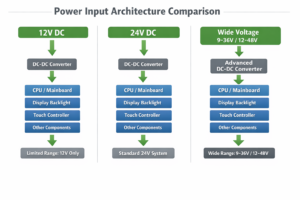
Most industrial panel PCs support wide input voltage ranges (e.g., 9–36V DC). While this improves system flexibility, internal protection logic may prevent startup when operating conditions fall outside defined thresholds.
A step-by-step process improves repeatability and reduces diagnostic time.
Industrial environments frequently introduce unstable power conditions:
These conditions directly impact regulator performance and long-term reliability.
Industrial panel PCs include multiple protection features:
These mechanisms prevent hardware damage but can also block system startup, making faults appear as a complete power failure.
Environmental conditions significantly influence system reliability:
These effects are often cumulative and may not be immediately visible.
Thermal management is a critical design parameter:
Long-term thermal stress is a common contributor to intermittent or permanent failures.
| Scenario | Recommended Action |
|---|---|
| External power adapter failure | Replace adapter |
| Wiring or connector issue | Repair |
| Internal power board failure | Repair (if modular) |
| Motherboard or PMIC failure | Replace unit |
| System older than 5 years | Evaluate upgrade |
| Repeated failures in harsh environments | Redesign system |
In many industrial applications, downtime cost exceeds hardware cost.
In time-critical systems, waiting for component-level repair can introduce more risk than replacing the unit with a stable, industrial-grade solution.
If the failure affects production systems or public infrastructure, replacing the unit is often the lower-risk and faster solution compared to component-level repair.
To reduce recurrence of power failures:
Preventive design and maintenance are typically more cost-effective than reactive repair.
A structured troubleshooting process is suitable when:
Alternative actions should be considered when:
An industrial panel PC not powering on is typically the result of combined factors, including power quality, environmental conditions, and internal system design.
Applying a structured diagnostic method enables faster fault isolation and supports informed decisions between repair, replacement, and system redesign.
1. How do I distinguish external power issues from internal failure?
Measure input voltage under load. Stable voltage usually indicates an internal issue.
2. Can low voltage prevent startup?
Yes. Undervoltage lockout (UVLO) can block system boot.
3. Can display failure appear as no power?
Yes. A failed backlight can make the system appear unpowered.
4. Does temperature affect power-on reliability?
Yes. Temperature impacts both regulator behavior and component lifespan.
5. Is intermittent startup typically a hardware issue?
It is usually related to unstable power input or thermal conditions.
If you’re experiencing repeated power-on failures or are unsure whether to repair or replace your system, our engineering team can help.
We support industrial clients with:
👉 Contact us for a quick engineering evaluation
Introduction Industrial panel PC touch screen failure is a common reliability issue in applications such as …
Introduction When an industrial panel PC is not powering on, the root cause typically falls into …
Introduction Panel PC mounting options are a key aspect of industrial panel PC system design.Selecting the …
Introduction: Why Industrial Panel Pc Power Input Selection Matters Selecting the correct power input for an …
Send your application details. We respond with configuration direction and next steps.