Industrial Touch Screen Sensitivity Adjustment: Root Causes and Engineering Solutions
Introduction In industrial environments, touch interfaces must operate reliably under conditions such as glove use, moisture …
In industrial environments, touch interfaces must operate reliably under conditions such as glove use, moisture exposure, electromagnetic interference (EMI), and continuous operation.
When a touch screen becomes unresponsive, overly sensitive, or unstable, it is often described as a “sensitivity issue.” In practice, however, industrial touch screen sensitivity is not a single adjustable parameter—it is the result of sensor design, controller configuration, and environmental interaction.
This article explains how to diagnose, adjust, and optimize industrial touch screen sensitivity, with a focus on determining whether the issue can be resolved through parameter tuning or requires system-level changes.For a broader overview of industrial touch technologies and selection criteria, refer to our industrial touch screen guide.
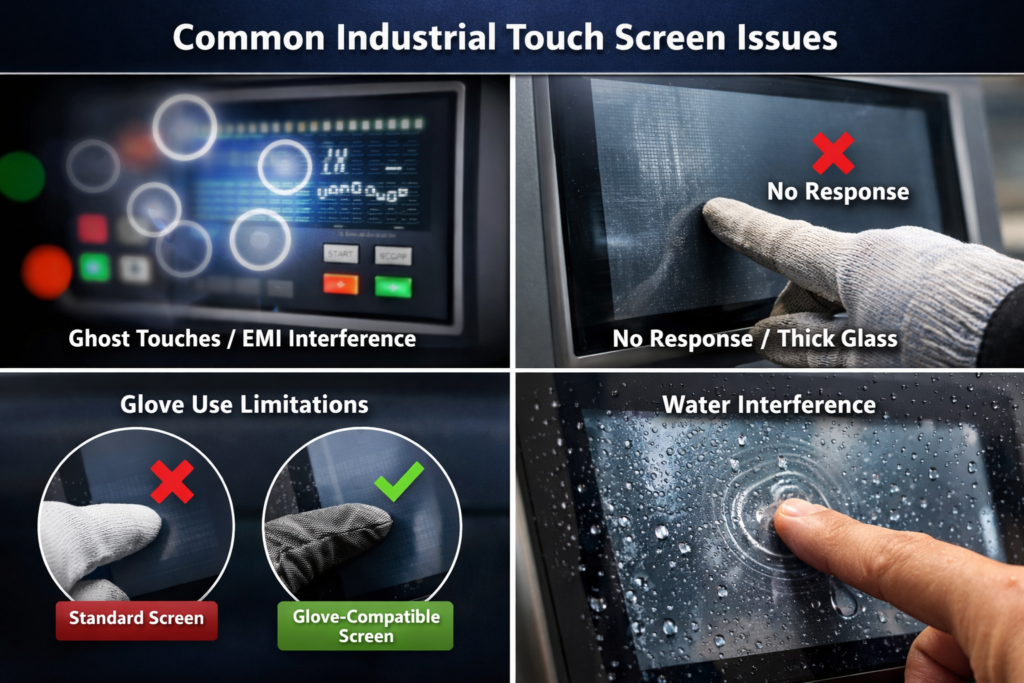
Before modifying any settings, it is critical to identify the underlying issue:
| Symptom | Likely Cause | Recommended Action |
|---|---|---|
| No response to touch | Low signal strength / thick cover glass | Increase gain or redesign stack |
| Ghost touch / false input | EMI interference | Improve shielding and filtering |
| Works without gloves only | Weak capacitive coupling | Enable glove mode or use a glove touch screen |
| Works indoors but fails outdoors | Water or temperature effects | Enable compensation algorithms |
| Slow or delayed response | Excessive filtering or debounce | Adjust controller timing |
Key insight: Most sensitivity issues are not caused by calibration errors, but by mismatches between hardware, firmware, and environment.
In practice, this table is often used during system validation to quickly distinguish between firmware limitations and hardware constraints.
In projected capacitive (PCAP) systems, sensitivity is defined by how the controller detects and processes input signals.
Key parameters include:
Adjusting sensitivity involves modifying controller behavior rather than changing the physical sensor.
Applicable when hardware design is already appropriate.
Typical actions:
Best suited for:
Industrial touch controllers allow deeper parameter control.
Typical adjustments:
Engineering trade-off:
When software tuning is insufficient, system-level improvements are required.
Typical approaches:
Optical bonding benefits:
In many industrial scenarios, parameter tuning alone cannot resolve the issue.
Conclusion:
In these cases, sensitivity adjustments may only provide temporary or unstable improvements.
In engineering practice, these limitations are typically identified during design validation or field debugging.
Mitigation strategies:
Touch performance is influenced by:
Design relationship:
Thicker glass reduces capacitive coupling and increases reliance on controller tuning.
| Application Scenario | Recommended Solution |
|---|---|
| Indoor HMI systems | Standard PCAP |
| Glove-based operation | PCAP with glove mode |
| Outdoor / wet environments | Industrial PCAP with water rejection |
| High EMI environments | Shielded industrial touch system |
| High-reliability applications | Resistive touch |
Industrial touch screen sensitivity should be treated as a system-level performance outcome rather than a simple adjustable parameter.
It depends on:
Effective optimization requires:
In practice, sensitivity tuning is part of overall HMI system engineering rather than an isolated configuration step.
Industrial touch screen sensitivity is affected by controller configuration, glass thickness, environmental noise (EMI), moisture, and signal processing algorithms.
Not always. While firmware can improve sensitivity, reliable glove touch screen operation often requires controller support and appropriate sensor design.
EMI touch screen issues are typically resolved through improved grounding, shielding, controller filtering, and optimized PCB layout.
Outdoor touch screen performance is affected by water, temperature, and sunlight. Systems require water rejection algorithms and proper optical bonding.
Resistive touch is suitable when environmental conditions (water, EMI, thick gloves) exceed the practical limits of capacitive touch systems.
If your system is experiencing unstable touch performance in glove, EMI, or outdoor environments, it is important to determine whether the issue can be resolved through parameter tuning or requires hardware-level optimization.
Providing details such as glass thickness, operating environment, and input method can significantly improve the accuracy of this evaluation.
Early-stage assessment can help avoid repeated tuning cycles and reduce overall development risk.
Introduction In industrial environments, touch interfaces must operate reliably under conditions such as glove use, moisture …
Introduction In industrial environments, a touch screen not responding is not only a usability issue—it can …
Introduction The multi-touch industrial screen is often assumed to improve usability in industrial HMI systems. In …
Introduction Industrial panel PC touch screen failure is a common reliability issue in applications such as …
Send your application details. We respond with configuration direction and next steps.