Industrial Panel PC Not Powering On: Causes, Troubleshooting, and Engineering Solutions
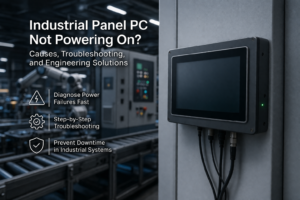
Introduction When an industrial panel PC is not powering on, the root cause typically falls into …
Industrial panel PC reboot issues are often misattributed to software faults. In practice, most reboot events originate from power instability, thermal stress, or system-level integration issues.For a broader overview of industrial panel PC system design and reliability considerations, see our guide on Industrial Panel PC Design.
Industrial panel PCs operate under conditions significantly more demanding than office environments, including:
Under these conditions, reboots are rarely random. They are deterministic responses to electrical and environmental stress.
Resolving these issues requires a system-level engineering perspective rather than isolated component troubleshooting.
A simplified classification can quickly identify the likely root cause:
This approach helps identify the root cause in a majority of real deployment cases.
In industrial panel PCs, reboot events are typically triggered by:
In HMI systems, these events directly impact:
A common field observation is that systems operate normally during testing but fail after installation.
This occurs because laboratory environments do not replicate:
As a result, reboot issues typically emerge:
Industrial panel PCs typically support wide DC input ranges (e.g., 9–36V). However, real-world conditions introduce:
These can trigger:
Key point: Most “random reboots” are power integrity failures.
Fanless designs rely on passive cooling. In real deployments:
When thermal limits are exceeded:
Important: Fanless design does not eliminate thermal risk.
Industrial environments accelerate component wear:
Typical symptoms:
Risk factor: Use of non-industrial-grade components.
Common EMI sources include:
System-level effects:
Improper grounding significantly increases system susceptibility.
Watchdog timers are intended for fault recovery but may introduce instability if misconfigured:
Additional contributing factors:
When selecting an industrial panel PC, evaluate based on engineering characteristics rather than nominal specifications:
Systems designed with these considerations are more stable in real deployment environments.
Before deployment, verify:
Early validation significantly reduces field failure risk.
Industrial panel PC reboot issues are not random failures.
They result from interacting system-level factors, including:
Long-term stability depends on system-level design validation rather than isolated component replacement.
What is the most common cause of industrial panel PC reboots?
Power instability, particularly voltage dips and electrical noise.
Can overheating cause reboot cycles?
Yes. Thermal protection mechanisms can trigger shutdown and restart behavior.
Are watchdog timers a risk?
Yes, if improperly configured under variable workloads.
Do industrial environments accelerate hardware failure?
Yes. Temperature, vibration, and EMI increase degradation rates.
How can reboot issues be prevented?
By validating power, thermal, and system integration under real deployment conditions.
If your panel PC system is experiencing repeated or unexplained reboots, the root cause is often related to power quality, thermal conditions, or system integration — rather than a single component failure.
A structured evaluation typically includes:
Addressing these factors at the system level can significantly improve long-term stability and reduce downtime in industrial environments.
Introduction When an industrial panel PC is not powering on, the root cause typically falls into …
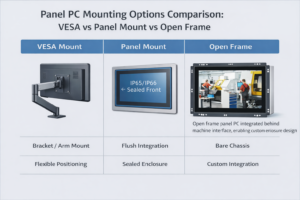
Introduction Panel PC mounting options are a key aspect of industrial panel PC system design.Selecting the …
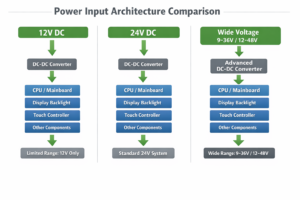
Introduction: Why Industrial Panel Pc Power Input Selection Matters Selecting the correct power input for an …
Introduction Industrial panel PC reboot issues are often misattributed to software faults. In practice, most reboot …
Send your application details. We respond with configuration direction and next steps.